












Nexter SEO is the built-in SEO module inside Nexter Extension. It gives you a full SEO toolkit right in your WordPress admin: a health score and audit, on-page meta and schema controls, technical settings like sitemaps and robots rules, redirects, and import/export. This guide shows you how to open it and what each part does, so you can jump straight to the setting you need.
Nexter → SEO.
Once open, the module has a left-hand nav with six sections: Dashboard, Site Audit, On-Page, Technical, Redirects, and Tools. The On-Page, Technical, Redirects, and Tools items expand to reveal their sub-tabs.
How To Get Started With Nexter SEO?
- In the WordPress admin sidebar, open Nexter and click SEO.
- You land on the Dashboard — your SEO overview with a Site Health Score, issue tiles, and top fixes.
- Use the left-hand nav to move between modules. Each on-page and technical screen has its own Save button, so save before you switch tabs.
- Run your first audit from the Dashboard (Run Audit) or from Site Audit (Run Checks) to see where your site stands.
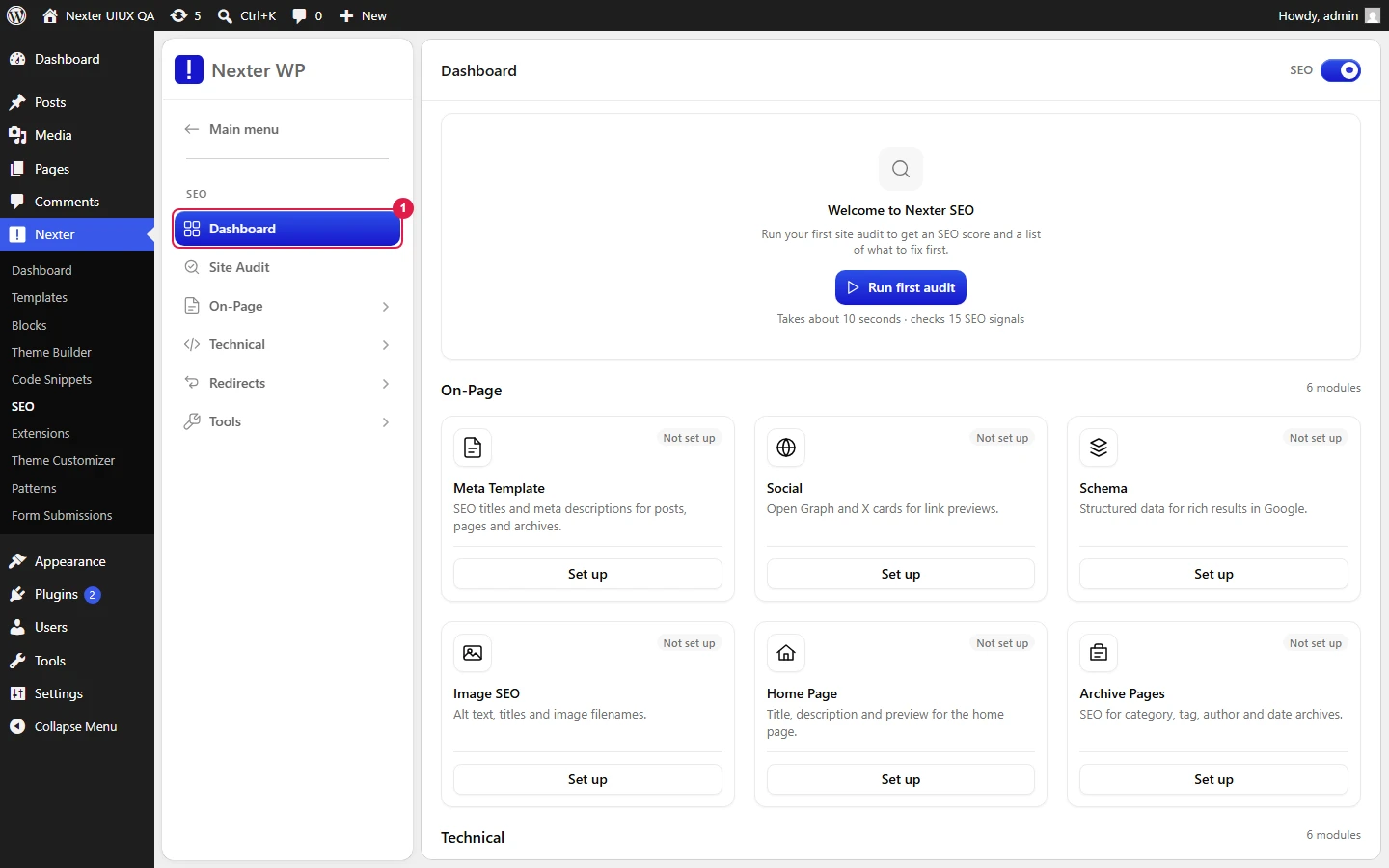
The Module Map
Here is every screen in Nexter SEO and what it does. Follow a link to the full article for each one.
Core
- Dashboard Overview — Site Health Score gauge, Critical / Warnings / Passed tiles, Top Fixes, module status, and the Schedule Auto-Scan modal.
- Running A Site Audit — run the 15-check site health scan, filter by All / Issues / Passed, export JSON or CSV, and work through fixes.
On-Page
- Meta Title & Description Templates — set site-wide default title and description templates with dynamic variables and a live SERP preview.
- Social / Open Graph Sharing — control the default share image and per-platform accounts across the Default Social Image, Facebook, X, and Other Accounts tabs.
- Structured Data (Schema) — manage site-wide and page-specific JSON-LD schema, the 18-type library, dynamic variables, and display conditions.
- Add & Configure A Schema Entry — the how-to for adding a schema, editing its fields, and setting conditions.
- Supported Schema Types & Fields — reference for every schema type and its notable fields.
- Homepage SEO — dedicated title, meta description, and social settings for your front page.
- Archive Pages SEO — title and description templates for archives, plus toggles to disable or redirect author, date, category, and tag archives.
- Image SEO — attachment page redirects and automatic or bulk alt text.
Technical
- XML Sitemaps — generate and control XML sitemaps, plus optional video, news, and HTML sitemaps and exclude lists.
- Robots Instructions — bulk No Index / No Follow / No Archive directives per post type, taxonomy, and archive.
- Robots.txt Editor — edit your site’s virtual robots.txt from the panel.
- Instant Indexing — push URLs to search engines instantly via IndexNow, automatically or in bulk.
- LLMs.txt For AI Search — auto-generate an LLMs.txt file so AI engines can discover and cite your content.
- Site Verification — add Google, Bing, Pinterest, and Facebook verification tags in one place.
Redirects
- Redirection Manager — create and manage 301 and other redirects with match conditions and query-parameter handling.
- 404 Monitor — log real-visitor 404 hits so you can find broken URLs and redirect them.
Tools
- Import & Export SEO Settings — move Nexter SEO settings between sites via a JSON file.
Good To Know
- Each on-page and technical screen saves independently. If you make changes on two tabs, save each one before moving on.
- Start with an audit. The Dashboard and Site Audit both give you a prioritized list of fixes, which is the fastest way to know what to configure first.
- Many fields (meta templates, schema properties) accept dynamic variables. Type
@in a supported field to open the token picker.
Troubleshooting
- I don’t see SEO under Nexter. Confirm Nexter Extension v4.7.0.10 or later is active. The SEO module ships inside the extension.
- A change didn’t stick. Make sure you clicked Save on that specific screen before switching tabs — each screen has its own Save button.
Related: Dashboard Overview · Running A Site Audit · Structured Data (Schema) · XML Sitemaps
This is how you can get started with Nexter SEO in the Nexter Extension.
