












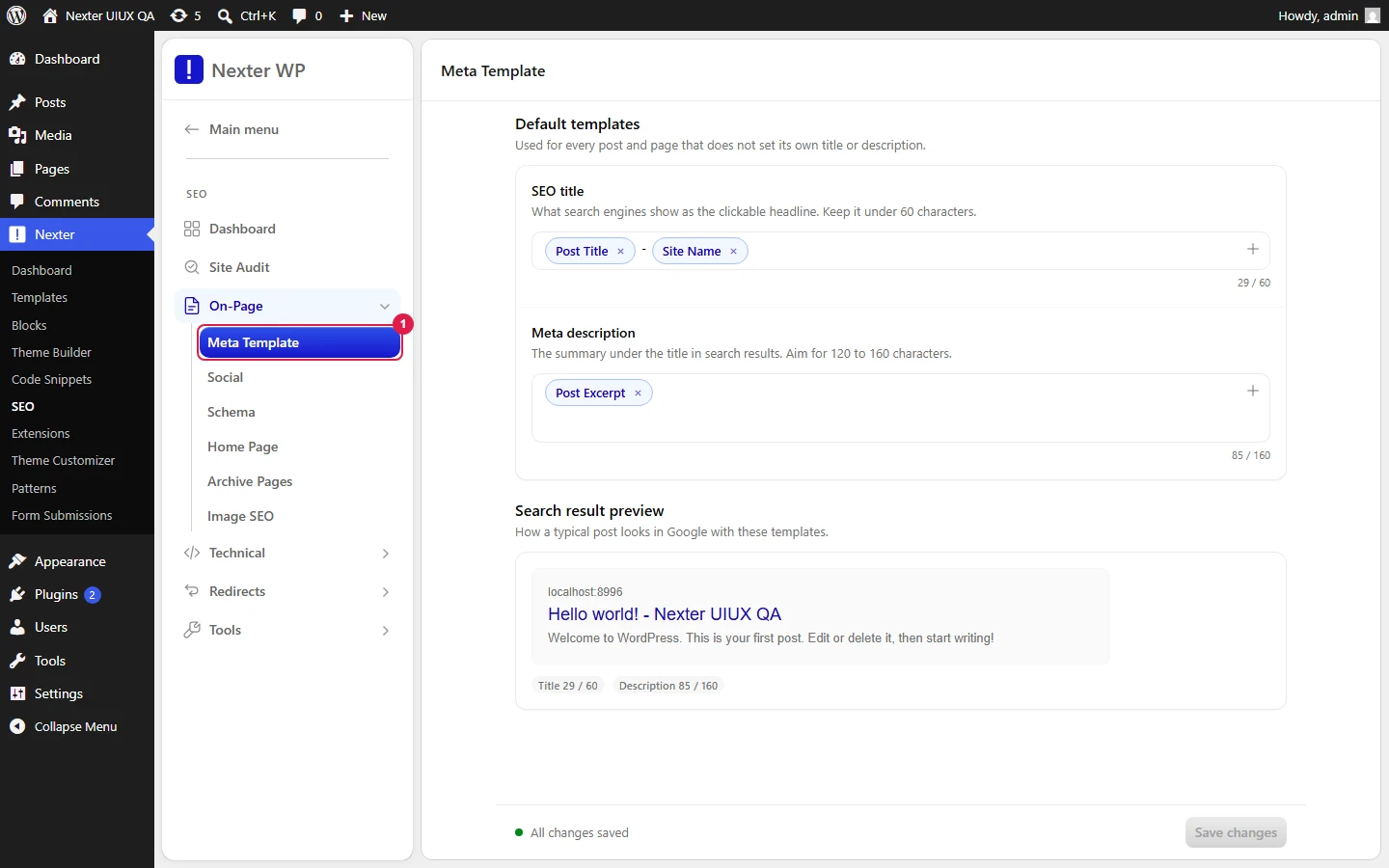
The Meta Template screen sets the site-wide default title and meta description for your content using dynamic variables, so every post and page gets a consistent, search-ready snippet without you writing one by hand. A live search-result preview shows exactly how the result will read on Google before you save.
Nexter → SEO → On-Page → Meta Template.
How To Set Up Meta Title & Description Templates?
- Open the Search Engine Title field and build your title from dynamic variable chips. Out of the box you will see chips like Post Title and Site Name. Each chip is removable, and you can type plain text between chips (for example a separator such as
-or|). - Build the Search Description Template the same way. A common starting point is the Post Excerpt chip, which pulls each post's own excerpt.
- Watch the character counters next to each field. The title counter targets /60 characters and the description counter targets /160. Staying inside these limits keeps your snippet from being cut off in search results.
- Check the Search Result Preview at the bottom. It renders a Google-style snippet with the page URL breadcrumb, the blue title, and the description, plus color-coded counters (Title N/60, Description N/160) so you can see at a glance whether you are within range.
- Click Save at the top right.
| Setting | What it does |
|---|---|
| Search Engine Title | The default <title> template applied across your content. Built from variable chips (for example Post Title, Site Name) plus any literal text you add. Counter targets /60. |
| Search Description Template | The default meta description template. Built from variable chips such as Post Excerpt. Counter targets /160. |
| Search Result Preview | Live Google-style snippet (URL breadcrumb, title, description) with color-coded /60 and /160 counters that update as you type. |
| Save | Stores the templates and applies them site-wide. |
Working With Variables
The chips you insert are dynamic variables (tokens) drawn from Nexter SEO's @ token library. Type @ inside a template field to open the picker and browse the full set. This is the same picker used in Schema, and it carries 80+ tokens grouped by source, including Post, Author, Site, Term, and WooCommerce product variables.
The three you will reach for most on this screen:
- Post Title — the individual post or page title.
- Site Name — your site title, useful as a suffix (for example
Post Title - Site Name). - Post Excerpt — the post's own excerpt, ideal for the description template.
For the complete token list and what each one outputs, see the Schema variables reference.
Good To Know
- Templates are defaults. A per-post title or description set elsewhere will take precedence over the template for that specific post.
- Keep the title comfortably under 60 characters and the description under 160 so search engines show the full snippet instead of truncating it with an ellipsis.
- Adding Site Name to the title helps brand recognition, but on long post titles it can push you past 60 characters. Watch the counter.
- The preview reflects your template with sample content, so treat the counters as a guide for typical posts, not an exact per-post measurement.
Troubleshooting
- My snippet is cut off in Google. Your title or description is over the limit. Trim literal text or drop a variable until both counters sit inside /60 and /160.
- A post shows the wrong title. A post-level override is in place for that post. Templates only fill in where no manual title or description has been set.
- The
@picker does not open. Click directly inside the template field first, then type@. The picker is field-scoped.
Related: Social / Open Graph Sharing · Homepage SEO · Supported Schema Types & Fields
This is how you can set up meta title and description templates with Nexter SEO.
