












This is the reference companion to the Schema articles: every schema type Nexter SEO can generate, and the full library of dynamic variables you can drop into any schema field with the @ token picker.
Nexter → SEO → On-Page → Schema → Add Schema (types), and the @ picker inside any schema field (variables).
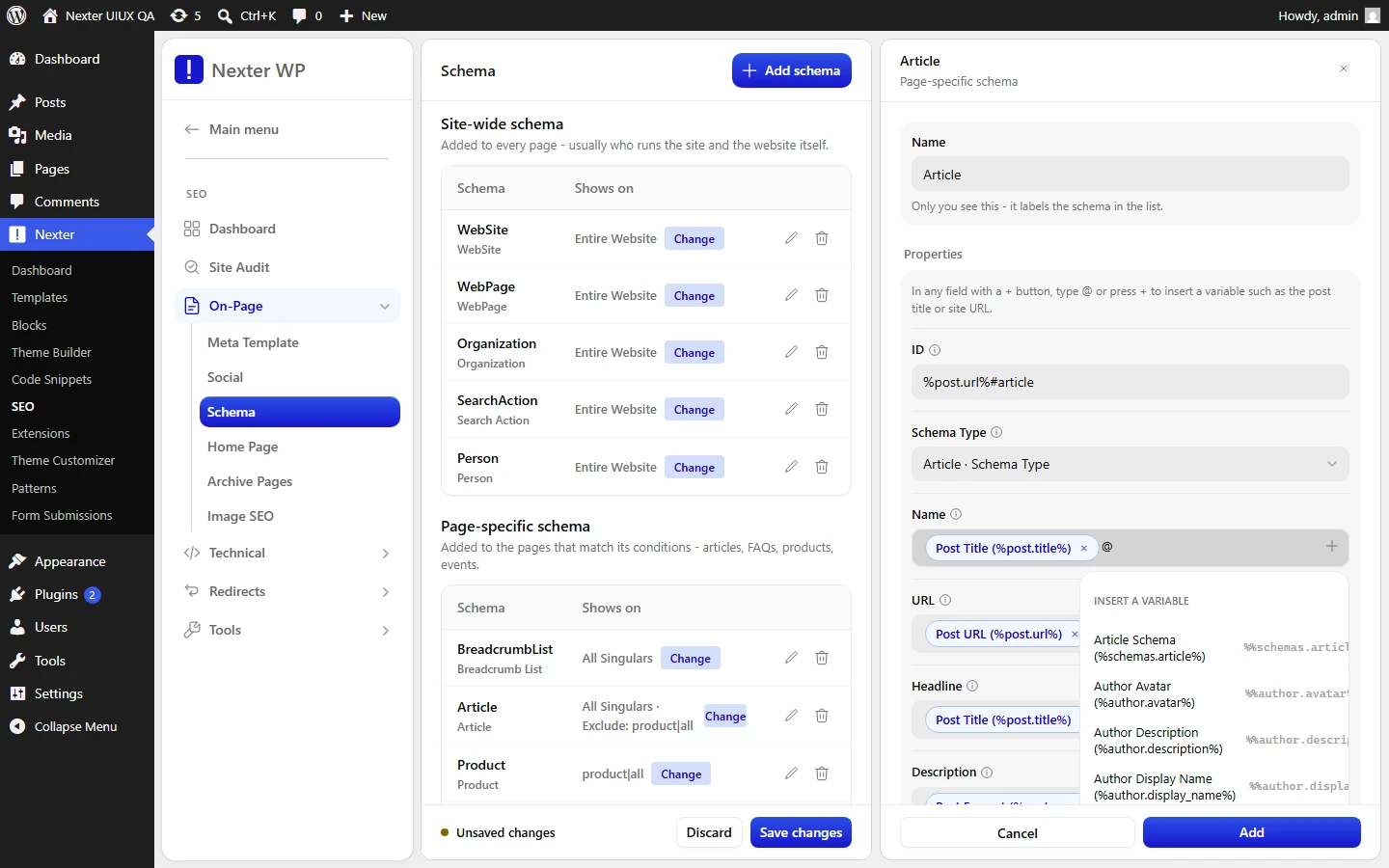
Supported Schema Types
Nexter SEO ships 18 schema types, grouped by scope in the Add Schema dropdown.
Page Specific Schema (12)
Loads on individual pages that match your display conditions.
- Article
- Breadcrumb List
- Claim Review
- Course
- Event
- FAQ Page
- How To
- Local Business
- Product
- Recipe
- Software Application
- Video Object
Site Wide Schema (6)
Describes the site as a whole; typically loads on the entire website.
- Organization
- Person
- Search Action
- Service
- WebPage
- WebSite
Dynamic Variables
Every schema field accepts variables. Type @ in a field to open the picker, then choose a token. Variables keep your schema bound to live content, so output stays correct as posts are added and edited. You can mix variables with static text and use more than one per field.
Post
| Variable | Outputs |
|---|---|
%post.title% | Post title |
%post.url% | Post URL |
%post.excerpt% | Post excerpt |
%post.content% | Post content |
%post.date% | Post date |
%post.date_c% | Post date (ISO 8601) |
%post.modified_date% | Post modified date |
%post.modified_date_c% | Post modified date (ISO 8601) |
%post.ID% | Post ID |
%post.slug% | Post slug |
%post.comment_count% | Post comment count |
%post.word_count% | Post word count |
%post.tags% | Post tags |
%post.categories% | Post categories |
%post.thumbnail% | Post featured image |
Post Taxonomy
| Variable | Outputs |
|---|---|
%post.tax.category% | Categories |
%post.tax.post_tag% | Tags |
%post.tax.post_format% | Formats |
%post.tax.product_brand% | Brands (WooCommerce) |
%post.tax.product_cat% | Product categories (WooCommerce) |
%post.tax.product_tag% | Product tags (WooCommerce) |
Author
| Variable | Outputs |
|---|---|
%author.avatar% | Author avatar |
%author.description% | Author description |
%author.display_name% | Author display name |
%author.first_name% | Author first name |
%author.last_name% | Author last name |
%author.ID% | Author ID |
%author.nicename% | Author nicename |
%author.nickname% | Author nickname |
%author.posts_url% | Author posts URL |
%author.username% | Author username |
%author.website_url% | Author website URL |
Site
| Variable | Outputs |
|---|---|
%site.title% | Site title |
%site.description% | Site description |
%site.url% | Site URL |
%site.icon% | Site icon |
%site.language% | Site language |
Website Details
| Variable | Outputs |
|---|---|
%website_details.website_name% | Website name |
%website_details.website_logo% | Website logo |
%website_details.website_owner_name% | Website owner name |
%website_details.website_owner_phone% | Website owner phone |
%website_details.organization_type% | Organization type |
Term
| Variable | Outputs |
|---|---|
%term.name% | Term name |
%term.ID% | Term ID |
%term.slug% | Term slug |
%term.description% | Term description |
%term.taxonomy% | Term taxonomy |
%term.url% | Term URL |
Current Page
| Variable | Outputs |
|---|---|
%current.title% | Current page title |
%current.url% | Current page URL |
%current.breadcrumbs% | Breadcrumb list items (JSON) |
WooCommerce Product
| Variable | Outputs |
|---|---|
%product.price% | Product price |
%product.sku% | Product SKU |
%product.stock% | Availability (schema.org URL) |
%product.rating% | Average rating |
%product.rating_value% | Average rating value |
%product.review_count% | Rating / review count |
%product.image% | Product image URL |
%product.image_width% | Product image width |
%product.image_height% | Product image height |
%product.currency% | Store currency code |
%product.offer_count% | Variation count |
Schema References
Insert another schema entry by reference, so entries can point at each other (for example, an Article's Publisher pointing at your Organization).
| Variable | References |
|---|---|
%schemas.article% | Article |
%schemas.breadcrumblist% | Breadcrumb List |
%schemas.claimreview% | Claim Review |
%schemas.course% | Course |
%schemas.event% | Event |
%schemas.faqpage% | FAQ Page |
%schemas.howto% | How To |
%schemas.localbusiness% | Local Business |
%schemas.organization% | Organization |
%schemas.person% | Person |
%schemas.product% | Product |
%schemas.recipe% | Recipe |
%schemas.searchaction% | Search Action |
%schemas.service% | Service |
%schemas.videoobject% | Video Object |
%schemas.webpage% | WebPage |
%schemas.website% | WebSite |
Good To Know
- Match the variable to the page context. On an Article,
%post.*%,%author.*%,%site.*%, and%schemas.*%variables resolve;%product.*%variables only resolve on WooCommerce products. %product.*%and%post.tax.product_*%variables require WooCommerce to be active.- Schema-reference variables (
%schemas.*%) let site-wide entities like Organization and WebPage be reused across page-specific schemas instead of duplicating data.
Troubleshooting
- A variable outputs blank. It does not exist for that page context — for example a
%product.*%variable on a normal post. Pick a variable that matches the page.
Related: Structured Data (Schema) In Nexter SEO · Add & Configure A Schema Entry · Schema Display Conditions
This is the full set of schema types and dynamic variables available in Nexter SEO.
