












Every WordPress site owner knows the routine. You install a plugin to compress images. Another one to convert to WebP. A third to catch your form submissions.
And somewhere in that stack, something breaks on update day.
This March 2026 release is about collapsing that stack.
Nexter Blocks Free V 4.7.2 & Nexter Block Pro V4.7.1, and the updated Nexter Extension add three things your site has needed for a while: a full WordPress Image Optimisation plugin built right into the Extension, AI writing inside every single Gutenberg block, and form submissions stored and visible directly in your WordPress admin.
Here’s everything that’s new.
Update 1: A WordPress Image Optimisation Plugin That’s Already Inside Nexter Extension
Most WordPress image optimisation plugins work the same way: sign up for an account, connect an API key, pick a plan, and finally compress your images. It’s a whole extra relationship to manage.
Nexter Extension now includes image optimisation built in.
Head to Extensions > Performance, enable Image Optimisation, configure once, and every new image you upload is automatically compressed and converted.
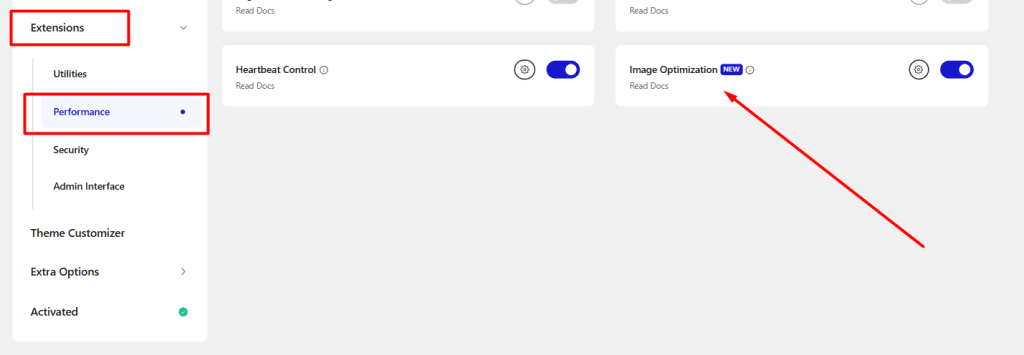
No account. No API key. No extra plugin.
What It Does
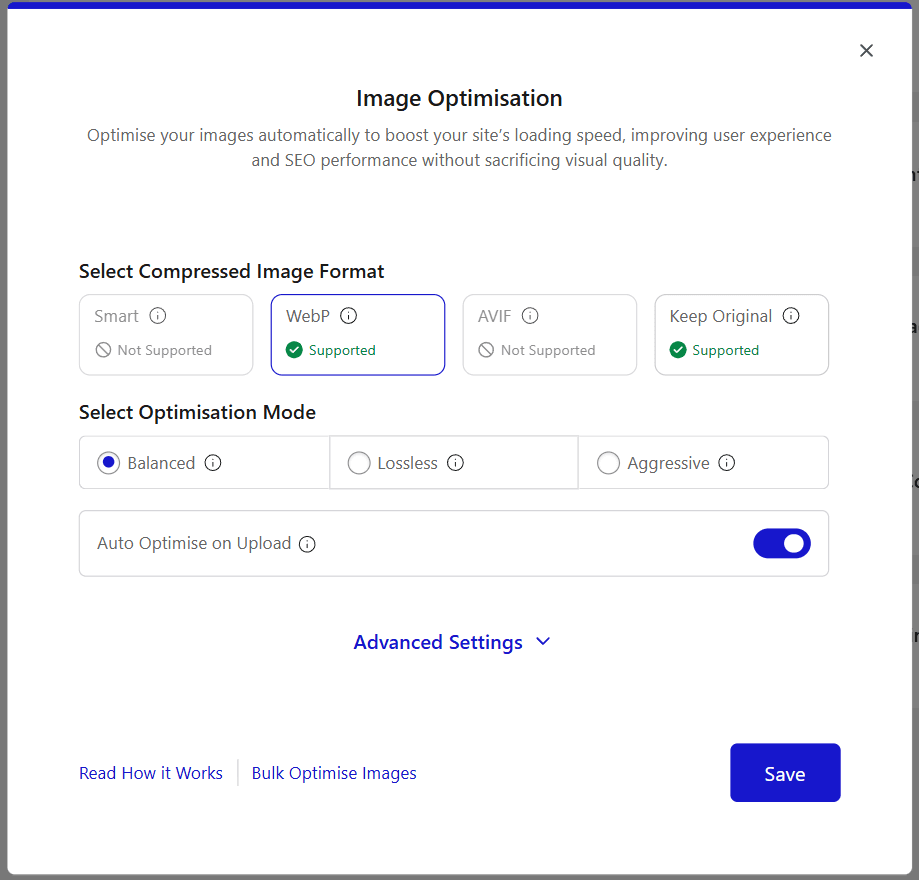
• Converts to WebP — supported on all modern browsers, smaller than JPEG and PNG without visible quality loss
• Converts to AVIF (Pro) — next-gen format, smaller than WebP on most images
• Smart Mode (Pro) — compresses to both WebP and AVIF, then serves whichever is smaller per image automatically
• Three compression modes — Balanced (default), Lossless (full quality), Aggressive (maximum size reduction)
• Auto-resize on upload — set a max width/height (default 1920px), oversized images are resized before saving
• Auto Optimise on Upload — toggle on and every upload is handled immediately, nothing manual
• Strip EXIF metadata — removes GPS location and device info embedded in phone photos
• Exclude paths — skip specific folders or images you want untouched
• Restore original — one-click restore to originals if you ever need to undo
Bulk Image Optimisation for Existing Libraries
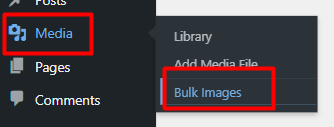
If your site already has hundreds of images sitting unoptimised, go to Media > Bulk Images.
The Nexter Image Optimisation Center shows your full queue with original file sizes, storage saved, monthly usage, and per-image status.
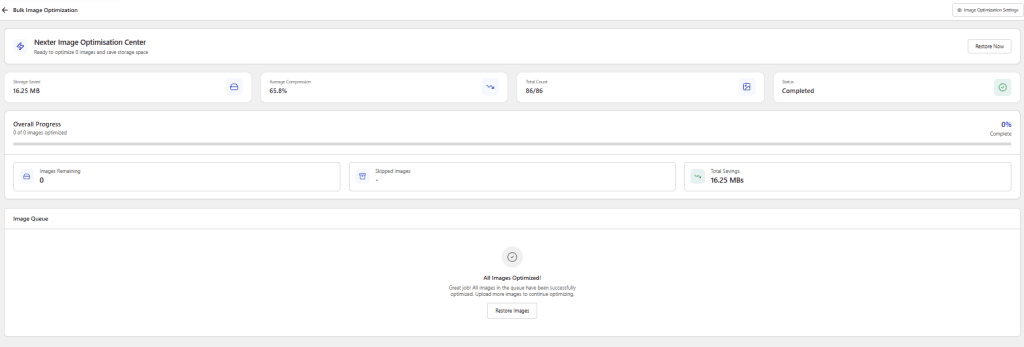
Hit Start Bulk Optimisation, and it processes in the background.
Free vs Pro
• Free: WebP conversion, Balanced/Lossless/Aggressive modes, auto-resize, EXIF strip — 500 optimisations per month
• Pro: Everything in Free + AVIF support, Smart Mode (auto-picks smallest format per image), unlimited optimisations per month
For sites already running Smush, EWWW, ShortPixel, or similar, this is the same functionality, consolidating into a tool you already have installed.
Update 2: AI Writing Is Now in Every Gutenberg Text Block: Not Just Nexter Blocks
The frustration with most WordPress AI plugins is that you end up with a workflow that looks like this: open a separate AI tool, generate content, copy it, switch back to the editor, paste it, and fix the formatting.
That’s five steps for something that should be one.
Nexter Blocks 4.7.1 adds AI directly into the Gutenberg block toolbar.
Select any Text block, Heading, Paragraph, List, Quote, Button, and the Nexter AI icon appears in the toolbar.

Write your prompt, pick your tone and creativity level, click Generate, and the content lands directly in the block.
No tab switching. No clipboard. One step.
Update 3: AI Generation Support for More Repeater-Based Blocks
Now users can generate AI content and images inside more repeater-based blocks: Media Listing, Circle Menu, Mobile Menu, and Stylish List.
This means you can generate a full set of images for a portfolio grid, team section, or feature carousel in one pass, directly inside the block panel.
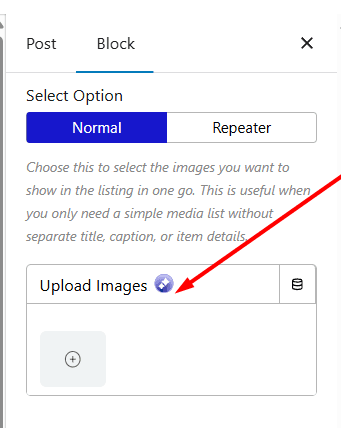
The AI Image Generator supports multiple models, including Gemini 2.5 Flash, lets you set aspect ratio, image type, style, and quality, and generates all images at once.
Update 4: Form Submissions in Your WordPress Admin: No More Relying Only on Email
How many contact form leads have you lost to a spam filter? Or had to dig through email threads to piece together what someone submitted two weeks ago?
Nexter Blocks Pro now stores every form submission in a database and surfaces them under Nexter > Form Submissions in the wp-admin.
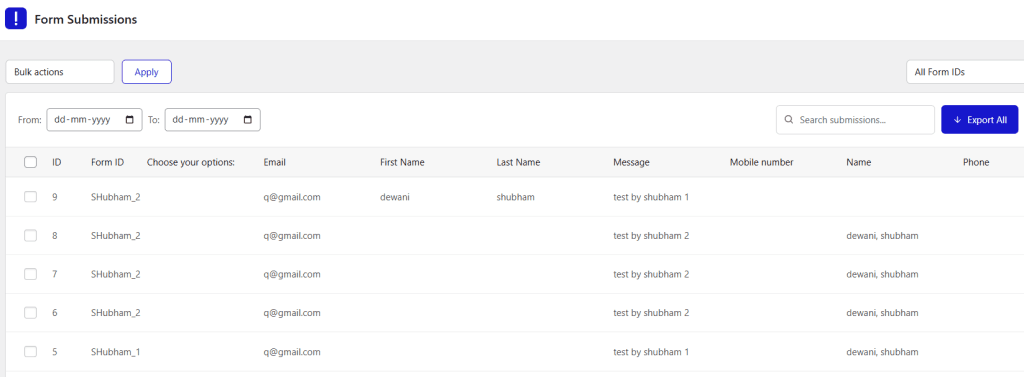
Every entry shows email, name, message, phone, any custom fields, submission date, and read/unread status in a clean table with date filters.
To activate: open your Form block, go to Action After Submit, and select Database Entry from the dropdown.
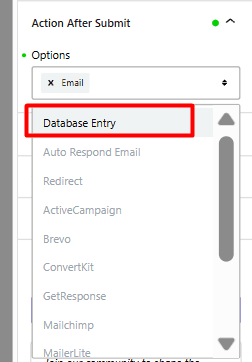
You can run it alongside email notifications or instead of them. Make sure your Form ID is set in the block, so Nexter knows which form each submission belongs to.
Update 5: Code Snippets AJAX Fix (Nexter Extension)
PHP snippets using the “Add On AJAX Work” option were not executing correctly in the previous version.
This is fixed. If you had AJAX-triggered PHP snippets that weren’t firing, they should work correctly after updating.
Update 6: Block Labels Added Across 50+ Blocks & More
This release adds clearer labels to options panels across a large number of blocks in both Free and Pro, making it faster to find and use settings without hunting.
Background position across components also defaults to FocalPointPicker with a new custom option for more precise image control.
Post Listing category filter is also fixed for non-English language sites.
For all the changes, you can refer to the Changelog.
Wrapping Up
This release is all about reducing plugin clutter while giving you more capability directly inside Nexter. Image optimisation, AI-assisted content creation, and built-in form submission storage now work seamlessly inside your existing workflow.
Update to the latest Nexter Blocks and Nexter Extension to try these improvements on your site.
Questions? Find us in theFacebook Community or viaLive Chat.
