












Knowing that a page was viewed tells you very little. Knowing which button was clicked on it tells you what to change.
Event tracking turns any Nexter block into a tracked element: when someone clicks a link or submits a form inside it, an event goes to Google Analytics, the Meta pixel, or both.
Before You Start
- Edition: Pro — event tracking needs Nexter Blocks Pro.
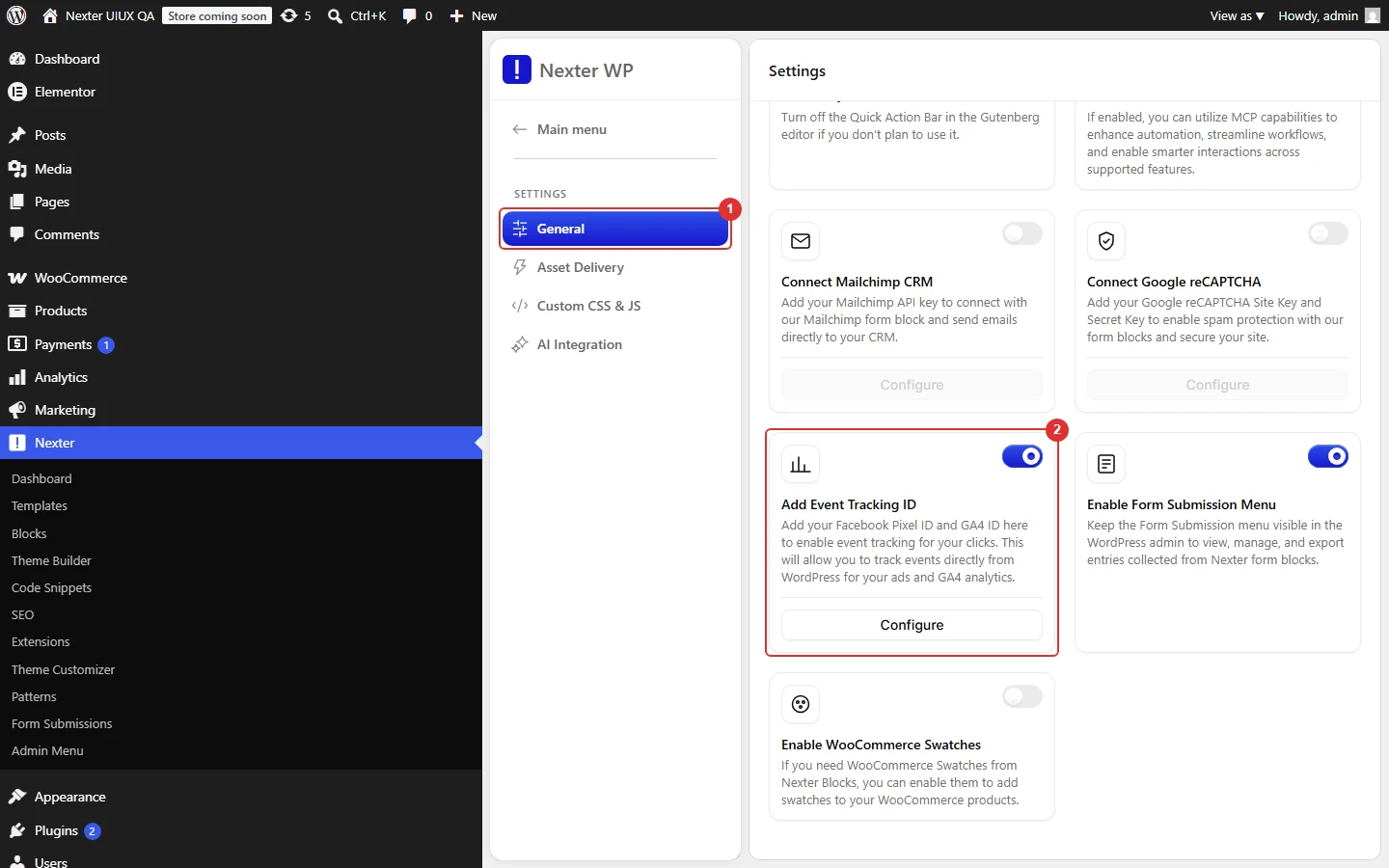
- Block to enable: Event Tracking, switched on under Nexter > Blocks in your WordPress dashboard.
- A GA4 measurement ID, a Meta pixel ID, or both, entered in Nexter’s settings.
- Event tracking switched on in those same settings — see the note below.
Save the event tracking setting as enabled before you configure anything on a block. Measured on 5.0.6: with that setting never saved, the editor still offers event tracking, but the published page contains no tracking markup at all. Enabling it and changing nothing else fixed it immediately.
Steps
- Enter your GA4 measurement ID and Meta pixel ID in Nexter’s settings, and switch event tracking on.
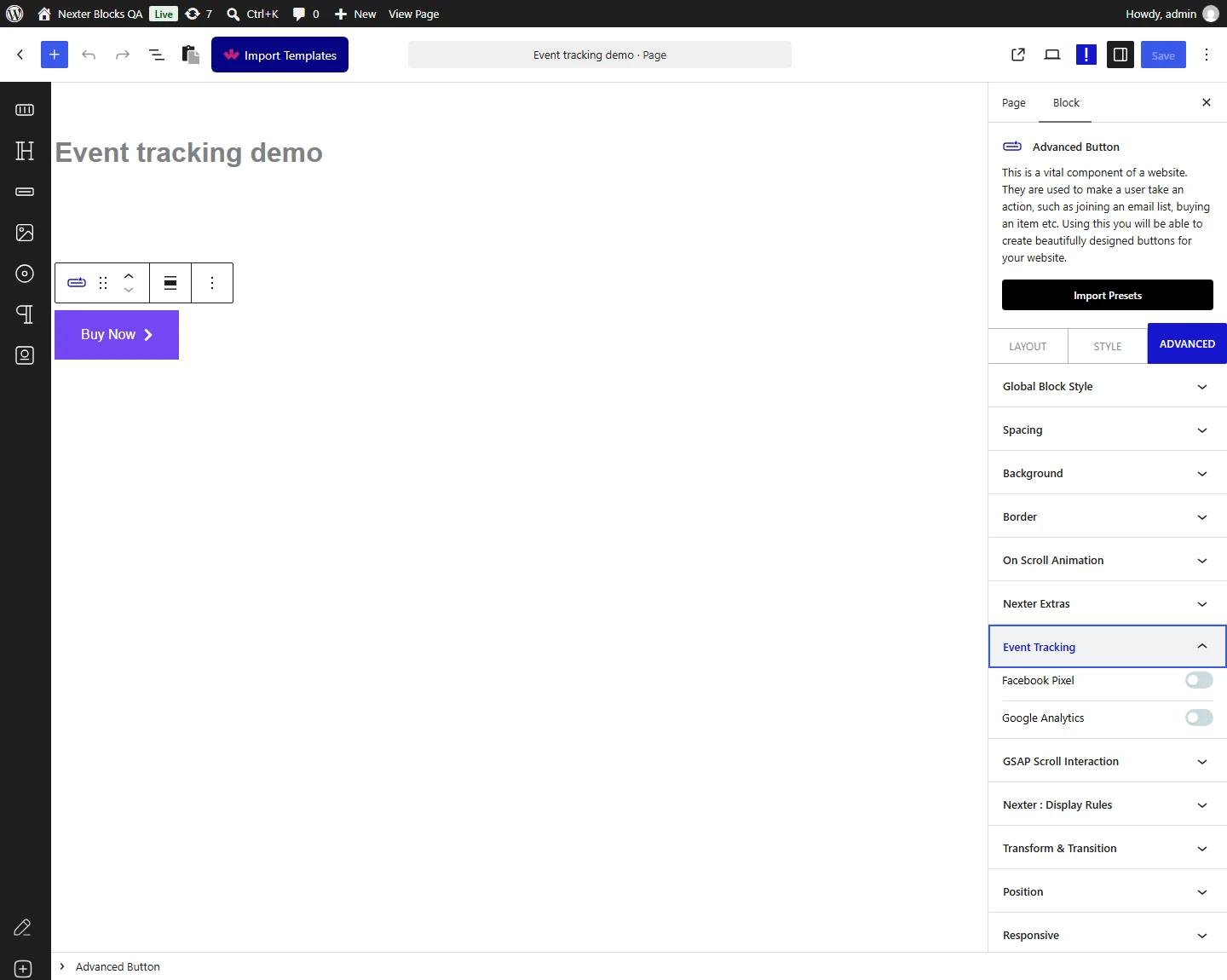
- Select a block, open its Advanced tab, and choose which providers to send to and which event to send.
- Publish, then confirm the event arrives in Google Analytics’ realtime view or the Meta pixel helper.
How It Behaves
- Turn event tracking on in Nexter’s settings first. Measured: with the site-level setting unset, a block configured for both providers emitted nothing — no markup, no console message, no warning. With the setting enabled and nothing else changed, the same block immediately emitted its full tracking payload.
- The editor can show event tracking as available while the front end emits nothing. Measured on 5.0.6: with the setting never saved, the editor treats it as on but the front end requires it to be explicitly enabled. If your events are not firing, open the setting and save it as enabled even if it already looks on. Reported to the developers.
- The whole configuration is written onto the block. Measured: the block gains a
tpgb-event-trackerwrapper and an inner element carrying adata-event-optattribute holding the providers, the event type and name, and any custom properties. You can confirm your setup reached the page by looking for that attribute. - Only certain things inside the block fire an event. Read from the shipped script, this is the complete list, all on click: any link, a video play button, and the submit button of Mailchimp, WPForms, Everest Forms or Contact Form 7. A block containing none of those is tracked in name only.
- Binding happens once, when the page loads. Blocks added to the page later by AJAX are not picked up.
- Ticking neither provider renders nothing, even with properties filled in. At least one of Google or Facebook has to be selected.
- Measured with Nexter Blocks Pro deactivated: a fully configured block emits no tracking markup at all. Event tracking is Pro only and does not degrade.
- Either provider works alone. Measured: Google only and Facebook only each rendered correctly; you do not need both.
Limitations
- What this page verified, and what it did not. The markup the block emits and the calls the script makes were measured. Whether an event arrives in your analytics account was not, and cannot be from the page source. Confirm arrival in the provider’s own tools.
- Only a fixed set of elements fire events. There is no way to bind to an arbitrary element inside the block.
- A block added by AJAX after page load is not tracked, because binding happens once on load.
- Custom properties reach Google only. Read from the script: properties are merged into an object and passed on every Google call, while the Facebook calls are made with the event name alone. If you need properties on a Meta event, this feature will not send them.
- Setting a pixel ID also fires a PageView on every page, independently of any block, which is worth knowing before you add one.
- It is Pro only, and emits nothing without Pro rather than degrading.
Troubleshooting
No events are firing at all
Check the site-level event tracking setting first and save it as enabled even if it looks on. This is the most common cause by a wide margin, and it produces no error anywhere.
How do I tell whether the block is set up correctly?
View the published page’s source and look for data-event-opt on the block. If it is there, the setup reached the page. If it is not, the problem is the setting above, not the block.
The attribute is there but nothing reaches my analytics
Open the browser console. The script logs gtag is not defined or fbq is not defined when the provider library has not loaded, which usually means the ID is missing or a consent or blocking script has stopped it.
Clicks on the block do nothing
Events fire from links and from a small set of form submit buttons. A block with neither has nothing to bind to.
