How To Add Global Style to a WordPress Block?

Key Takeaways

  • Global Block Style block from Nexter Blocks allows users to save a block style globally and apply it to new blocks of the same type.
  • Users can sync style changes across all blocks with the same global style using the sync feature in the Global Block Style tab.
  • Nexter Blocks enables users to easily delete a global style, which removes it from all blocks where it was applied.
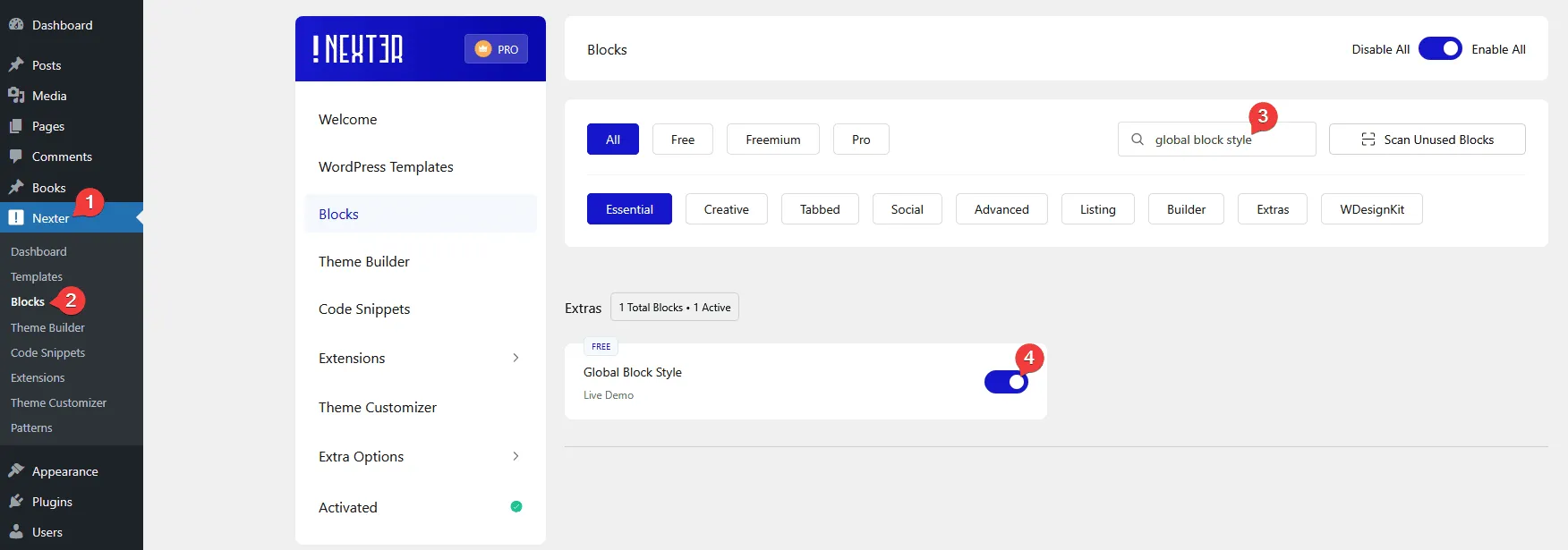
  • To activate the Global Block Style, users must search for it in Nexter u2192 Blocks and turn on the toggle.
Table of Contents

Do you want to easily apply the style of a block to a new block? With the Global Block Style block from the Nexter Blocks, you can easily save the style of a block globally and apply the same style to a new block (same block type). This feature allows you to maintain and manage a consistent style of blocks across your site.

Required Setup

  • Make sure the default WordPress Block editor is active. 
  • You need to have the Nexter Blocks plugin installed and activated.
  • Make sure the Global Block Style block is activated. To verify this, visit Nexter → Blocks → and search for Global Block Style and activate.

How to activate the Global Block Style?

Go to 

  • Nexter Blocks 
  • Search the block name and turn on the toggle.

global block style activate new 1

Key Features

  • Save style – You can easily save a block style globally.
  • Apply style – You can easily apply a global style to another block.
  • Sync style – You can easily make changes to a global style and sync it across all the blocks with the same global style.
  • Delete style – You can easily delete a global style of a block.

How to Use the Global Block Style?

To use the Global Block Style block feature, add any block from the Nexter Blocks. 

For example, let’s use the Blockquote block.

First, make necessary style changes from the Style tab.

Note: You can also add style to the block from the Advanced tab, but the styles applied from On Scroll Animation, Nexter Extra, Event Tracking, Nexter: Display Rule and Custom won’t be added to the global style when you save the style.

Save Global Style

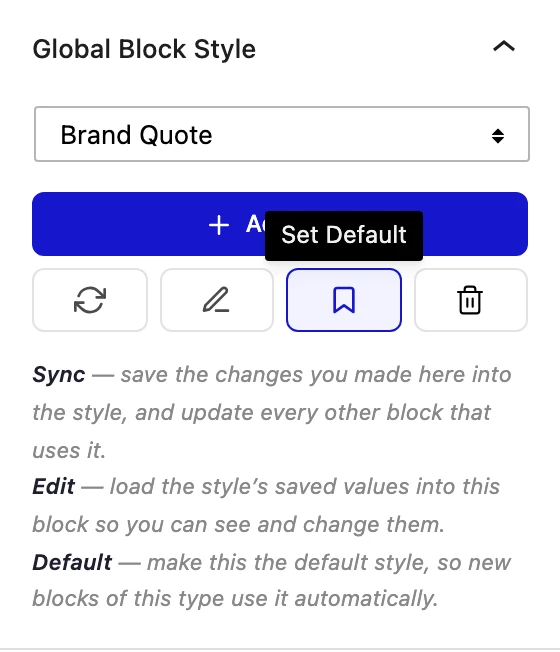
Now, to save this style globally, go to the Global Block Style tab under the Advanced tab.

Click on the Add Style button.

In the popup, add a style name and click on the Save button.

Note: Make sure you don’t use any special characters in the name.

Similarly, you can save multiple global styles of a block.

Apply the Global Style

Now, to use that global style, let’s add another Blockquote block from Nexter Blocks. 

Note: A global style saved for a block can be applied to the same block type only. You can’t apply a global style of a block to another block type.

Then go to the Global Block Style tab under the Advanced tab.

From the dropdown, select the global style name you saved the previous block with, and it will apply the same style of the previous block to this new block.

Note: The same style will only apply if you are using the same preset; otherwise, only common elements in your current preset will get global style.

Sync Global Style

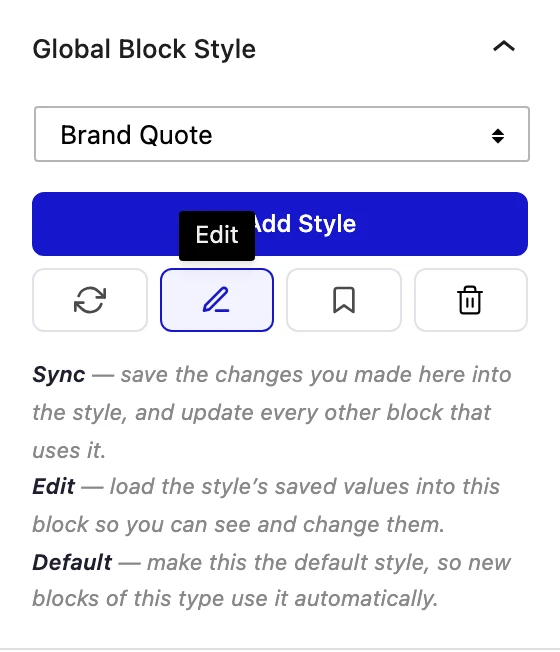
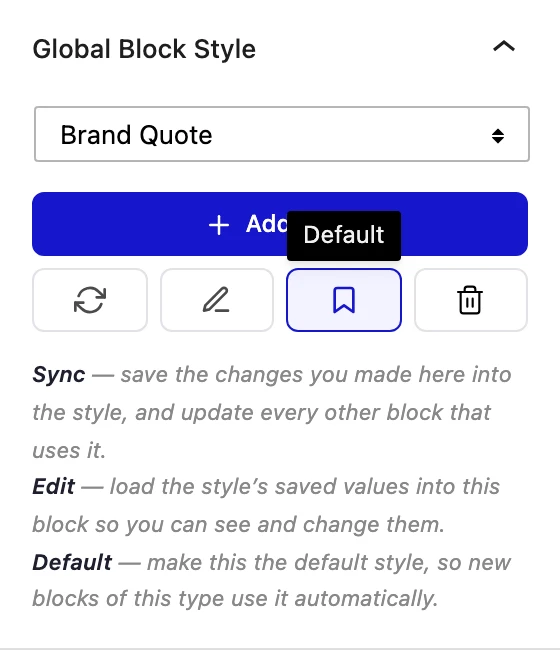
All the block that has a global style applied, you can easily maintain their style using the sync feature. With this, you can make style changes to one block and apply to all the blocks using the same global style.

To do this, let’s make changes to the style of one Blockquote block.

Then go to the Global Block Style tab under the Advanced tab.

Click on the Sync Style button, the new style will be applied to the other Blockquote block.

Delete a Global Style

You can easily delete the global style of a block.

To do that, go to the Global Block Style tab under the Advanced tab.

Then, from the dropdown, select the global style you want to delete.

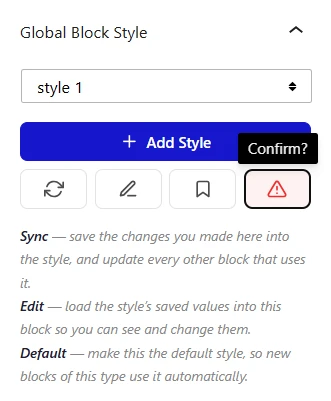
After that, click on the delete icon button, and click it again to confirm.

Now that specific global style of the block will be deleted, and wherever that style was applied will be deleted as well.

About the Author

Photo of Aditya Sharma CMO of NexterWP
CMO at POSIMYTH Innovations · NexterWP · 7 years experience

He has spent years in the WordPress ecosystem building, breaking, and optimizing sites until they actually perform. He works at the intersection of speed, growth, and usability, helping creators ship websites that load fast and convert. An active WordPress community contributor sharing through tools, tutorials, and direct collaboration. Tested practice, not theory.

WordpressThemesElementorn8nAIClaudeAutomationServer

Share your Thoughts

Get Instant Answers to all your questions about Nexter Blocks,
Extensions & Theme trained on 1000+ Docs and Videos

Still in Doubt? Let’s Assist You

Have Feedback or Questions?

Join our WordPress Community on Facebook!

Related Frequently Asked Questions

What should I do if the Global Block Style isn't activating?

If the Global Block Style isn't activating, ensure that the Nexter Blocks plugin is installed and activated. Additionally, check that the Global Block Style block is enabled by navigating to Nexter u2192 Blocks and toggling it on. If these steps are followed and it still doesn't activate, consider clearing your browser cache or checking for plugin conflicts.

Can I apply a global style from one block type to another?

No, a global style saved for a block can only be applied to the same block type. For example, if you save a style for a Blockquote block, you cannot apply that style to a Paragraph block. This limitation ensures that styles remain consistent and relevant to the specific block type.

What is the best way to save multiple global styles for a block?

To save multiple global styles for a block, make sure to add a unique name for each style when you click the Add Style button in the Global Block Style tab. Avoid using special characters in the name, as this can cause issues. This practice allows you to easily manage and apply different styles as needed across your site.

What happens if I delete a global style?

When you delete a global style, it removes that specific style from all blocks where it was applied. To delete a global style, go to the Global Block Style tab under the Advanced tab, select the style from the dropdown, and confirm the deletion. Be cautious, as this action cannot be undone and will affect all instances of that style.

How does syncing a global style work?

Syncing a global style allows you to make changes to one block's style and automatically apply those changes to all blocks using the same global style. After modifying a block, go to the Global Block Style tab and click the Sync Style button. This feature helps maintain a consistent look across your site without needing to manually update each block.

What are the key features of the Global Block Style in Nexter Blocks?

The Global Block Style in Nexter Blocks offers several key features: you can save styles globally, apply those styles to other blocks of the same type, sync changes across all blocks using the same style, and delete styles as needed. These features enable efficient management of block styles, ensuring a cohesive design throughout your WordPress site.

Last reviewed: April 14, 2026

Related Docs