How to Open WordPress Menu Dropdown on Hover?

Key Takeaways

  • Nexter Blocks includes a Navigation Menu block that allows users to open the dropdown menu on hover in WordPress.
  • Users can select 'OnHover' from the Submenu Open section to enable the dropdown menu on hover.
  • Nexter Builder is available for free to create the header template needed for the Navigation Menu block.
Table of Contents

Are you looking to show the WordPress dropdown menu on hover? Showing submenu on hover makes it easier for users to find the options, which improves the user experience.

With the Navigation Menu block from the Nexter Blocks, you can easily open the dropdown menu on hover in WordPress.

To check the complete feature overview documentation of the Nexter Blocks Navigation Menu block, click here.

Requirement  – This block is a part of the Nexter Blocks, make sure it’s installed & activated to enjoy all its powers.

To do this, add the Navigation Menu block to the header template and follow the steps –

Note: To create the header template, you can use the free Nexter Builder. 

1. Select the appropriate options from the Type and Menu Layout sections.

2. Then select or create the menu, depending on the option selected in the Type section.

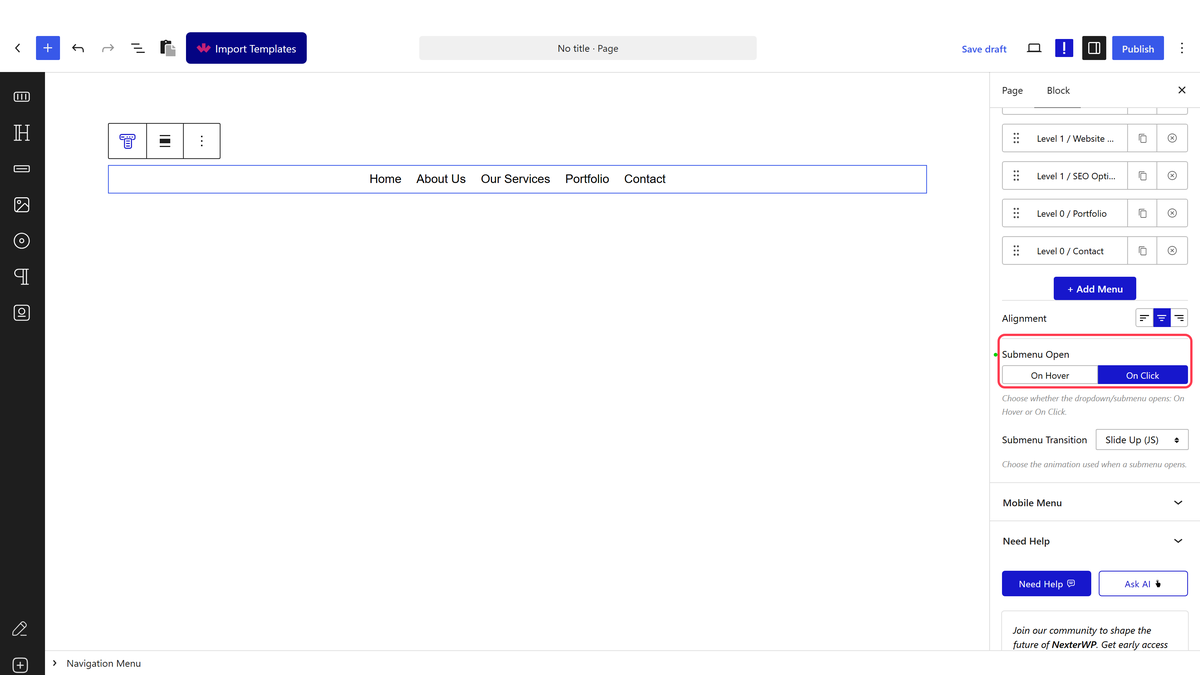
3. From the Submenu Open section, select OnHover.

navigation menu on hover

You can select the appropriate effects for the dropdown menu from the Submenu Transition dropdown.

Now, your dropdown menu will open on hover. 

navigation menu on hover demo

About the Author

Photo of Aditya Sharma CMO of NexterWP
CMO at POSIMYTH Innovations · NexterWP · 7 years experience

He has spent years in the WordPress ecosystem building, breaking, and optimizing sites until they actually perform. He works at the intersection of speed, growth, and usability, helping creators ship websites that load fast and convert. An active WordPress community contributor sharing through tools, tutorials, and direct collaboration. Tested practice, not theory.

WordpressThemesElementorn8nAIClaudeAutomationServer

Share your Thoughts

Get Instant Answers to all your questions about Nexter Blocks,
Extensions & Theme trained on 1000+ Docs and Videos

Still in Doubt? Let’s Assist You

Have Feedback or Questions?

Join our WordPress Community on Facebook!

Related Frequently Asked Questions

What should I do if the dropdown menu doesn't open on hover?

If the dropdown menu isn't opening on hover, check that you've correctly selected 'OnHover' in the Submenu Open section. This setting is crucial for enabling the hover effect. Additionally, ensure that the Navigation Menu block from Nexter Blocks is installed and activated, as it's required for this feature to function properly.

Can I use the Nexter Blocks Navigation Menu block for a mobile-friendly menu?

The Nexter Blocks Navigation Menu block is designed primarily for desktop use with hover effects. For mobile devices, consider how the hover functionality translates, as touch devices typically require a click to open menus. You might need to adjust settings or consider alternative methods for mobile compatibility.

What are the benefits of showing the WordPress dropdown menu on hover?

Showing the dropdown menu on hover improves user experience by making it easier for visitors to find options quickly. This can lead to better navigation and potentially higher engagement on your site, as users can access submenus without additional clicks.

Is there a way to preview the dropdown menu effects before publishing?

While the page does not specify a direct preview feature, using the Nexter Builder allows you to see changes in real-time as you configure the Navigation Menu block. This can help you fine-tune the dropdown menu effects before publishing your site.

Last reviewed: April 14, 2026

Related Docs