












On a company blog where everything is written by the same small team, an author name on every card is noise. On a single-author site it is the same name repeated down the page.
The author line can be switched off without touching the posts themselves.
Before You Start
- Edition: Free — works in Nexter Blocks (free) and with Nexter Blocks Pro.
- Block to enable: Post Listing, switched on under Nexter > Blocks in your WordPress dashboard.
Steps
- Select your Post Listing block.
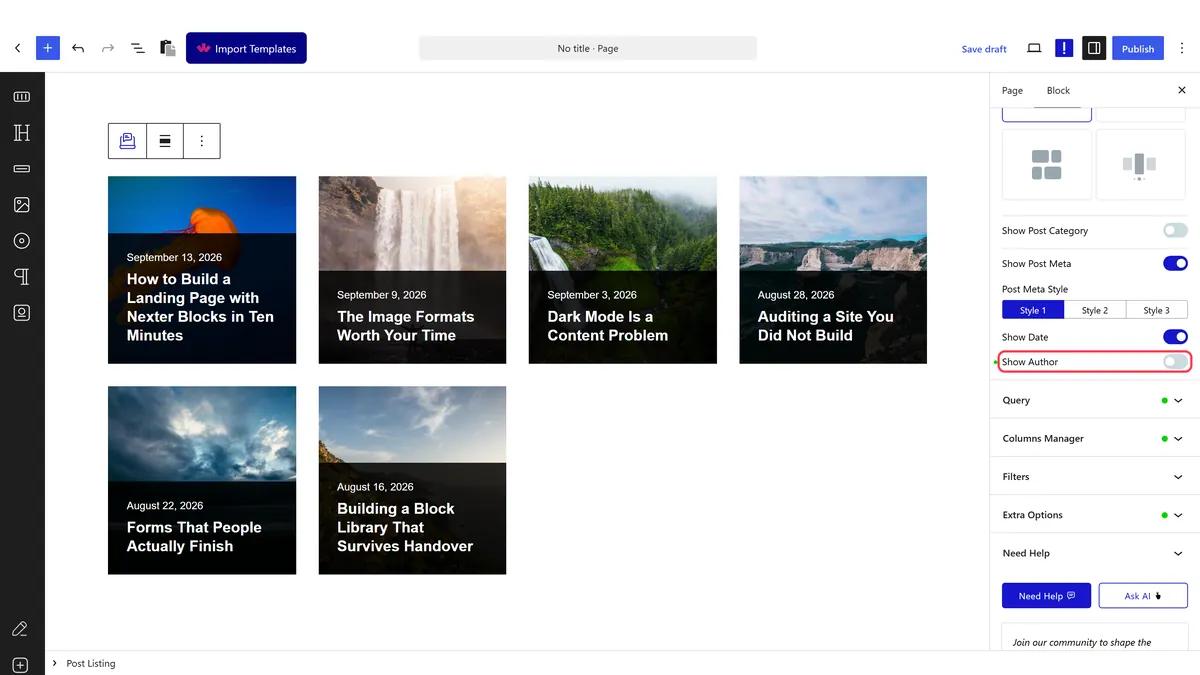
- Switch the author display off.
- Publish and check the cards on the real page.
How It Behaves
The author is part of the post meta line, and hiding it removes that element from each card.
- It is on by default. Measured on an untouched listing, each card rendered a
post-meta-authorelement with the author name linking to their archive. - It changes the listing only. The author is still recorded on the post and still shows anywhere else your theme prints it, including the single post page.
- The date usually sits on the same line, so hiding the author can leave a lone separator. Check the card afterwards, and hide the date too if the line looks odd — see hide the post date.
- Measured with Nexter Blocks Pro deactivated: the listing still renders its posts. The block itself is free.
Limitations
- It is presentation only. Hiding the author does not make a post anonymous, since the author archive and the single post can still show it.
- Author archives stay reachable at their own URLs unless you deal with them separately.
- It applies to the whole listing, so you cannot hide the author on some cards and not others.
- Attribution has value on some sites. For anything where expertise matters, the author line is doing real work.
Troubleshooting
The author still shows
Check you changed the setting on the right block, and that you are looking at the published page.
There is a stray separator left behind
The meta line still has its divider. Hide the date as well, or restyle the meta line.
The author shows on the single post page
That is your theme, not this block. The block only controls the listing.
The author name is blank
The post has no valid author assigned. Set an author on the post itself.
