How to Create a WordPress Vertical Toggle Menu?

Key Takeaways

  • Nexter Blocks includes a Navigation Menu block that allows users to create a vertical toggle menu on their WordPress website.
  • Users can select from three toggle menu opening behaviors: Normal, Hover, or Click, to customize the menu experience.
  • The Nexter Builder is available for free and can be used to create the header template needed for the vertical toggle menu.
Table of Contents

Do you want to create a WordPress vertical toggle menu? A side menu or vertical toggle menu is great for large websites with lots of content with many different categories.

With the Navigation Menu block from the Nexter Blocks, you can easily create a side menu or sidebar toggle menu on your WordPress website.

To check the complete feature overview documentation of the Nexter Blocks Navigation Menu block, click here.

Requirement  – This block is a part of the Nexter Blocks, make sure it’s installed & activated to enjoy all its powers.

To do this, add the Navigation Menu block to the header template and follow the steps –

Note: To create the header template, you can use the free Nexter Builder. 

1. From the Type section, select the appropriate option.

2. Then select Vertical Toggle from the Menu Layout section.

3. Finally, select or create the menu depending on the option selected in the Type section.

You can select the appropriate submenu hover event and effect.

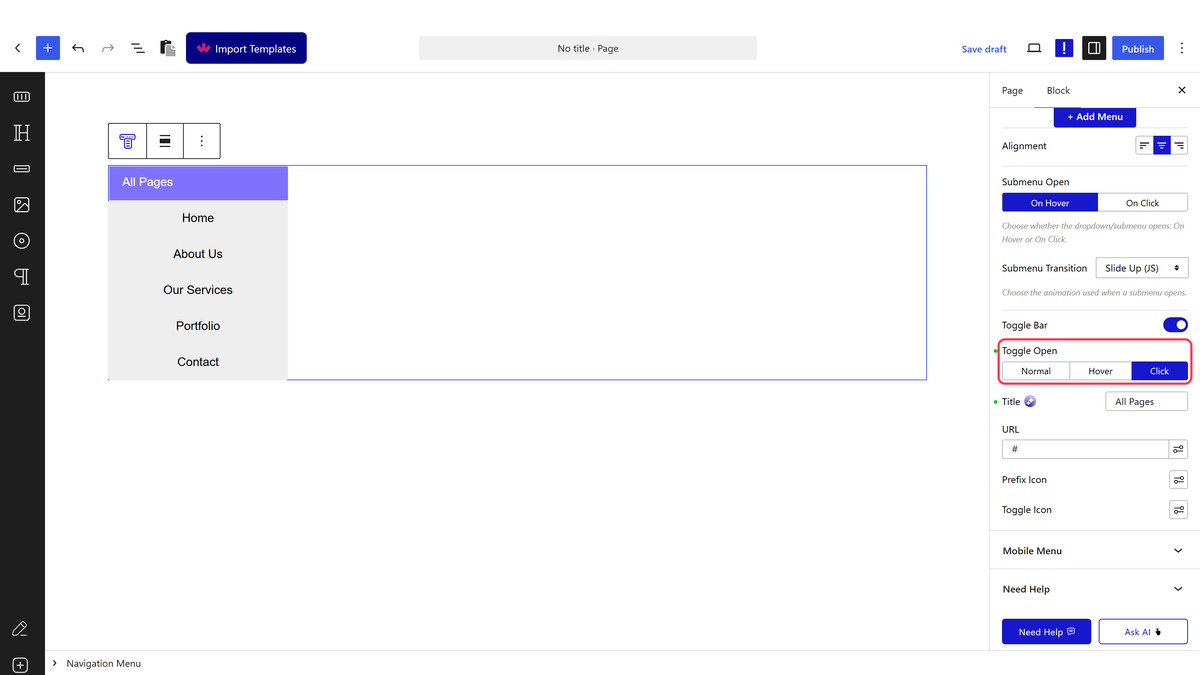
By enabling the Toggle Bar toggle, you can add a toggle bar for the menu.

navigation menu toggle bar

From the Toggle Open section, you can set the behavior of the toggle menu opening. Here, you’ll find three options – 

Normal – To always show the menu.

Hover – To show the menu on hover.

Click – To show the menu on click.

From the Title field, you can change the toggle bar title.

You can add a link for the toggle bar in the URL field.

From the Prefix Icon and Toggle Icon sections, you can change the toggle bar icons.

Now you’ll see a vertical toggle menu.

navigation menu toggle bar demo

About the Author

Photo of Aditya Sharma CMO of NexterWP
CMO at POSIMYTH Innovations · NexterWP · 7 years experience

He has spent years in the WordPress ecosystem building, breaking, and optimizing sites until they actually perform. He works at the intersection of speed, growth, and usability, helping creators ship websites that load fast and convert. An active WordPress community contributor sharing through tools, tutorials, and direct collaboration. Tested practice, not theory.

WordpressThemesElementorn8nAIClaudeAutomationServer

Share your Thoughts

Get Instant Answers to all your questions about Nexter Blocks,
Extensions & Theme trained on 1000+ Docs and Videos

Still in Doubt? Let’s Assist You

Have Feedback or Questions?

Join our WordPress Community on Facebook!

Related Frequently Asked Questions

What should I do if the vertical toggle menu doesn't appear after following the steps?

If the vertical toggle menu isn't showing up, ensure that the Navigation Menu block from Nexter Blocks is installed and activated. This block is essential for creating the menu. Additionally, check that you've correctly selected 'Vertical Toggle' in the Menu Layout section and that you've created or selected a menu in the Type section.

Can I use the vertical toggle menu for a website with many categories?

A vertical toggle menu is particularly beneficial for large websites with numerous categories, as it helps organize content efficiently. By using the Navigation Menu block from Nexter Blocks, you can create a sidebar toggle menu that enhances user navigation, making it easier for visitors to find relevant sections.

What are the best settings for submenu hover events in a vertical toggle menu?

When configuring submenu hover events for your vertical toggle menu, consider using the 'Hover' option for a dynamic user experience. This setting allows the submenu to appear when users hover over the main menu item, which can be more intuitive for visitors exploring multiple categories.

Last reviewed: April 14, 2026

Related Docs