Skip to content

How to Make a Clickable Container in WordPress?

Key Takeaways

  • Nexter Blocks Container block makes an entire section clickable in the WordPress Block editor by turning on Wrapper Link and adding a destination URL, with no custom code.
  • Extra Options tab includes a dedicated link group with Wrapper Link, a URL field, Open In New Tab, and Nofollow settings.
  • Container block and Container (Inner) block both support Wrapper Link, so it works for single sections and inner Containers inside multi-column layouts.
  • Wrapper Link is best for card layouts, feature sections, and portfolio grids, but nested links are not valid HTML and interactive content like accordions, tabs, or embedded forms can conflict with the outer click area.
Table of Contents

What It Does

The Container block from Nexter Blocks lets you make an entire section clickable in the WordPress Block editor, without any custom code. Turn on the Wrapper Link toggle, add a destination URL, and the whole container becomes a single clickable area instead of only the text or button inside it.

To check the complete feature overview documentation of the Nexter Blocks Container block, click here.

Requirement – This block is a part of Nexter Blocks. Make sure it is installed and activated.

Why It Matters

Users click bigger targets faster than they click small links. A card or feature block where only a headline or button is clickable creates friction, visitors miss the link, hover the wrong spot, or give up. Making the full container clickable removes that friction, lets any part of the section respond to a click, and improves usability across card grids, feature sections, and portfolio layouts.

What You Get

The Container block’s Extra Options tab ships with a dedicated link group for this exact purpose:

  • A Wrapper Link toggle that turns the whole container into a clickable area
  • A URL field for the destination link or anchor point
  • An option to open the link in a new tab
  • An option to mark the link as nofollow

Benefits

  • No custom code or JavaScript needed to make a section clickable
  • Works the same way on the main Container and on inner Containers inside multi-column layouts
  • Reduces missed clicks on card and feature layouts by turning the full area into the click target
  • Keeps the setup inside the native Block editor, alongside every other Container setting

Capabilities

The Wrapper Link setting is available on both the Container block and the Container (Inner) block, so it works whether you are linking a single section or individual columns inside a multi-column row. Alongside the destination URL, you can independently choose to open the link in a new tab and to add a nofollow attribute, so the same toggle covers standard internal links, external links, and SEO-controlled outbound links.

How It Works

When you enable Wrapper Link, the Container block wraps its own markup with a link using the URL, new-tab, and nofollow settings you set. Because the link sits on the container itself rather than on a single piece of text, clicking anywhere inside the section, the background, the heading, the image, triggers the same navigation.

How to Use It

Add the Container block with the appropriate layout to the page and follow the steps below.

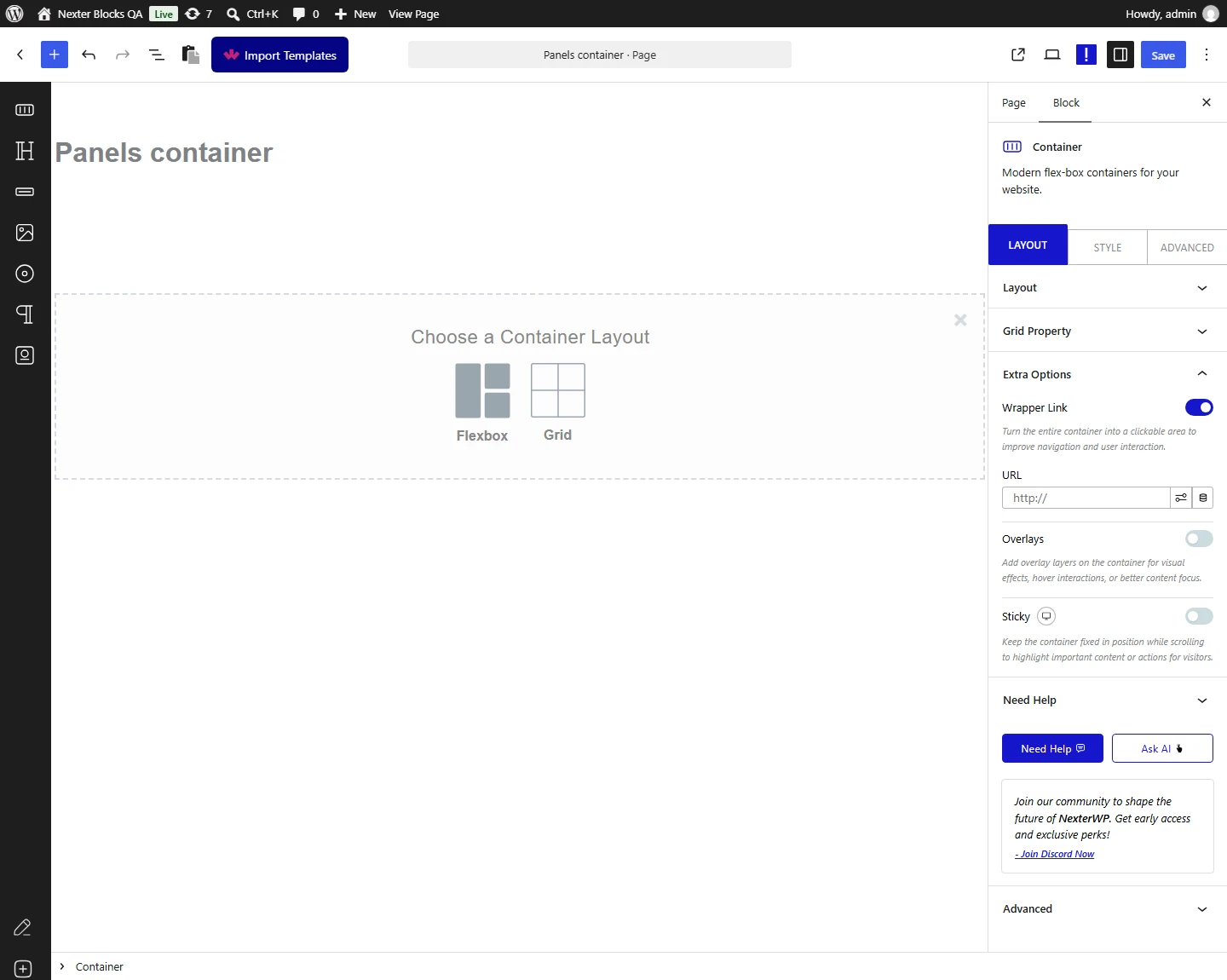
1. Go to the Extra Options tab and enable the Wrapper Link toggle.

Container block Extra Options tab showing Wrapper Link toggle in Nexter Blocks
The Wrapper Link toggle inside the Container block’s Extra Options tab.

2. In the URL field, add the destination link for the container. Turn on Open In New Tab or Nofollow here as well, if the destination link needs either.

The entire container is now clickable. For portfolio or product grids where each card links to a detail page, combine the clickable Container block with the Post Listing block in Nexter Blocks to build a dynamic, fully-linked content grid.

Use Cases

Best used for:

  • Card layouts where the entire card area should link to a post, product, or landing page
  • Feature sections where clicking anywhere on a highlighted block redirects users to a detail page
  • Portfolio grids where each project container links to the full case study or project page

Limitations

  • Do not place another link or button inside a container that has Wrapper Link enabled. Nested links are not valid HTML, so browsers will generally only follow the outer container link and the inner one becomes unreliable or unreachable.
  • Wrapper Link is a single destination per container. If different parts of the same section need to go to different pages, split that content across separate containers instead of one wrapped container.
  • Interactive content placed inside a wrapped container, such as accordions, tabs, or embedded forms, can conflict with the outer click area. Test the section after enabling Wrapper Link to confirm inner interactions still work as expected.

Troubleshooting

Note: no FluentSupport tickets were found specifically for the Container block’s Wrapper Link feature at the time of this update. The issues below are based on verified Wrapper Link behavior and settings, not on live support tickets.

  • Container is not clickable even with Wrapper Link turned on. The URL field is empty by default, the toggle alone does not create a link. Open the Extra Options tab and confirm a destination URL is entered.
  • Buttons or links inside the container stop working after Wrapper Link is enabled. This happens because a link cannot be nested inside another link in HTML. Remove Wrapper Link from that specific container, or move the inner button outside of it.
  • The link does not open in a new tab, or nofollow is not applied. Open In New Tab and Nofollow are separate toggles next to the URL field and must be turned on individually, enabling Wrapper Link does not turn them on automatically.

This is how you can make a container clickable in WordPress with the Nexter Blocks Container block.

Share your Thoughts

Still in Doubt? Let’s Assist You

Have Feedback or Questions?

Join our WordPress Community on Facebook!