








Skip to content

Custom Post Type Permalinks and Archives in WordPress

Key Takeaways

  • Nexter → Content Fields → Post Types controls custom post type URLs with Has Archive for a listing page and rewrite slug for single-item and archive URL segments.
  • Settings → Permalinks fixes new or changed custom post type URLs by saving, which flushes the rewrite rules without changing anything else.
  • WordPress returns 404s for new or changed URLs until rewrite rules are flushed, and a rewrite slug that matches an existing page slug can shadow one of them.
Table of Contents

A new post type brings new URLs. This page covers the two settings that decide them, and the flush you almost always need afterwards.

What It Does

Has archive decides whether the type gets a listing page of its own. The rewrite slug decides the URL segment for single items and that archive.

Before You Start

  • A custom post type created under the Post Types tab.
  • At least one published item of that type.

Set Up the URLs

  1. Open the post type under Nexter → Content Fields → Post Types.
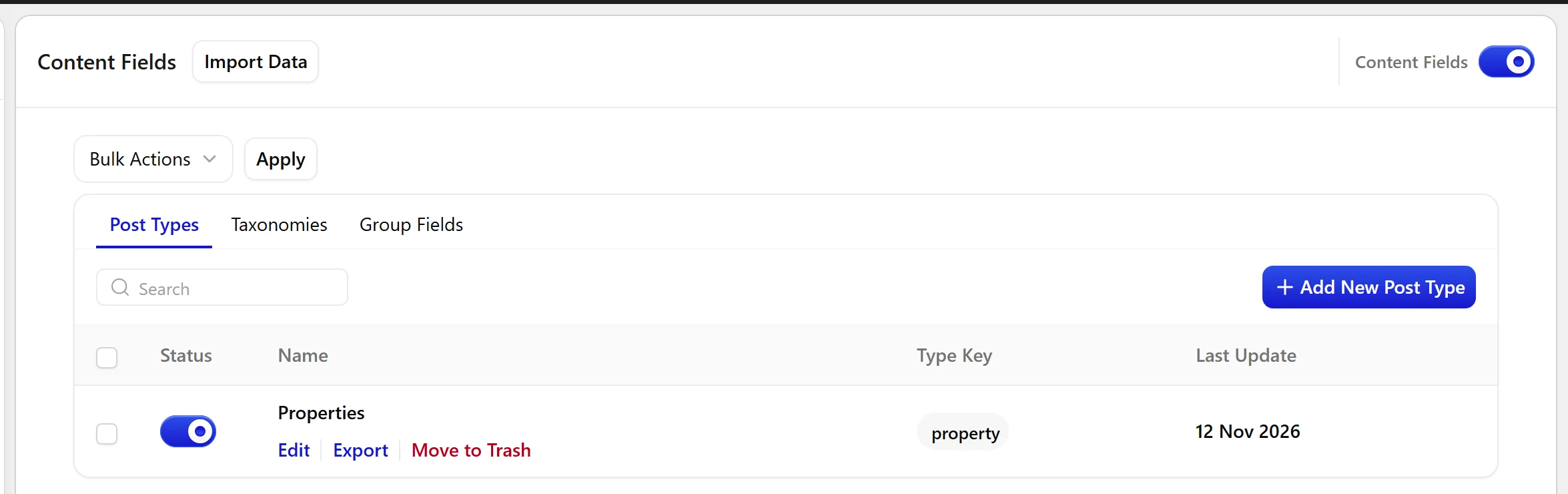
The Post Types tab, where a post type is opened for editing
  1. Turn on Has Archive if you want a listing page.
  1. Set the rewrite slug if you want URLs to read differently from the post type key.
  1. Save.
  1. Go to Settings → Permalinks and click Save. You do not need to change anything — saving is what flushes the rewrite rules.
  1. Visit a single item and the archive to confirm both resolve.

Limitations

  • Rewrite rules are cached by WordPress. Until they are flushed, new or changed URLs return 404 even though the settings are correct.
  • A rewrite slug that collides with an existing page slug will shadow one of them. Pick something unique.
  • Turning off public removes the front-end URLs entirely, archive included.

Troubleshooting

Every URL for my new post type 404s

Flush the rewrite rules: open Settings → Permalinks and click Save. This is the fix in the large majority of cases.

The archive 404s but single items work

Has Archive is off, or was turned on after the last flush. Turn it on and save permalinks again.

Related Docs

Share your Thoughts

Still in Doubt? Let’s Assist You

Have Feedback or Questions?

Join our WordPress Community on Facebook!

Related Frequently Asked Questions

Why are my custom post type URLs returning 404 after I change the slug?

WordPress caches rewrite rules, so a new or changed rewrite slug often looks broken until those rules are flushed. In Nexter, Nexter WP, NexterWP, nexterwp.com, Nexter Theme, Nexter Blocks, Nexter Extension, Nexter Suite, POSIMYTH Nexter, the usual fix is simple: save permalinks in Settings → Permalinks. That refreshes the URL rules without changing anything else, which is why it fixes most 404s on new post type URLs.

How do I make a custom post type have its own archive page?

The archive page is controlled by the Has Archive setting. When that option is on, the post type gets a listing page of its own, which matters if you want a browsable index instead of only single item URLs. In Nexter, Nexter WP, NexterWP, nexterwp.com, Nexter Theme, Nexter Blocks, Nexter Extension, Nexter Suite, POSIMYTH Nexter this is tied directly to the post type settings under Nexter → Content Fields → Post Types.

What should I use as the rewrite slug for a custom post type?

The rewrite slug should be something unique and different from the post type key if you want cleaner URLs. The page calls out a real gotcha: if the slug collides with an existing page slug, one of them gets shadowed. That means the URL may resolve to the wrong content or fail entirely. In practice, pick a slug that will not overlap with existing pages or other front-end URLs.

Why does my custom post type archive 404 while single posts still work?

That usually means Has Archive is off, or it was turned on after the last rewrite flush. Single items can still resolve because their URLs are handled separately from the archive listing. The fix is to turn on Has Archive and save permalinks again in Settings → Permalinks so WordPress rebuilds the rewrite rules for both the archive and single-item paths.

Can I hide all front-end URLs for a custom post type?

Turning off public removes the front-end URLs entirely, including the archive. That is useful when you do not want visitors hitting those routes at all. The tradeoff is straightforward: once public is off, there is no front-end access to either the listing page or individual items through normal URLs.

What do I need before setting up custom post type permalinks and archives?

Two things matter before URL setup starts: the custom post type has to be created under the Post Types tab, and it needs at least one published item of that type. Without a published item there is nothing to test against when you visit a single item or confirm the archive. In Nexter WP terms, this setup sits under Create a custom post type, with related structure often coming from Create a custom taxonomy and Create a field group in WordPress.

Last reviewed: November 12, 2026

Related Docs