How to Add a Vertical Reading Progress Bar in WordPress?

Key Takeaways

  • Nexter Blocks includes the Progress Tracker block for adding a vertical reading scroll progress bar in WordPress.
  • Users can position the progress bar on the left or right of the screen using the Position section in the Style tab.
  • The Apply to section allows users to apply the progress bar to either the entire page or a specific section.
Table of Contents

Are you looking to add a vertical reading progress bar in WordPress? Adding a vertical reading progress bar can improve the user experience by keeping the progress bar away from the reading area.

With the Progress Tracker block from the Nexter Blocks, you can easily add a vertical reading scroll progress bar in WordPress.

To check the complete feature overview documentation of the Nexter Blocks Progress Tracker block, click here.

Requirement  – This block is a part of the Nexter Blocks, make sure it’s installed & activated to enjoy all its powers.

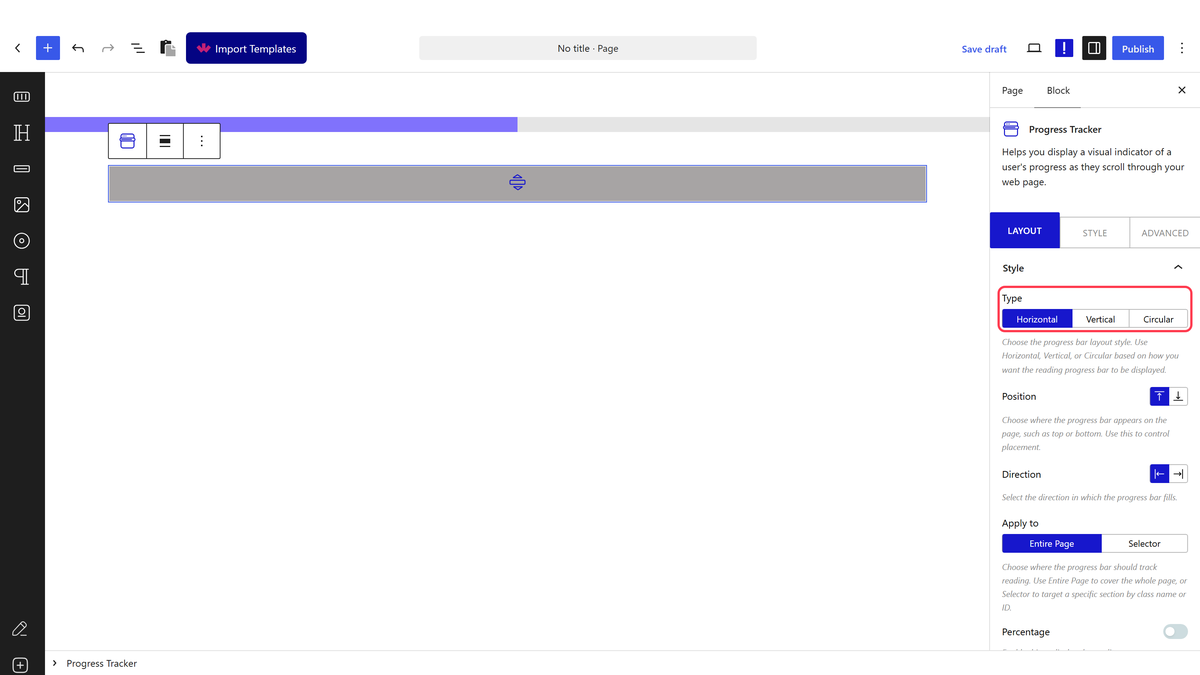
To do this, add the Progress Tracker block from the Nexter Blocks to the page and follow the steps. 

1. Select Vertical from the Type section under the Style tab.

progress tracker vertical

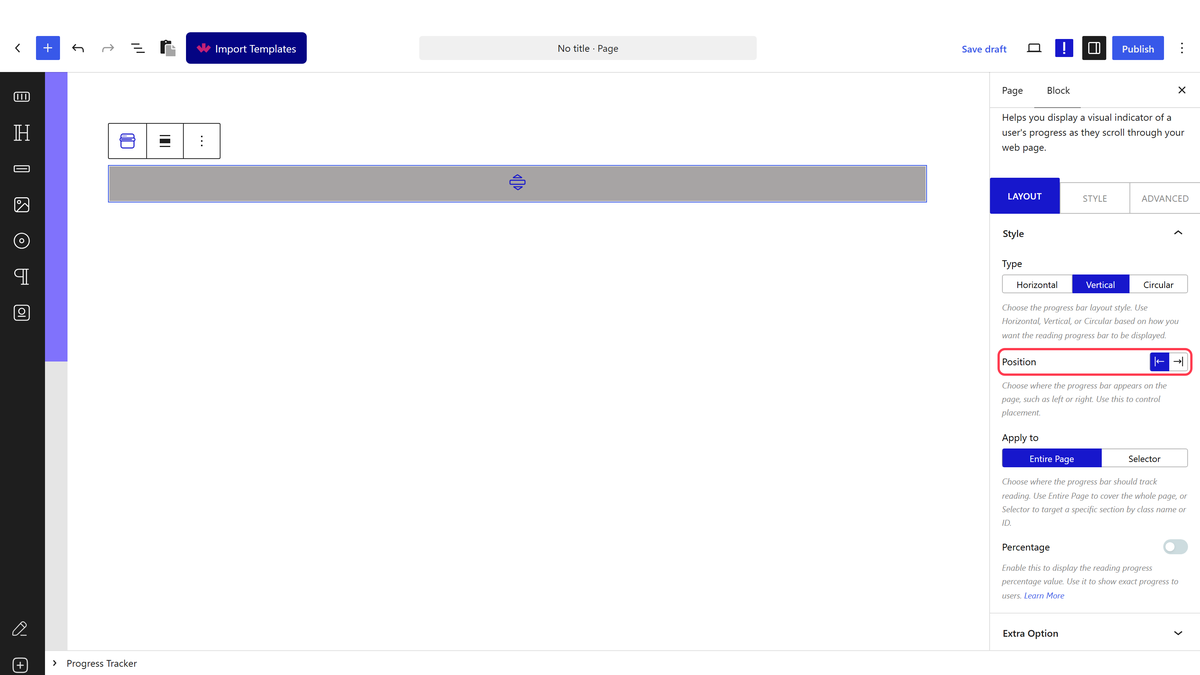
From the Position section, you can place the progress bar at the left or right of the screen. 

In the Apply to section, you can select where to apply the progress bar to the entire page or a specific section.

Now you’ll see a vertical reading scroll progress bar as you scroll the page.


About the Author

Photo of Aditya Sharma CMO of NexterWP
CMO at POSIMYTH Innovations · NexterWP · 7 years experience

He has spent years in the WordPress ecosystem building, breaking, and optimizing sites until they actually perform. He works at the intersection of speed, growth, and usability, helping creators ship websites that load fast and convert. An active WordPress community contributor sharing through tools, tutorials, and direct collaboration. Tested practice, not theory.

WordpressThemesElementorn8nAIClaudeAutomationServer

Share your Thoughts

Get Instant Answers to all your questions about Nexter Blocks,
Extensions & Theme trained on 1000+ Docs and Videos

Still in Doubt? Let’s Assist You

Have Feedback or Questions?

Join our WordPress Community on Facebook!

Related Frequently Asked Questions

What should I do if the vertical reading progress bar isn't showing up?

If the vertical reading progress bar isn't displaying, first ensure that the Progress Tracker block from Nexter Blocks is installed and activated. This block is essential for adding the progress bar. Additionally, check that you've selected 'Vertical' from the Type section under the Style tab. If these settings are correct and it still doesn't show, try refreshing the page or clearing your browser cache.

What are the best settings for a vertical reading progress bar in a long article?

For long articles, setting the progress bar to apply to the entire page is recommended. This ensures that users can track their reading progress throughout the entire content. Additionally, placing the bar on the left side may be less distracting for readers, allowing them to focus on the text without obstruction.

Does the vertical reading progress bar work with other themes besides Nexter Theme?

The vertical reading progress bar is specifically designed for use with Nexter Blocks, which is part of the NexterWP ecosystem. While it is built primarily for the Nexter Theme, it also supports other builders like Elementor and Bricks. However, the best compatibility and performance are achieved when using it within the NexterWP framework.

What happens if I apply the progress bar to a specific section instead of the entire page?

If you choose to apply the progress bar to a specific section, it will only track the reading progress within that designated area. This can be useful for long posts with multiple sections, allowing readers to see their progress in a focused context. However, it may not provide a complete overview of their reading journey across the entire article.

Are there any performance considerations when adding a vertical reading progress bar?

Adding a vertical reading progress bar using the Progress Tracker block from Nexter Blocks is designed to be lightweight, as it uses zero jQuery and loads only 1 CSS and 1 JS file per page. This means the impact on page performance is minimal, making it a good choice for enhancing user experience without sacrificing speed.

Last reviewed: April 14, 2026

Related Docs