












“AI-powered” gets stamped on so many WordPress features now that the phrase has stopped meaning much on its own. So when Nexter Blocks shipped AI generation across the block editor in January 2026, the useful question isn’t “does it have AI” — it’s which fields actually generate content, which blocks support it, and what you still have to do yourself. Here’s the feature-by-feature answer, sourced from Nexter’s own release notes.
Where This Update Came From
Nexter announced AI-powered text and image generation inside Nexter Blocks on January 21, 2026, alongside a reworked Code Snippets manager and WooCommerce CAPTCHA support. It rolled up into the site’s own January 2026 monthly digest a month later. The pitch was specific: instead of a generic “click generate, get generic output, spend time fixing it” AI tool, generation happens inline, inside the block you’re already editing, using your own business context.
Setting It Up: OpenAI or Gemini, Your Own API Key
Nexter Blocks AI runs on your own OpenAI or Gemini API key, not a bundled Nexter key. Setup happens once, from the Nexter dashboard’s Extra Options tab:
- Toggle on AI Integration from Extra Options.
- Enter your OpenAI or Gemini API key.
- Toggle Text Generation, Image Generation, or both.
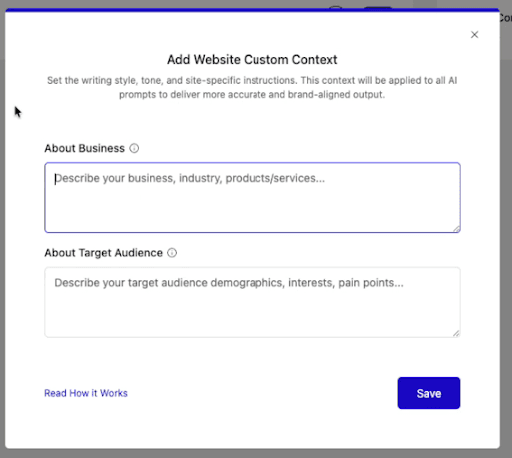
- Optionally fill in your business details under Custom Content so generated copy matches your actual business, not a generic template voice.
What You Can Actually Generate
Text and images, without leaving the block editor
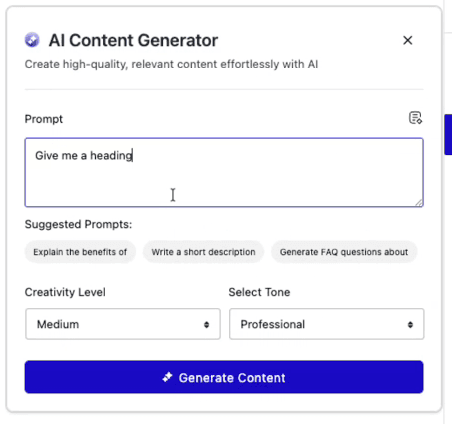
Open any Nexter block, left-click it, and an AI generation icon appears in the block toolbar. Enter a prompt, and it fills the field directly — no separate tab, no copy-pasting from ChatGPT into a text field. A Prompt Enhancer option refines a rough prompt before generation, and image generation (Pro only) works the same way for blocks that accept an image.
Repeater blocks: generate a whole section, not one field at a time
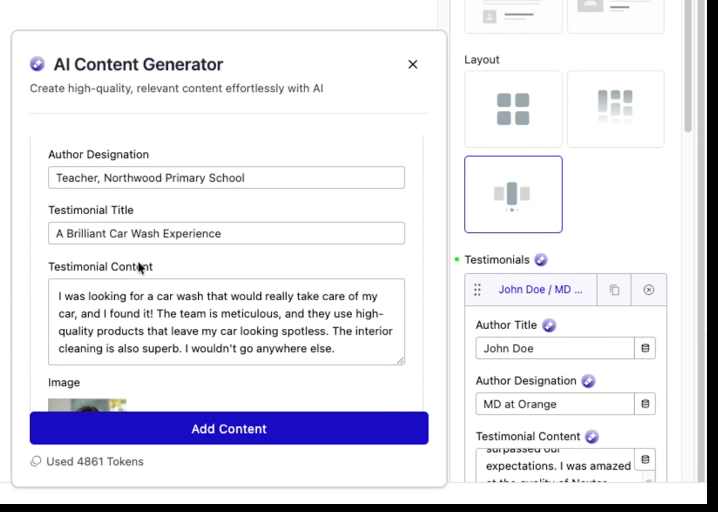
This is the part that actually saves build time. Testimonials, team listings, infoboxes, media listings, process steps, animated service boxes, and flipboxes all support AI generation inside their repeater items — meaning you can generate content across every repeated item in a section instead of writing each one by hand. You still review and edit what comes back, but you’re not starting from a blank field seven times in a row.
Also Read: How to Set Up a WordPress MCP Server, Step by Step — if you’re building an AI-agent workflow around your WordPress site beyond in-editor content generation, start there.
Fix, rephrase, shorten, expand, or translate existing text
The AI tab isn’t just for generating from scratch. Click a block, open the AI generation tab, and you can fix grammar, rephrase a sentence, shorten or expand it, summarize it, or translate it — the kind of editing pass that used to need a separate grammar or translation plugin.
Separate tokens for text vs. images, agency-friendly
If you manage client sites, Nexter Blocks tracks AI usage as separate tokens for text and image generation. You can let a client generate text freely while capping or disabling image generation, so API spend stays predictable without shutting off the feature entirely.
Also Read: The WordPress Abilities API: What It Is and Why AI Tools Need It — the underlying WordPress-core AI plumbing Nexter Blocks’ AI features sit alongside, not on top of.
The Follow-Up: Nexter Abilities Took This Further in May 2026
The January 2026 release notes said core-WordPress-block AI support was planned for “very soon” — what actually shipped next was a bigger step than that. In May 2026, Nexter rolled out 84 new WP Abilities across the Extension and Blocks plugins alongside WordPress 7.0 compatibility, and introduced Nexter Abilities: a set of 115 server-side tools that let Claude or any MCP-compatible AI assistant act as a hands-on Gutenberg builder, composing real Nexter Blocks from a single prompt, a screenshot, or even a URL to replicate. That’s a meaningfully different capability than the in-editor generation covered above — instead of you clicking the AI icon on one field at a time, an MCP-connected assistant can build out entire block layouts on its own, calling the same abilities a human would trigger manually. The plugin kept iterating through the summer: an August 2026 update added a “Get Site Fonts” ability so an MCP assistant can check which fonts are actually installed and will render before using them, plus edit/default options for Global Block Styles.
Also Read: Nexter Abilities Explained: The WordPress Abilities API Inside Nexter Blocks — the full picture of what these 115 MCP-connected abilities let an AI assistant do beyond in-editor field generation.
Before You Publish: What Still Needs a Human Pass
Generated text and images speed up the first draft, but they shouldn’t skip your normal editorial review just because a human didn’t type the first version. Check generated copy for factual claims specific to your business (pricing, service areas, credentials) that a generic prompt has no way to get right on its own — the AI is filling in your business context if you provided it under Custom Content, but it will still confidently write something plausible-sounding and wrong if that context is thin or outdated. The same caution applies to generated images: verify they don’t misrepresent a real product, location, or person, and that they’re captioned and alt-tagged the same as any other image on the page, since the AI generation step doesn’t automatically handle accessibility metadata for you.
What’s Not Included
- AI image generation is a Pro feature; text generation is available on Free and Pro.
- You bring your own OpenAI or Gemini API key — there’s no bundled Nexter AI credit system.
- At launch, AI generation worked inside Nexter Blocks specifically. Nexter’s own release notes said core WordPress blocks support was planned for “very soon” after — check your current version’s changelog before assuming it covers core blocks.
- The in-editor generator is field-by-field and human-triggered; it doesn’t build a whole page layout autonomously on its own. That capability arrived separately, five months later, as Nexter Abilities.
FAQ
Do I need a Nexter Pro license to use AI text generation?
No. AI-powered text generation shipped for both Free and Pro versions of Nexter Blocks. AI image generation is Pro-only.
Which AI providers does Nexter Blocks support?
OpenAI and Gemini, using an API key you provide yourself from your own account with either provider.
Does this replace a dedicated AI writing plugin?
For content generated inside Nexter Blocks specifically, yes — grammar fixes, rephrasing, and translation are built into the same AI tab. It doesn’t extend to core WordPress blocks yet, so a separate tool may still be relevant there depending on your build.
Is the in-editor AI generator the same thing as Nexter Abilities / MCP?
No, they’re related but distinct. The in-editor generator (covered above) fills one field or repeater at a time, triggered manually by a human clicking the AI icon. Nexter Abilities, added in May 2026, is a separate MCP-based layer of 115 server-side tools that lets an external AI assistant like Claude build out whole block layouts autonomously from a prompt, screenshot, or URL, without a human clicking through each field.
Conclusion
The AI features work best as a first draft you edit, not a finished product you publish untouched — treat the generated text and images the same way you’d treat a junior writer’s first pass. Used that way, they genuinely cut the time spent on repetitive content without adding a new plugin to your stack.
Suggested Reading
- The WordPress Abilities API: What It Is and Why AI Tools Need It
- How to Set Up a WordPress MCP Server, Step by Step
- The Nexter Grid View Theme Builder: What It Is and How to Use It
- WordPress 7.1 Adds Tabs, but Not a Table of Contents. Do You Still Need a Blocks Plugin?
