












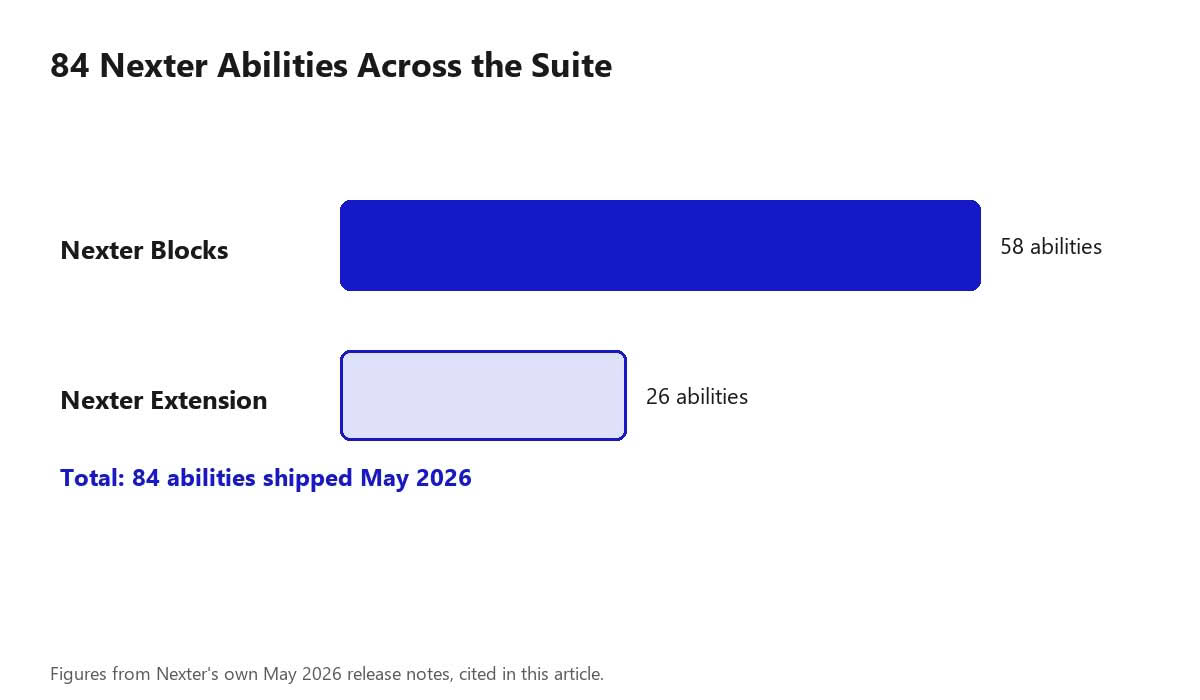
Point Claude, ChatGPT, or Cursor at a WordPress site, and it needs a defined, permissioned way to actually read and change things — not screen-scraping the admin. That’s what the WordPress Abilities API standardizes, and in May 2026 Nexter shipped 84 of its own abilities across the Suite: 26 on Nexter Extension, 58 on Nexter Blocks. Here’s what that actually means, how to turn it on, and the security tradeoffs worth understanding before granting an AI agent write access to a live site.
What the Abilities API Is, Briefly
WordPress Core’s Abilities API is the standard that lets an AI agent discover and call specific, permissioned actions on a WordPress site (create a post, update a setting, query data) instead of relying on generic API access or UI automation. WordPress Core’s own AI plugin reached version 0.9.0 the same month Nexter shipped its abilities, adding an approval system and tighter API-key security — the two releases landed in the same window deliberately, on the same emerging standard.
Also Read: The WordPress Abilities API: What It Is and Why AI Tools Need It — the Core-level explainer, for the standard Nexter’s abilities are built on top of.
What Nexter Shipped: 84 Abilities Across the Suite
- 26 abilities on Nexter Extension — covering templates, code snippets, SMTP, security, performance, image optimization, and custom fonts.
- 58 abilities on Nexter Blocks — laying the groundwork for AI-driven work inside the Gutenberg editor itself.

What the 26 Nexter Extension Abilities Actually Cover
The Extension-side abilities span a wide range of admin surface area rather than one narrow category, which is exactly why the least-privilege thinking below matters. Templates and code snippets let an agent read or modify site structure and custom PHP/CSS/JS. SMTP touches how the site sends email. Security abilities can include settings like login protections and access rules. Performance and image optimization abilities can change caching and asset-delivery behavior sitewide. Custom fonts is comparatively low-stakes by comparison. Grouping them this way makes the risk asymmetry obvious: an agent scoped to “read templates” is a very different exposure than one scoped to “modify security settings,” even though both technically fall under the same 26-ability Extension set.
A Worked Example: A Content-Only Agent Setup
Consider a realistic first use case: a site owner wants Claude to draft new blog posts as WordPress drafts, pulling from the site’s existing published posts for style and tone reference, but should never touch settings, security, templates, or SMTP. The correct rollout here isn’t enabling all 84 abilities and trusting the agent to only use what it needs — it’s enabling specifically the content-related abilities on Nexter Blocks (reading existing posts, creating draft posts) and leaving every Extension-side ability (templates, SMTP, security, performance) switched off entirely, since none of them are needed for this task. If a later task genuinely requires, say, updating a code snippet, that’s the point to deliberately enable that one additional ability rather than having left it on by default from the start. The narrower the enabled set, the smaller the list of things a successful prompt-injection attempt against that agent could actually do.
Troubleshooting Common Setup Issues
- The AI tool can’t see any Nexter abilities after connecting: confirm MCP Abilities is actually toggled on under Nexter Extension → Connection, and that the specific AI tool’s own MCP connection settings point at the correct site URL and credentials.
- An ability appears available but calling it fails: check whether that specific ability requires a permission level the connected account doesn’t have — abilities can be individually gated even when the broader connection is working.
- Unsure which abilities are currently enabled: revisit Nexter Extension → Connection directly rather than assuming from memory; a setup that started narrow can accumulate additional enabled abilities over time as different tasks came up, worth periodically auditing.
- Considering disabling abilities after initially enabling too many: that’s a reasonable response, not an overreaction — toggling off abilities that turned out not to be needed for the actual workflow is exactly the kind of course-correction the least-privilege approach recommends.
How to Turn It On
From the Nexter Extension dashboard, go to Connection → Enable MCP Abilities. Once enabled, an AI agent such as Claude, ChatGPT, or Cursor connected to your site through the Model Context Protocol can read and modify your Nexter-powered WordPress site directly, within whatever abilities you’ve enabled and whatever permissions your setup grants it.
Also Read: How to Set Up a WordPress MCP Server, Step by Step — the general MCP server setup this connects to.
The Real Security Risk: Prompt Injection, Not Just “Too Much Access”
The headline risk with any MCP-connected agent isn’t simply that it has access — it’s that the content the agent reads while doing its job can itself contain instructions designed to hijack it. Security researchers describe this specifically as prompt injection or “tool poisoning”: malicious instructions embedded in content the agent processes (a comment, a form submission, even metadata inside a tool’s own description) that can steer the agent into calling tools in ways the person who granted access never intended. The danger compounds with over-permissioning — if an agent is compromised this way while holding broad site-modifying abilities, an attacker effectively gets access to everything that agent can do, including destructive actions nobody meant to expose. This isn’t a hypothetical specific to Nexter; it’s the standard risk profile of any AI-agent-to-CMS integration built on MCP or the Abilities API, and it’s exactly why the “start narrow” advice below isn’t just caution for caution’s sake.
A related, easy-to-miss detail: dynamic tool discovery means that if a connected server adds a new ability in a future update, an already-authorized agent can gain access to that new capability automatically, without a fresh explicit approval step from the site owner. That’s worth knowing specifically because it means “I only enabled a narrow set of abilities once” isn’t necessarily a permanent guarantee — it’s a reason to periodically re-check what’s actually enabled rather than treating an initial configuration as fixed forever.
The Least-Privilege Approach: What It Looks Like in Practice
Security guidance on MCP integrations converges on a consistent pattern: begin with the smallest set of abilities that actually solves the task at hand (discovery or read-only access first), rather than enabling the full 84-ability catalogue because it’s available. With 58 abilities on Nexter Blocks and 26 on Nexter Extension covering everything from templates to security settings, enabling all of them at once means an agent (or anything that successfully manipulates that agent) has that same full range of actions available. A narrower initial grant — content abilities only, say, with settings and security abilities left off until there’s a specific, understood reason to enable them — keeps the blast radius of any single compromised session proportional to what’s actually needed, rather than to what’s technically possible.
Why This Shipped Before the Core API Was Fully Stable
Nexter’s own release notes framed the timing directly: the goal was to be one of the first plugin Suites with a real, live ability catalogue, rather than waiting for the Core standard to fully settle. That’s a real trade-off — an emerging standard can still change — worth knowing if you’re deciding how much of your workflow to build around it today versus waiting for a more mature spec.
A Practical Rollout Plan
- Enable MCP Abilities on a staging environment first, not directly on a production site, especially for a first-time setup.
- Start with read-only or content-only abilities enabled, leaving settings, security, and performance abilities off until there’s a concrete task that needs them.
- Test the connection with a specific, low-stakes task (reading a post, listing settings) before attempting anything that writes to the site.
- Expand the enabled ability set deliberately, one category at a time, rather than switching everything on because the catalogue supports it.
- Treat any content an agent will read through these abilities (comments, form submissions, user-generated fields) as potentially adversarial input, the same way you’d treat it for a security review of any other automated system.
- Periodically re-audit the enabled ability set rather than treating the initial configuration as permanent — a workflow that expanded over several sessions can accumulate more enabled abilities than any single task ever actually required.
FAQ
Do I need a separate MCP server plugin to use Nexter Abilities?
Nexter Abilities are enabled from within Nexter Extension itself (Connection → Enable MCP Abilities); check current documentation for whether your setup also needs a general-purpose MCP server layer depending on which AI tool you’re connecting.
Which AI tools can use Nexter Abilities?
Nexter’s own release notes name Claude, ChatGPT, and Cursor as tools that can connect once abilities are enabled.
Is enabling abilities risky for a production site?
Enabling AI-agent access to modify a live site is a meaningful permission grant; review which specific abilities you enable and treat it the same way you’d treat any other admin-level integration, testing on staging first if you’re unsure.
What is prompt injection, and does it apply to Nexter Abilities?
Prompt injection is malicious instructions hidden inside content an AI agent processes, designed to make it call tools it shouldn’t. It’s a general risk of any MCP or Abilities-API-connected agent, not something specific to Nexter, and it’s the main reason to enable only the abilities a given task actually needs rather than the full catalogue.
Should I test on staging before enabling abilities on a live site?
Yes, particularly for a first-time setup or before enabling any ability that writes to the site. Confirming the connection and testing low-stakes, read-only actions on staging first is standard practice for any new admin-level integration.
What’s the actual difference in risk between the 58 Blocks abilities and the 26 Extension abilities?
Extension abilities skew toward site-level configuration (security, SMTP, performance, templates), which tends to be higher-stakes if misused than Blocks abilities, which are more focused on editor-level content work. That’s a generalization, not a rule for every individual ability — reviewing what a specific ability actually does before enabling it is still worth doing rather than assuming by category alone.
Can I audit which abilities are currently enabled on my site?
Check Nexter Extension → Connection directly for the current enabled state, rather than relying on memory of what was turned on during initial setup. Periodically revisiting this, especially after any period of active AI-agent use, is a reasonable habit given how easily an enabled set can grow over time.
Conclusion
84 abilities is a lot of surface area to enable at once — start with a narrow set of read-only or low-risk abilities, confirm the connection works as expected, then expand from there rather than turning everything on in one step. The Abilities API is still an emerging standard, and the prompt-injection risk that comes with any AI-agent-to-CMS connection is real, not theoretical; a cautious, staged rollout costs you nothing and meaningfully limits what a compromised agent session could actually do.
Suggested Reading
- The WordPress Abilities API: What It Is and Why AI Tools Need It
- How to Set Up a WordPress MCP Server, Step by Step
- Best WordPress MCP Plugins Compared
