How to Redirect Users from WordPress Form?

Key Takeaways

  • Nexter Blocks allows users to redirect to a specific link after form submission.
  • The Form block requires installation and activation of Nexter Blocks to function properly.
  • Users can add an external link for redirection in the Link field after form submission.
Table of Contents

Do you want to redirect users to a specific link after form submission? Redirecting users from a WordPress form to a specific page—whether it’s a thank-you page, a custom offer, or a follow-up survey—enables site owners to maintain control over the user journey and deliver tailored content that aligns with business objectives. 

With the Form block from Nexter Blocks, you can easily redirect users to a specific link after form submission in WordPress.

To check the complete feature overview documentation of the Nexter Blocks Form block, click here.

Requirement  – This block is a part of the Nexter Blocks, make sure it’s installed & activated to enjoy all its powers.

Learn via Video Tutorial

YouTube video

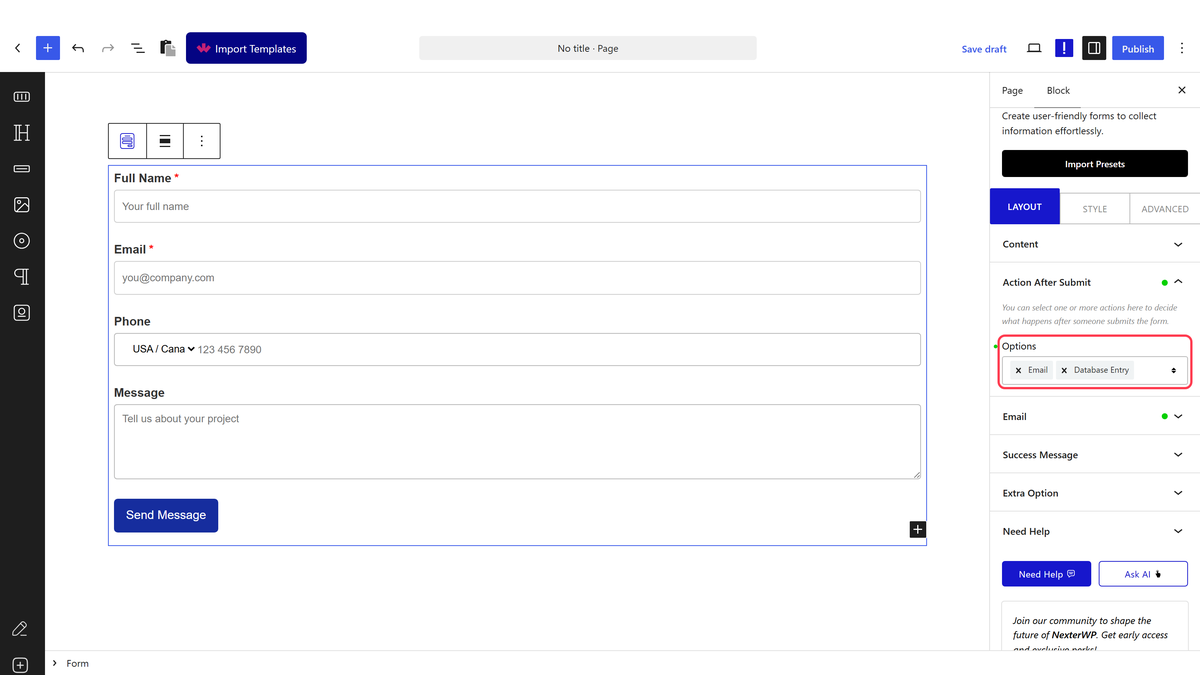
To do this, add the Form block to the page and select the appropriate form type, then follow the steps – 

1. Add the required form fields and customize them as per your requirements.

2. Then select the main form block and go to the Action After Submit tab and select Redirect from the Options dropdown.

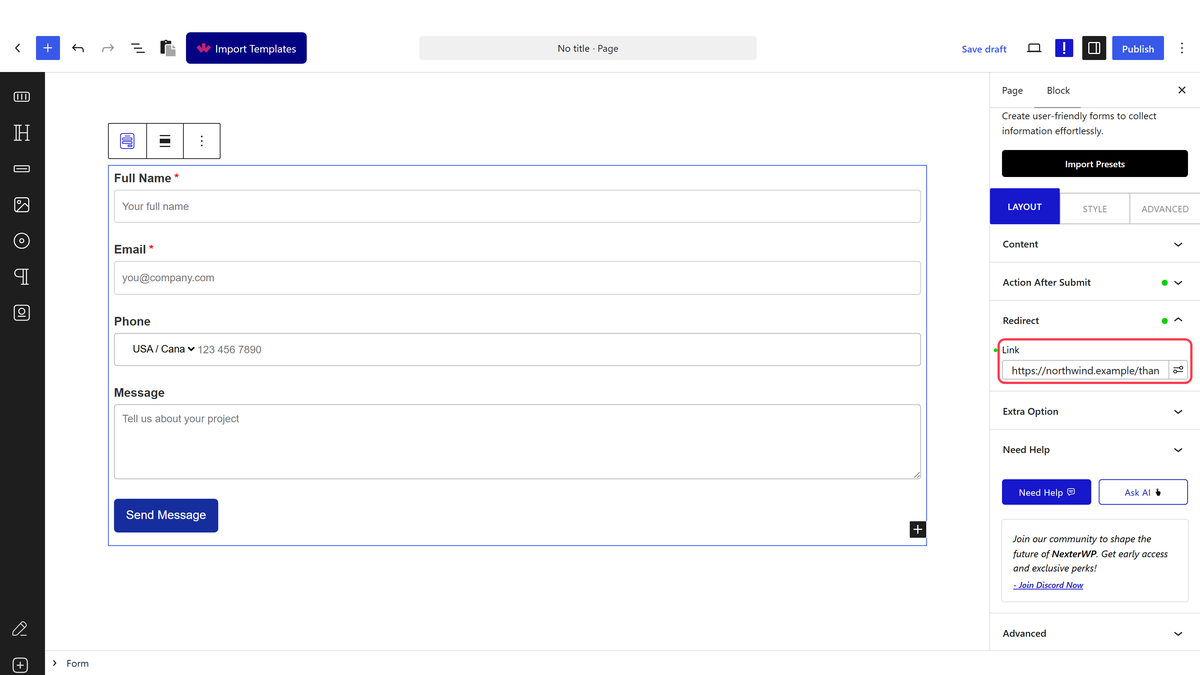
2. Now you’ll see the Redirect tab, open it. 

3. Then add your desired link in the Link field where you want to redirect users after the form submission.

Note: You can add an external link as well.

Now, when users submit the form, it will redirect them to your specified link.

About the Author

Photo of Aditya Sharma CMO of NexterWP
CMO at POSIMYTH Innovations · NexterWP · 7 years experience

He has spent years in the WordPress ecosystem building, breaking, and optimizing sites until they actually perform. He works at the intersection of speed, growth, and usability, helping creators ship websites that load fast and convert. An active WordPress community contributor sharing through tools, tutorials, and direct collaboration. Tested practice, not theory.

WordpressThemesElementorn8nAIClaudeAutomationServer

Share your Thoughts

Get Instant Answers to all your questions about Nexter Blocks,
Extensions & Theme trained on 1000+ Docs and Videos

Still in Doubt? Let’s Assist You

Have Feedback or Questions?

Join our WordPress Community on Facebook!

Related Frequently Asked Questions

What should I do if the redirect doesn't work after form submission?

If the redirect isn't functioning, first check that the Form block from Nexter Blocks is properly installed and activated. Ensure you've selected 'Redirect' from the Action After Submit tab and entered a valid URL in the Redirect tab. A common issue is entering an incorrect link format, so double-check your URL for typos or missing elements.

What is the best practice for setting up a thank-you page after form submission?

A best practice for setting up a thank-you page is to create a dedicated page that confirms the user's submission and provides additional information or next steps. This page should be linked in the Redirect tab of the Form block. This approach not only acknowledges the user's action but also encourages further interaction with your site.

What happens if I forget to select the Redirect option in the Form block?

If you forget to select the Redirect option in the Form block, users will not be redirected after submitting the form. Instead, they will remain on the same page. This could lead to confusion, as they might not receive feedback about their submission, so it's crucial to ensure this option is selected for a smooth user experience.

Is there a limit to how many redirects I can set up with the Form block?

The page does not specify a limit on the number of redirects you can set up with the Form block. However, it's important to keep your redirects organized and relevant to avoid overwhelming users. Each form can have one redirect link, so plan your user journey carefully to maximize effectiveness.

Last reviewed: April 14, 2026

Related Docs