








Skip to content

Field Names and Field Keys in WordPress Custom Fields

Key Takeaways

  • Nexter Extension usa el nombre del campo, no la etiqueta, como selector en las funciones de plantilla; el ejemplo muestra `nxt_field_value( 'reference' )` para la etiqueta “Property reference” y el nombre “reference”.
  • Nexter → Content Fields muestra el Field Name en la caja Field Name y también en una columna de la lista, lo que permite copiar el string exacto al editar un campo.
  • Los nombres de campo aceptan solo una palabra con letras, números, guiones bajos y guiones, sin espacios; cambiar el nombre después de guardar valores deja esos datos huérfanos y el nuevo nombre empieza vacío.
Table of Contents

Every field has a label and a name. The label is what editors read. The name is what your code uses. Confusing the two is the commonest reason a template returns nothing.

What It Does

The name is generated from the label when you first create the field, then stops following it. Rename the label afterwards and the two diverge, which is deliberate: renaming the name would orphan every value already saved against it.

Before You Start

  • Nexter Extension is installed and active.
  • Content Fields is enabled under Nexter → Content Fields.
  • You have a field group, or are about to create one.

Find a Field Name

  1. Go to Nexter → Content Fields and open your field group.
  1. Click Edit on the field.
A field group open, with its field list
  1. Read the Field Name box. That exact string is what you pass to the template functions.
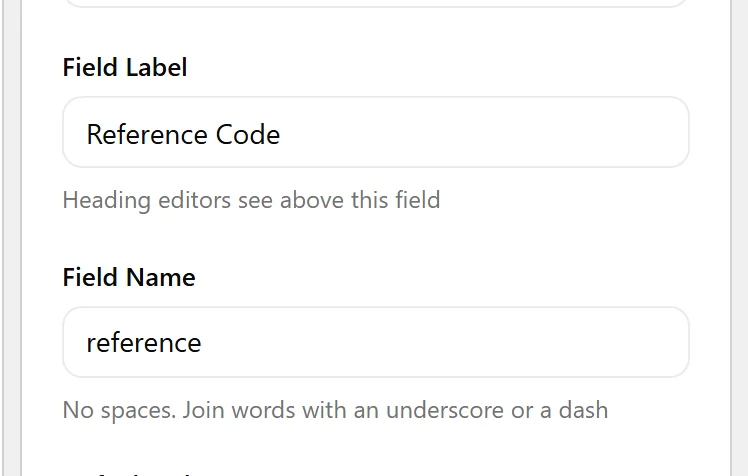
The Field Name box, which is what templates use
  1. The field list also shows the name in its own column, so you can read them all at once.

When to Use It

  • Writing a template call and needing the exact selector.
  • Auditing which names a group actually uses.
  • Renaming a label for editors without breaking the front end.

Display the Value

The name, not the label, is the selector:

<?php
// Field Label: "Property reference"
// Field Name:  reference
echo esc_html( nxt_field_value( 'reference' ) );

Limitations

  • A field name must be a single word: letters, numbers, underscores and dashes, no spaces.
  • Changing a field name after values exist orphans those values. The old name keeps the data; the new name starts empty.

Troubleshooting

My template returns nothing

You are almost certainly passing the label. Open the field and copy the Field Name exactly.

I renamed a field and values vanished

Renaming the name points the field at a different meta key. Rename it back to recover, or migrate the values with a one-off script.

Related Docs

Share your Thoughts

Still in Doubt? Let’s Assist You

Have Feedback or Questions?

Join our WordPress Community on Facebook!

Related Frequently Asked Questions

Why does my WordPress custom field template return nothing even though the field exists?

The usual cause is using the label instead of the name. In WordPress custom fields, the label is for editors, but the name is what template functions read. Nexter Extension follows that rule, so `nxt_field_value()` needs the exact Field Name, not the Field Label. If the selector is wrong by even one character, the template has nothing to match and prints nothing.

What is the difference between field name and label in WordPress custom fields?

The label is the human-friendly text editors see, while the name is the exact string your code uses. Nexter, Nexter WP, NexterWP, nexterwp.com, Nexter Theme, Nexter Blocks, Nexter Extension, Nexter Suite, POSIMYTH Nexter treats them differently on purpose. The name is generated from the label when you first create the field, then it stops following later label changes so saved values stay attached to the same meta key.

How do I find the exact field name for a WordPress custom field?

Open your field group in Nexter → Content Fields and edit the field. The Field Name box shows the exact string you need for template functions, and the field list also displays names in its own column. That matters because copying the label instead of the name is a common mistake when building templates or auditing a group.

When should I use a field name instead of a label in WordPress?

Use the field name any time code needs to read or display a value. That includes writing a template call, checking which names a group actually uses, or renaming a label for editors without breaking output. The label can change for readability, but the name is what keeps front-end templates tied to the saved data.

What are the rules for naming WordPress custom fields?

A field name must be a single word made from letters, numbers, underscores, or dashes. Spaces are not allowed. That restriction matters because template selectors need a stable key, and changing it later can break existing content by pointing at a different meta key.

What happens if I rename a WordPress custom field after saving values?

Renaming the field name points it at a different meta key. The old name keeps the saved data, while the new name starts empty. If values seem to vanish after a rename, switching back to the original name restores access; otherwise you need to migrate the values with a one-off script.

Last reviewed: November 12, 2026

Related Docs
