












A carousel that stops dead on the last slide tells the visitor they have reached the end. That is right for a sequence and wrong for a set of equals such as logos or reviews.
Infinite loop lets it continue from the last slide straight back to the first.
Before You Start
- Edition: Pro — the Carousel Anything block needs Nexter Blocks Pro.
- Block to enable: Carousel Anything, switched on under Nexter > Blocks in your WordPress dashboard.
- A Carousel Anything block with several slides — see the Carousel Anything guide.
- Test with several slides. A carousel with one slide has nothing to move to, so most settings will look broken when they are simply idle.
Steps
- Select your Carousel Anything block.
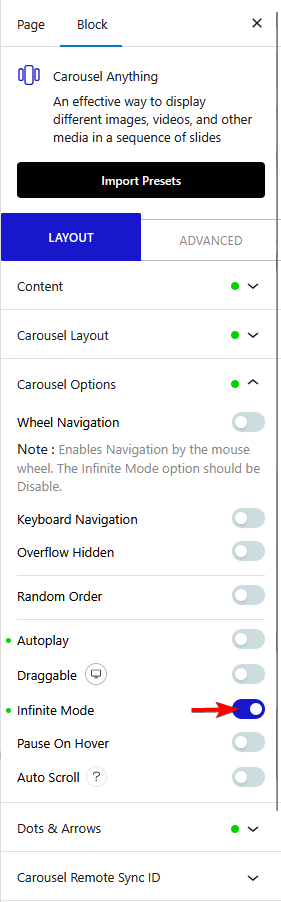
- Switch infinite loop on.
- Publish and click past the last slide on the real page.
How It Behaves
The loop setting changes the carousel’s type rather than adding anything to it.
- Measured on a published page: with the loop on, the configuration rendered
type: "loop"; with it off,type: "slide". - With loop off the carousel stops at both ends and the arrow in that direction does nothing.
- Loop suits sets, not sequences. Logos and testimonials loop naturally; numbered steps do not.
- It pairs with autoplay. Autoplay without loop stops at the last slide and stays there — see the autoplay guide.
- Every setting ends up in one place. The block writes its whole configuration into a
data-splideattribute on the carousel, which is what the slider script reads. If a setting is not doing what you expect, that attribute is where to look. - Measured with Nexter Blocks Pro deactivated: the carousel renders nothing at all — no wrapper, no configuration and no slides. This is a Pro-only block.
Limitations
- Pro only — measured with Nexter Blocks Pro deactivated, nothing renders.
- There is no end. A visitor cannot tell how many slides there are or when they have seen them all. Dots help, up to about six slides.
- It is not a marquee. Loop means the carousel wraps around, not that it scrolls continuously.
- Few slides loop visibly. With two, the wrap is obvious and can look like a glitch.
- Fade mode handles the end differently, using its own rewind setting rather than looping.
Troubleshooting
It stops at the last slide
Loop is off. Measured, that renders type: "slide", which stops at both ends.
The jump back looks abrupt
With only a few slides the wrap is visible. Add more slides, or show more than one at a time.
Autoplay stops after one pass
Autoplay is running without loop. Switch loop on so it continues.
Nothing renders at all
Check Nexter Blocks Pro is active.
