












Both Nexter Theme and Blocksy are free, performance-focused block themes with premium extensions, and both show up constantly in the same “fastest WordPress theme” comparisons. The real differences show up in three places: measured page weight, what’s actually bundled at each price tier, and how each team structures its block library. Here’s the comparison with real numbers, not marketing claims.
What Blocksy Is
Blocksy is a free WordPress theme by CreativeThemes, built around a lightweight core plus an optional companion plugin (Blocksy Companion) that adds header/footer building, WooCommerce extras, and other features as needed rather than bundling everything into the base theme. Its live feature-comparison page lists a genuinely large surface area at the Pro tiers: a drag-and-drop header and footer builder, multiple conditional headers, transparent and sticky header options, a dark mode switch element, an advanced mega-menu module, and a long list of WooCommerce-specific blocks (quick view, product compare, variation swatches, a free shipping progress bar, stock scarcity messaging, and more).
What Nexter Theme Is
Nexter Theme follows a similar lightweight-core philosophy, paired with the separate Nexter Extension for theme building (header/footer/template building) and Nexter Blocks for the actual page-content block library. Where Blocksy consolidates most of its Pro feature set inside one Companion plugin, Nexter splits the same job across three named products — Theme, Extension, and Blocks — built by the same team and sold together in bundles.
Also Read: The Fastest WordPress Themes, Benchmarked on Identical Demo Sites — the live speed-test data this section draws from.
Performance: The Real Numbers
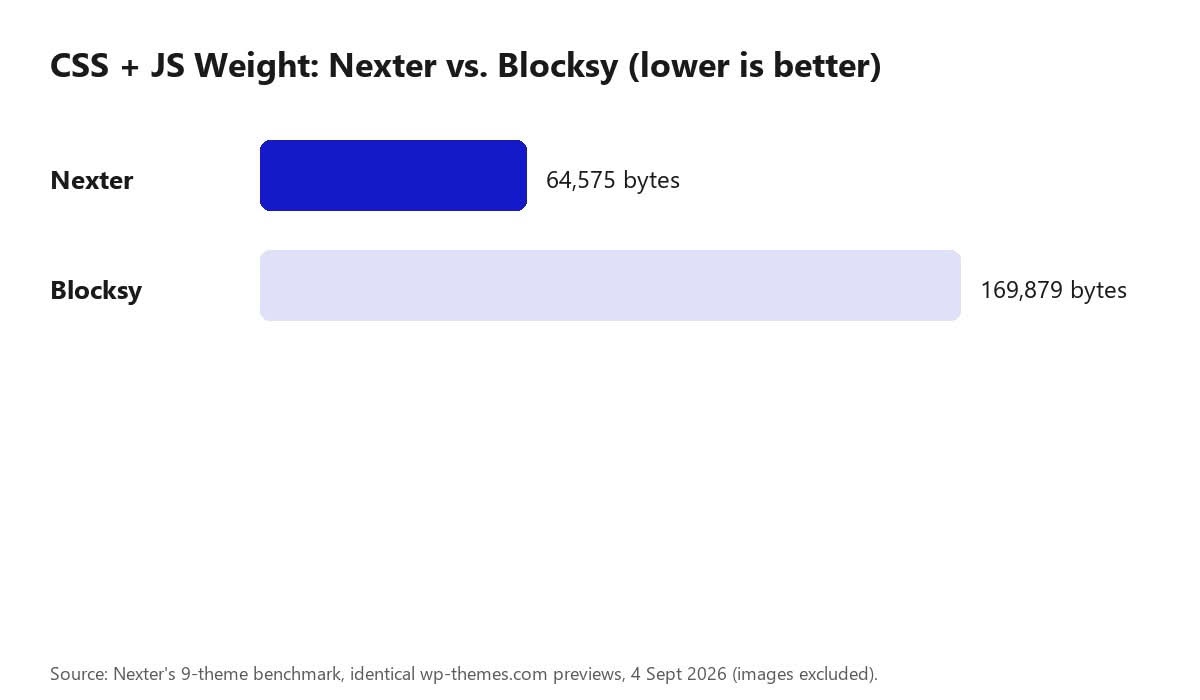
Nexter’s own nine-theme benchmark, run on identical wp-themes.com preview pages on 4 September 2026 with images excluded from the count, put real, repeatable numbers on both themes:
| Theme | Rank of 9 | CSS + JS (bytes, uncompressed) | External JS files |
|---|---|---|---|
| Nexter | 4th | 64,575 | 0 |
| Blocksy | 7th | 169,879 | 1 |
Nexter’s preview loads roughly 2.6× less CSS and JavaScript than Blocksy’s on this test, and ships zero external JavaScript files versus Blocksy’s one. As the benchmark post itself is careful to note, this measures one demo page on one day with no plugins installed — it is a real, repeatable lab number, not a guarantee of how either theme performs on your specific build once page builders and plugins are added on top.
Pricing Compared
Both themes are free at the core with paid tiers for the extended feature set, and both price by site count. Checked live on their respective pricing pages:
| Tier | Nexter (Agency Bundle: Theme + Extension + Blocks + Abilities) | Blocksy (Companion Pro) |
|---|---|---|
| 1 site | $39/yr (Starter) | $69/yr (Personal) |
| Mid tier | $89/yr (Professional, 5 sites) | $99/yr (Business, 10 sites) |
| Unlimited sites | $129/yr (Studio) | $149/yr (Agency) |
At every matching tier Nexter’s list price is lower, and Nexter’s entry-level plan already includes its AI Abilities/MCP layer, which Blocksy has no direct equivalent for. Blocksy’s Business tier covers more sites (10) than Nexter’s equivalent Professional tier (5) at a similar price point, which matters more if you’re managing a mid-size agency portfolio specifically.
A Structural Difference: Hybrid Theme vs. True Block Theme
One architectural distinction that doesn’t show up in a feature-list comparison but affects how you actually build: Blocksy is a hybrid theme, meaning it keeps the classic WordPress Customizer as its settings interface while relying on Gutenberg blocks for the content area itself — it doesn’t register as a full block theme with WordPress’s own Site Editor. Nexter ships two separate theme options to cover both paths: the standard Nexter Theme (classic, Customizer-based, same as Blocksy’s model) and a dedicated Nexter FSE theme built specifically for the native WordPress Site Editor, with a theme.json-driven setup and template editing through Site Editor rather than the Customizer. If you specifically want to build in WordPress’s own Site Editor rather than a theme-specific header/footer builder, that’s a Nexter FSE vs. Blocksy decision, not a Nexter Theme vs. Blocksy one — worth checking which of the two Nexter options you’re actually comparing before deciding.
Where They Actually Differ
- Block library approach — Nexter Blocks ships a large, dedicated Gutenberg block library (including a 27-block WooCommerce suite) as its own plugin; Blocksy’s block-level extras live inside the Companion plugin’s Content Blocks (hooks) system and a smaller set of dedicated blocks (Advanced Posts, Advanced Search, Dynamic Data, and similar).
- Theme building — both offer a genuinely comparable drag-and-drop header/footer builder with conditional templates, transparent headers, sticky headers, and mega-menu support; the specific element libraries differ (Blocksy’s header builder includes a dedicated Wishlist and Compare element out of the box, for example) but the underlying capability is close.
- AI and MCP support — Nexter’s Abilities layer (58 abilities on Blocks, 26 on Extension) gives an AI agent a defined, permissioned way to work with the site; Blocksy’s feature list, as of this comparison, has no equivalent AI-agent connectivity layer.
- Ecosystem maturity and distribution — Blocksy has a longer track record specifically as a starter-site-library theme across many page builders, with a large volume of five-star reviews citing its header builder and WooCommerce depth; Nexter’s ecosystem has consolidated more recently around its Unified Dashboard and a faster recent release cadence (AI generation, Abilities/MCP, WooCommerce blocks all shipped within the last 12 months).
Also Read: Nexter’s Unified Dashboard: A Complete Walkthrough of the New Admin Experience — the consolidated-ecosystem angle referenced above, in full.
Conclusion
On the numbers that are actually checkable today — measured page weight and list pricing at matching tiers — Nexter comes out ahead: lighter on the same benchmark and cheaper at every site-count tier, with AI Abilities support included from the entry plan. Blocksy’s case is real too: a longer track record, a broader WooCommerce feature set at the Business tier specifically, and 10-site coverage at its middle tier versus Nexter’s 5. If your build needs Nexter’s block depth, its dedicated FSE theme for the native Site Editor, or its AI/Abilities layer, that tips toward Nexter; if you’re already inside a Blocksy-based starter-site workflow or need Blocksy’s specific WooCommerce extras, switching costs likely outweigh the difference.
FAQ
Is Blocksy free?
The core Blocksy theme is free, with paid Blocksy Companion Pro tiers (Personal $69/yr, Business $99/yr, Agency $149/yr) for the extended feature set, similar in structure to Nexter’s free-theme-plus-paid-extension model.
Which theme is actually faster?
On Nexter’s own nine-theme benchmark (4 September 2026, identical wp-themes.com previews, images excluded), Nexter measured 64,575 bytes of CSS/JS and zero external scripts versus Blocksy’s 169,879 bytes and one external script. That’s a real, repeatable lab measurement, though it reflects one demo page with no plugins installed rather than a real-world build.
Can I migrate an existing Blocksy site to Nexter?
Content and post data migrate normally via standard WordPress export/import, but theme-specific header/footer templates and block-specific settings would need to be rebuilt in Nexter’s own Theme Builder and Blocks, not automatically converted.
Is Blocksy a full block theme, like Nexter FSE?
No. Blocksy is a hybrid theme that keeps the classic WordPress Customizer for its settings while using Gutenberg blocks in the content area — it doesn’t register with WordPress’s native Site Editor. Nexter offers both a classic hybrid option (Nexter Theme, structurally similar to Blocksy) and a separate, dedicated full block theme (Nexter FSE) built for the Site Editor specifically.
Suggested Reading
- The Fastest WordPress Themes, Benchmarked on Identical Demo Sites
- Nexter’s Unified Dashboard: A Complete Walkthrough of the New Admin Experience
- How to Add Custom Fonts to Your Nexter Theme Site (2026 Update)
Stay updated with Helpful WordPress Tips, Insider Insights, and Exclusive Updates – Subscribe now to keep up with Everything Happening on WordPress!
