








---
title: "Internal Linking Strategy for WordPress: A Practical 2026 Playbook"
url: https://nexterwp.com/blog/internal-linking-strategy-wordpress/
date: 2026-09-08
modified: 2026-09-08
author: "Aditya Sharma"
description: "A client once sent me their site's Search Console export and asked why a genuinely useful guide, one they had spent a full day writing, was stuck on page 3..."
image: https://nexterwp.com/wp-content/uploads/2023/05/Internal-links-report.png
word_count: 1096
---

# Internal Linking Strategy for WordPress: A Practical 2026 Playbook

## Key Takeaways

- Google Search Console says every page that matters should have a link from at least one other page on the site, and it gives no magical ideal number of links per page.
- Pillar pages and cluster pages form the most durable internal linking structure, with every cluster post linking up to its pillar and the pillar linking down to every cluster post it covers.
- Anchor text works best when it describes the destination, stays short at two to five words, and varies naturally instead of repeating the same exact-match phrase.
- Search Console's Links report shows internal links per page, so pages with one or zero internal links become the first audit targets in a monthly linking routine.

A client once sent me their site's Search Console export and asked why a genuinely useful guide, one they had spent a full day writing, was stuck on page 3 for its target term. The post had good content and a decent word count. It also had zero links pointing to it from anywhere else on the site. Google had no reason to treat it as important, because nothing on the site treated it as important either.

That is the problem this playbook solves. Not "should I install a linking plugin," but "what structure should my links actually follow, and how do I keep it up as the site grows." If you already run a linking tool, this is what to point it at. If you do not, this works by hand on a site of almost any size.

Table of Contents

## A Strategy Is Not a Plugin List

Plenty of guides walk through which [internal linking plugin](https://nexterwp.com/blog/best-internal-linking-plugins-for-wordpress/) to install and how it works. That is a useful, separate question. This is not that guide. A strategy is the structure your links follow before any tool touches them: which pages are the pillars, which are the supporting cluster content, how they connect to each other, and how often you revisit that structure as the site grows. A plugin can execute a strategy faster. It cannot invent one for you.

## What Google Actually Says About Internal Links

Google's own crawling and indexing documentation is more direct than most SEO advice on this topic, and less specific than most people expect. It does not give a target link count. It gives a rule and a filter instead: "There's no magical ideal number of links a given page should contain. However, if you think it's too much, then it probably is." The one hard requirement it does state plainly is that "every page you care about should have a link from at least one other page on your site."

Read those two lines together and the strategy question gets simpler. You are not hunting for a perfect number. You are making sure every page that matters is reachable, and every link you add earns its place with genuine relevance rather than padding a count, the same relevance test that matters for [semantic SEO](https://nexterwp.com/blog/semantic-seo-wordpress/) more broadly.

## The Pillar and Cluster Model

The most durable structure for internal links is a pillar page (a broad, comprehensive page on a topic) surrounded by cluster pages (narrower posts on subtopics), all linking back to the pillar and to each other where genuinely relevant. It looks like this:

![Pillar and cluster internal linking model diagram](data:image/svg+xml;base64,PHN2ZyB2aWV3Qm94PSIwIDAgODAwIDQ2MCIgd2lkdGg9IjgwMCIgaGVpZ2h0PSI0NjAiIHhtbG5zPSJodHRwOi8vd3d3LnczLm9yZy8yMDAwL3N2ZyIgc3R5bGU9ImJhY2tncm91bmQ6I2ZhZmFmYSI+CjxzdHlsZT4KICAucGxhYmVse2ZvbnQ6NjAwIDE1cHggQXJpYWwsIHNhbnMtc2VyaWY7ZmlsbDojMWExYTFhfQogIC5jbGFiZWx7Zm9udDo1MDAgMTNweCBBcmlhbCwgc2Fucy1zZXJpZjtmaWxsOiMyMTIxMjF9CiAgLmxpbmt7c3Ryb2tlOiMxNzE3Y2M7c3Ryb2tlLXdpZHRoOjI7ZmlsbDpub25lO21hcmtlci1lbmQ6dXJsKCNhcnJvdyl9CiAgLmNyb3NzbGlua3tzdHJva2U6IzlhYTBhNjtzdHJva2Utd2lkdGg6MS41O2ZpbGw6bm9uZTtzdHJva2UtZGFzaGFycmF5OjQgM30KPC9zdHlsZT4KPGRlZnM+CiAgPG1hcmtlciBpZD0iYXJyb3ciIG1hcmtlcldpZHRoPSI4IiBtYXJrZXJIZWlnaHQ9IjgiIHJlZlg9IjYiIHJlZlk9IjMiIG9yaWVudD0iYXV0byI+CiAgICA8cGF0aCBkPSJNMCwwIEwwLDYgTDYsMyB6IiBmaWxsPSIjMTcxN2NjIi8+CiAgPC9tYXJrZXI+CjwvZGVmcz4KPHJlY3QgeD0iMCIgeT0iMCIgd2lkdGg9IjgwMCIgaGVpZ2h0PSI0NjAiIGZpbGw9IiNmYWZhZmEiLz4KPHJlY3QgeD0iMzAwIiB5PSIyMDAiIHdpZHRoPSIyMDAiIGhlaWdodD0iNjAiIHJ4PSIxMCIgZmlsbD0iIzE3MTdjYyIvPgo8dGV4dCB4PSI0MDAiIHk9IjIzNSIgdGV4dC1hbmNob3I9Im1pZGRsZSIgY2xhc3M9InBsYWJlbCIgZmlsbD0iI2ZmZmZmZiI+UGlsbGFyIFBhZ2U8L3RleHQ+CjxnPgogIDxyZWN0IHg9IjQwIiB5PSI0MCIgd2lkdGg9IjE3MCIgaGVpZ2h0PSI1MCIgcng9IjgiIGZpbGw9IiNmZmZmZmYiIHN0cm9rZT0iIzE3MTdjYyIgc3Ryb2tlLXdpZHRoPSIxLjUiLz4KICA8dGV4dCB4PSIxMjUiIHk9IjcwIiB0ZXh0LWFuY2hvcj0ibWlkZGxlIiBjbGFzcz0iY2xhYmVsIj5DbHVzdGVyIFBvc3QgMTwvdGV4dD4KICA8cGF0aCBjbGFzcz0ibGluayIgZD0iTTE1NSw5MCBRMjUwLDE1MCAzNDAsMjA1Ii8+CjwvZz4KPGc+CiAgPHJlY3QgeD0iMzE1IiB5PSIyMCIgd2lkdGg9IjE3MCIgaGVpZ2h0PSI1MCIgcng9IjgiIGZpbGw9IiNmZmZmZmYiIHN0cm9rZT0iIzE3MTdjYyIgc3Ryb2tlLXdpZHRoPSIxLjUiLz4KICA8dGV4dCB4PSI0MDAiIHk9IjUwIiB0ZXh0LWFuY2hvcj0ibWlkZGxlIiBjbGFzcz0iY2xhYmVsIj5DbHVzdGVyIFBvc3QgMjwvdGV4dD4KICA8cGF0aCBjbGFzcz0ibGluayIgZD0iTTQwMCw3MCBMNDAwLDE5OCIvPgo8L2c+CjxnPgogIDxyZWN0IHg9IjU5MCIgeT0iNDAiIHdpZHRoPSIxNzAiIGhlaWdodD0iNTAiIHJ4PSI4IiBmaWxsPSIjZmZmZmZmIiBzdHJva2U9IiMxNzE3Y2MiIHN0cm9rZS13aWR0aD0iMS41Ii8+CiAgPHRleHQgeD0iNjc1IiB5PSI3MCIgdGV4dC1hbmNob3I9Im1pZGRsZSIgY2xhc3M9ImNsYWJlbCI+Q2x1c3RlciBQb3N0IDM8L3RleHQ+CiAgPHBhdGggY2xhc3M9ImxpbmsiIGQ9Ik02NDUsOTAgUTU1MCwxNTAgNDYwLDIwNSIvPgo8L2c+CjxnPgogIDxyZWN0IHg9IjQwIiB5PSIzNjAiIHdpZHRoPSIxNzAiIGhlaWdodD0iNTAiIHJ4PSI4IiBmaWxsPSIjZmZmZmZmIiBzdHJva2U9IiMxNzE3Y2MiIHN0cm9rZS13aWR0aD0iMS41Ii8+CiAgPHRleHQgeD0iMTI1IiB5PSIzOTAiIHRleHQtYW5jaG9yPSJtaWRkbGUiIGNsYXNzPSJjbGFiZWwiPkNsdXN0ZXIgUG9zdCA0PC90ZXh0PgogIDxwYXRoIGNsYXNzPSJsaW5rIiBkPSJNMTU1LDM2MCBRMjUwLDMwMCAzNDAsMjYyIi8+CjwvZz4KPGc+CiAgPHJlY3QgeD0iMzE1IiB5PSIzOTAiIHdpZHRoPSIxNzAiIGhlaWdodD0iNTAiIHJ4PSI4IiBmaWxsPSIjZmZmZmZmIiBzdHJva2U9IiMxNzE3Y2MiIHN0cm9rZS13aWR0aD0iMS41Ii8+CiAgPHRleHQgeD0iNDAwIiB5PSI0MjAiIHRleHQtYW5jaG9yPSJtaWRkbGUiIGNsYXNzPSJjbGFiZWwiPkNsdXN0ZXIgUG9zdCA1PC90ZXh0PgogIDxwYXRoIGNsYXNzPSJsaW5rIiBkPSJNNDAwLDM4OCBMNDAwLDI2MiIvPgo8L2c+CjxnPgogIDxyZWN0IHg9IjU5MCIgeT0iMzYwIiB3aWR0aD0iMTcwIiBoZWlnaHQ9IjUwIiByeD0iOCIgZmlsbD0iI2ZmZmZmZiIgc3Ryb2tlPSIjMTcxN2NjIiBzdHJva2Utd2lkdGg9IjEuNSIvPgogIDx0ZXh0IHg9IjY3NSIgeT0iMzkwIiB0ZXh0LWFuY2hvcj0ibWlkZGxlIiBjbGFzcz0iY2xhYmVsIj5DbHVzdGVyIFBvc3QgNjwvdGV4dD4KICA8cGF0aCBjbGFzcz0ibGluayIgZD0iTTY0NSwzNjAgUTU1MCwzMDAgNDYwLDI2MiIvPgo8L2c+CjxwYXRoIGNsYXNzPSJjcm9zc2xpbmsiIGQ9Ik0yMTAsNjUgTDMxNSw0NSIvPgo8cGF0aCBjbGFzcz0iY3Jvc3NsaW5rIiBkPSJNNDg1LDQ1IEw1OTAsNjUiLz4KPHBhdGggY2xhc3M9ImNyb3NzbGluayIgZD0iTTIxMCwzODUgTDMxNSw0MDUiLz4KPHBhdGggY2xhc3M9ImNyb3NzbGluayIgZD0iTTQ4NSw0MDUgTDU5MCwzODUiLz4KPC9zdmc+)The pillar and cluster model: solid lines are the required pillar links, dashed lines are the optional cluster-to-cluster cross-links added only where genuinely relevant.

The solid lines are non-negotiable: every cluster post links up to its pillar, and the pillar links down to every cluster post it covers. The dashed lines are cluster-to-cluster links, and they are optional. Add one only when two cluster posts genuinely relate, not to hit a link quota. A forced cross-link that does not help the reader does not help the algorithm either.

***Also Read:** [Best Internal Linking Plugins for WordPress (6 Tools Compared)](https://nexterwp.com/blog/best-internal-linking-plugins-for-wordpress/) once you have the structure decided, a plugin can help you execute and maintain it at scale.*

## Anchor Text That Actually Helps

The words you link with are doing real work, and "click here" wastes that work completely. A few rules that hold up in practice:

- **Describe the destination, not the action.** "See our WordPress caching guide" tells a reader and a crawler what is on the other end. "Click here" tells them nothing.
- **Vary it naturally.** Linking to the same page with the identical exact-match phrase every time reads as repetitive to a human and can look manipulative at scale. Rotate a handful of natural variations of the target page's topic.
- **Keep it short.** Two to five words is usually enough to describe a destination clearly without turning half a sentence into a link.
- **Link from the first genuinely relevant mention**, not from every mention of a keyword on the page. One well-placed link beats three redundant ones in the same paragraph.

## Auditing What You Already Have

Before adding new links, find out which pages have almost none. [Google Search Console's](https://nexterwp.com/blog/google-search-console-wordpress/) Links report shows exactly this: internal links per page, so you can spot orphaned or under-linked content that Google may be struggling to weigh as important.
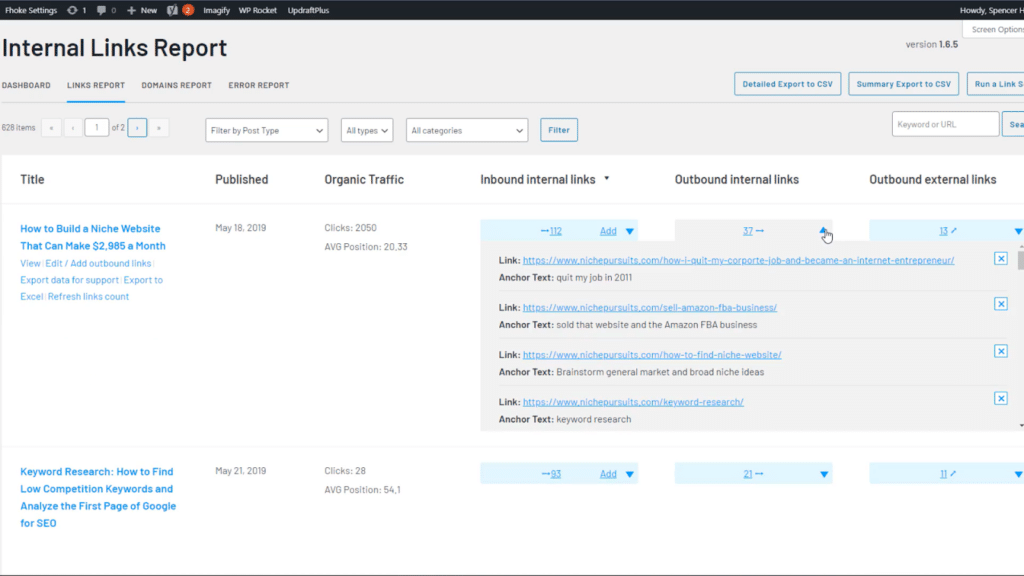
![Google Search Console internal links report showing link counts per page](https://nexterwp.com/wp-content/uploads/2023/05/Internal-links-report.png)A per-page internal link count, the kind of report an internal linking audit starts from.

Sort that report by link count, ascending, and the first screen is your worklist: the posts with one or zero internal links pointing to them. Those are the pages an internal linking strategy should touch first, not your newest post or your personal favorite.

***Also Read:** [What Is Topical Authority? How WordPress Sites Build It](https://nexterwp.com/blog/topical-authority-wordpress/) internal linking is one of the mechanisms that builds topical authority, not a separate, unrelated task.*

## A Practical Monthly Cadence

Internal linking strategy fails most often not from a bad [topical map](https://nexterwp.com/blog/how-to-build-a-topical-map/) but from never revisiting it. A simple monthly routine keeps it alive without turning into a full-time job:

- Pull the Search Console Links report and sort by internal link count, ascending.
- Pick the 3 to 5 lowest-linked pages that are still relevant and worth ranking.
- For each one, find 2 to 3 existing posts where a genuinely relevant mention already exists, and add a contextual link there rather than bolting one onto an unrelated paragraph.
- Every new post you publish gets at least one outbound link to its pillar (if it is cluster content) and at least one inbound link added from an existing related post, on the same day it goes live.
- Once a quarter, re-check whether your pillar pages still cover their cluster completely, since a cluster tends to grow faster than the pillar that is supposed to summarize it.

## The Bottom Line

Decide your pillar and cluster structure first. Link with anchor text that describes the destination. Audit what you already have before adding more. Revisit it monthly instead of once and forgetting it. That is the whole strategy, and it works whether you execute it by hand or hand it to a plugin once the structure is clear.

## Suggested Reading

- [Best Internal Linking Plugins for WordPress (6 Tools Compared)](https://nexterwp.com/blog/best-internal-linking-plugins-for-wordpress/)
- [What Is Topical Authority? How WordPress Sites Build It](https://nexterwp.com/blog/topical-authority-wordpress/)
- [How to Build a Topical Map for WordPress](https://nexterwp.com/blog/how-to-build-a-topical-map/)
- [Semantic SEO for WordPress](https://nexterwp.com/blog/semantic-seo-wordpress/)

#### Stay updated with Helpful WordPress Tips, Insider Insights, and Exclusive Updates – Subscribe now to keep up with Everything Happening on WordPress!

Subscribe

## Frequently Asked Questions

**Q: Why is my WordPress post stuck on page 3 even though the content is good?**
A: A strong post can still sit low in search if nothing else on the site points to it. Google uses internal links as a signal that a page matters, and the playbook’s example shows a useful guide with zero inbound internal links had no reason to be treated as important. The fix is structural, not cosmetic: make sure relevant pages link to it, especially from related cluster content or a pillar page.

**Q: How many internal links should a blog post have?**
A: There is no magic number. Google’s guidance says there is no ideal link count and adds that if you think a page has too many links, it probably does. The better rule is relevance: every link should earn its place by helping readers reach a related page. A short post may only need a few strong contextual links, while a broader guide can support more.

**Q: What is the difference between an internal linking strategy and an internal linking plugin?**
A: A strategy is the structure: which pages are pillars, which are cluster posts, and how they connect. A plugin is just the tool that helps you execute that structure faster once it already exists. The important part is deciding the relationships first, because a plugin can suggest or insert links, but it cannot decide what your site should treat as central. See also [internal linking plugin](https://nexterwp.com/blog/best-internal-linking-plugins-for-wordpress/).

**Q: Do internal links actually help SEO?**
A: Internal links help search engines discover pages and understand how your content fits together. Google also says every page you care about should have at least one link from another page on your site, which is why orphaned content often underperforms. The practical win is not just crawlability, but topical clarity: linked pages reinforce each other when they are genuinely related.

**Q: Should every page link back to the homepage?**
A: Forcing homepage links everywhere usually adds noise instead of value. The better move is to link to the most relevant destination for that context, whether that is a pillar page, a related cluster post, or occasionally the homepage. That keeps anchor text meaningful and avoids turning every article into the same generic navigation pattern.

**Q: What should I audit first in an internal linking cleanup?**
A: Start with pages that have one or zero internal links pointing to them. Google Search Console’s Links report shows internal links per page, so sorting by ascending count quickly surfaces orphaned or under-linked content. That gives you a practical worklist instead of guessing which posts need attention first. For deeper context on related structure work, [semantic SEO](https://nexterwp.com/blog/semantic-seo-wordpress/) and [topical map](https://nexterwp.com/blog/how-to-build-a-topical-map/) are the next pieces to look at.
