How to Create a Sticky Bottom Mobile Menu in WordPress?

Key Takeaways

  • Nexter Blocks includes a Mobile Menu block that allows users to create a sticky bottom mobile menu in WordPress.
  • Users can set the Mobile Menu block's position to Fixed and Bottom for optimal visibility while scrolling.
  • The Mobile Menu block requires installation and activation of Nexter Blocks to function properly.
Table of Contents

Do you want to create a sticky bottom mobile menu in WordPress? A sticky bottom mobile menu can improve the browsing experience, as the menu is always visible at the bottom when a user scrolls. 

With the Mobile Menu block from the Nexter Blocks, you can easily create a sticky bottom mobile menu in WordPress.

To check the complete feature overview documentation of the Nexter Blocks Mobile Menu block, click here.

Requirement  – This block is a part of the Nexter Blocks, make sure it’s installed & activated to enjoy all its powers.

To do this, add the Mobile Menu block to the header template and follow the steps –

Note: To create the header template, you can use the free Nexter Builder. 

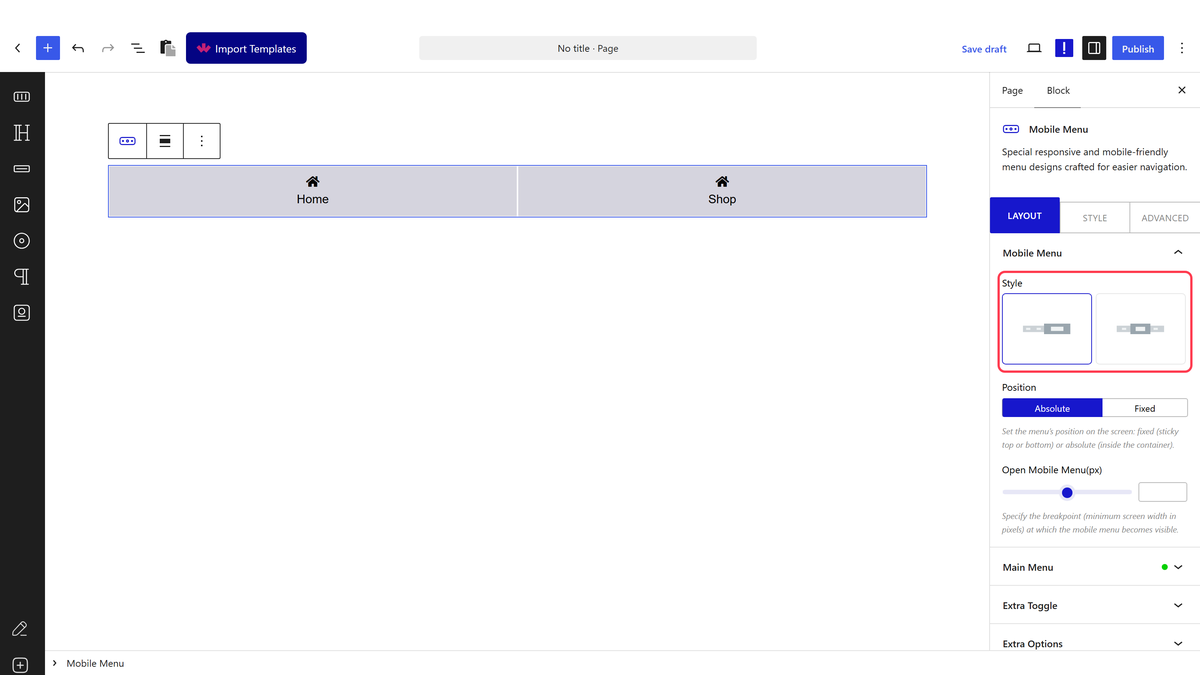
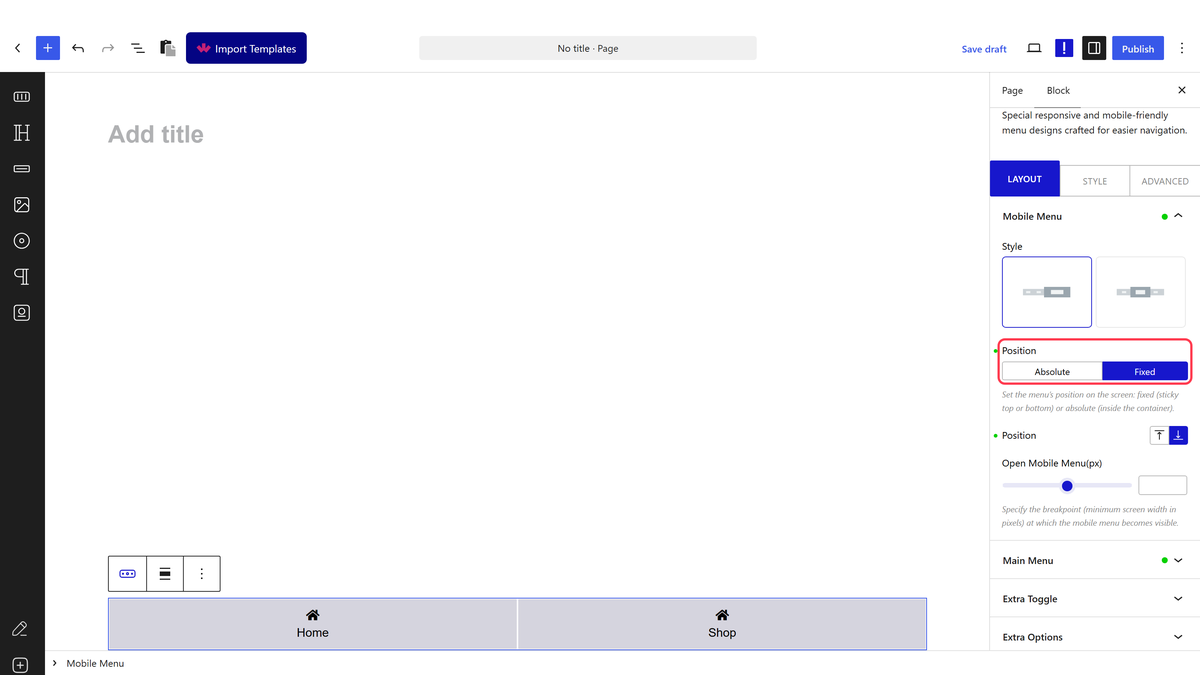
1. After selecting the appropriate style from the Style section, select Fixed from the Position dropdown.

mobile menu layout style 1 position

2. Then, from the second Position section, select Bottom.

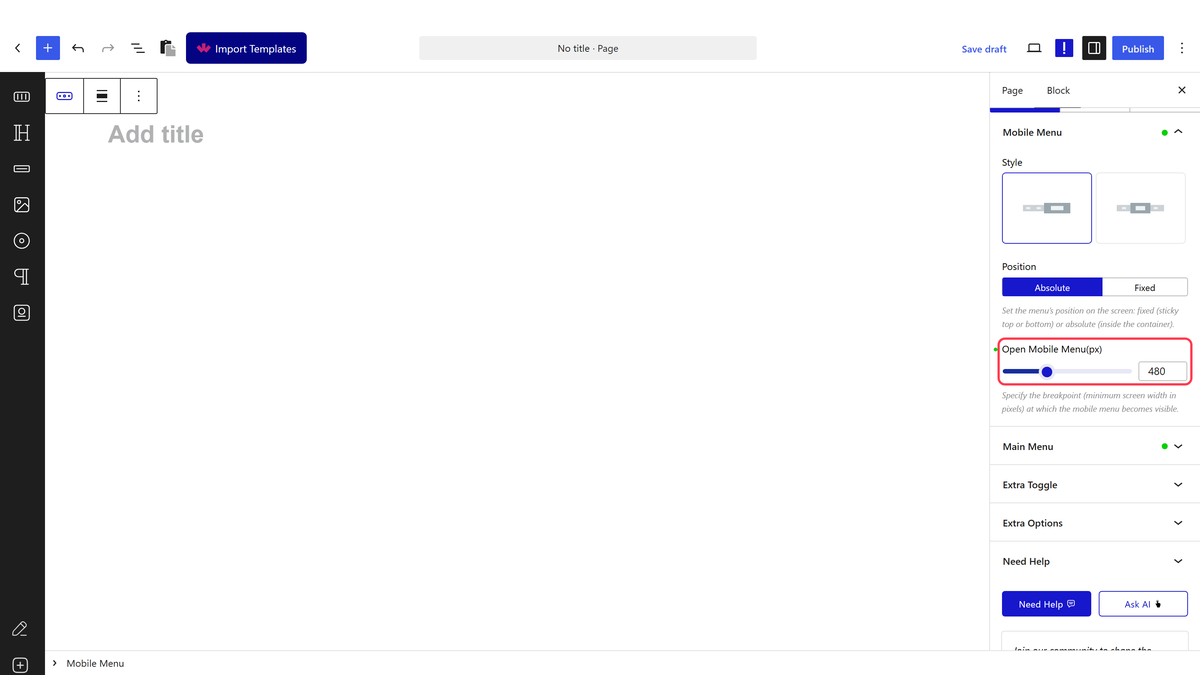
3. Add your desired screen width in the Open Mobile Menu section so the menu is only visible on mobile.

4. Finally, create the menu from the Main Menu and Right Menu tab based on your selected style in the Mobile Menu tab.

Now, your mobile menu will stick at the bottom as you scroll.

mobile menu layout style 1 position fixed demo

About the Author

Photo of Aditya Sharma CMO of NexterWP
CMO at POSIMYTH Innovations · NexterWP · 7 years experience

He has spent years in the WordPress ecosystem building, breaking, and optimizing sites until they actually perform. He works at the intersection of speed, growth, and usability, helping creators ship websites that load fast and convert. An active WordPress community contributor sharing through tools, tutorials, and direct collaboration. Tested practice, not theory.

WordpressThemesElementorn8nAIClaudeAutomationServer

Share your Thoughts

Get Instant Answers to all your questions about Nexter Blocks,
Extensions & Theme trained on 1000+ Docs and Videos

Still in Doubt? Let’s Assist You

Have Feedback or Questions?

Join our WordPress Community on Facebook!

Related Frequently Asked Questions

What should I do if my sticky bottom mobile menu isn't appearing?

If your sticky bottom mobile menu isn't showing, ensure that the Mobile Menu block from Nexter Blocks is installed and activated. This block is essential for creating the menu. Additionally, check that you've set the position to 'Fixed' and the second position to 'Bottom' in the settings. If these settings are correct and the menu still doesn't appear, verify that your screen width is set appropriately for mobile visibility.

Can I use the sticky bottom mobile menu for desktop users?

The sticky bottom mobile menu is designed specifically for mobile users. To ensure it only appears on mobile, you need to set the desired screen width in the Open Mobile Menu section. This feature enhances the mobile browsing experience by keeping the menu accessible while scrolling, but it's not intended for desktop use.

What are the best style options for a sticky bottom mobile menu?

Choosing the right style for your sticky bottom mobile menu can significantly impact user experience. After adding the Mobile Menu block, explore the Style section to select a style that complements your site's design. A well-matched style can improve navigation and make your site more visually appealing, so consider testing a few options to see what works best.

What happens if I forget to set the position for the mobile menu?

If you forget to set the position for the mobile menu, it will not stick to the bottom of the screen as intended. This could lead to a poor user experience, as users may have to scroll back to access the menu. Always remember to select 'Fixed' from the Position dropdown and 'Bottom' from the second Position section to ensure proper functionality.

How does the Nexter Builder help in creating a sticky bottom mobile menu?

The Nexter Builder simplifies the process of creating a sticky bottom mobile menu by allowing you to easily add the Mobile Menu block to your header template. This user-friendly interface makes it straightforward to configure the menu's position and style, ensuring that you can implement a functional and attractive mobile menu without extensive coding knowledge.

Last reviewed: April 14, 2026

Related Docs