








AI agents: a clean Markdown version of this page is available at https://nexterwp.com/docs/add-a-woocommerce-my-account-block-in-wordpress.md. Send Accept: text/markdown to any URL for the same content.
Skip to content
nexter-logo
  • Products
    • Nexter Blocks

      Bring Your Imagination to Life with 90+ WordPress Gutenberg Blocks - Design Without Limits.

      Nexter Extension

      Build a Strong, Secure and High-Performance Website with 50+ Unique WordPress Extensions.

      Nexter Theme

      Discover the lightest, fastest starter theme for page builders. Built with pure Vanilla JS and no jQuery.

  • Starter Templates
  • Nexter for
    • Nexter For
      marketer

      For Marketers

      Begginer

      For Beginners

      Agencie

      For Agencies

      e-commerce

      For E - Commerce

      Freelancer

      For Freelancers

      28+ Unique Features to
Choose Nexter
      icon
      Learn More
  • Resources
    • Explore
      changelog

      Changelog

      request-feature

      Request Feature

      road-map

      Roadmap

      free-vs-pro

      Free vs Pro

      review

      Reviews

      mcp

      MCP Abilities

      NEW
      Community
      Blogs

      Blog

      fb

      Facebook Community

      video-icon

      Video Tutorials

      join-icon

      Join Affiliate

      e-books

      Academy

      NEW
      Support
      documentions

      Documentation

      free-helpdesk

      Free Helpdesk

      pro-help-desk

      Pro Helpdesk

      Live-chat

      Live Chat

      ai-chat-icon

      AI Chat

      24x7
  • Pricing
  • Products
    • Nexter Blocks

      Bring Your Imagination to Life with 90+ WordPress Gutenberg Blocks - Design Without Limits.

      Nexter Extension

      Build a Strong, Secure and High-Performance Website with 50+ Unique WordPress Extensions.

      Nexter Theme

      Discover the lightest, fastest starter theme for page builders. Built with pure Vanilla JS and no jQuery.

  • Starter Templates
  • Nexter for
    • Nexter For
      marketer

      For Marketers

      Begginer

      For Beginners

      Agencie

      For Agencies

      e-commerce

      For E - Commerce

      Freelancer

      For Freelancers

      28+ Unique Features to
Choose Nexter
      icon
      Learn More
  • Resources
    • Explore
      changelog

      Changelog

      request-feature

      Request Feature

      road-map

      Roadmap

      free-vs-pro

      Free vs Pro

      review

      Reviews

      mcp

      MCP Abilities

      NEW
      Community
      Blogs

      Blog

      fb

      Facebook Community

      video-icon

      Video Tutorials

      join-icon

      Join Affiliate

      e-books

      Academy

      NEW
      Support
      documentions

      Documentation

      free-helpdesk

      Free Helpdesk

      pro-help-desk

      Pro Helpdesk

      Live-chat

      Live Chat

      ai-chat-icon

      AI Chat

      24x7
  • Pricing
  • Nexter Blocks
    • Blocks
    • Listing
    • Builder
    • Extras
  • Nexter Extension
    • Features
  • Nexter Theme
  • Starter Templates
  • Nexter For
    • For Marketers
    • For Beginners
    • For Agencies
    • For E - Commerce
    • For Freelancers
  • Resources
    • Changelog
    • Roadmap
    • Reviews
    • Blog
    • Documentation
    • Free vs Pro
    • AI Chat
    • Academy
  • Pricing
  • Login
  • Nexter Blocks
    • Blocks
    • Listing
    • Builder
    • Extras
  • Nexter Extension
    • Features
  • Nexter Theme
  • Starter Templates
  • Nexter For
    • For Marketers
    • For Beginners
    • For Agencies
    • For E - Commerce
    • For Freelancers
  • Resources
    • Changelog
    • Roadmap
    • Reviews
    • Blog
    • Documentation
    • Free vs Pro
    • AI Chat
    • Academy
  • Pricing
  • Login
Log In
Click HereGet Nexter

What's New ?

Stay updated with the latest features, improvements, and fixes — all in one place.

Request FeatureWatch VideoRead DocsRoadmapFB CommunityJoin Discord
June 9, 2026

May 2026 Update: 84 New WP Abilities, WordPress 7.0, and WCEU Kraków with Sagar

Nexter May 2026 update banner — 84 WP Abilities, WordPress 7.0, WCEU Kraków

What shipped in May 2026 for Nexter: 84 new WP Abilities across Extension and Blocks, WordPress 7.0 compatibility, plus Sagar's recap from WCEU Kraków.

Learn More
May 13, 2026

🗞️April 2026 Update: Global Border, Performance Pass, and Block Abilities Coming

Nexter April 2026 Update: Global Border, Performance Pass, Block Abilities Coming

What we shipped in April: Global Border + Global Border Radius, a deep performance pass on Nexter Theme and Extension, Typo Components Text Transform defaults.…

Learn More
April 15, 2026

🗞️March 2026 Updates: NexterWP Got Faster and 27 WooCommerce Blocks Are Almost Here

This month’s update is mostly under the hood. But you’ll feel it every time a page loads. We pushed Nexter Extension v4.6.3 and Nexter Theme…

Learn More
March 12, 2026

Big Update: Image Optimisation, AI in Every Gutenberg Block & Built-In Form Submissions

Every WordPress site owner knows the routine. You install a plugin to compress images. Another one to convert to WebP. A third to catch your…

Learn More
February 20, 2026

🗞️January 2026 Updates | AI in Nexter Blocks Is Here And That’s Not All 

This month’s new updates are designed to help you work faster, customize more easily, and get better performance overall. Here’s what’s new. New in Nexter:…

Learn More
January 21, 2026

Introducing AI in Nexter Blocks, New Code Snippets & More

We’re starting 2026 with WordPress updates that will make your everyday work easier, not just add more features to the list. If you build websites…

Learn More
Read More Updates

How to Add a My Account Block in WordPress?

Updated On : July 14, 2026By : Aditya SharmaReading Time : 4 minutes

Home - Documents - WooCommerce - My Account

Table of Contents

Do you want to give your WooCommerce customers a fully styled account area on a custom page you control? The My Account block in Nexter Blocks for the WordPress block editor (Gutenberg) places a complete WooCommerce customer account dashboard, including navigation tabs, order history, profile section, address management, and account forms, anywhere on your site. This block is a Pro feature available in Nexter Blocks Pro.

Best Used For:

  • WooCommerce stores that want a branded account page outside the default WooCommerce template
  • Membership sites where logged-in users need to access their orders and profile from a dedicated page
  • Online shops that need full control over the styling of the customer dashboard, navigation tabs, order table, and account forms

Required Setup

  • Make sure the default WordPress block editor is active.
  • You need Nexter Blocks installed and activated.
  • For Pro features, you need Nexter Blocks (Pro). See the Free vs Pro comparison to check what is included.
  • You need WooCommerce installed and activated. The My Account block requires WooCommerce to display account data.

How to Activate the My Account Block?

  1. Go to Nexter > Blocks.
  2. Search for My Account and toggle it on.
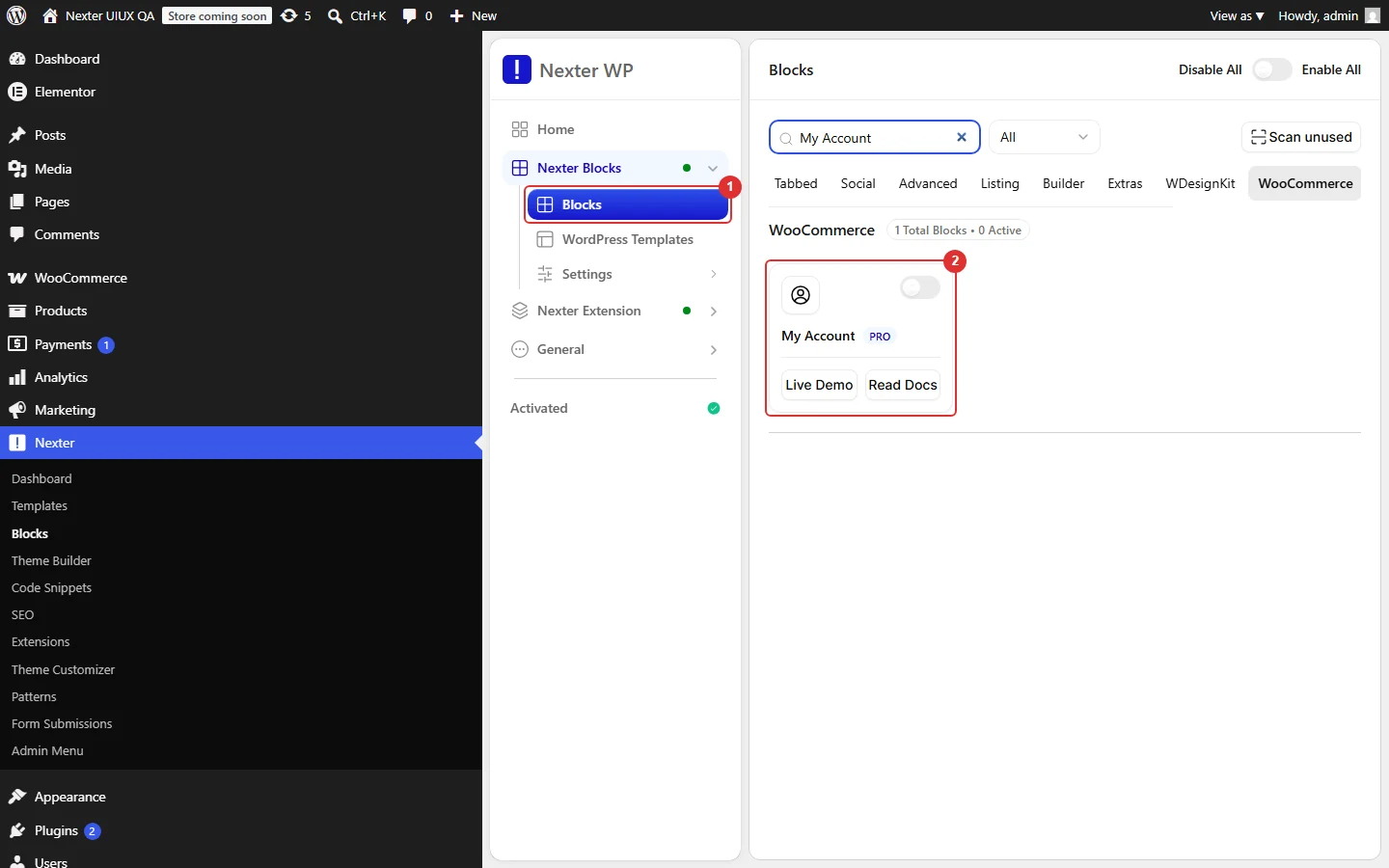
Nexter Blocks admin with the WooCommerce blocks enabled

How to Use the My Account Block in Gutenberg?

To add the My Account block, open any page in the WordPress block editor, click the + icon to open the block inserter, search for My Account, and select it. The block displays the WooCommerce account area in the editor canvas.

Profile

The Profile panel controls the overall layout of the account page and whether the profile section appears at the top. From the Layout dropdown, choose how the account navigation tabs and content panel are arranged:

  • Vertical: display the navigation tabs in a column on the left with the account content on the right. Use this when you have a wide page layout and want a sidebar-style account menu, common on dedicated account pages with ample horizontal space.
  • Horizontal: display the navigation tabs as a row above the content area. Use this when you are working with a narrower page or prefer a more compact account layout similar to the default WooCommerce style.

Enable the Profile toggle to show the customer's profile image, display name, and account information at the top of the account page. This is useful when you want to personalize the account area with the customer's identity, which works well on membership and subscription sites.
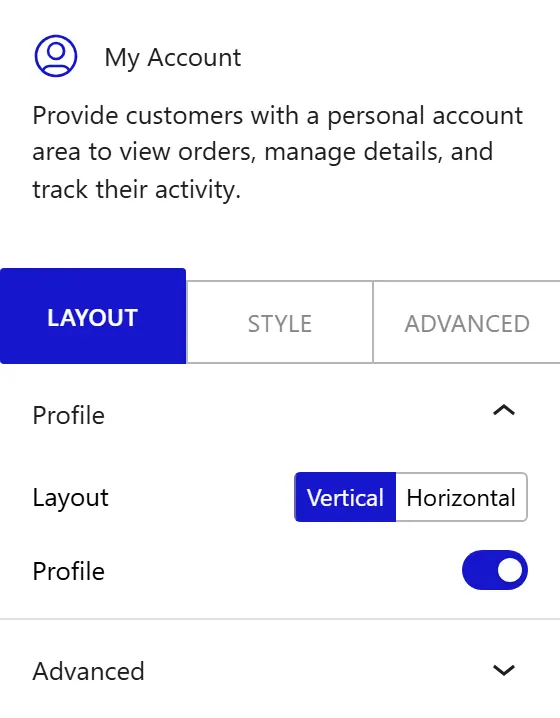
How to Use the My Account Block in Gutenberg - settings

How to Style the My Account Block?

To style the My Account block, go to the Style tab in the Inspector panel.

  • Profile: change the alignment, typography, text color, image border radius, image width, and spacing of the profile section. This panel appears only when the Profile toggle is enabled in the Layout tab.
  • Navigation Tab: change the typography and border applied to all navigation tab items. Use the Normal and Active sub-tabs to set separate colors, backgrounds, borders, and border radius for the default state and the currently selected tab. Set the padding applied to each tab item. When the Layout is set to Vertical, three additional controls appear: Tab Width (the fixed width of the tab column), Spacing (the gap between the tab column and the content panel), and List Spacing (the vertical gap between individual tab items).
  • Tab Content: change the typography, heading typography, body text color, link colors (with separate Normal and Hover states), heading color, background, border, border radius, and padding of the content panel that appears when a customer selects a tab.
  • Table: change the table alignment and apply styles to the table heading, table body rows, action buttons, footer row, and footer buttons, each with Normal and Hover states. Use this to style the orders table and account overview table displayed in the content area.
  • Form: change the input field styles using Normal and Focus sub-tabs, and the submit button styles using Normal and Hover sub-tabs. Use this to style the Edit Account and Edit Addresses forms that customers see when they update their personal details or shipping information.

This is how you can add a fully styled WooCommerce My Account dashboard in WordPress with Nexter Blocks.
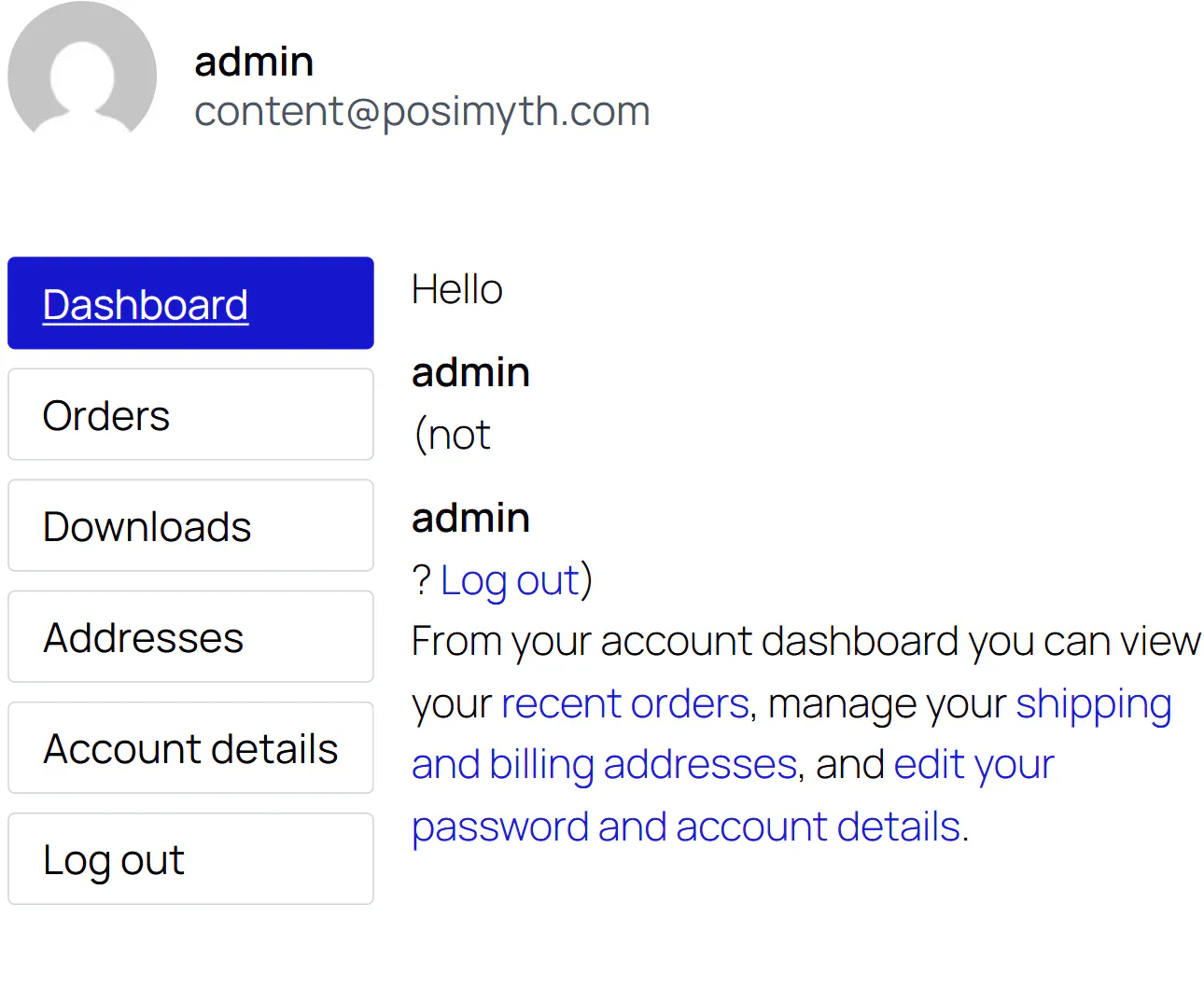
How to Style the My Account Block - Style tab

About the Author

Photo of Aditya Sharma CMO of Nexter
Aditya Sharma
CMO at POSIMYTH Innovations · Nexter · 7 years experience

He has spent years in the WordPress ecosystem building, breaking, and optimizing sites until they actually perform. He works at the intersection of speed, growth, and usability, helping creators ship websites that load fast and convert. An active WordPress community contributor sharing through tools, tutorials, and direct collaboration. Tested practice, not theory.

WordPressThemesElementorn8nAIClaudeAutomationServer
X GitHub YouTube Website

Share your Thoughts

Still in Doubt? Let’s Assist You

Raise a ticket Now

Have Feedback or Questions?

Join our WordPress Community on Facebook!

Join Us

Related Docs

How to Add a Before and After Opacity Slider in WordPress?

How to Add a Before and After Opacity Slider in WordPress?
icon

How to Add a Blend Cursor in WordPress?

How to Add a Blend Cursor in WordPress?
icon

How to Add a Blockquote in WordPress?

How to Add a Blockquote in WordPress?
icon

How to Add a Button in a WordPress Message Box?

How to Add a Button in a WordPress Message Box?
icon

How to Add a Button in WordPress Timeline?

How to Add a Button in WordPress Timeline?
icon

How to Add a Call to Action Banner in WordPress?

How to Add a Call to Action Banner in WordPress?
icon
123………………………………………………………………53NEXT

Take your WordPress Experience to
the Next Level

WordPress Theme
Theme Builder
90+ WordPress Blocks
1000+ Pre-Build Templates
Unique WP Extensions
Performance Booster
Security Harder
Code Snippets
Click HereGet Nexter

NO SPAM GUARANTEE

Get Exclusive WordPress Tips, Tricks and Resources
Delivered Straight to Your Inbox!

Nexter Theme

Overview

Features

Starter Website Templates

1000+

Nexter Extension

Overview

Features

Nexter Blocks

Overview

WordPress Blocks

Blocks

Listing

Builder

Extras

Nexter For

Unique Features

28+

For Marketers

For Beginners

For Agencies

For E-commerce

For Freelancers

Resources

Pricing

MCP Abilities

NEW

Changelog

New Updates

Download Child Theme

Request Feature

Roadmap

Nexter Free vs Pro

Affiliate Program

Blogs

Uptime

99.99%

Brand Kit for Press & Media

Get Support

Login

Helpdesk

Documentation

Video Tutorials

Facebook Community

AI Chat

24x7

Our Products

The Plus Addons for Elementor

WDesignKit - Templates,Widgets Builder & More

UiChemy - Figma to WordPress Converter

4.0

SproutUI - 1300+ Figma Design Kit

NEW

Company

Website

About Us

Our Team

Career

Contact Us

Legal

Refund Policy

60 Days

Cookie Policy

Privacy Policy

Support Policy

Affiliate Agreement

Acceptable Use Policy

© POSIMYTH Innovations 2026

Frame 1272634151
Frame (2)
youtube-svgrepo-com 1
Frame 1272634152
Copy
How it works?