












WordPress 7.2 ships a new Secrets API, a core way for plugins to store API keys, tokens and passwords encrypted instead of as plain text in the options table. It uses libsodium XChaCha20-Poly1305 encryption, a root key called WP_SECRETS_KEY in wp-config.php, and a small set of functions such as wp_set_secret() and wp_get_secret(). The final dev note was published on 11 November 2026, and it includes two breaking changes from Beta 1 that plugin developers need to act on now.
This guide explains what the Secrets API is, how it works, how to set up the key, what changed since the beta, and what it means for site owners who connect AI providers, payment gateways and email services to WordPress.
Why WordPress Needed A Secrets API
Almost every modern site stores credentials. An SMTP plugin keeps a mail password. A payment plugin keeps gateway keys. An AI plugin keeps an OpenAI or Anthropic API key. Until now, each plugin decided on its own how to store these, and most saved them as plain text in the wp_options table.
That creates real risk. A leaked database backup, a SQL injection bug in any plugin, or a staging copy shared with a contractor can expose every key on the site at once. WordPress 7.0 made this more urgent by adding the AI Client and Connectors, which encourage sites to store provider keys. The Secrets API proposal from August 2026 set out to give every plugin one shared, encrypted place for these values, tracked in Trac ticket #66187.
Also Read: WordPress 7.2: Everything Coming In The Next Release
How The WordPress Secrets API Works
The API has three layers. Each one is an abstract class that a host or security plugin can replace.
- Keyring (
WP_Secrets_Keyring): holds the root key that wraps every other key. - Store (
WP_Secrets_Store): decides where encrypted values live. The default store uses the options table. - Provider (
WP_Secrets_Provider): ties the keyring and store together and exposes the public functions.
By default, each secret is encrypted with libsodium’s XChaCha20-Poly1305 and saved to the database. The encryption key is itself wrapped by WP_SECRETS_KEY, which lives in wp-config.php and never in the database. So a database dump on its own is no longer enough to read your keys.
Hosts and enterprise teams can swap the default storage by placing a wp-content/secrets.php drop-in. That drop-in can send secrets to a cloud key vault or a hardware module while plugins keep calling the same functions.
Secrets API Functions In WordPress 7.2
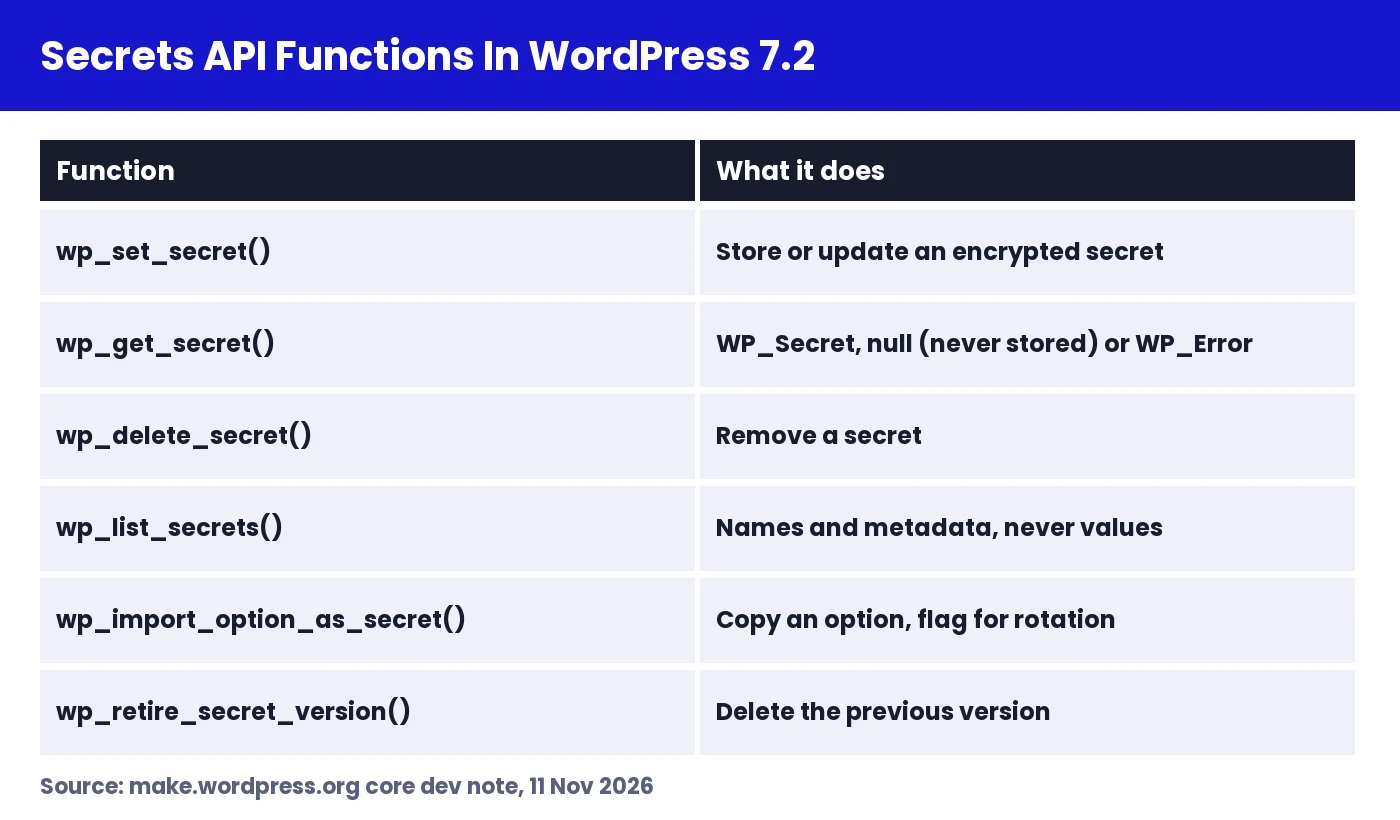
wp_set_secret( $name, $value ): stores or updates an encrypted secret.wp_get_secret( $name ): returns aWP_Secretobject,nullif it was never stored, or aWP_Erroron failure.wp_delete_secret( $name ): removes a secret.wp_list_secrets(): returns names and metadata, never values.wp_import_option_as_secret( $option, $name ): copies an existing option into the vault and flags it for rotation.wp_retire_secret_version( $name ): deletes the previous version after a rotation.wp_is_secrets_api_available()andwp_secrets_provider_is_writable(): let a plugin check support before using it.- Network variants such as
wp_set_network_secret()for multisite-wide values.
Secret names use a plugin-slug/name format, for example my-smtp/password. This keeps plugins from overwriting each other’s values.
A Basic Example
if ( function_exists( 'wp_is_secrets_api_available' ) && wp_is_secrets_api_available() ) {
    wp_set_secret( 'my-plugin/api-key', $api_key );

    $secret = wp_get_secret( 'my-plugin/api-key' );
    if ( $secret instanceof WP_Secret ) {
        $client->authenticate( $secret->reveal() );
    }
}
The WP_Secret object masks its value when printed, logged or dumped. You only get the real string by calling reveal(), which makes accidental leaks through debug logs much less likely.
Rotation And The Change Hook
When you update a secret, WordPress keeps the previous version so you can roll over safely, for example while a remote service still accepts the old key. Once the new key works, call wp_retire_secret_version() to delete the old one. Every change fires the wp_secret_changed action, so a plugin can clear caches or re-register a webhook when a key changes.
No Built-In Capability Checks
The functions do not check user capabilities. That is deliberate, because secrets are often read during cron jobs or REST requests where there is no logged-in admin. It also means the plugin is responsible for checking current_user_can() before it lets anyone view or change a secret through a settings screen.
How To Set Up WP_SECRETS_KEY
New installs of WordPress 7.2 add the key to wp-config.php automatically. Existing sites that update need one in place. Site Health can generate one for you, or you can add it by hand.
- Back up wp-config.php before you edit it.
- Generate a random 32-byte key on the command line with the command below.
- Open wp-config.php and add the define above the line that says “That’s all, stop editing!”.
- Save the file and open Tools, then Site Health, to confirm the Secrets tests pass.
- Store a copy of the key in your password manager. Without it, saved secrets cannot be decrypted.
php -r 'echo base64_encode( random_bytes( 32 ) ), "\n";'

// wp-config.php
define( 'WP_SECRETS_KEY', 'paste-your-generated-key-here' );
Important: do not rotate this key the way you might refresh your salts. Changing WP_SECRETS_KEY without the migration steps below makes every stored secret unreadable. Also make sure the same key goes with the site when you move it to a new host or clone it to staging.
Site Health Checks For Secrets
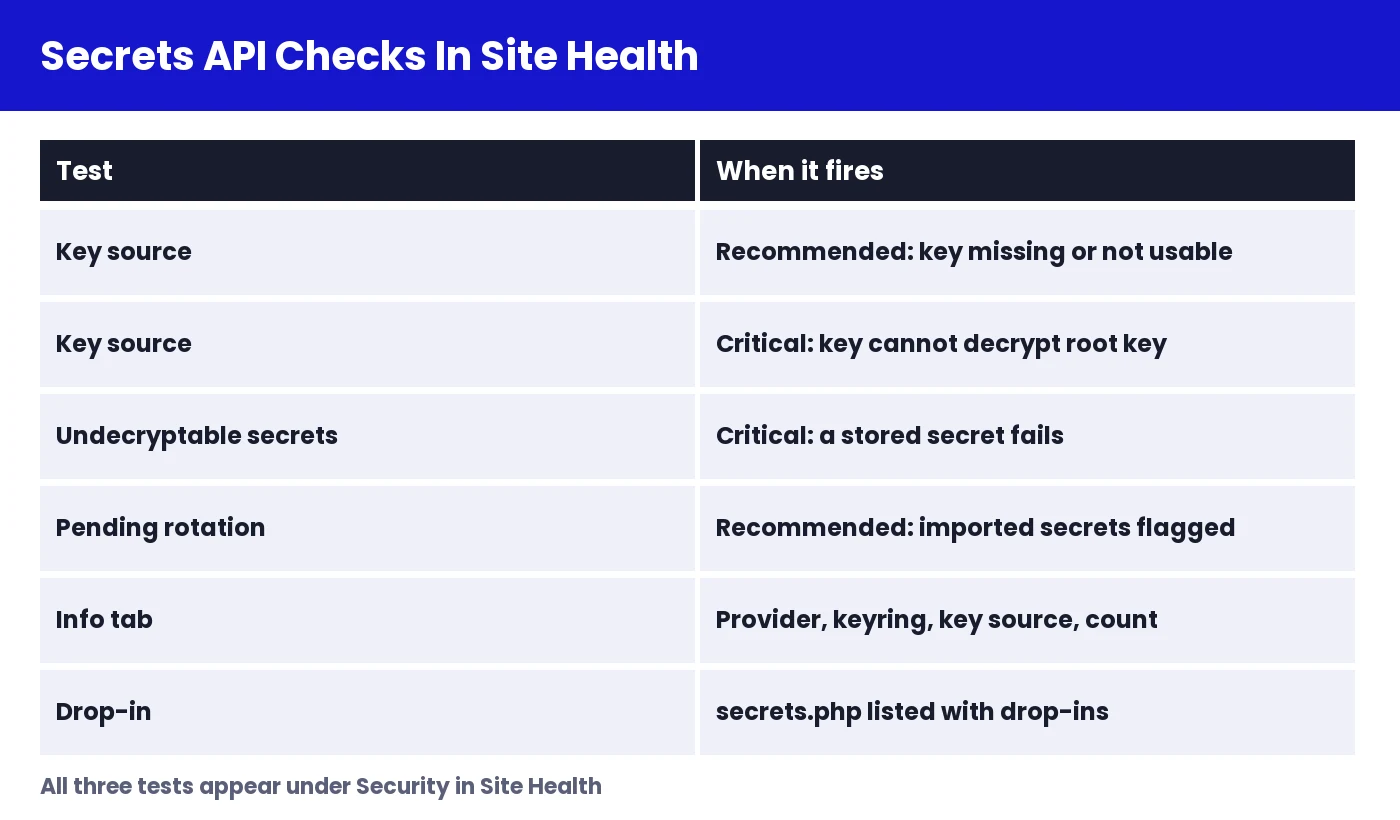
WordPress 7.2 adds three Site Health tests. They check that the key is defined, that the provider is working and writable, and whether any plaintext options are still waiting to be moved into the vault. If you see a warning after updating, start here. It is the fastest way to know whether your site is ready.
Breaking Changes Since Beta 1
Developers who tested early builds need to know about two changes in the final version.
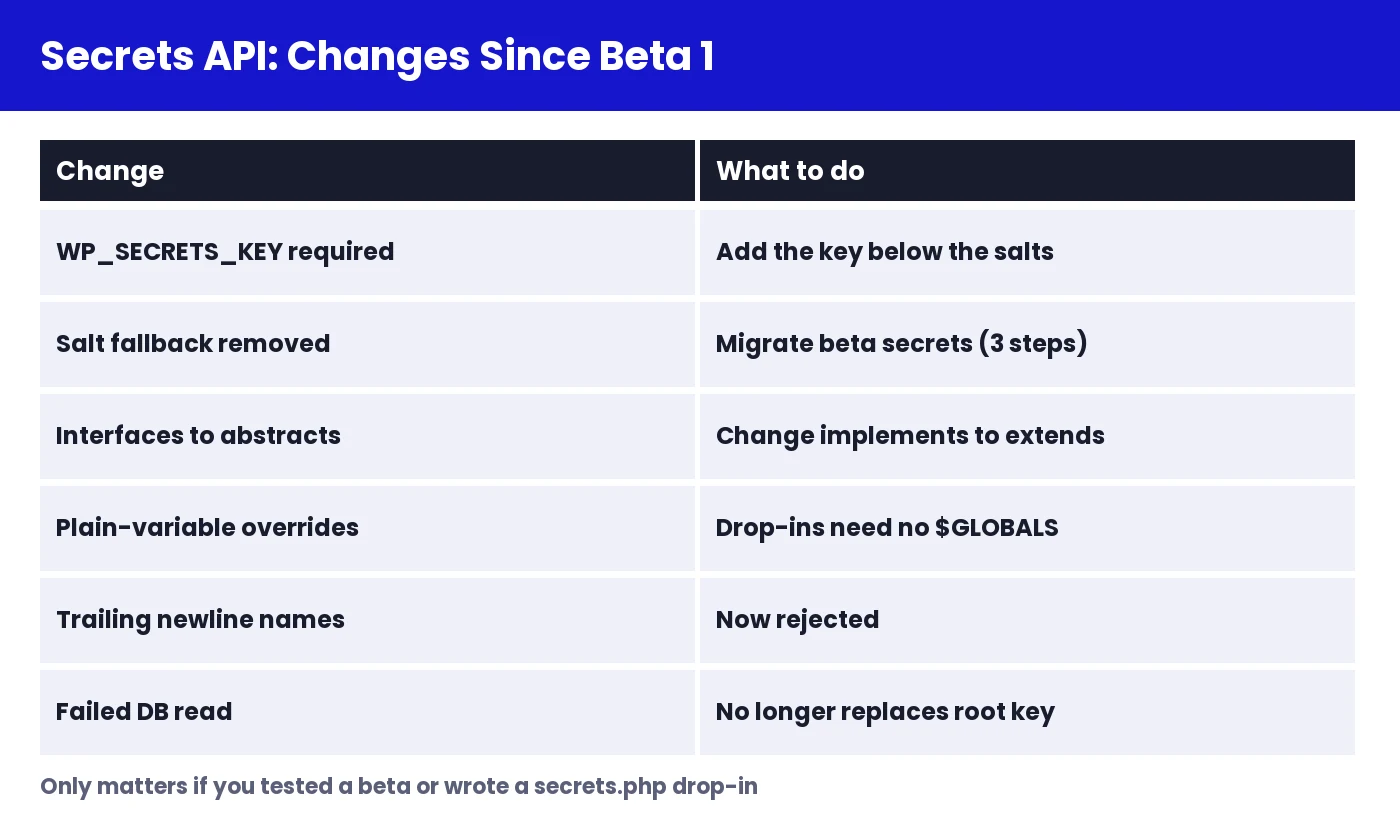
- The key is now required. Beta 1 could fall back to deriving a key. The final API expects
WP_SECRETS_KEYto be defined. - Interfaces became abstract classes. Custom keyrings, stores and providers must change
implementstoextends. Code that still usesimplementscauses a fatal error.
// Beta 1 (now fatal)
class My_Vault_Store implements WP_Secrets_Store { }

// WordPress 7.2 final
class My_Vault_Store extends WP_Secrets_Store { }
Migrating A Beta Site
If you stored secrets on a beta build with a derived key, the dev note describes a three-step move to a real key.
- Define your old key as
WP_SECRETS_KEY_PREVIOUSand your new key asWP_SECRETS_KEY. - Run the
rotate_site_keyroutine so each secret is re-wrapped with the new key. - Once Site Health is green, remove
WP_SECRETS_KEY_PREVIOUSfrom wp-config.php.
Moving Existing Plugin Options Into The Vault
Plugins with years of installs already have keys sitting in options. The cleanest path is gradual:
- On update, check
wp_is_secrets_api_available(). - If it is available, call
wp_import_option_as_secret()to copy the old option into the vault. - Read from the vault first and fall back to the option only on older WordPress versions.
- Delete the plaintext option once the import succeeds, and ask the user to rotate the key at the provider, since the old value may already have been exposed.
function my_plugin_get_api_key() {
    if ( function_exists( 'wp_get_secret' ) ) {
        $secret = wp_get_secret( 'my-plugin/api-key' );
        if ( $secret instanceof WP_Secret ) {
            return $secret->reveal();
        }
    }
    return get_option( 'my_plugin_api_key', '' );
}
For sites still on WordPress 7.0 or 7.1, the Secrets API feature plugin provides the same functions, with full docs at secretsapi.dev. That lets you write against one API today and drop the plugin once 7.2 is everywhere.
Also Read: WordPress Core Security Initiative Explained
What The Secrets API Means For Site Owners
You do not need to write code to benefit. Once your plugins adopt the API, the keys you paste into settings screens are encrypted at rest without any extra step. Here is what to do as a site owner:
- After updating to 7.2, open Site Health and fix any Secrets warnings.
- Back up wp-config.php alongside your database. A database backup without the key cannot restore your secrets.
- When you clone a site to staging, decide on purpose whether the staging copy should share the live key or get its own.
- Watch plugin changelogs for “Secrets API” support, especially SMTP, payment, backup and AI plugins.
- Rotate old API keys at the provider once a plugin moves them into the vault.
Why This Matters For AI On WordPress
The timing is not an accident. WordPress 7.0 added the AI Client and Connectors, and the Abilities API lets AI assistants act on a site through tools exposed by plugins. Every AI connection starts with a provider key. The Secrets API gives those keys a safe home, which matters more as sites connect several AI providers at once.
It also changes how you should think about agent access. Because wp_get_secret() has no capability check, plugins that expose abilities to AI agents must never return secret values through those abilities. A well-built ability uses a key internally and returns only the result. Nexter follows this pattern: its 150+ AI Abilities, available through any MCP plugin, let AI assistants build pages and manage settings without ever handing provider keys back to the agent.
To learn more about how core AI features are moving, read our coverage of the WordPress AI plugin 1.5.0 release.
Secrets API FAQ
Which WordPress version includes the Secrets API?
WordPress 7.2. Older versions can use the feature plugin.
Where are secrets stored?
Encrypted in the options table by default. A secrets.php drop-in can move them to an external vault.
What happens if I lose WP_SECRETS_KEY?
Stored secrets cannot be decrypted. You would need to enter every key again, so keep a safe copy.
Can I rotate WP_SECRETS_KEY like my salts?
No. Use WP_SECRETS_KEY_PREVIOUS and the rotation routine, or your secrets become unreadable.
Does the API stop admins from seeing keys?
Not by itself. It encrypts keys at rest. Who can view them in the dashboard still depends on each plugin’s capability checks.
What This Doesn’t Cover
This guide is based on the official Secrets API dev note published on 11 November 2026. It does not walk through writing a full custom keyring or store, configuring a specific cloud key vault, or which plugins have adopted the API so far. WordPress 7.2 is still in beta, so details may change before the final release. Check the dev note for updates.
Wrapping Up
The Secrets API is one of the most practical security changes in WordPress 7.2. It gives every plugin one encrypted place for API keys, keeps the root key out of the database, and supports rotation and external vaults. Site owners should check Site Health and back up wp-config.php. Developers should switch implements to extends, start importing old options, and keep secret values out of anything an AI agent can read.
Suggested Reading
- WordPress 7.2: Everything Coming In The Next Release
- WordPress 7.2 SVG Admin Icons
- WordPress 7.2 Random Post URL
- WordPress Core Security Initiative
- Gutenberg 24.4 Release Candidate
