








How to Add Revision Control to WordPress Post Type?

Key Takeaways

  • Nexter Extension (Free) enables revision control for different WordPress post types.
  • Users can set a limit on the number of revisions for each post type in the Revision Control section.
  • Nexter Extension allows users to view and restore previous versions of posts after saving changes.
Table of Contents

Are you looking to track changes and manage content versions more effectively in WordPress? By enabling revision control for different post types, you can easily view what changes were made, compare versions, and even restore an earlier version if needed. It’s a great way to keep your content organized and avoid accidental loss of important updates.

With the Nexter Extension (Free) plugin, you can easily add revision control to different WordPress post types.


Learn via Video Tutorial

YouTube video

How to Add Revision Control with the Nexter Extension?

To add revision control with the Nexter Extension plugin, from the WordPress Dashboard, go to Nexter > Extensions > Performance.

Then go to the Revision Control section, enable the toggle, and click on the gear icon (⚙).

enable revision control new

It will open the Revision Control popup.

In the Limit to section, you can set the number of revisions a post type can have.

Then you’ll see different post types available on your site.

Turn on the toggle for specific post types as per your requirements.

Once done, click on the Save button.

Now, when you edit a post of that specific post type and save the changes, you’ll see a revision number in the right Settings panel.
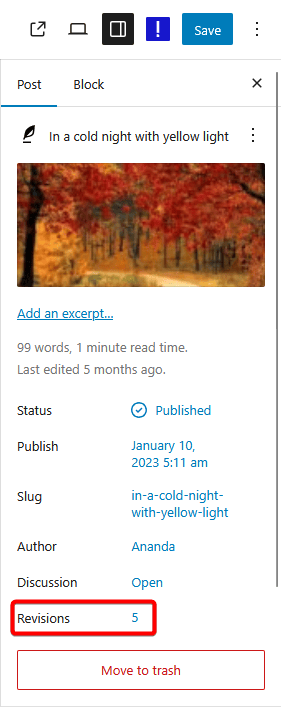
revision number

When you click on that number, you can see the changes made in a specific version, and you can easily restore a previous version.

About the Author

Photo of Aditya Sharma CMO of NexterWP
CMO at POSIMYTH Innovations · NexterWP · 7 years experience

He has spent years in the WordPress ecosystem building, breaking, and optimizing sites until they actually perform. He works at the intersection of speed, growth, and usability, helping creators ship websites that load fast and convert. An active WordPress community contributor sharing through tools, tutorials, and direct collaboration. Tested practice, not theory.

WordpressThemesElementorn8nAIClaudeAutomationServer

Share your Thoughts

Get Instant Answers to all your questions about Nexter Blocks,
Extensions & Theme trained on 1000+ Docs and Videos

Still in Doubt? Let’s Assist You

Have Feedback or Questions?

Join our WordPress Community on Facebook!

Related Frequently Asked Questions

What should I do if the revision control toggle doesn't enable?

If the revision control toggle in the Nexter Extension doesn't enable, check if the plugin is properly installed and activated. Sometimes, conflicts with other plugins can prevent features from working. Ensure that your WordPress version is compatible with the Nexter Extension, as outdated versions may cause issues.

How does revision control help in managing content updates?

Revision control allows you to track changes and manage content versions effectively. By enabling it, you can view what changes were made, compare different versions, and restore previous versions if needed. This is particularly useful for avoiding accidental loss of important updates and maintaining content organization.

What happens if I exceed the set limit of revisions?

If you exceed the set limit of revisions for a post type, older revisions will be automatically deleted to make room for new ones. This ensures that your database remains optimized and prevents it from becoming bloated with unnecessary data. Regularly reviewing your revision settings can help maintain optimal performance.

Does the Nexter Extension work with custom post types?

The Nexter Extension can be used with custom post types as long as they are registered in your WordPress site. You can enable revision control for these custom post types by toggling them on in the Revision Control settings. This feature enhances your ability to manage content across various post types effectively.

What are the best practices for using revision control in WordPress?

Best practices for using revision control include setting a reasonable limit on the number of revisions to prevent database bloat, regularly reviewing and cleaning up old revisions, and enabling revision control for all critical post types. This ensures that you have a reliable backup of your content changes without overwhelming your database.

Last reviewed: April 14, 2026

Related Docs