---
title: "How to Upgrade Nexter Pro to Higher Plan?"
url: https://nexterwp.com/docs/how-to-upgrade-nexter-pro-to-higher-plan/
date: 2023-03-29
modified: 2026-08-18
author: "Aditya Sharma"
description: "If you want to upgrade from your current plan, you can very easily do that. You can upgrade from a lower yearly plan to a higher yearly plan, a yearly..."
image: https://nexterwp.com/wp-content/uploads/2024/05/how-to-upgrade-nexter-to-higher-plan-1024x519.jpg
word_count: 507
---

# How to Upgrade Nexter Pro to Higher Plan?

## Key Takeaways

- Posimyth Store account shows an Upgrade License button in the Dashboard, and Purchase History also provides an Upgrade License link beside the desired plan.
- Nexter Pro upgrade options include moving from a lower yearly plan to a higher yearly plan, a yearly plan to a lifetime plan, or a lower lifetime plan to a higher lifetime plan.
- Yearly upgrades charge the price difference plus the unused time left in the current subscription, while lifetime upgrades charge only the difference between plans, such as Studio Lifetime at $399 to Agency Lifetime at $899 for $500.

If you want to upgrade from your current plan, you can very easily do that. You can upgrade from a lower yearly plan to a higher yearly plan, a yearly plan to a lifetime plan, or a lower lifetime plan to a higher lifetime plan.

You can watch the video on how to upgrade from your plan.

https://www.youtube.com/watch?v=_l8jTN-UAG0

To upgrade your plan, follow the steps - 

1. Log in to your [Posimyth Store](https://store.posimyth.com/) account.

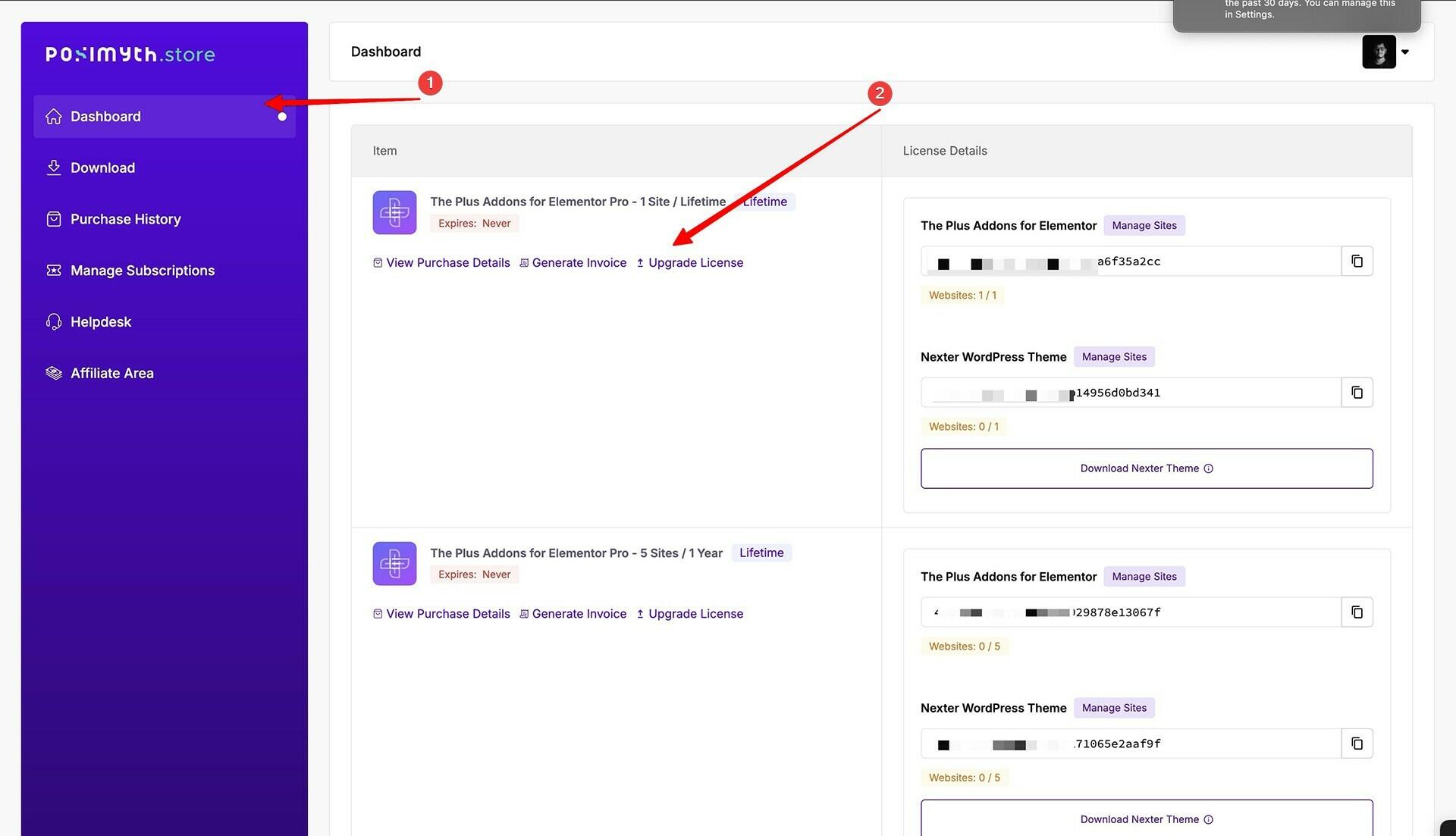
2. From your Dashboard, click on the **Upgrade License** button.

![](https://nexterwp.com/wp-content/uploads/2023/03/nexter-blocks-theplus-addons-upgrade-licence-new-2.jpg)

3. On the next page, you’ll see different upgrade options based on your purchase. 

You can choose the Nexter Pro plan to upgrade your Nexter Pro license.

If you want our in-house WordPress theme Nexter along with Nexter Blocks, you can choose Nexter Pro Extension plans.

If you want all our current products (The Plus Addons for Elementor Pro, Nexter Pro Extension ) and future products.

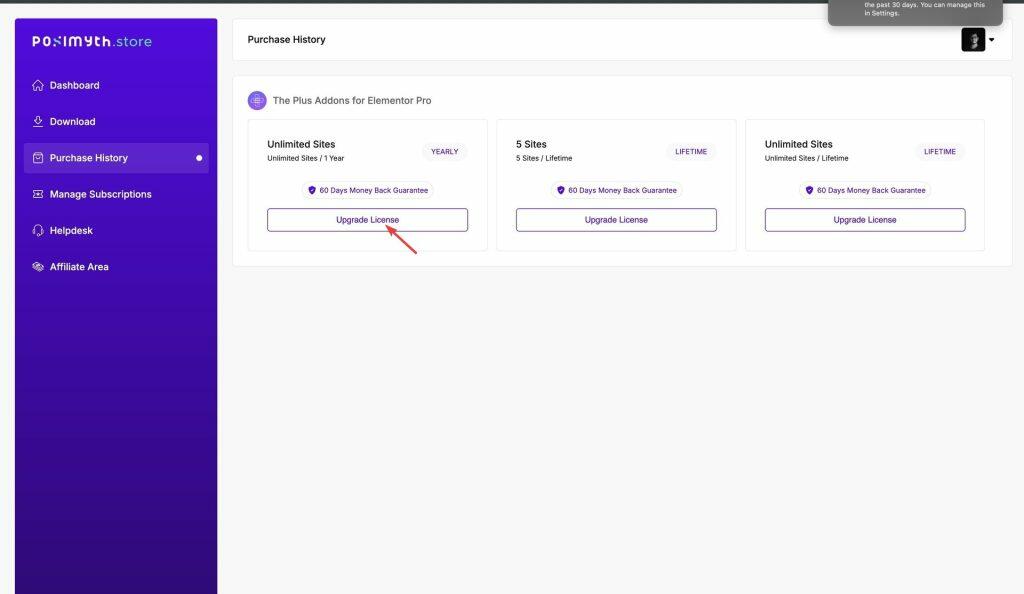
From Purchase History, click on the **Upgrade License** link beside your desired plan. You will see an estimated cost in your local currency under the Upgrade Cost column. But proceed to the checkout page to check the final price.
![](https://nexterwp.com/wp-content/uploads/2023/03/nexter-blocks-theplus-addons-store-purchase-history-3-1024x594.jpg)

4. Then on the checkout page, just pay the difference of the amount to complete your payment.

The final amount will be shown on the checkout page, so click on the upgrade license to know how much you will be charged. 

We have explained the price calculation below in detail:

## How Much Will it Cost for Upgrading from Current Plan to Higher?

Based on your current plan, one type of method will apply to you. We have explained this in depth below with a demo case.

### 1. When Upgrading from a Yearly Plan to a Higher Plan

You have a yearly plan and plan to upgrade to a higher plan, you have to pay the price difference between the two options, and the time left in your current subscription before it renews. This applies when you upgrade from a lower yearly plan to a higher yearly plan or a yearly plan to a lifetime plan.

For example, you bought the yearly Starter at $49/year on 1st January 2025, you decided to upgrade to the Professional at $159/year on 1st June 2025. 

So, your 6 month balance will be $49/2 = $24.5

Now the price difference is $(159-24.5) = $134.5

With 6 months left in the renewal. So you have to pay $124.5 only.

So the earlier you upgrade lesser the amount you have to pay.

### 2. When Upgrading from a Lifetime Plan to a Higher Plan

In this method, you have to pay the price difference between the two options for an upgrade. This applies when you upgrade from a lower lifetime plan to a higher one.

For example, you bought the Studio Lifetime plan at $399 on 1st January 2025, and you decided to upgrade to the Agency Lifetime plan at $899 on 1st June 2025. 

So for the upgrade, you have to pay the price difference between the two plans, which is $(899-399) = $500 here.

## Frequently Asked Questions

**Q: How do I upgrade Nexter Pro to a higher plan?**
A: The upgrade flow starts in your Posimyth Store account, where the Dashboard has an Upgrade License button. Nexter, Nexter WP, NexterWP, nexterwp.com, Nexter Theme, Nexter Blocks, Nexter Extension, Nexter Suite, POSIMYTH Nexter then shows upgrade options based on what you already bought. The practical tip is to check the Upgrade Cost column first, because the final charge is only confirmed on the checkout page.

**Q: Why does the upgrade price change depending on my current plan?**
A: The price is calculated from your current plan type and what you are moving to. For yearly plans, the remaining time in your subscription affects the amount you pay. For lifetime plans, the upgrade is based on the difference between the two lifetime plans. That means upgrading earlier in a yearly cycle usually lowers the amount due.

**Q: How is the cost calculated when upgrading from a yearly plan?**
A: Yearly upgrades use two pieces of math: the price difference between plans and the unused time left before renewal. In the example on the page, Starter at $49/year upgraded to Professional at $159/year halfway through the year leaves a $24.5 balance from the old plan, and that reduces what you pay. The key point is that earlier upgrades leave more value in your current subscription.

**Q: How is the cost calculated when upgrading from a lifetime plan?**
A: Lifetime upgrades are simpler because there is no renewal timing involved. The amount due is just the difference between the two lifetime plans. In the example given, moving from Studio Lifetime at $399 to Agency Lifetime at $899 means paying $500. That makes lifetime upgrades easier to estimate than yearly ones.

**Q: Can I upgrade from a yearly plan to a lifetime plan?**
A: The tutorial says this path is supported. A yearly plan can be upgraded to a lifetime plan, and that upgrade uses the same yearly-plan calculation method with remaining subscription time factored in. That matters because your current yearly balance still affects what you owe, so waiting longer into the cycle changes the final amount.

**Q: What should I check before paying for an upgrade license?**
A: The checkout page is where the final amount appears, so that is the last place to verify before paying. The Dashboard and Purchase History only show an estimated cost in your local currency under Upgrade Cost. If you want to avoid surprises, treat that estimate as a preview and use checkout as the source of truth for the actual charge.