












A common blog layout features the latest post large at the top, then lists the rest below. Without help, the featured post appears twice.
The offset setting tells a listing to skip the first few posts, so the second listing starts where the featured one ended.
Before You Start
- Edition: Free — works in Nexter Blocks (free) and with Nexter Blocks Pro.
- Block to enable: Post Listing, switched on under Nexter > Blocks in your WordPress dashboard.
- Enough posts to see the effect. A listing with three posts cannot show pagination, filtering or a second row.
Steps
- Select the Post Listing block that should skip posts.
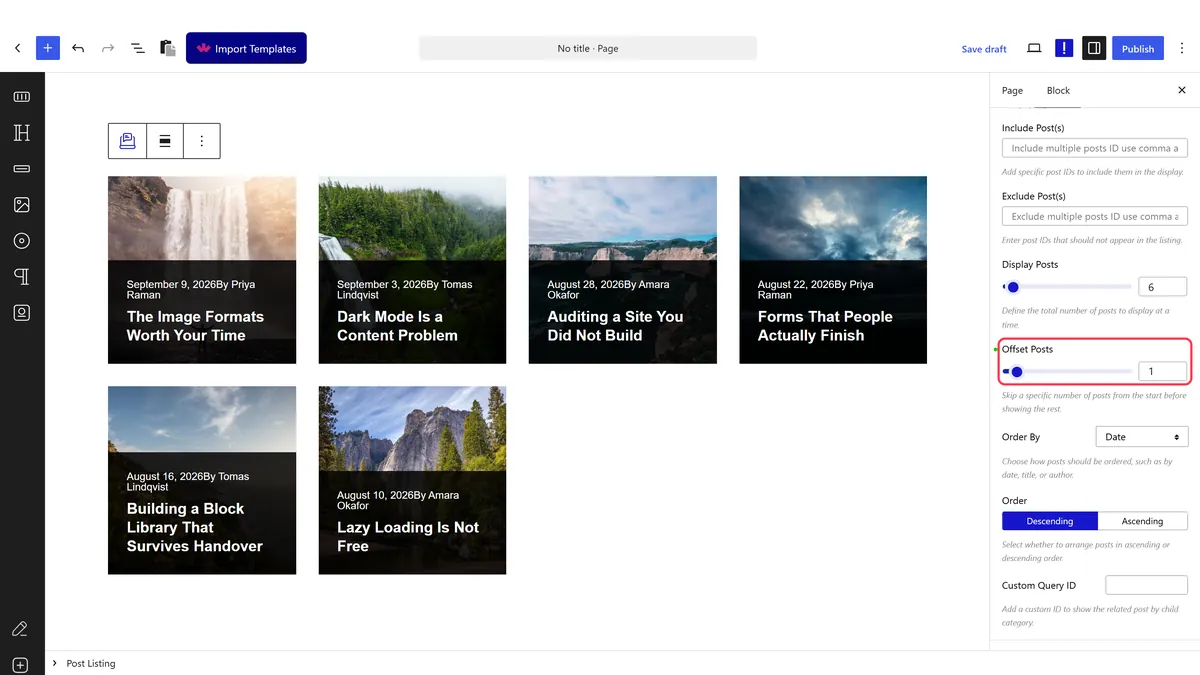
- Set the offset to the number of posts to skip.
- Publish and check the listing starts where you expect.
How It Behaves
The offset is applied to the block’s own query, so the skipped posts never reach the page.
- Measured on a published page: setting the offset to 2 rendered
offset_posts: 2in thedata-dypostattribute, and the listing genuinely started at the third newest post rather than the first. - It skips by position, not by post. Whatever is newest at the time is what gets skipped, so the listing stays correct as you publish.
- The count still fills. A listing set to four posts with an offset of two shows posts three to six.
- That is the difference from excluding by ID, which targets specific posts — see exclude a blog post by ID.
- Everything ends up in one attribute. The block writes its whole query configuration into a
data-dypostattribute on the published page, so if a setting is not doing what you expect, that is where to look. - Measured with Nexter Blocks Pro deactivated: the listing still renders its posts. The block itself is free.
Limitations
- It is positional, so it only works with matching ordering. If the featured block and the listing sort differently, the offset skips the wrong posts.
- Both blocks must use the same query. Different categories or post types and the offset stops lining up.
- Nothing links the two blocks. Change how many posts the featured block shows and you must change the offset by hand.
- A large offset on a small blog empties the listing, because there is nothing left after the skip.
Troubleshooting
The featured post still appears twice
The offset is not set, or is smaller than the number of posts the featured block shows. Match them.
The listing is empty
The offset is larger than the number of posts available. Lower it, or publish more posts.
It skips the wrong posts
The two blocks are ordering differently. Make sure both use the same ordering and the same query.
I want to skip one specific post instead
Use exclude by post ID, which targets a post rather than a position.
