









Skip to content
nexter-logo
  • Products
    • Nexter Blocks

      Bring Your Imagination to Life with 90+ WordPress Gutenberg Blocks - Design Without Limits.

      Nexter Extension

      Build a Strong, Secure and High-Performance Website with 50+ Unique WordPress Extensions.

      Nexter Theme

      Discover the lightest, fastest starter theme for page builders. Built with pure Vanilla JS and no jQuery.

  • Starter Templates
  • Nexter for
    • Nexter For
      marketer

      For Marketers

      Begginer

      For Beginners

      Agencie

      For Agencies

      e-commerce

      For E - Commerce

      Freelancer

      For Freelancers

      28+ Unique Features to
Choose Nexter
      icon
      Learn More
  • Resources
    • Explore
      changelog

      Changelog

      request-feature

      Request Feature

      road-map

      Roadmap

      free-vs-pro

      Free vs Pro

      review

      Reviews

      Community
      Blogs

      Blog

      fb

      Facebook Community

      video-icon

      Video Tutorials

      join-icon

      Join Affiliate

      e-books

      Academy

      NEW
      Support
      documentions

      Documentation

      free-helpdesk

      Free Helpdesk

      pro-help-desk

      Pro Helpdesk

      Live-chat

      Live Chat

      ai-chat-icon

      AI Chat

      24x7
  • Pricing
  • Products
    • Nexter Blocks

      Bring Your Imagination to Life with 90+ WordPress Gutenberg Blocks - Design Without Limits.

      Nexter Extension

      Build a Strong, Secure and High-Performance Website with 50+ Unique WordPress Extensions.

      Nexter Theme

      Discover the lightest, fastest starter theme for page builders. Built with pure Vanilla JS and no jQuery.

  • Starter Templates
  • Nexter for
    • Nexter For
      marketer

      For Marketers

      Begginer

      For Beginners

      Agencie

      For Agencies

      e-commerce

      For E - Commerce

      Freelancer

      For Freelancers

      28+ Unique Features to
Choose Nexter
      icon
      Learn More
  • Resources
    • Explore
      changelog

      Changelog

      request-feature

      Request Feature

      road-map

      Roadmap

      free-vs-pro

      Free vs Pro

      review

      Reviews

      Community
      Blogs

      Blog

      fb

      Facebook Community

      video-icon

      Video Tutorials

      join-icon

      Join Affiliate

      e-books

      Academy

      NEW
      Support
      documentions

      Documentation

      free-helpdesk

      Free Helpdesk

      pro-help-desk

      Pro Helpdesk

      Live-chat

      Live Chat

      ai-chat-icon

      AI Chat

      24x7
  • Pricing
  • Nexter Blocks
    • Blocks
    • Listing
    • Builder
    • Extras
  • Nexter Extension
    • Features
  • Nexter Theme
  • Starter Templates
  • Nexter For
    • For Marketers
    • For Beginners
    • For Agencies
    • For E - Commerce
    • For Freelancers
  • Resources
    • Changelog
    • Roadmap
    • Reviews
    • Blog
    • Documentation
    • Free vs Pro
    • AI Chat
    • Academy
  • Pricing
  • Login
  • Nexter Blocks
    • Blocks
    • Listing
    • Builder
    • Extras
  • Nexter Extension
    • Features
  • Nexter Theme
  • Starter Templates
  • Nexter For
    • For Marketers
    • For Beginners
    • For Agencies
    • For E - Commerce
    • For Freelancers
  • Resources
    • Changelog
    • Roadmap
    • Reviews
    • Blog
    • Documentation
    • Free vs Pro
    • AI Chat
    • Academy
  • Pricing
  • Login
Log In
click hereGet Nexter

What's New ?

Stay updated with the latest features, improvements, and fixes — all in one place.

Request FeatureWatch VideoRead DocsRoadmapFB CommunityJoin Discord
April 15, 2026

🗞️March 2026 Updates: NexterWP Got Faster and 27 WooCommerce Blocks Are Almost Here

This month’s update is mostly under the hood. But you’ll feel it every time a page loads. We pushed Nexter Extension v4.6.3 and Nexter Theme…

Learn More
March 12, 2026

Big Update: Image Optimisation, AI in Every Gutenberg Block & Built-In Form Submissions

Every WordPress site owner knows the routine. You install a plugin to compress images. Another one to convert to WebP. A third to catch your…

Learn More
February 20, 2026

🗞️January 2026 Updates | AI in Nexter Blocks Is Here And That’s Not All 

This month’s new updates are designed to help you work faster, customize more easily, and get better performance overall. Here’s what’s new. New in Nexter:…

Learn More
January 21, 2026

Introducing AI in Nexter Blocks, New Code Snippets & More

We’re starting 2026 with WordPress updates that will make your everyday work easier, not just add more features to the list. If you build websites…

Learn More
December 29, 2025

2025 With Nexter: How We Simplified WordPress Website Building

If there is one thing 2025 taught us, it is this. Building a WordPress website should not feel complicated. From the very beginning, Nexter’s goal…

Learn More
December 11, 2025

🗞️November 2025 Updates | A Unified Nexter Experience + Final Cyber Monday Call

This month brings major upgrades designed in Nexter to improve speed, simplify customization, and make your building experience smoother than ever. Here’s what’s new! New in Nexter:…

Learn More
Read More Updates

How to add Google login to a WordPress website?

Updated On : April 15, 2026By : Aditya SharmaReading Time : 4 minutes

Home - Documents - Nexter Blocks

Key Takeaways

  • Nexter Blocks includes a Login & Signup block that allows users to add a Google login option to their forms.
  • Users must generate a Google Client ID through the Google Developers Console to enable Google login.
  • The Login & Signup block supports enabling Google One Tap Popup for automatic login prompts.
  • Users can customize the button type, theme, shape, text, and size for the Google login button in their forms.
Table of Contents

With WordPress powering a growing number of websites on the internet, it’s no surprise that it is one of the most popular content management systems in use. To make it easier for users to access your website, offering a wide range of login methods is important. One of the most popular methods is to add a Google login option to your WordPress website. This allows users to log in using their existing Google account, reducing the need to create yet another username and password combination.

With the Login & Signup block from Nexter Blocks, you can easily add a Google login option to your login or registration form.

To check the complete feature overview documentation of Nexter Blocks Login & Signup block, click here.

Requirement  – This block is a part of Nexter Blocks, make sure its installed & activated to enjoy all its powers.

LIVE BLOCK LINK

First, you have to generate your Google Client ID.

Generate Google Client ID

1. For this, you have to login to your Google account and go to the Google Developers Console.

2. If you don’t have any project created, then click on CREATE PROJECT link.
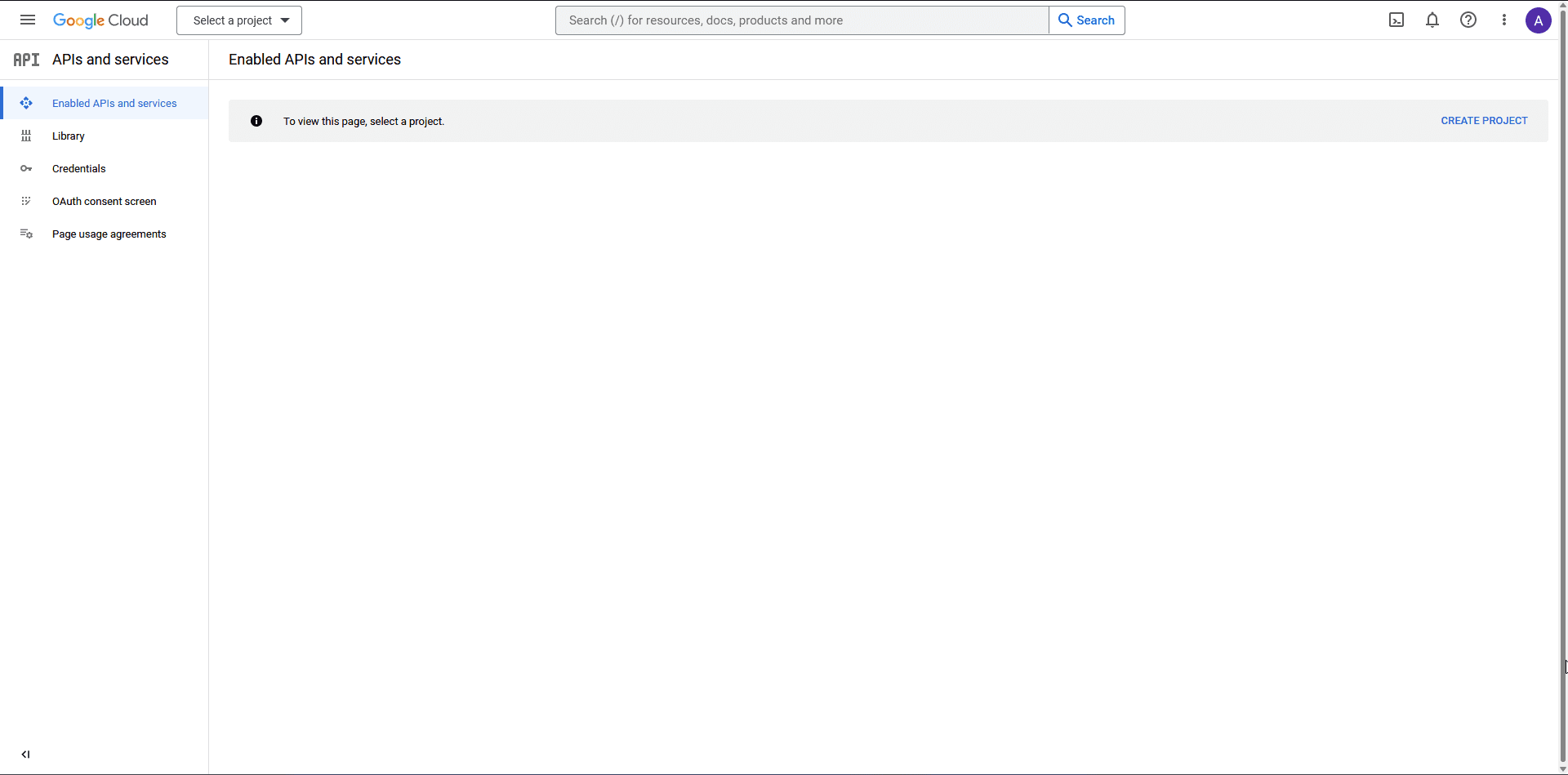
google client id 1

3. On the next screen, add your Project name and click the CREATE button.
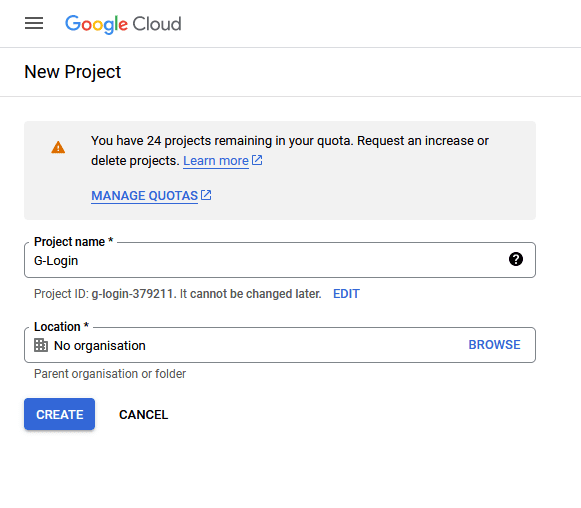
google client id 2

4. Then click on the OAuth consent screen on the left sidebar.
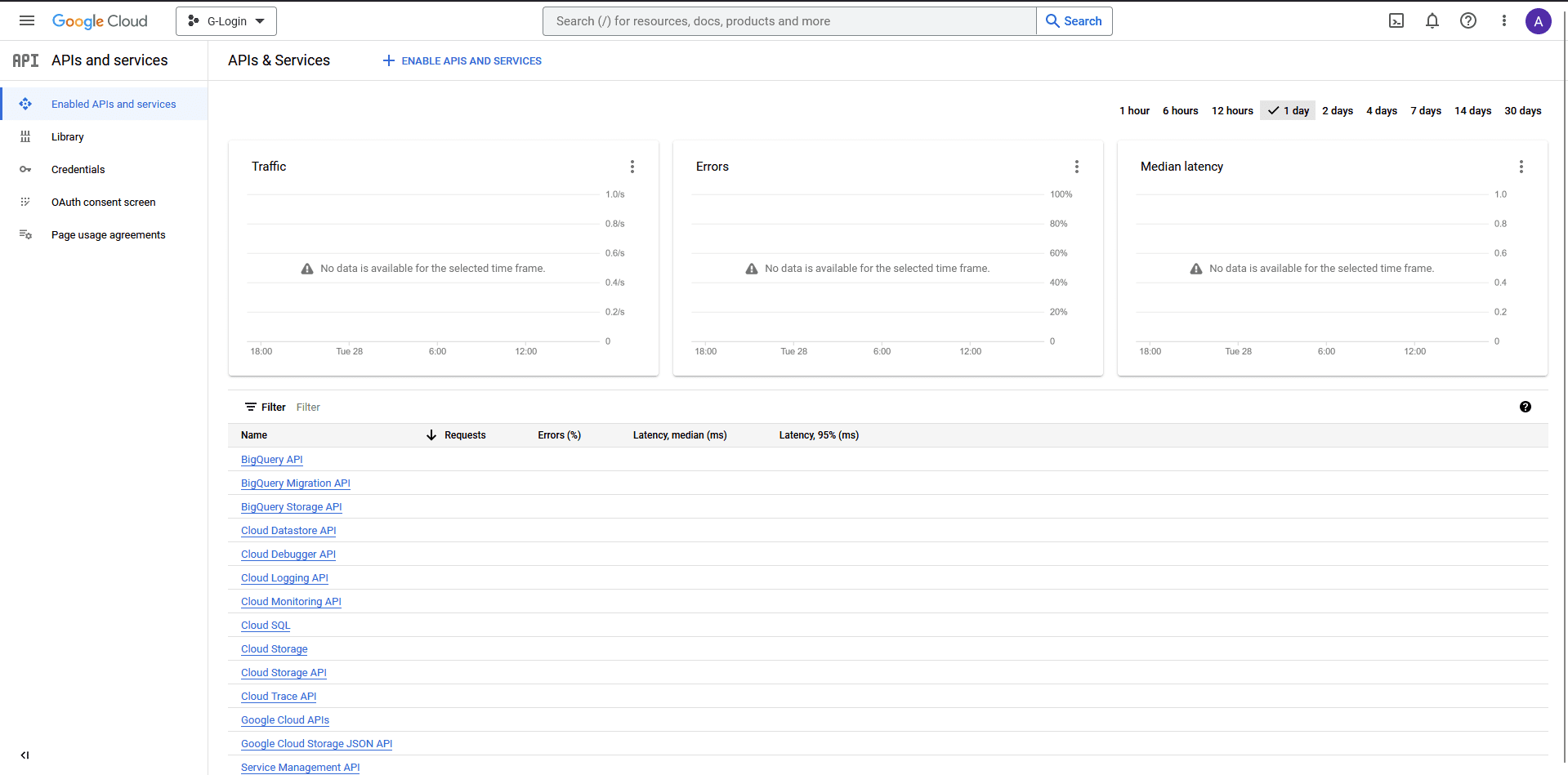
google client id 3

5. On that page, select the User Type and click the CREATE button.

  • Internal – Only available to users within your organisation.
  • External – Available to any user with a Google Account.
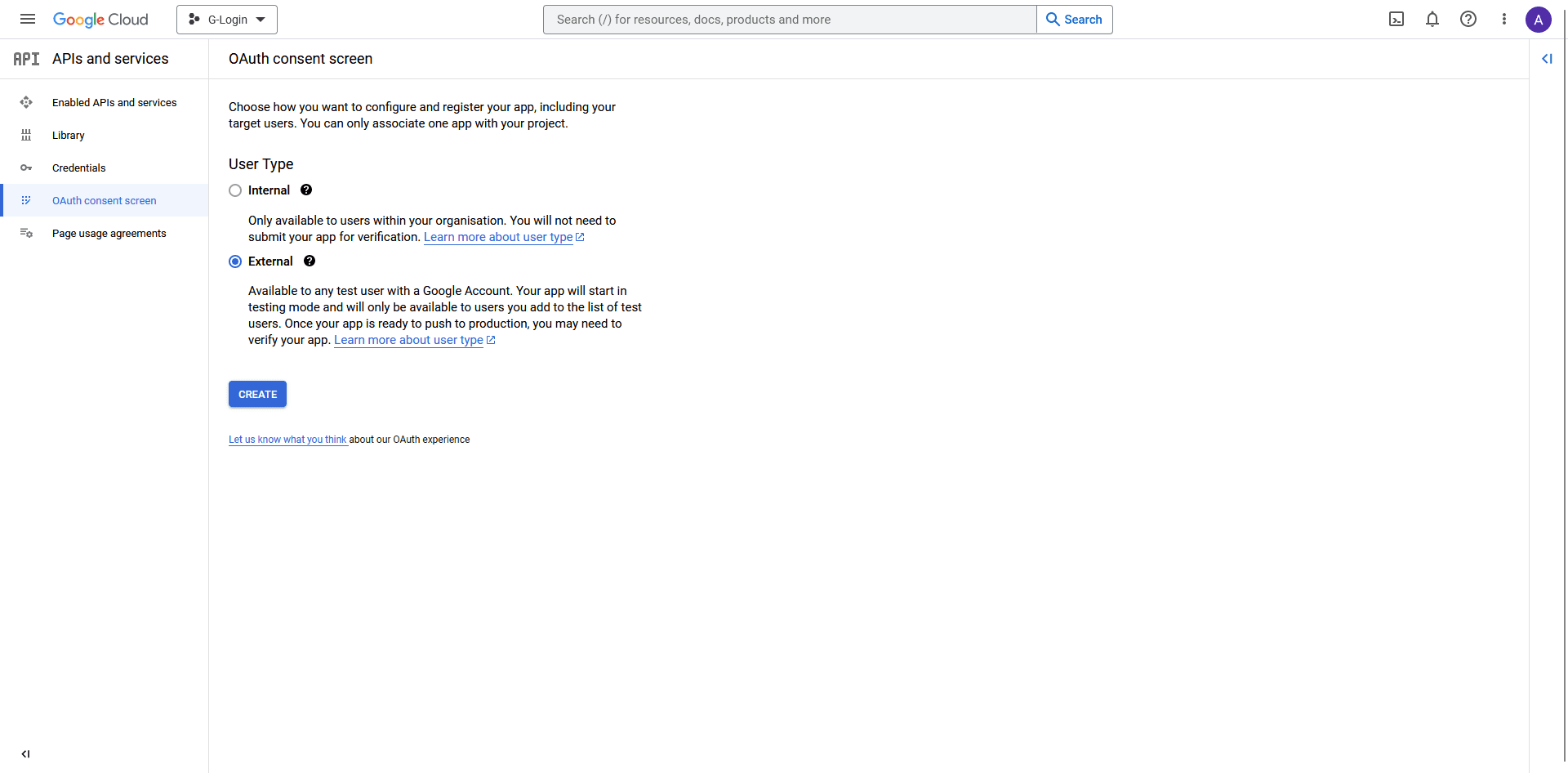
google client id 4

6. On the next page, add your app information. App name, User support email and Developer contact information fields are mandatory rest are optional until you deploy your app.

Then click on the SAVE AND CONTINUE button. 
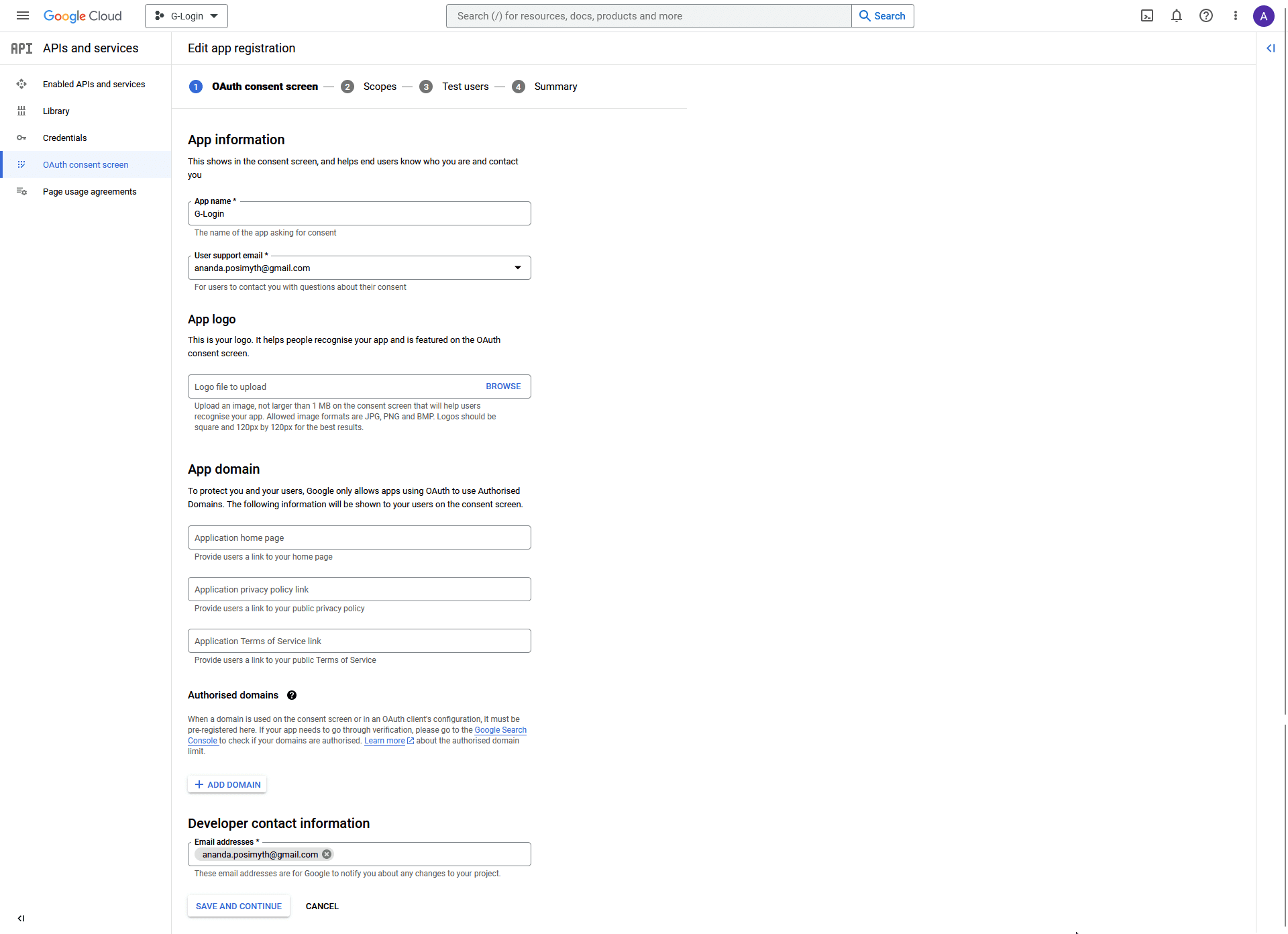
google client id 5

7. On the Scopes page, click the SAVE AND CONTINUE button.
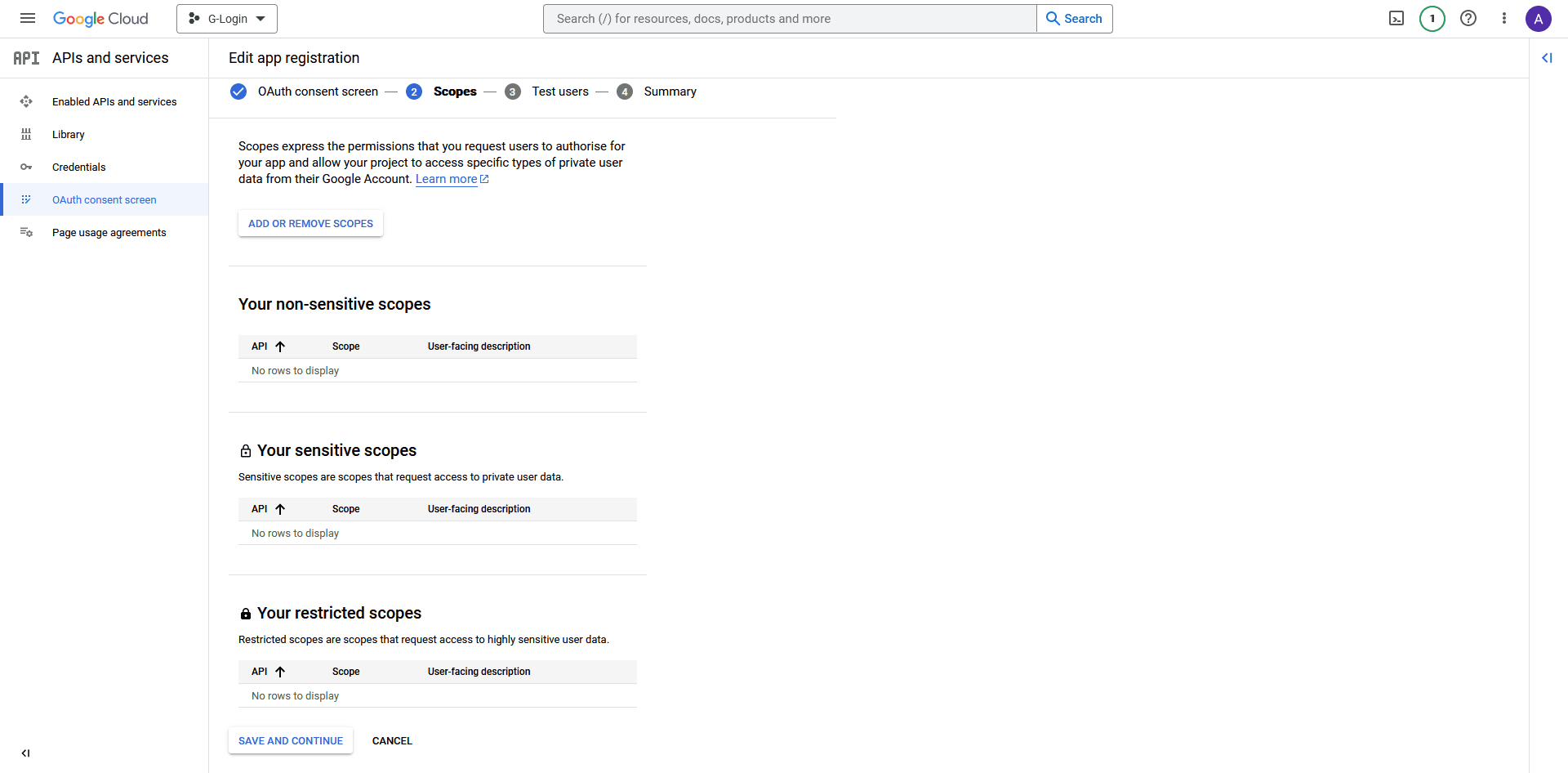
google client id 6

8. Also, on the Test users page, click the SAVE AND CONTINUE button.
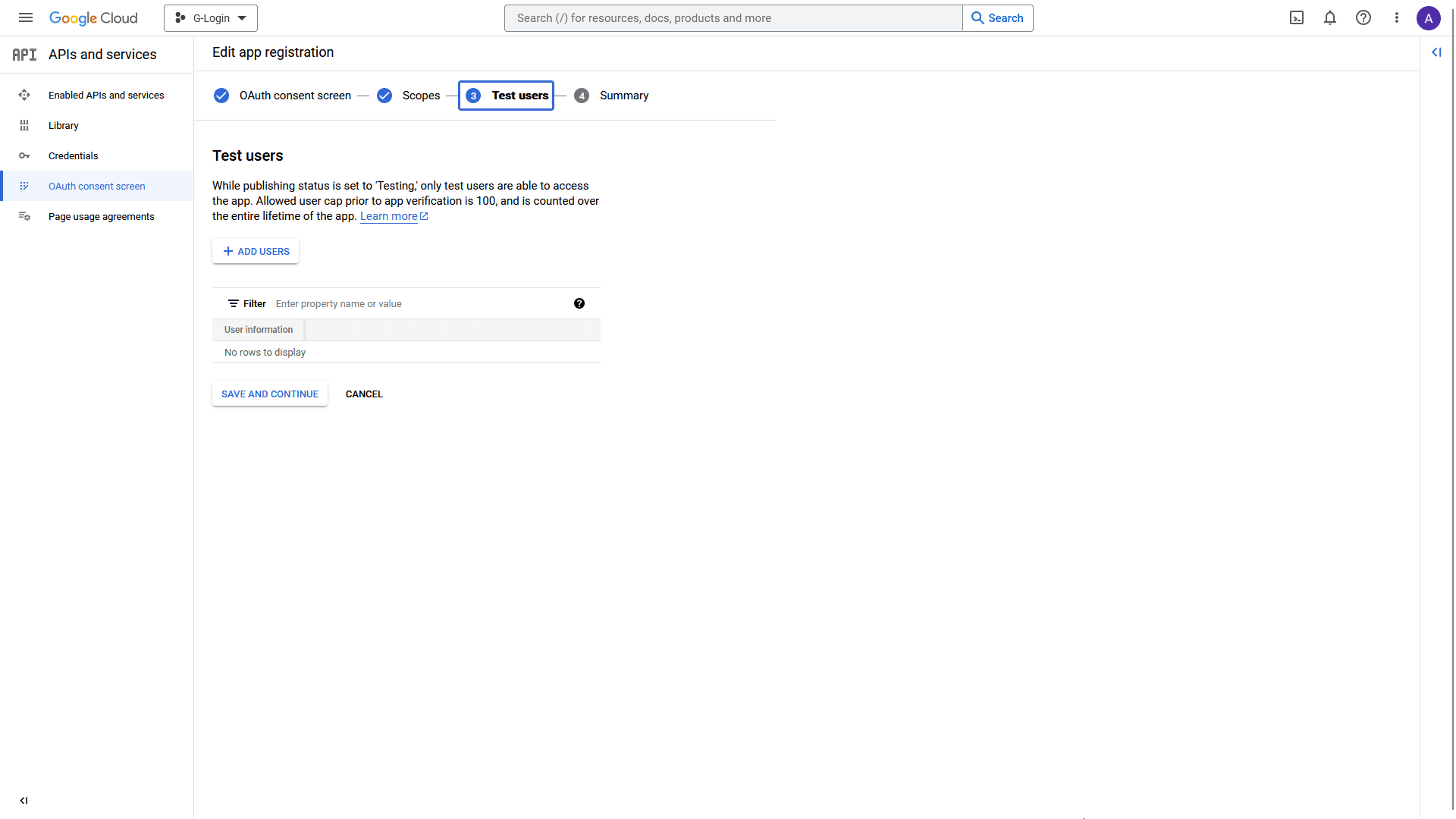
google client id 7

9. On the Summary page, click the BACK TO DASHBOARD button at the bottom.
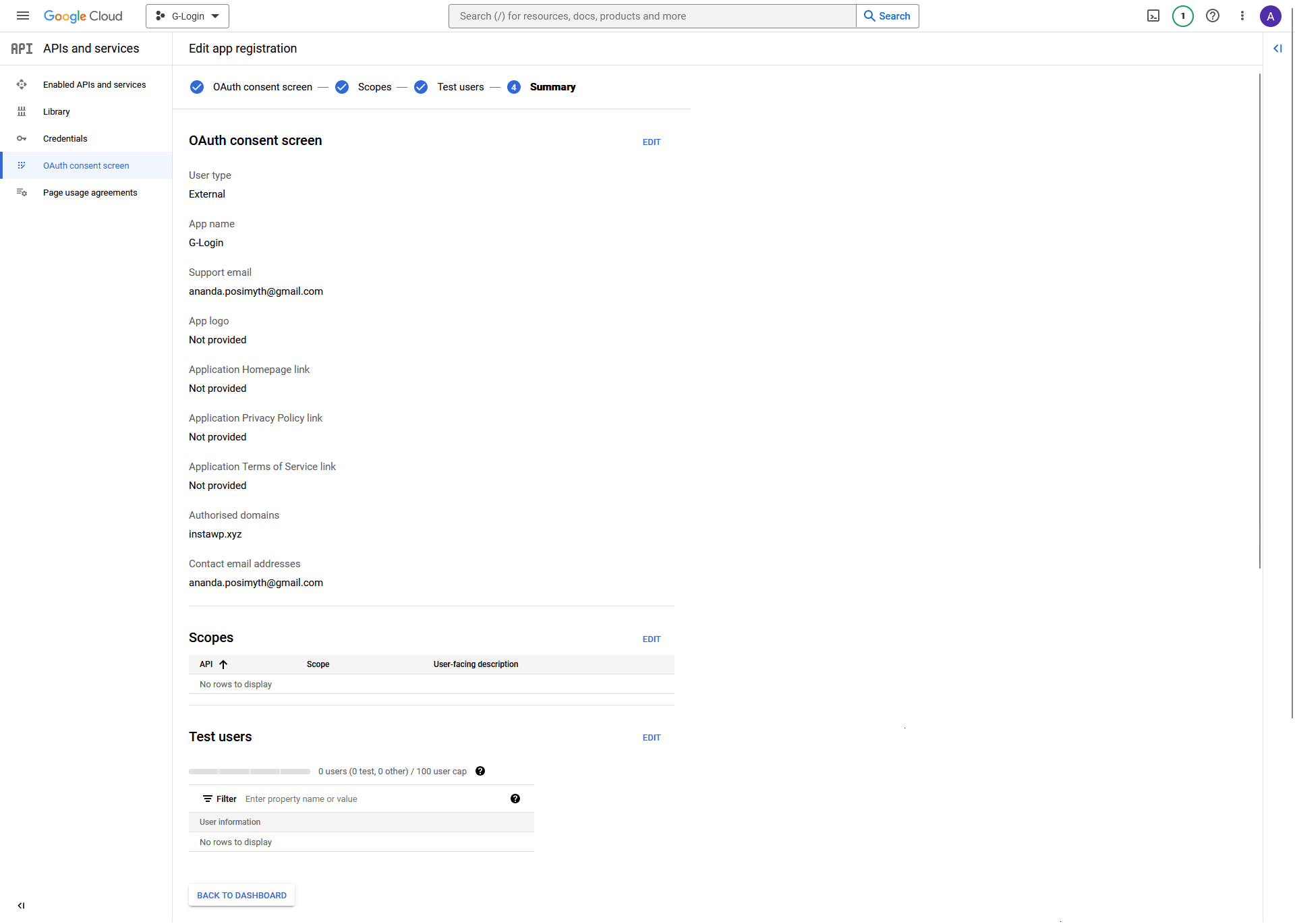
google client id 8

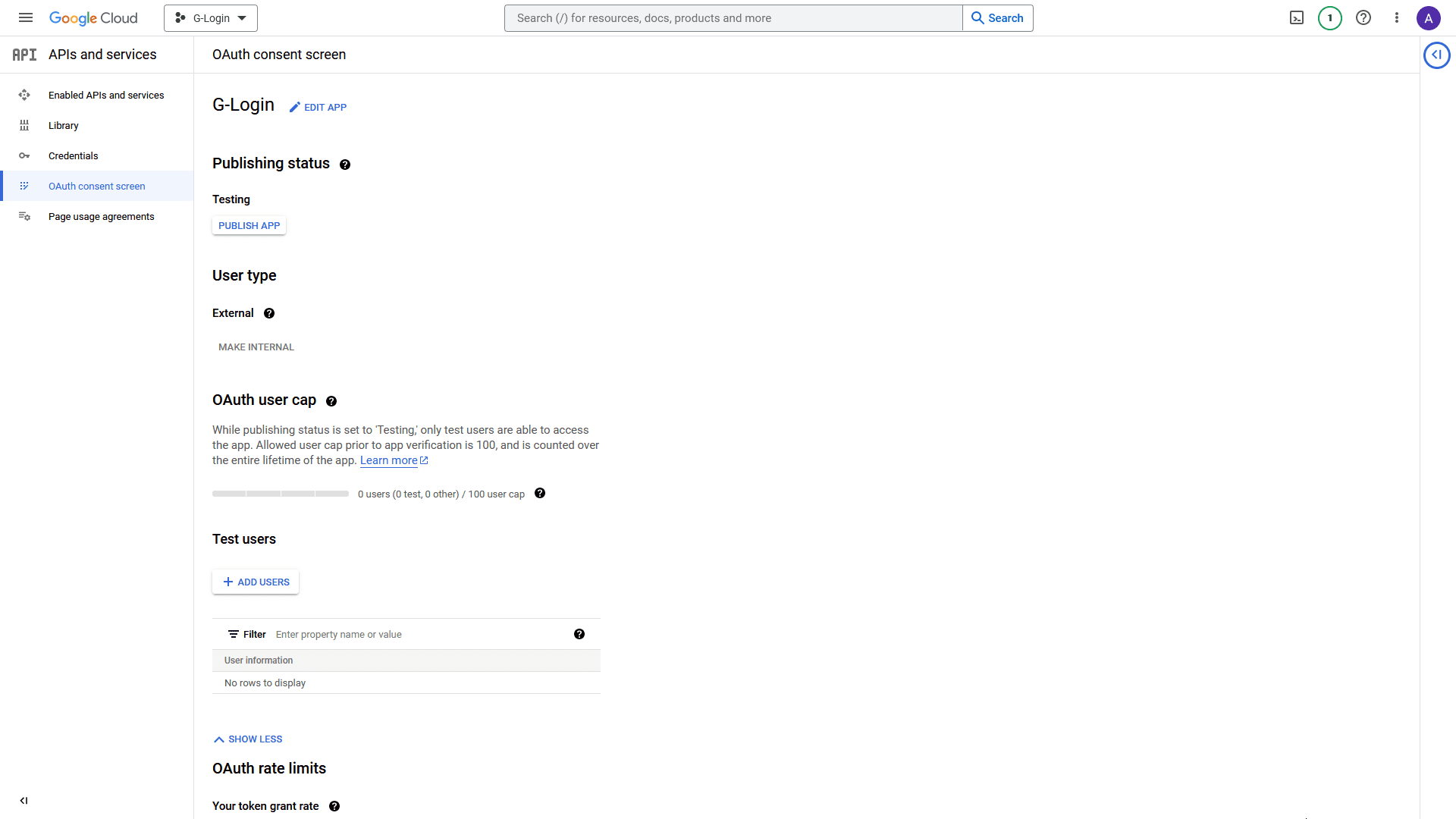
10. On the next page, click on the PUBLISH APP button to publish your app.
google client id 9

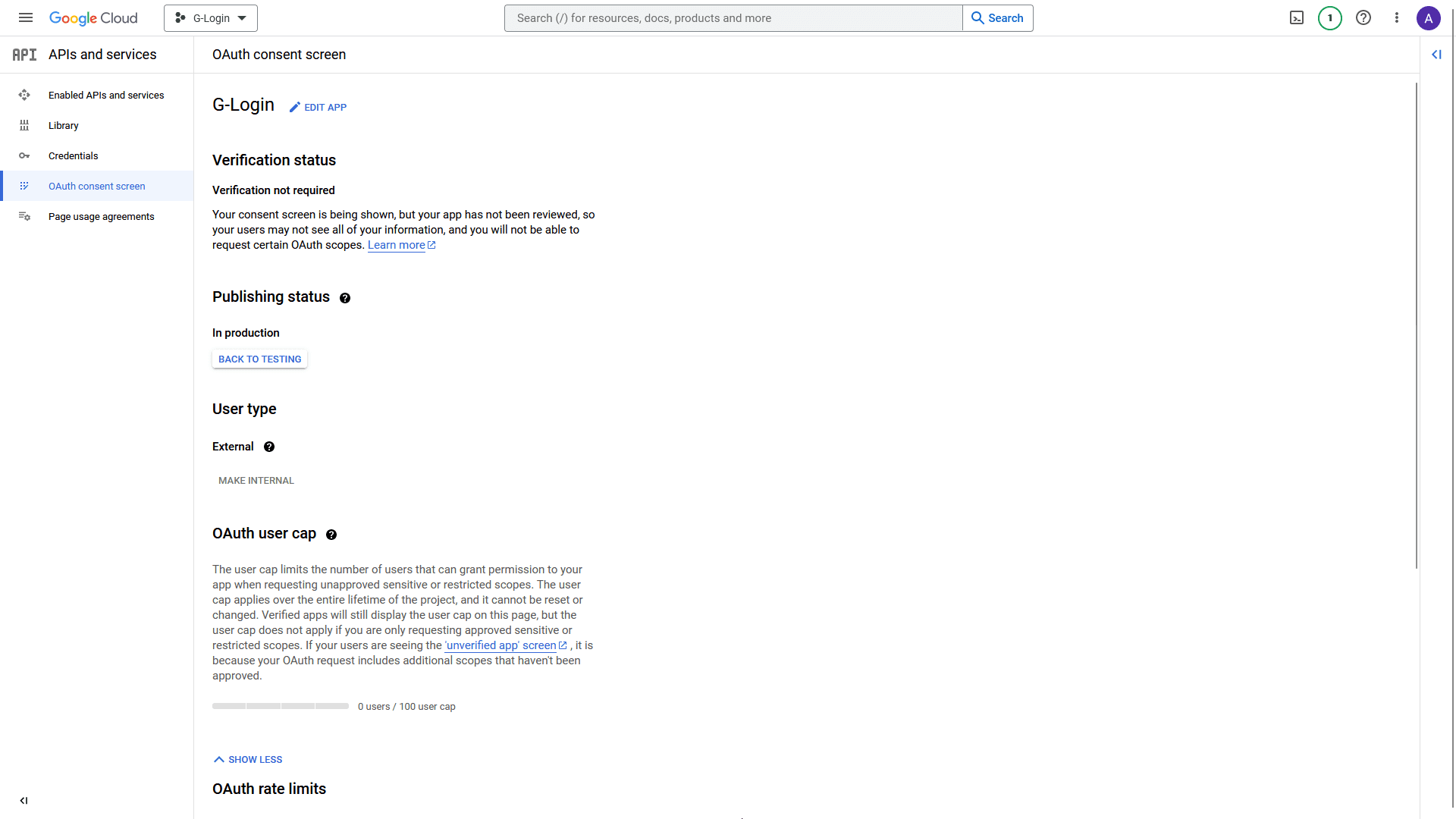
11. Once done, click on Credentials in the left sidebar.
google client id 10

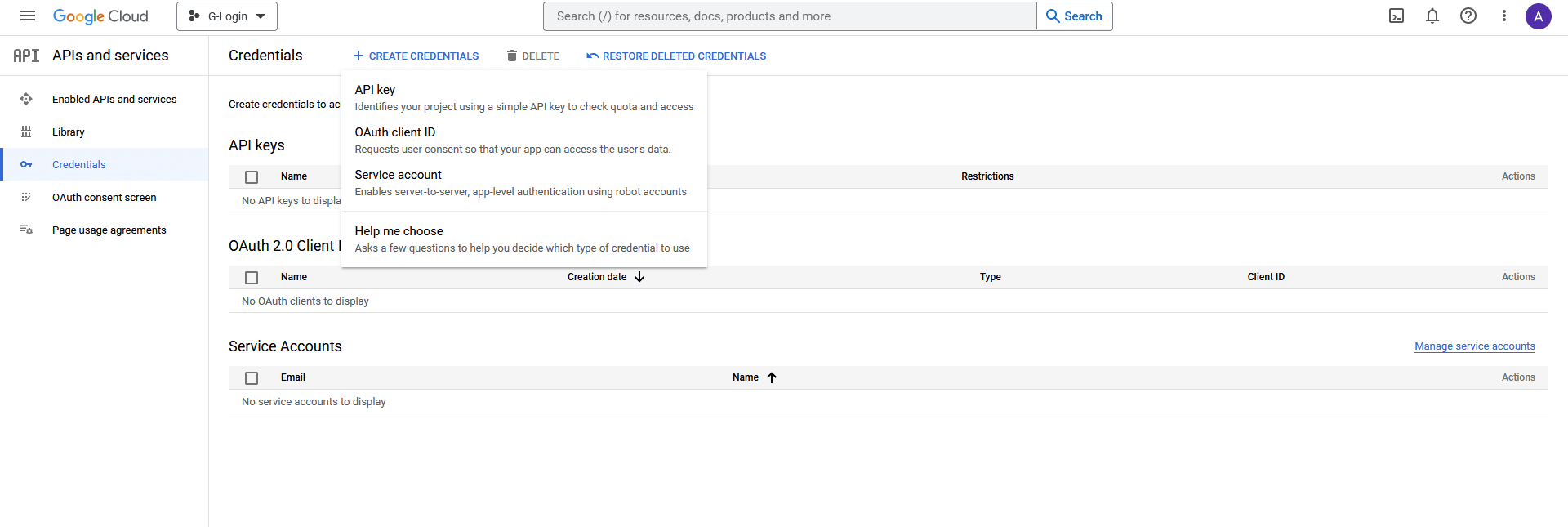
10. On the Credentials page, from the top, click on + CREATE CREDENTIALS > OAuth client ID.
google client id 11

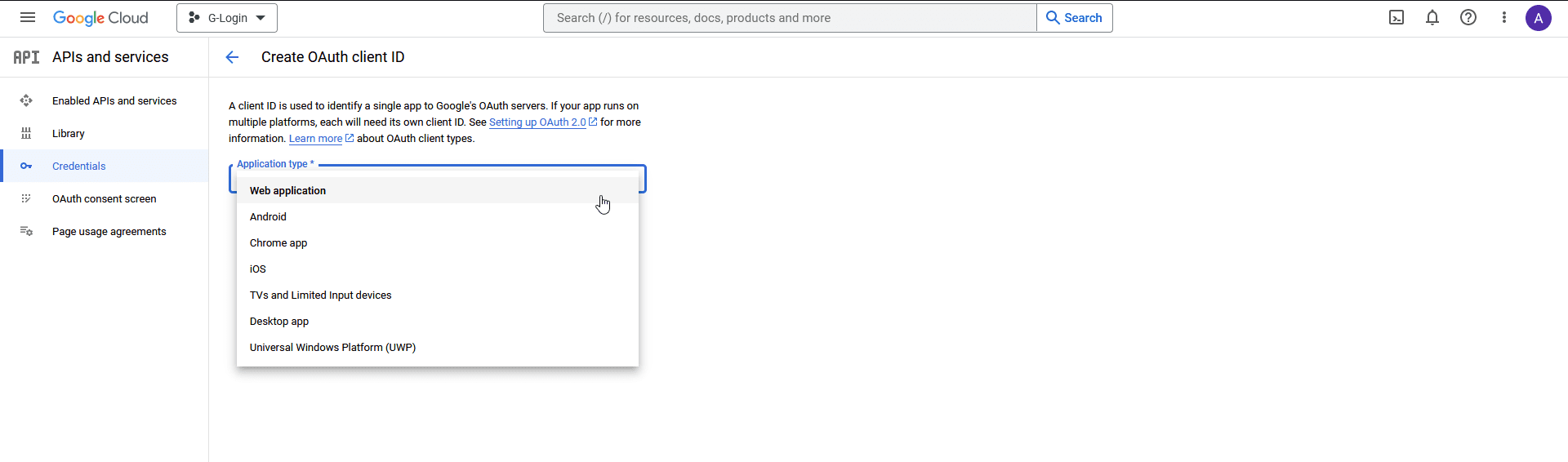
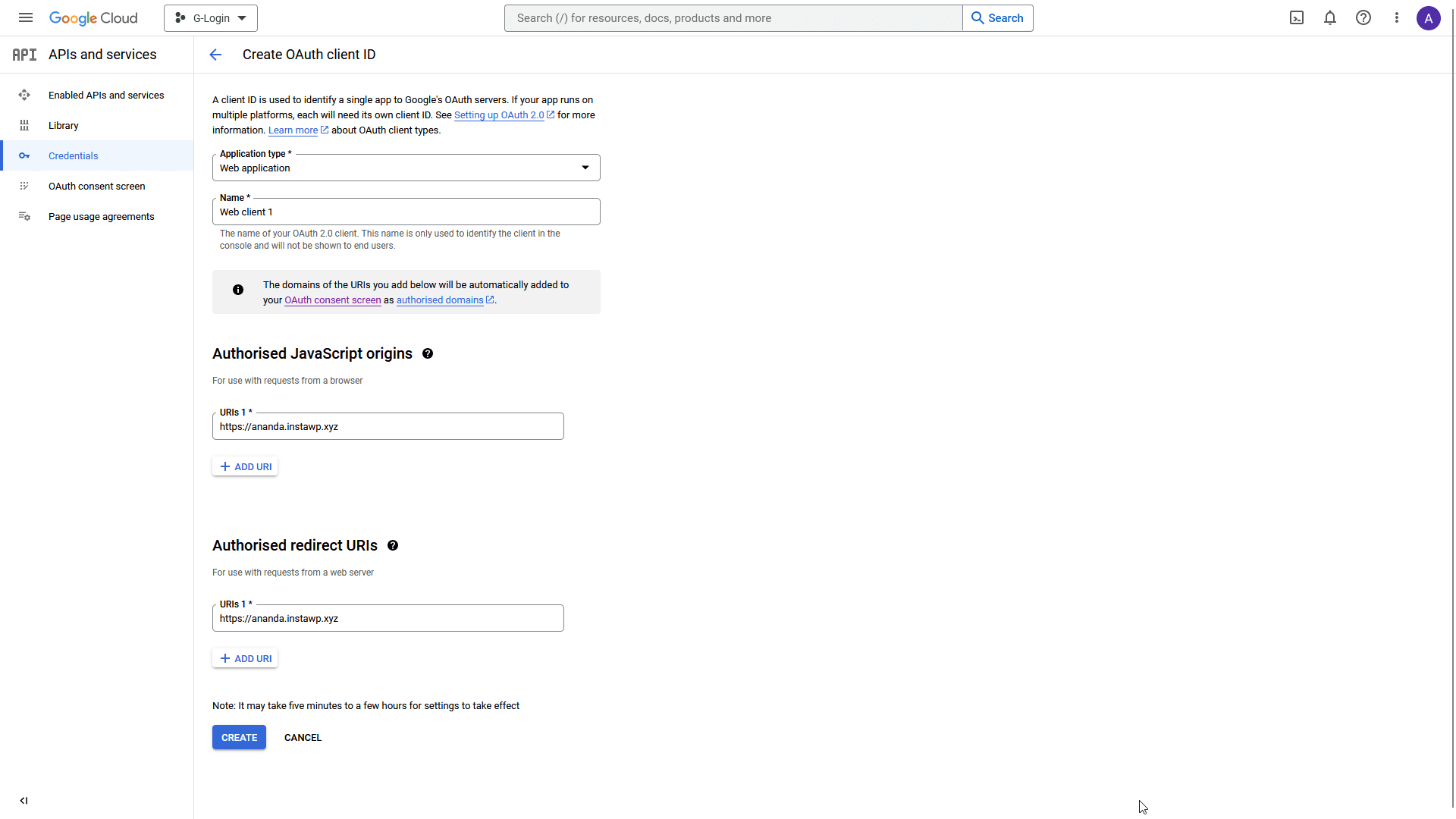
11. Then, from the Application type dropdown, select Web application.
google client id 12

12. Once you select the option then, you have to add the following details.

  • Name – Add your application name.
  • Authorised JavaScript origins – Click the ADD URI button to add your website URL – Example: http://www.yourwebsite.com.
  • Authorised redirect URLs – Click the ADD URI button to add your website URL – Example: http://www.yourwebsite.com.

Once done, click on the CREATE button.
google client id 13

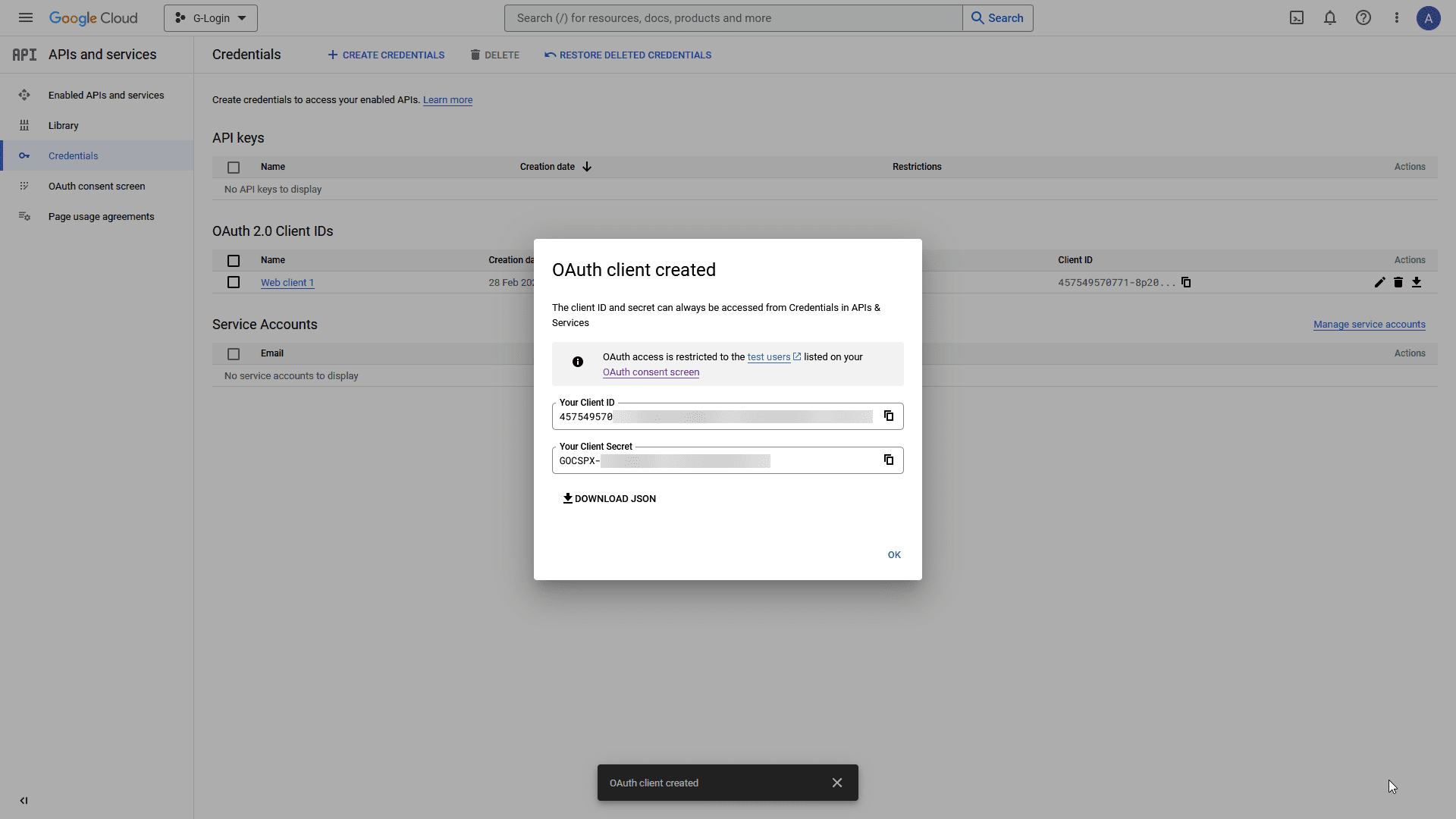
13.  On the next page, you’ll get your Client ID and Client Secret, copy and paste them into a notepad.
google client id 14

Note: For the Login & Signup block, you only need the Client ID.

Add the Client ID in the Login & Signup block

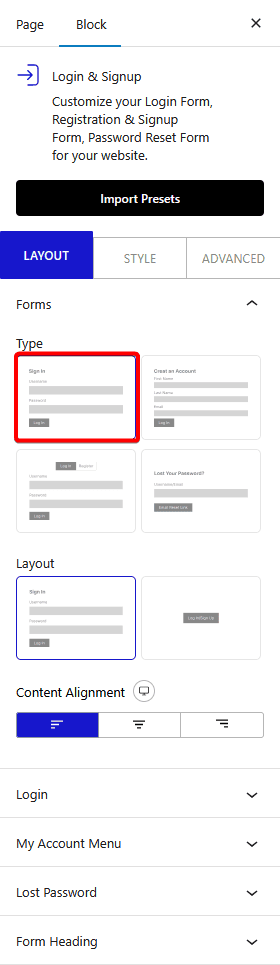
Once you have your Client ID, add the block on the page, go to Forms > Type and select any of the form types Login, Register or Login & Register. 


Select the appropriate layout from the Layout section.

Note: Here, we are using the Login form, but following the same process, you can add Google login to both Register and Login & Register forms.
login signup login type new

Once your form fields are ready, go to the Login tab and click the +Add Field button.

From the Field dropdown, select Social Login.

From there, turn on the Google toggle to enable login via Google. Add your id in the Google Client ID field.

You can also enable Google One Tap Popup by turning on the toggle. With this option, it will automatically show a popup asking the user to login via Google.

But if you don’t enable Google One Tap Popup, you’ll see a few more options.

Type – From here you can choose the button type, Standard or Icon.

Theme – You can select the button theme.

Shape – For the Standard button shape.

Button Text – You can choose from different button texts for the Standard button.

Icon Shape – For the Icon button shape.

Size – For the button size.

Finally, in the Redirect URL field, you can add a page link to redirect users to a specific page after login.

From the Alignment, you can align the button in the form.

Also, check How to add Facebook login to a WordPress website.

About the Author

Photo of Aditya Sharma CMO of NexterWP
Aditya Sharma
CMO at POSIMYTH Innovations · NexterWP · 7 years experience

He has spent years in the WordPress ecosystem building, breaking, and optimizing sites until they actually perform. He works at the intersection of speed, growth, and usability, helping creators ship websites that load fast and convert. An active WordPress community contributor sharing through tools, tutorials, and direct collaboration. Tested practice, not theory.

WordpressThemesElementorn8nAIClaudeAutomationServer
LinkedIn X Website

Share your Thoughts

Get Instant Answers to all your questions about Nexter Blocks,
Extensions & Theme trained on 1000+ Docs and Videos

Still in Doubt? Let’s Assist You

Raise a ticket Now

Have Feedback or Questions?

Join our WordPress Community on Facebook!

Join Us

Related Frequently Asked Questions

What should I do if I can't generate a Google Client ID?

If you're having trouble generating a Google Client ID, ensure you're logged into your Google account and have created a project in the Google Developers Console. If you haven't created a project, click on the CREATE PROJECT link. Remember, you need to fill out the OAuth consent screen and provide app information before you can access the Credentials page to create your OAuth client ID.

Are there any limitations when using Google login with Nexter Blocks?

One limitation to note is that the Login & Signup block requires the Google Client ID to function properly. Without it, the Google login option will not work. Additionally, ensure that your website URL is correctly added in the Authorized JavaScript origins and redirect URLs when creating the Client ID to avoid issues.

What are the best practices for setting up Google login on my WordPress site?

When setting up Google login, ensure that your Google Client ID is correctly configured and that you have enabled the necessary permissions in the Google Developers Console. It's also a good practice to test the login functionality after setup to ensure users can log in seamlessly. Consider using the Google One Tap Popup for a better user experience.

How do I troubleshoot issues with the Google login not appearing?

If the Google login option is not appearing, first check that the Login & Signup block is properly installed and activated. Then, verify that you have correctly added your Google Client ID in the block settings. Additionally, ensure that your website URL matches the one registered in the Google Developers Console under Authorized JavaScript origins.

Last reviewed: April 15, 2026

Related Docs

Docs Loop

How to Add a Before and After Opacity Slider in WordPress?
icon

Docs Loop

How to Add a Blend Cursor in WordPress?
icon

Docs Loop

How to Add a Blockquote in WordPress?
icon

Docs Loop

How to Add a Button in a WordPress Message Box?
icon

Docs Loop

How to Add a Button in WordPress Timeline?
icon

Docs Loop

How to Add a Call to Action Banner in WordPress?
icon
123……………………………………………………………51NEXT

Take your WordPress Experience to
the Next Level

WordPress Theme
Theme Builder
90+ WordPress Blocks
1000+ Pre-Build Templates
Unique WP Extensions
Performance Booster
Security Harder
Code Snippets
click hereGet Nexter

NO SPAM GUARANTEE

Get Exclusive WordPress Tips, Tricks and Resources
Delivered Straight to Your Inbox!

Nexter Theme

Overview

Features

Starter Website Templates

1000+

Nexter Extension

Overview

Features

Nexter Blocks

Overview

WordPress Blocks

Blocks

Listing

Builder

Extras

Nexter For

Unique Features

28+

For Marketers

For Beginners

For Agencies

For E-commerce

For Freelancers

Resources

Pricing

Changelog

New Updates

Download Child Theme

Request Feature

Roadmap

Nexter Free vs Pro

Affiliate Program

Blogs

Uptime

99.99%

Brand Kit for Press & Media

Get Support

Login

Helpdesk

Documentation

Video Tutorials

Facebook Community

AI Chat

24x7

Our Products

The Plus Addons for Elementor

WDesignKit - Templates,Widgets Builder & More

UiChemy - Figma to WordPress Convertor

4.0

SproutUI - 1300+ Figma Design Kit

NEW

Company

Website

About Us

Our Team

Career

Contact Us

Legal

Refund Policy

60 Days

Cookie Policy

Privacy Policy

Support Policy

Affiliate Agreement

Acceptable Use Policy

© POSIMYTH Innovations 2026

Frame 1272634151
Frame (2)
youtube-svgrepo-com 1
Frame 1272634152
Copy
How it works?