How to Create Marquee Text Effect in WordPress? (Left to Right Motion)

Key Takeaways

  • Nexter Blocks includes the Advanced Typography block, which allows users to create marquee text effects in WordPress.
  • The Advanced Typography block offers two marquee types: Default, which uses a marquee tag, and On Transition, which uses CSS transition.
  • Users can customize marquee scrolling direction, behavior options like Scroll or Slide, and set an infinite loop by adjusting the Loop field to 0 or -1.
Table of Contents

Are you looking to add a marquee text effect in WordPress? Marquee text, also known as scrolling or ticker text, adds motion to your webpage, grabbing visitors’ attention. This eye-catching effect is great for highlighting important information or announcements.

With the Advanced Typography block from Nexter Blocks, you can easily create a marquee text in WordPress.

To check the complete feature overview documentation of the Nexter Blocks Advanced Typography block, click here.

Requirement  – This block is a part of the Nexter Blocks, make sure it’s installed & activated to enjoy all its powers.

To do this, add the Advanced Typography block to the page and follow the steps – 

1. In the Advanced Typography tab, select Normal or Multiple from the Select Option section.

Let’s select Normal.

2. Then add the text in the Text field.

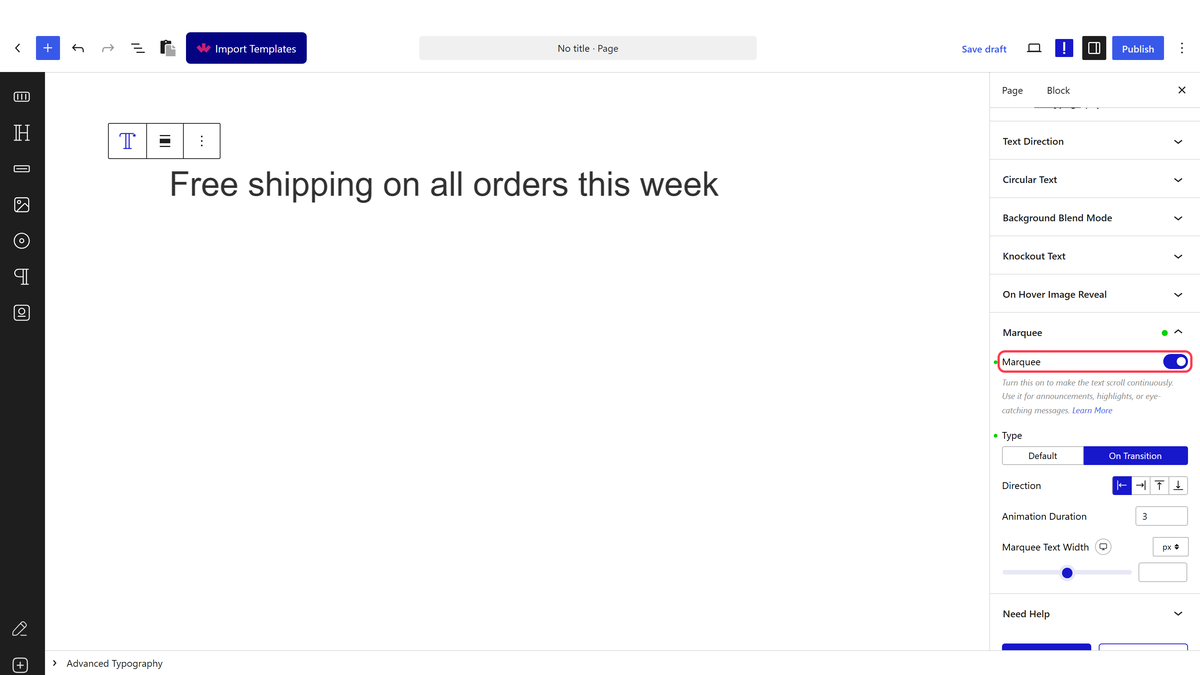
3. After that, enable the Marquee toggle from the Marquee tab.

Note: In the Multiple option you’ll find the Marquee option in each text repeater item.

Then from the Type section, you can select the marquee type. Here you’ll find two options – 

  • Default – This will add a marquee tag to create the marquee effect. 
  • On Transition – This will create the marquee effect using CSS transition.

Note: We recommend using the On Transition option as the marquee tag is not very SEO-friendly.

Let’s select Default here.

From the Direction dropdown, you can select the marquee scrolling direction. From here you can set the marquee direction to left, right, top and bottom.

Then, from the Behavior section, you can set the scrolling behavior. Here you’ll find three options – 

  • Scroll – This will add a scrolling effect.
  • Slide – This will create a sliding effect.
  • Alternate – This will make the text move in both directions alternatively.

 In the Loop field, you can set how many times the animation will play.

Note: You can set the loop to 0 or -1 to set an infinite loop.

From the Scroll Amount field, you set the animation speed.

Then, from the Animation Duration field, you can set the animation duration.

You can set the marquee animation horizontal area for responsive devices in the Marquee Text Width field.

Based on your settings, you’ll see a beautiful marquee text.

About the Author

Photo of Aditya Sharma CMO of NexterWP
CMO at POSIMYTH Innovations · NexterWP · 7 years experience

He has spent years in the WordPress ecosystem building, breaking, and optimizing sites until they actually perform. He works at the intersection of speed, growth, and usability, helping creators ship websites that load fast and convert. An active WordPress community contributor sharing through tools, tutorials, and direct collaboration. Tested practice, not theory.

WordpressThemesElementorn8nAIClaudeAutomationServer

Share your Thoughts

Get Instant Answers to all your questions about Nexter Blocks,
Extensions & Theme trained on 1000+ Docs and Videos

Still in Doubt? Let’s Assist You

Have Feedback or Questions?

Join our WordPress Community on Facebook!

Related Frequently Asked Questions

What should I do if the marquee text is not displaying correctly?

If the marquee text isn't displaying as expected, first ensure that the Advanced Typography block from Nexter Blocks is installed and activated. This block is essential for creating the marquee effect. Additionally, check your settings in the Marquee tab, particularly the toggle for enabling the marquee effect. If the settings are correct, consider testing with different marquee types, such as 'On Transition', which is more SEO-friendly than the default marquee tag.

What is the best marquee type to use for SEO purposes?

For SEO purposes, it's recommended to use the 'On Transition' marquee type instead of the default marquee tag. The default tag may not be SEO-friendly, while the CSS transition method provides a smoother effect and better compatibility with search engines. This choice can help ensure that your marquee text is both visually appealing and optimized for search visibility.

What happens if I set the loop value to 0 or -1?

Setting the loop value to 0 or -1 will create an infinite loop for your marquee text animation. This means that the text will continuously scroll without stopping, which can be useful for keeping important messages visible to visitors. However, be cautious with this setting, as it may become distracting if overused.

Last reviewed: April 14, 2026

Related Docs