















We’re starting 2026 with WordPress updates that will make your everyday work easier, not just add more features to the list.
If you build websites regularly, you already know where time quietly slips away. You write the same kind of content again and again, even when the layout never changes.
You add a small code snippet, and suddenly you are double-checking where it runs, just to make sure nothing breaks.
You try to add a simple hover effect, and before you know it, you are dealing with custom CSS that feels heavier than the result.
So, what are the new updates, and more importantly, how can these updates help you with your above challenges?
So, let’s walk through the updates together.

Update 1: AI Inside Nexter Blocks That Listens to You
AI is everywhere right now. But most tools work like this. You click generate, you get something generic, and then you spend time fixing it.
That’s not how AI works in Nexter Blocks.
We’ve introduced AI-powered text & image generation across Nexter blocks, making content creation faster and easier than ever. With built-in support for OpenAI and Gemini, you can generate high-quality text directly inside the block editor without switching tools or workflows.
Here, AI starts with your input. You tell it what you want, how you want it to sound, and what the content is for. Based on that, it generates content that actually fits your page.
Right now, this AI experience is available inside Nexter Blocks. But very soon, we’ll bring it to the core WordPress blocks also.
How Can Our AI Generation Help You?
Let’s look at where this actually saves you time and effort in your day-to-day work.
1. Generate Custom Content and Images Without Leaving the Gutenberg Editor
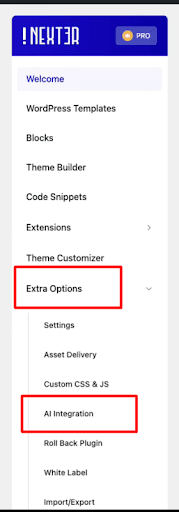
There is no new workflow to learn here. You just have to toggle on the AI integration option from the Extra Options tab in the Nexter dashboard.
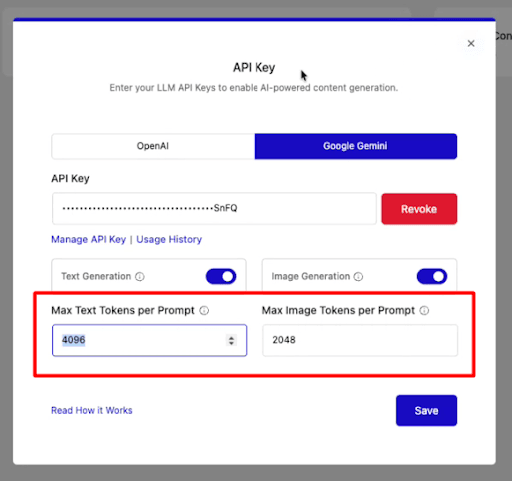
Then, enter your LLM API keys and toggle on the Text Generation, Image Generation, or both.
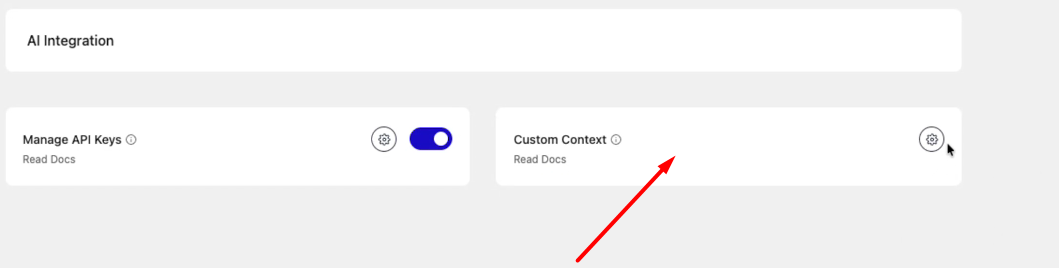
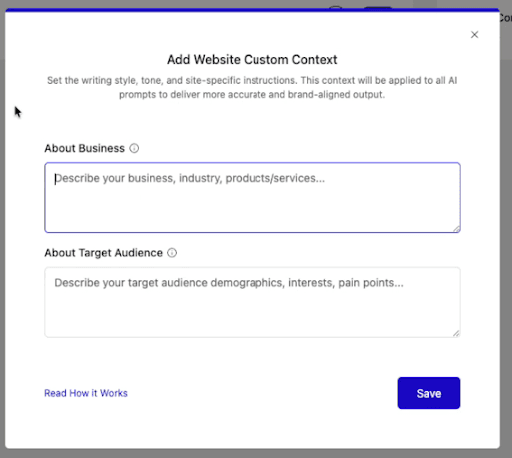
From the Custom Content tab, you can enter the details of your business (highly recommended) so that you can get your AI content as per your needs.
This will give you personalized content as per your business requirements.
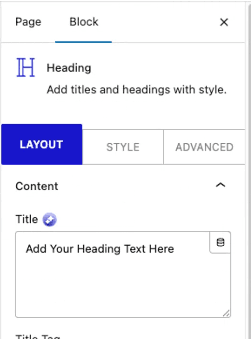
Then open the post or page, and when you add Nexter Block, you’ll see the option in the left sidebar.
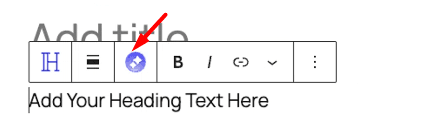
Also, you can directly click the AI generation icon that appears by left-clicking the block.
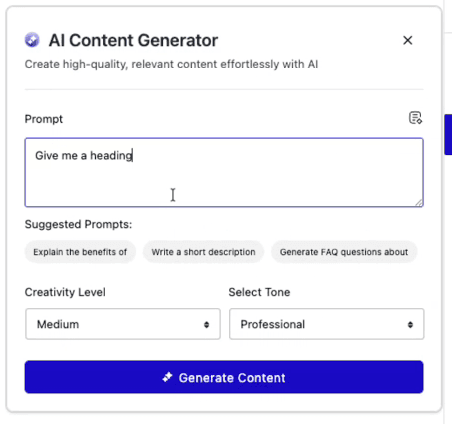
Enter your prompt, then get the content as you want.
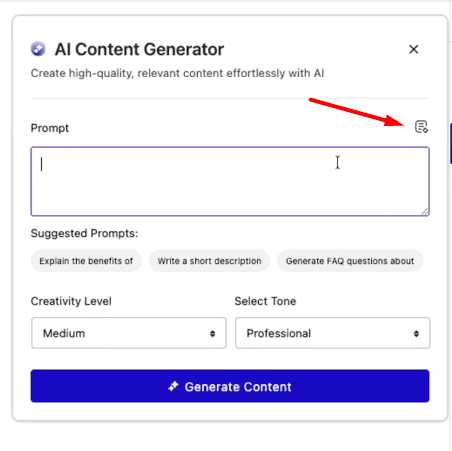
Also, we have added the Prompt Enhancer option that will refine your prompt so that the output is correct and super personalized.
To enable Prompt Enhancer, just click on this icon:
So, basically, you stay inside the block editor and:
- Generate text directly inside text fields
- Generate images using AI if you are on PRO
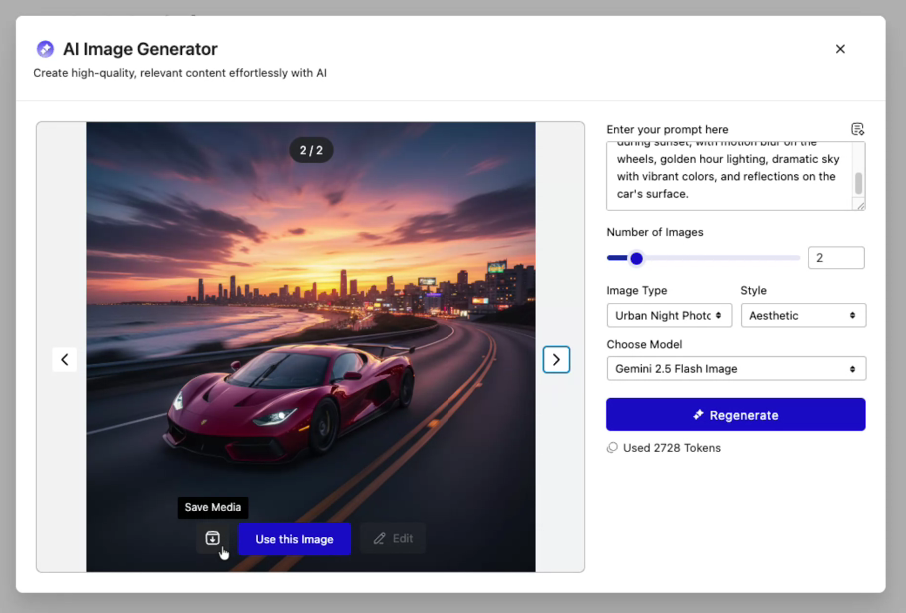
Set the number of images you want and select the model.
- Use AI inside repeater items for scalable sections
You do not need to switch tabs or copy content from other tools. Everything happens where you are already building the page.
That alone saves more time than it sounds.
2. Create Repeated Content Without Repeating Yourself
If you have ever built a testimonials section, a team page, or a process layout, you know how repetitive it gets. Same structure. New content. Again and again.
Now, instead of writing each item manually, you can let AI help inside blocks that support repeater mode.
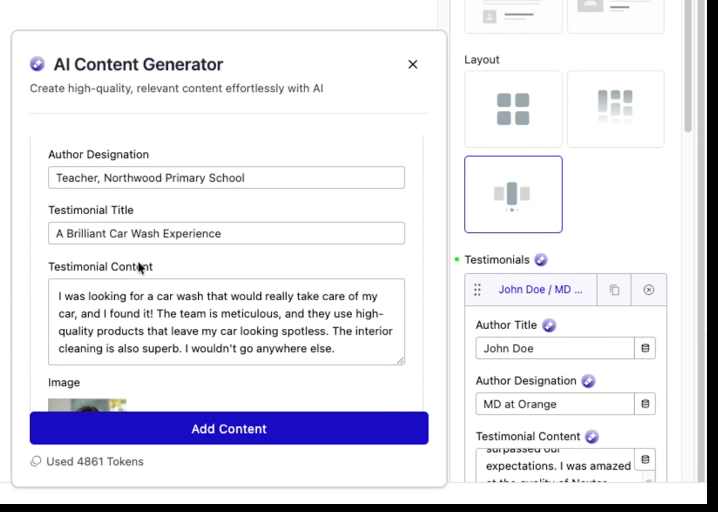
You can currently use AI content generation in repeater fields for:
- Testimonial
- Team Listing
- Infobox
- Media Listing
- Process Steps
- Animated Service Box
- Flipbox
What this means for you is simple.
You focus on the layout once, and AI helps you fill in the content consistently across all items.
You still review and adjust things, but you are no longer starting from scratch every time.
More repeater-based blocks will support this soon, so creating larger sections will keep getting easier.
3. No Extra Plugins Required To Refine, Improve or Translate Content
Writing is rarely perfect on the first try. We know that.
So Nexter Blocks AI also helps you refine content right where you write it.
You can fix grammar, rephrase sentences, shorten or expand text, summarize content, or translate it, simply by left clicking opn the block and clicking on the AI generation tab.
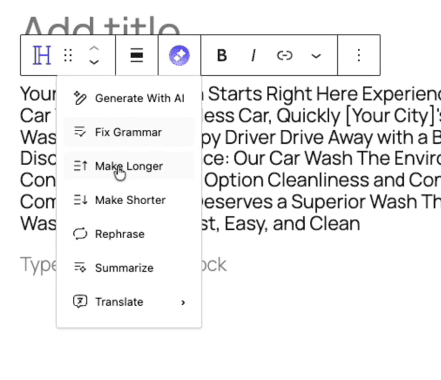
Then set the options as you want them.
You no longer need separate plugins just to polish what you wrote.
Fewer plugins, less bloat for your website.
This keeps your site lighter and your workflow simpler.
4. Smart Token Control for Agencies and Teams
If you manage client sites, AI can be helpful, but only when it is controlled.
That’s why Nexter Blocks gives you separate AI tokens for text and images.
You can allow clients to generate text, but restrict image generation if needed. You can protect your API credits and still let clients work independently.
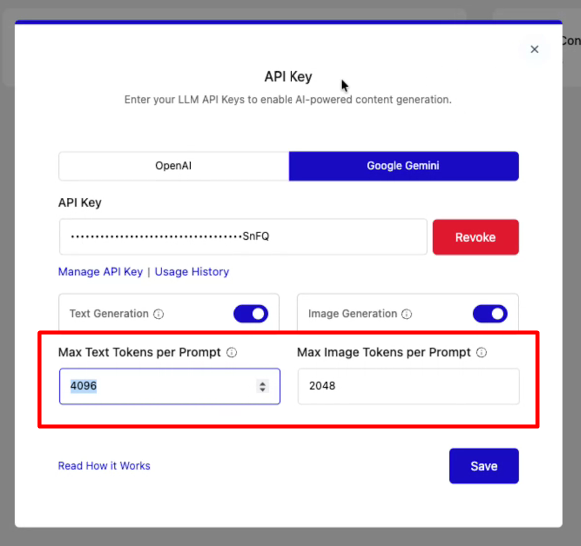
You decide how AI is used, not the other way around.
What This AI Update Really Gives You
When you step back, this update is about removing friction.
- You spend less time writing repetitive content.
- You rely on fewer plugins.
- You keep control over quality and costs.
- And you build faster without changing how you already work.
Update 2: Smarter & Faster Code Snippet Management(Nexter Extension)
Adding custom code should not feel risky.
This update gives you clearer control over where your code runs and improves performance in the background.
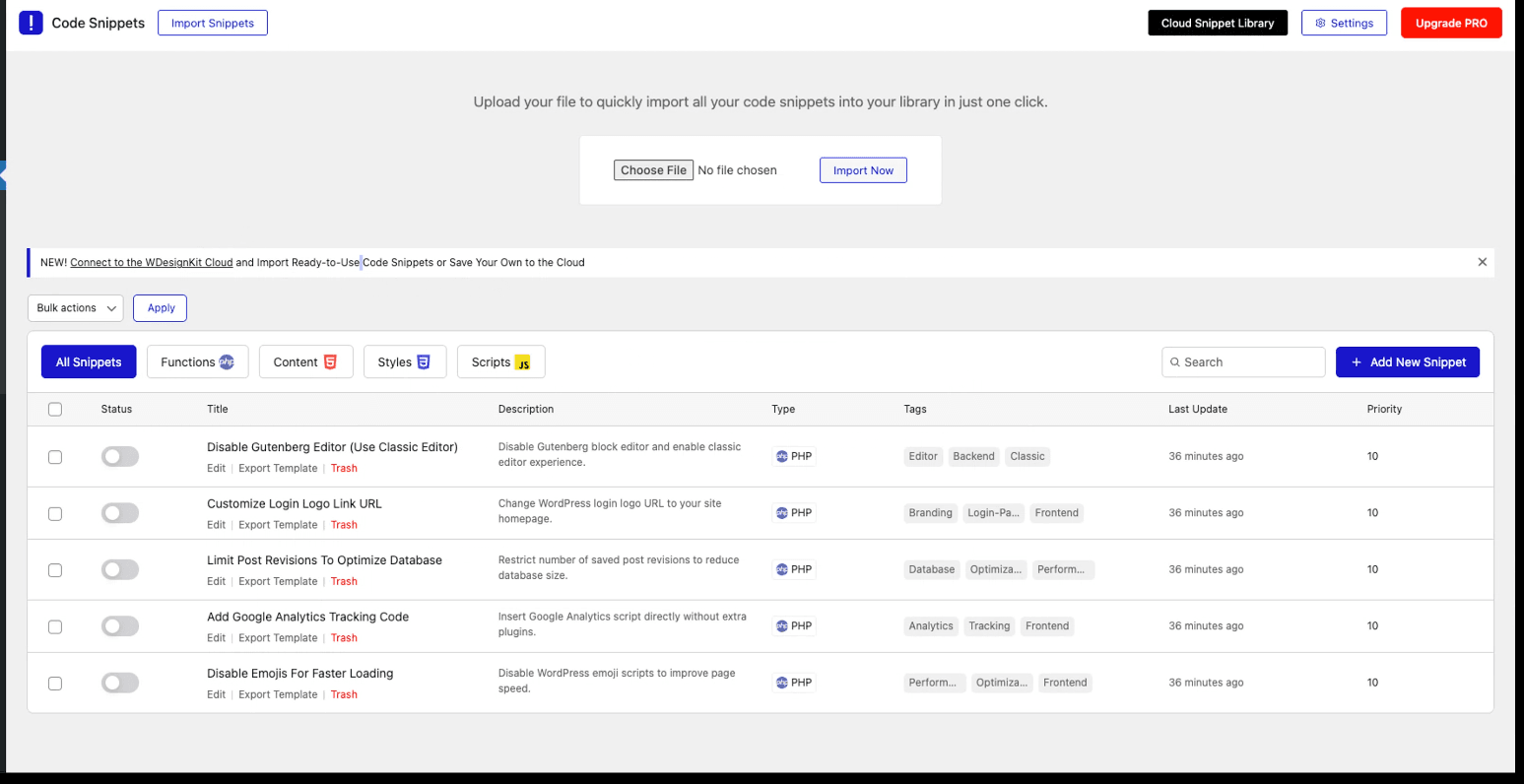
Let’s see what new changes have been made to the Code Snippets:
1. Better Performance with File-Based Snippets
Behind the scenes, snippets are now stored as files instead of database entries.
You do not need to do anything differently, but your site benefits from:
- Faster execution
- Reduced database load
- Better stability on larger sites
It is a quiet improvement, but one that matters over time.
2. Cleaner UI for a Better Editing Experience
We’ve refined the Code Snippet interface to make it cleaner, more intuitive, and easier to navigate. The improved UI/UX helps you focus on writing and managing code without distractions, making snippet creation and updates smoother, especially when working with multiple snippets.
3. Save Snippets Instantly with Keyboard Shortcuts
You can now create or update code snippets using simple keyboard shortcuts, Ctrl + S (Windows) or Cmd + S (Mac). This quick-save option removes extra clicks, speeds up your workflow, and lets you make changes faster while staying in the editor.
4. Bulk Actions for Code Snippets
Manage multiple snippets at once using the new bulk action dropdown.
You can now import, export, or delete snippets in one go, making cleanup, migration, and backups much easier.
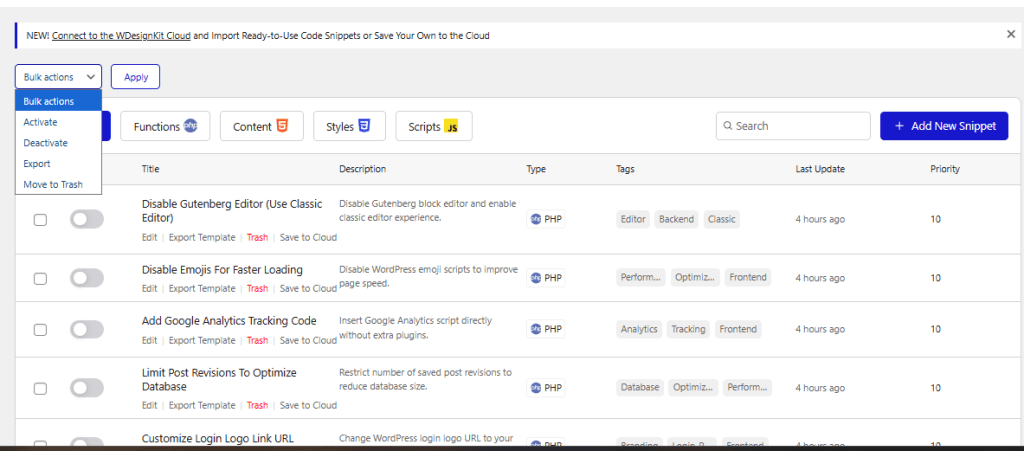
Also, very soon we’ll be expanding our Code Snippets library, so you don’t have to code from scratch or import snippets from low-code platforms.
Update 3: Better WooCommerce Security Without Breaking Checkout ( Nexter Extension)
If you run a WooCommerce store, security matters. But so does keeping checkout simple for real customers.
We’ve improved CAPTCHA compatibility in the Nexter Extension so spam protection works smoothly without interrupting the buying experience.
You can now add CAPTCHA to key WooCommerce areas, like:
- Checkout
- Pay for Order
- Login
- Registration
- Reset Password
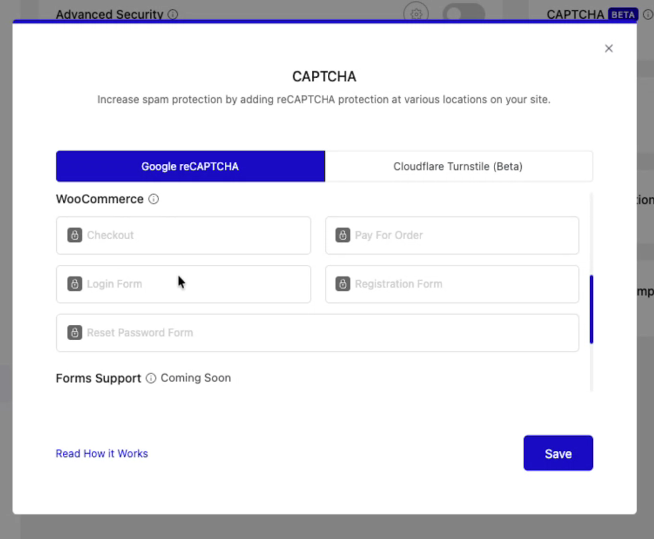
Nexter supports both Google reCAPTCHA and Cloudflare Turnstile, giving you flexible options based on your setup.
What this means in practice:
- Fewer bot attacks on login and checkout pages
- Fewer conflicts with WooCommerce forms
- A smoother flow for real customers
- Clear visibility into which CAPTCHA option is active from the settings page
Your store stays protected where it matters most, without adding unnecessary friction to the customer journey.
Update 4: Transform & Transition on Hover: More Interaction, Less Effort (Nexter Blocks)
Small hover effects can make a site feel polished, but writing custom CSS for each one gets tiring.
Now, Nexter Blocks lets you control transform and transition settings with separate options for normal and hover states.
You can adjust rotation, scale, movement, skew, flip, transition timing, and easing directly from the UI.
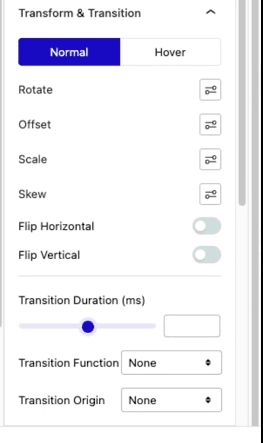
This helps you add just enough interaction to guide users and improve experience, without overdoing animations or hurting performance.
Your designs stay consistent and easier to maintain.
For more updates, you can check the changelog.
Wrapping Up
This update is all about helping you work smarter without changing the way you already build websites.
Our AI Generator is designed to listen to your input and generate content that matches your intent, instead of producing generic output.
Your code now runs exactly where it should, without affecting areas it doesn’t belong to.
Security improvements work quietly in the background, protecting your site without interrupting real users or breaking checkout flows.
Design controls stay simple and visual, giving you more flexibility without adding complexity.
And this is just the beginning; many more improvements are already on the way.


