












Sometimes a page needs one icon on its own — above a heading, beside a statistic, as a small link back to the top.
The Icon block places a single icon with its own colour, size and optional link, without borrowing a larger block to get it.
Before You Start
- Edition: Free — works in Nexter Blocks (free) and with Nexter Blocks Pro.
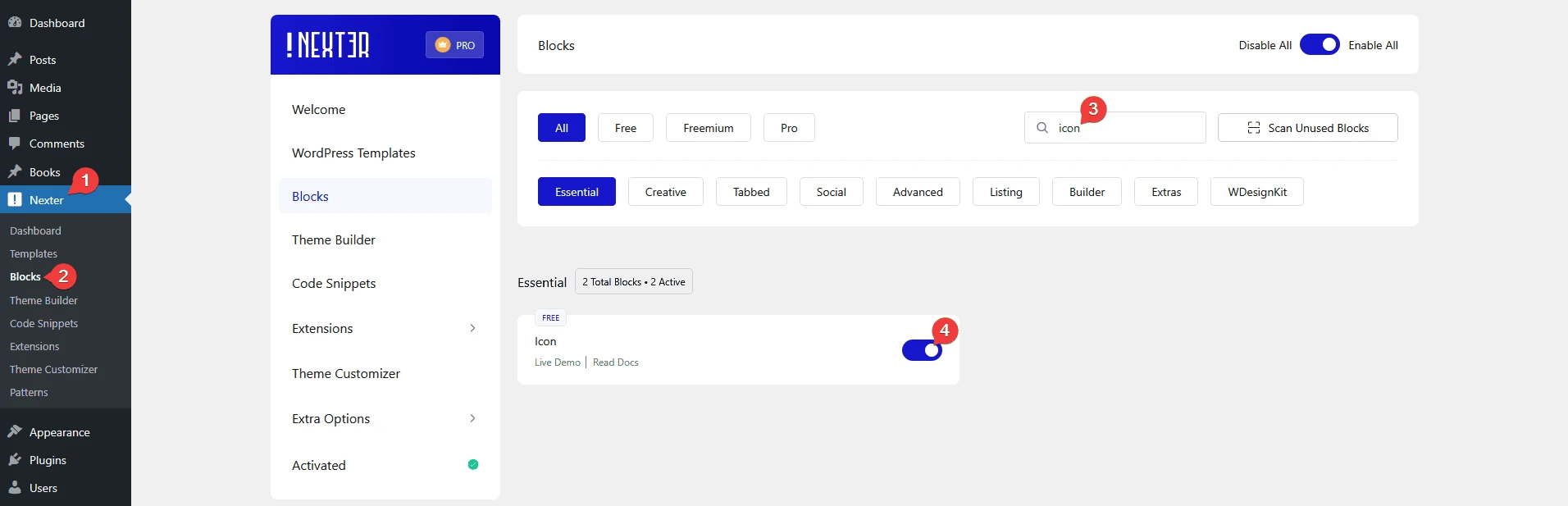
- Block to enable: Icon, switched on under Nexter > Blocks in your WordPress dashboard.
Video Tutorial

Steps
- Add the Icon block to your page.
- Choose an icon from the library, or switch the type to SVG and upload your own.
- Set the icon size and colour, and the hover colour.
- Set the alignment.
- Add a link if the icon should be clickable, then publish.
How It Behaves
The Icon block renders one icon in a small wrapper, so it can be aligned and spaced like any other block rather than being locked inside a card.
- It renders a compact wrapper — measured,
span.tpgb-nicon-wrap, 24 pixels tall at the default size. - A link makes the icon itself clickable — measured, the wrapper’s contents become an anchor.
- Any icon class from the library is accepted, so you are not limited to a short preset list.
- Separate normal and hover colours let the icon respond without any custom CSS.
- Measured with Nexter Blocks Pro deactivated: this block renders identically. It is a free block.
Limitations
- One icon per block. For a row of social icons use the Social Icon block, which is built for that.
- An icon on its own carries no meaning to a screen reader. If the icon is the only content of a link, give the link text or a label so it is not announced as empty.
- Uploading SVG files needs the right permissions in WordPress, and SVGs from untrusted sources should not be uploaded at all.
- The block draws an icon; it does not animate it — use the Draw SVG block for that.
Troubleshooting
My icon is not appearing
Check an icon is actually selected, and that the icon type matches what you set — a block set to SVG with no file uploaded renders nothing.
My SVG will not upload
WordPress blocks SVG uploads by default for security. Your administrator has to allow it, and only for files you trust.
The icon is tiny or huge
Set the icon size on the block rather than scaling it with CSS — the size control is in the block’s own settings.
The icon is a link but screen readers announce nothing
An icon has no text. Add a label to the link so the destination is announced.
