












Web accessibility is a core part of modern WordPress website design. Adding ARIA labels to your links and buttons ensures that users relying on screen readers and assistive technologies can understand the purpose of every interactive element on your site.
With Nexter Blocks links and buttons, you can add ARIA text to any element on your WordPress page.
Best Used For:
- Any WordPress site that needs to meet WCAG accessibility standards
- Government, healthcare, or educational sites where accessibility compliance is required
- E-commerce sites where product links and CTA buttons need ARIA descriptions for screen reader users
Requirement – This feature is a part of Nexter Blocks. Make sure it is installed and activated.
Why It Matters
A link or button with no accessible name is invisible to a screen reader user, even if it is visually obvious to a sighted visitor (an icon-only button, for example). ARIA stands for Accessible Rich Internet Applications, a set of HTML attributes that describe the purpose of an element to assistive technologies. Adding an ARIA label gives every interactive element in Nexter Blocks a spoken name, which is a WCAG requirement, not just a nice-to-have.
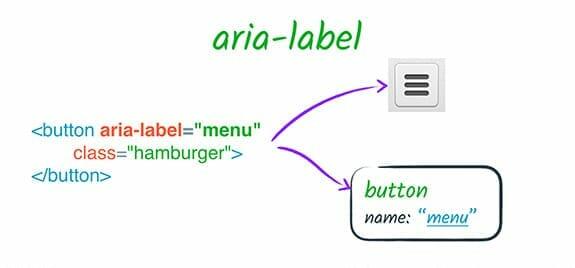
What You Get
- An Aria Label field on the Advanced Button block, under the Accessibility tab
- An ARIA Label field on the link settings of other Nexter Blocks blocks whenever a link is added
Benefits
- WCAG-aligned by default – the field is built into the block’s link settings, so accessible naming is a normal part of adding a link, not a separate plugin or custom code.
- Screen-reader clarity – icon-only buttons and vague link text (“click here”, “read more”) get a real spoken description instead of no context at all.
- No markup to hand-write – you never need to edit the block’s HTML to add an
aria-labelattribute yourself.
Capabilities
- Advanced Button block – set the ARIA label from the block’s Accessibility tab.
- Other Nexter Blocks blocks – whenever you add a link inside a block, an ARIA Label field appears alongside it.
How to Use It
To add an ARIA label on the Advanced Button block, add the block to the page and go to the Accessibility tab.
In the Aria Label field, enter your ARIA label text. Use a descriptive phrase that tells screen reader users what action the button performs, such as “Open contact form” or “Download product brochure”.

For other Nexter Blocks blocks, whenever you add a link, you will see a field under the link that asks for the ARIA Label. Enter a description of what the link leads to so users with visual impairments understand the context of the link.
Use Cases
- Any WordPress site that needs to meet WCAG accessibility standards
- Government, healthcare, or educational sites where accessibility compliance is required
- E-commerce sites where product links and CTA buttons need ARIA descriptions for screen reader users
Limitations
- The ARIA Label field only sets the accessible name for the element it’s attached to; it does not audit the rest of the page for other accessibility issues (color contrast, keyboard focus order, heading structure).
- An ARIA label overrides the element’s visible text for screen readers, so it should describe the same action the visible text or icon represents – a label that says something different from what the button actually does creates a confusing, not accessible, experience.
- Some third-party blocks or custom HTML embedded elsewhere on the page are outside Nexter Blocks and will not gain an ARIA Label field automatically.
Troubleshooting
- ARIA label isn’t announced by a screen reader. Confirm the label was saved on the correct element – on the Advanced Button block it lives under the Accessibility tab specifically, not the general Content or Style tabs.
- Custom attributes (including ARIA-related ones) can’t be added on a specific block, such as the Mega Menu. A real, confirmed report (FluentSupport ticket #13546, Nexter WP) found the mega menu did not expose a Custom Attributes field for this – if the block you’re working with has no ARIA Label field, use the block’s own Accessibility tab where available, and check for a plugin update, since attribute support has been added to individual blocks over time.
- Aria label looks correctly implemented but still fails an accessibility test tool. A real, confirmed report (FluentSupport ticket #12714, Nexter WP, Tabs Tours block) found an automated accessibility scanner flagging the label despite it being set – scanners check ARIA implementation against the full WAI-ARIA spec (roles, states, and the label together), so also verify the element’s role is appropriate for what it does, not just that a label string is present.
