
















In the Nexter Image Optimization feature, AVIF conversion helps you generate next-gen images with better compression and performance.
However, if you see that AVIF is not supported, this is not an issue with Nexter. AVIF support depends entirely on your server configuration.
This guide explains why this happens and how you can fix it.
1. Understanding AVIF and How WordPress Handles It
AVIF (AV1 Image File Format) is a next-generation image format that produces significantly smaller file sizes compared to JPEG, PNG, and even WebP — without sacrificing quality.
When enabled in Nexter Extension’s Image Optimization feature, your images are automatically converted to AVIF to improve your site’s loading speed and Core Web Vitals scores.
However, AVIF conversion is not handled by WordPress or the Nexter Extension plugin itself. It relies entirely on the server-side image processing libraries installed and configured on your web server. This is why AVIF support can vary from one hosting environment to another — even across different plans with the same provider.
When the plugin reports “AVIF Not Supported”, it means the server your website runs on does not currently have the required libraries configured for AVIF.
This is not a bug in the plugin. It is a server configuration limitation.
2. Server Requirements for AVIF Support
AVIF support on WordPress depends on one of two image processing libraries: GD or Imagick (ImageMagick).
Option A — PHP GD Library
GD is the most commonly installed image library on shared hosting. For AVIF to work via GD, all three conditions must be true:
- PHP 8.1 or higher must be installed on the server.
- The GD extension must be compiled with libavif support.
- The libavif C library must be installed on the server.
Option B — Imagick (ImageMagick) Library
For AVIF to work via Imagick:
- The Imagick PHP extension must be installed.
- ImageMagick version 7.0.10-58 or higher must be running.
- The libavif system library must be installed.
Note: Meeting only the PHP version requirement is not enough. The image library must also be compiled with AVIF support. This can only be done by your hosting provider.
3. How to Check AVIF Support on Your Site
Before contacting your hosting provider, verify AVIF support using WordPress Site Health.
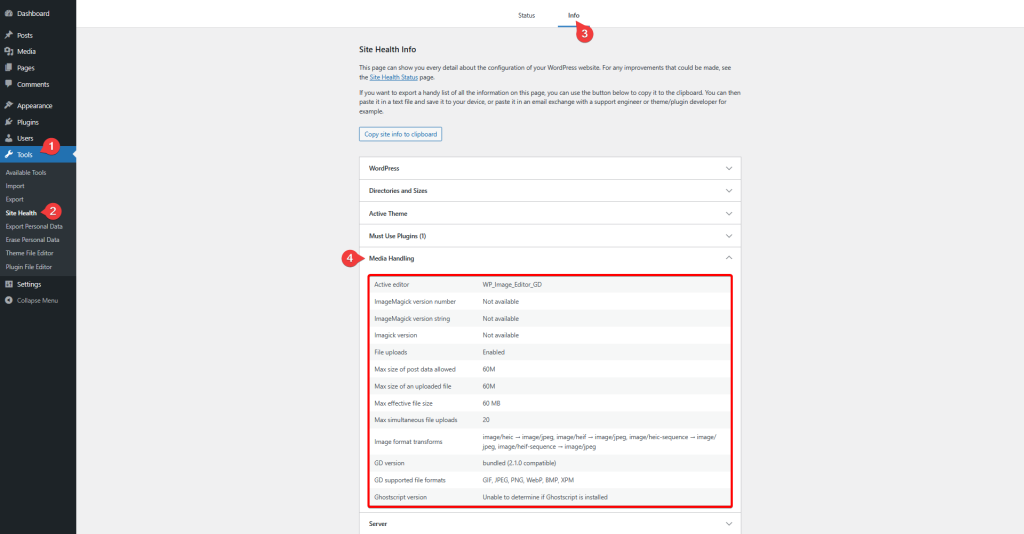
Steps:
- Log in to your WordPress dashboard.
- Go to Tools → Site Health.
- Open the Info tab.
- Expand the Media Handling section.
- Look for AVIF in supported formats.
What the Result Means
- AVIF is listed → Your server supports AVIF. If Nexter still shows “Not Supported”, contact support.
- AVIF is not listed → Your server does not support AVIF. Contact your hosting provider.
4. How to Enable AVIF — What to Ask Your Hosting Provider
Enabling AVIF requires server-level changes.
Sample Message to Hosting Provider
Hello,
I am running a WordPress website on your hosting plan and need AVIF image conversion support enabled. Please help with the following:
- Upgrade PHP to version 8.1 or higher.
- Recompile PHP GD with libavif support
OR upgrade ImageMagick to 7.0.10-58 or higher with AVIF support. - Install the libavif system library.
- Restart PHP-FPM / web server after changes.
I will verify via: WordPress Dashboard → Tools → Site Health → Info → Media Handling.
Thank you.
Technical Details (If Host Asks)
- Install libavif on the server
- Recompile PHP GD with –with-avif
- OR upgrade ImageMagick with AVIF support
- Restart services (PHP, Apache/Nginx)
5. Common Hosting Scenarios
Shared Hosting
Often lacks AVIF support due to older software or restrictions.
You may need to upgrade hosting if AVIF cannot be enabled.
Managed WordPress Hosting
Usually supports AVIF or can enable it quickly via support.
VPS / Dedicated Servers
You have full control — install dependencies and configure manually.
Local Development (XAMPP, LocalWP, etc.)
AVIF may not work locally due to outdated libraries.
Always test on live or staging servers.
6. Quick Reference Summary
| Root Cause | Who Needs to Act | Recommended Fix |
| PHP version too old | Site owner / host | Upgrade to PHP 8.1+ |
| GD without libavif | Hosting provider | Recompile GD with libavif |
| ImageMagick outdated | Hosting provider | Upgrade to 7.0.10-58+ |
| libavif missing | Hosting provider | Install libavif |
| Shared hosting limits | Site owner | Upgrade hosting |
7. If AVIF Cannot Be Enabled
If AVIF is not available, with the Nexter Image Optimiser you can use WebP.
WebP is widely supported and still provides excellent compression.
All other optimization features — including compression, lazy loading, and WebP conversion — will continue to work normally.
Need Help?
If the issue persists, contact our helpdesk with:
- Screenshot of Site Health → Media Handling
- Hosting provider and plan
- PHP version

