Skip to content

Radio Button Field in WordPress

Key Takeaways

  • Nexter Extension usa un campo Radio Button para listas cortas de dos a cinco opciones, porque muestra todas las opciones a la vez y permite elegir exactamente una.
  • Nexter Extension 4.9.0 organiza este tipo de campo en cuatro pestañas, General, Validation, Presentation y Conditional Logic, dentro del generador de grupos de campos.
  • Radio Button no se puede limpiar una vez seleccionado, así que el post recomienda añadir una opción explícita como none : Not specified o cambiar a Select cuando hay más de cinco opciones.
Table of Contents

A radio button field shows every option at once and lets the editor pick exactly one. It suits short lists where seeing all the choices matters more than saving space.

What It Does

Functionally this is a select field with a different presentation. Use radio buttons for two to five options; use a select when the list is longer.

Before You Start

  • Nexter Extension is installed and active.
  • Content Fields is enabled under Nexter → Content Fields.
  • You have a field group, or are about to create one.

Add a Radio Button Field

  1. Go to Nexter → Content Fields and open the Group Fields tab.
  1. Open a field group, or create a new one.
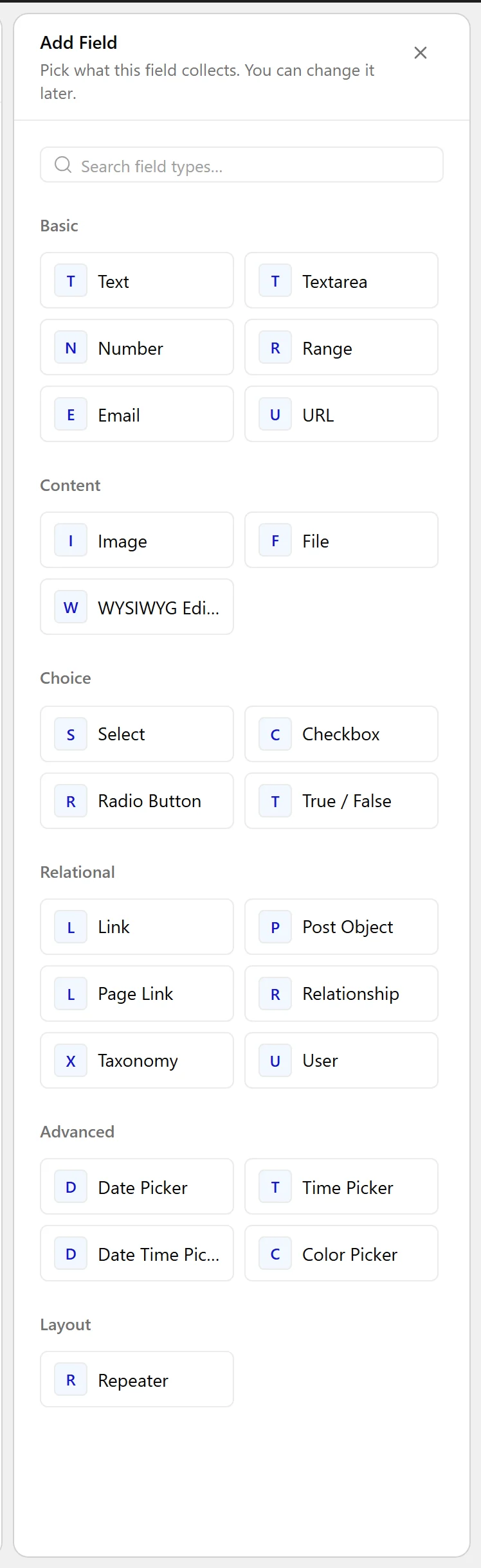
  1. Click Add Field.
A field group open with the Add Field button
  1. Set Field Label to Furnishing. The Field Name fills in automatically and is what you use in code.
  1. Set Field Type to Radio Button.
The Field Type dropdown listing the available field types
  1. Enter the Choices, one per line, as value : Label.
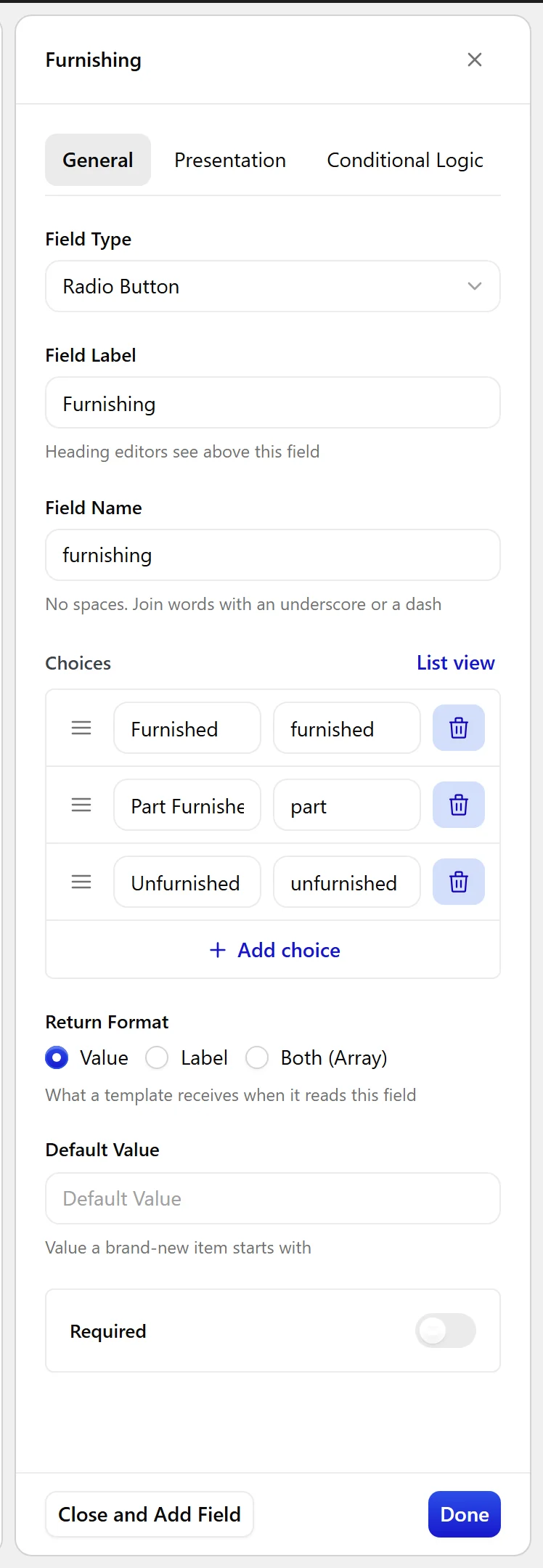
The Radio Button field settings in the Content Fields builder
  1. Set a Default Value if new posts should start with one selected.
  1. Click Update.
The Radio Button field as it appears on the post editing screen

Field Settings

Every field is configured across four tabs. These are the settings this field type offers, read from the field group builder in Nexter Extension 4.9.0.

General

SettingOptionsWhat it does
ChoicesNo help text in the UI.
Return FormatNo help text in the UI.
Default ValueNo help text in the UI.

Validation

SettingOptionsWhat it does
RequiredNo help text in the UI.

Presentation

SettingOptionsWhat it does
InstructionsNo help text in the UI.
LayoutNo help text in the UI.
Placeholder TextNo help text in the UI.
Wrapper AttributesNo help text in the UI.

Conditional Logic

SettingOptionsWhat it does
Conditional LogicNo help text in the UI.

When to Use It

  • A furnishing or condition state.
  • A short status with three or four options.
  • A yes / no / not applicable answer.

Display the Value

A single value, so read it directly:

<?php
echo esc_html( nxt_field_value( 'furnishing' ) );

Limitations

  • One value only. For several, use a Checkbox field.
  • Once selected, a radio group cannot be cleared from the editor. Add an explicit “Not specified” choice if editors need to unset it.

Troubleshooting

Editors cannot clear the selection

Radio buttons have no built-in clear. Add a choice such as none : Not specified so there is something to select.

Too many options to scan

Radio buttons stop being readable past about five choices. Switch the field type to Select.

Related Docs

Share your Thoughts

Still in Doubt? Let’s Assist You

Have Feedback or Questions?

Join our WordPress Community on Facebook!

Related Frequently Asked Questions

When should I use a radio button field instead of a select field in WordPress?

Radio buttons fit short lists where seeing every option at once matters more than saving space. The page says they work best for two to five options, while a select field is better when the list gets longer. That makes them a good choice for simple choices like a furnishing state or a yes / no / not applicable answer, where the editor should compare options without opening a dropdown.

Why can't editors clear a radio button selection once it's set?

A radio group has one active choice by design, so it cannot be cleared from the editor once selected. The practical fix is to include an explicit option such as none : Not specified if editors need a way to unset the value later. That avoids forcing people to pick an unrelated answer just to remove the current one.

How many radio button options are too many in WordPress?

Past about five choices, radio buttons stop being easy to scan. The page recommends switching the field type to Select when the list gets longer, because radio buttons are meant for short sets where all options can be read quickly on screen. That keeps the editor experience cleaner and avoids turning a simple choice into visual clutter.

What are good use cases for a WordPress radio button field?

The strongest use cases are a furnishing or condition state, a short status with three or four options, and a yes / no / not applicable answer. Nexter Extension provides this field type in Nexter Content Fields, and it is built for situations where one value must be chosen from a small set. If the choice list grows beyond that, another field type fits better.

How do I display a radio button field value on the front end?

A radio button field stores one value, so you can print it directly with ``. That works because the field returns a single selected value rather than multiple values. For front-end output, this is the simplest pattern and keeps the result escaped with `esc_html()`.

What do I need before adding a radio button field in Nexter?

Nexter Extension has to be installed and active, and Content Fields must be enabled under Nexter → Content Fields. You also need a field group ready to edit or create one first. The setup lives in the Group Fields tab, which is where you add the field label, choose Radio Button as the type, and define choices in `value : Label` format.

Last reviewed: November 12, 2026

Related Docs