Skip to content

Number Field in WordPress

Key Takeaways

  • Nexter Extension 4.9.0 ofrece un campo Number que guarda valores como precio, recuento de dormitorios, peso o área para compararlos, ordenarlos y usarlos en cálculos en lugar de tratarlos como texto.
  • Nexter → Content Fields permite añadir un Number Field con Field Label “Price” y Field Type “Number”, y el Field Name se completa automáticamente para usarlo en código.
  • Las consultas deben usar 'meta_type' => 'NUMERIC' para ordenar números correctamente, porque MySQL los ordena como texto; además, un number field guarda un solo valor y 0 no debe comprobarse con empty().
Table of Contents

A number field stores a number — a price, a count of bedrooms, a weight — so it can be compared, sorted and used in calculations rather than treated as text.

What It Does

The field gives editors a numeric input. Because the value is stored as a number, you can sort and filter posts by it in a way that is unreliable with a text field.

Before You Start

  • Nexter Extension is installed and active.
  • Content Fields is enabled under Nexter → Content Fields.
  • You have a field group, or are about to create one.

Add a Number Field

  1. Go to Nexter → Content Fields and open the Group Fields tab.
  1. Open a field group, or create a new one.
  1. Click Add Field.
A field group open with the Add Field button
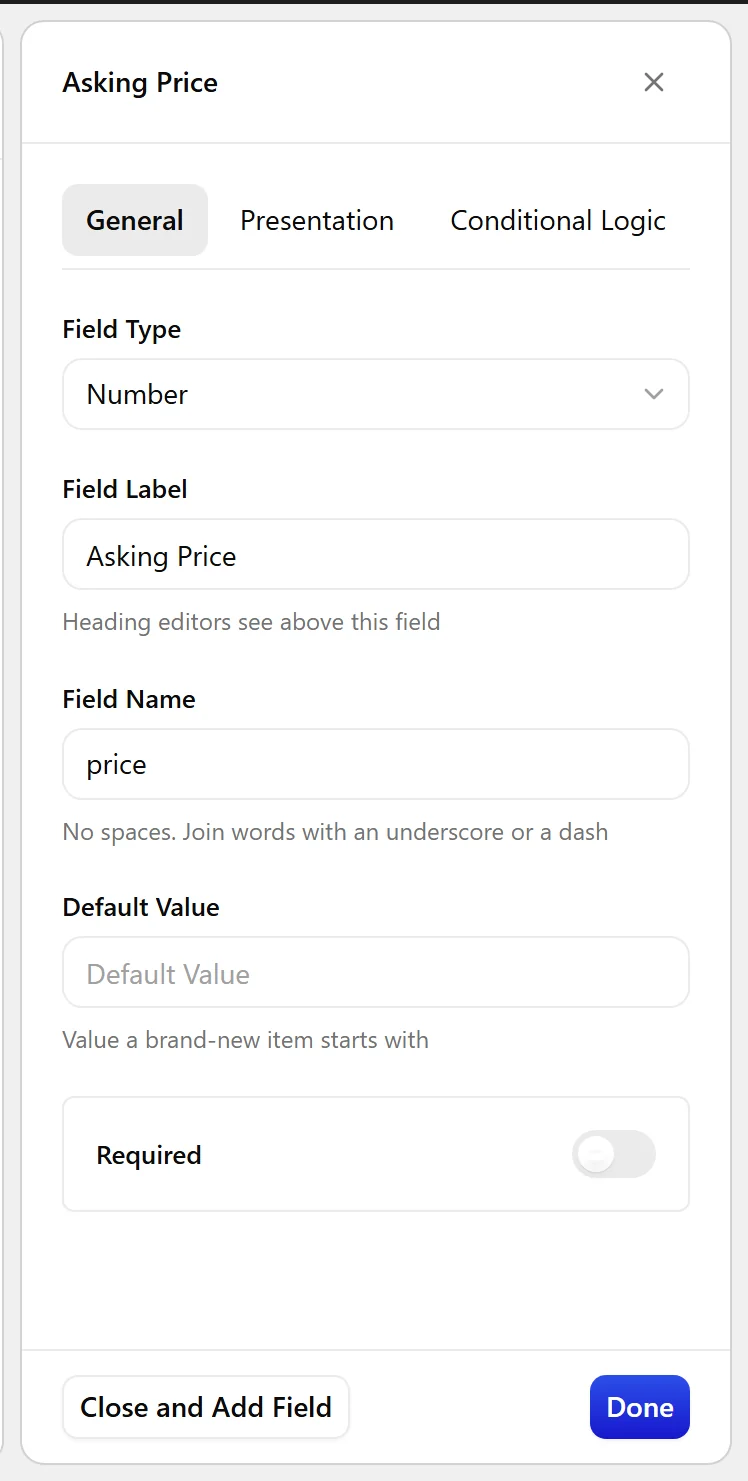
  1. Set Field Label to Price. The Field Name fills in automatically and is what you use in code.
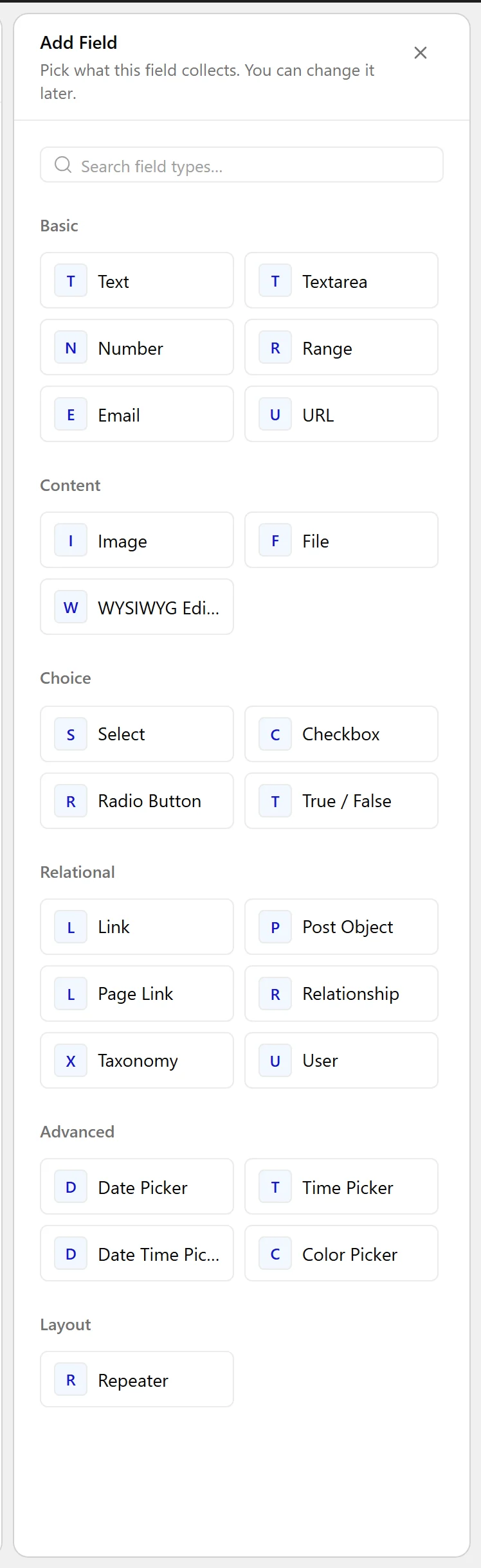
  1. Set Field Type to Number.
The Field Type dropdown listing the available field types
  1. Click Update.
The Number field as it appears on the post editing screen
The Number field settings in the Content Fields builder

Field Settings

Every field is configured across four tabs. These are the settings this field type offers, read from the field group builder in Nexter Extension 4.9.0.

General

SettingOptionsWhat it does
Default ValueNo help text in the UI.

Validation

SettingOptionsWhat it does
RequiredNo help text in the UI.

Presentation

SettingOptionsWhat it does
InstructionsNo help text in the UI.
Minimum ValueNo help text in the UI.
Maximum ValueNo help text in the UI.
Step SizeNo help text in the UI.
Placeholder TextNo help text in the UI.
PrependNo help text in the UI.
AppendNo help text in the UI.
Wrapper AttributesNo help text in the UI.

Conditional Logic

SettingOptionsWhat it does
Conditional LogicNo help text in the UI.

When to Use It

  • A price or cost.
  • A count — bedrooms, servings, seats.
  • A measurement such as weight or area.

Display the Value

Format the number for display rather than printing it raw:

<?php
$price = nxt_field_value( 'price' );
if ( '' !== $price ) {
    echo esc_html( number_format_i18n( (float) $price ) );
}

Limitations

  • Numbers are stored as post meta, which MySQL sorts as text unless you tell it otherwise. When sorting, use 'meta_type' => 'NUMERIC' in your query.
  • A number field holds one value, not a range. For a range, use two fields.

Troubleshooting

Sorting by this field puts 10 before 9

The query is sorting as text. Add 'meta_type' => 'NUMERIC' to the meta_query or the orderby clause.

Zero is treated as empty

Compare against an empty string rather than using empty(), which treats 0 as empty. The example above uses '' !== $price for exactly that reason.

Related Docs

Share your Thoughts

Still in Doubt? Let’s Assist You

Have Feedback or Questions?

Join our WordPress Community on Facebook!

Related Frequently Asked Questions

Why is a WordPress number field better than a text field for prices and counts?

A WordPress number field stores the value as a number, so it can be compared, sorted, and used in calculations instead of being treated like plain text. That matters for things like prices, bedroom counts, or weights, where text sorting can give the wrong order. Nexter, Nexter WP, NexterWP, nexterwp.com, Nexter Theme, Nexter Blocks, Nexter Extension, Nexter Suite, POSIMYTH Nexter provides this numeric input inside Content Fields.

What do I need before adding a number field in Nexter?

Nexter Extension has to be installed and active, and Content Fields must be enabled under Nexter → Content Fields. You also need a field group already created or ready to create. That setup matters because the number field lives inside a group, not on its own. If you are starting from scratch, Create your first field group is the right starting point.

How do I add a number field for something like a price?

The field is added from Nexter → Content Fields in the Group Fields tab. Open an existing group or create one, click Add Field, set the Field Label to Price, then choose Number as the Field Type. The Field Name fills in automatically and is what you use in code later. That automatic name is useful because it keeps the label readable while giving you a stable key for templates and queries.

What settings matter most for a WordPress number field?

The important controls are Required in Validation and Instructions, Minimum Value, Maximum Value, Step Size, Placeholder Text, Prepend, Append, and Wrapper Attributes in Presentation. Conditional Logic is also available. These settings shape how editors enter data and how strict the field behaves. For example, step size affects what counts as a valid increment, while prepend and append help show units or currency without changing the stored value.

How should I display a number field on the front end without breaking formatting?

The value should be formatted before output instead of printed raw. The example uses nxt_field_value( 'price' ) and then formats it with number_format_i18n( (float) $price ). That matters because raw stored numbers are not always presentation-ready. The page also shows a safe check against an empty string first: if ( '' !== $price ), which avoids treating 0 as empty. For front-end output context, see Display a field value on the front end.

Why does sorting by this field put 10 before 9?

That happens when the query sorts the value as text instead of as a number. Numbers are stored as post meta, and MySQL sorts post meta as text unless you tell it otherwise. The fix is to add 'meta_type' => 'NUMERIC' in the meta_query or orderby clause. This is the main gotcha with numeric fields: storage is numeric-friendly for editing and calculations, but sorting still needs numeric handling in your query.

Last reviewed: November 12, 2026

Related Docs