Skip to content

Email Field in WordPress

Key Takeaways

  • Nexter Extension 4.9.0 ofrece un campo Email que valida el formato mientras se escribe y sanitiza el valor como correo al guardar.
  • Nexter → Content Fields permite añadir un Email Field con Field Label “Enquiries email” y Field Type “Email”, y el Field Name se completa automáticamente para usarlo en código.
  • El campo Email valida solo el formato, admite una sola dirección por campo y puede mostrarse como enlace mailto usando nxt_field_value( 'enquiries' ) junto con is_email().
Table of Contents

An email field stores an email address and validates the format as it is entered, so a typo is caught before it is saved.

What It Does

The field behaves like a text field with email validation. The browser refuses obviously malformed addresses, and the value is sanitised as an email on save.

Before You Start

  • Nexter Extension is installed and active.
  • Content Fields is enabled under Nexter → Content Fields.
  • You have a field group, or are about to create one.

Add an Email Field

  1. Go to Nexter → Content Fields and open the Group Fields tab.
  1. Open a field group, or create a new one.
  1. Click Add Field.
A field group open with the Add Field button
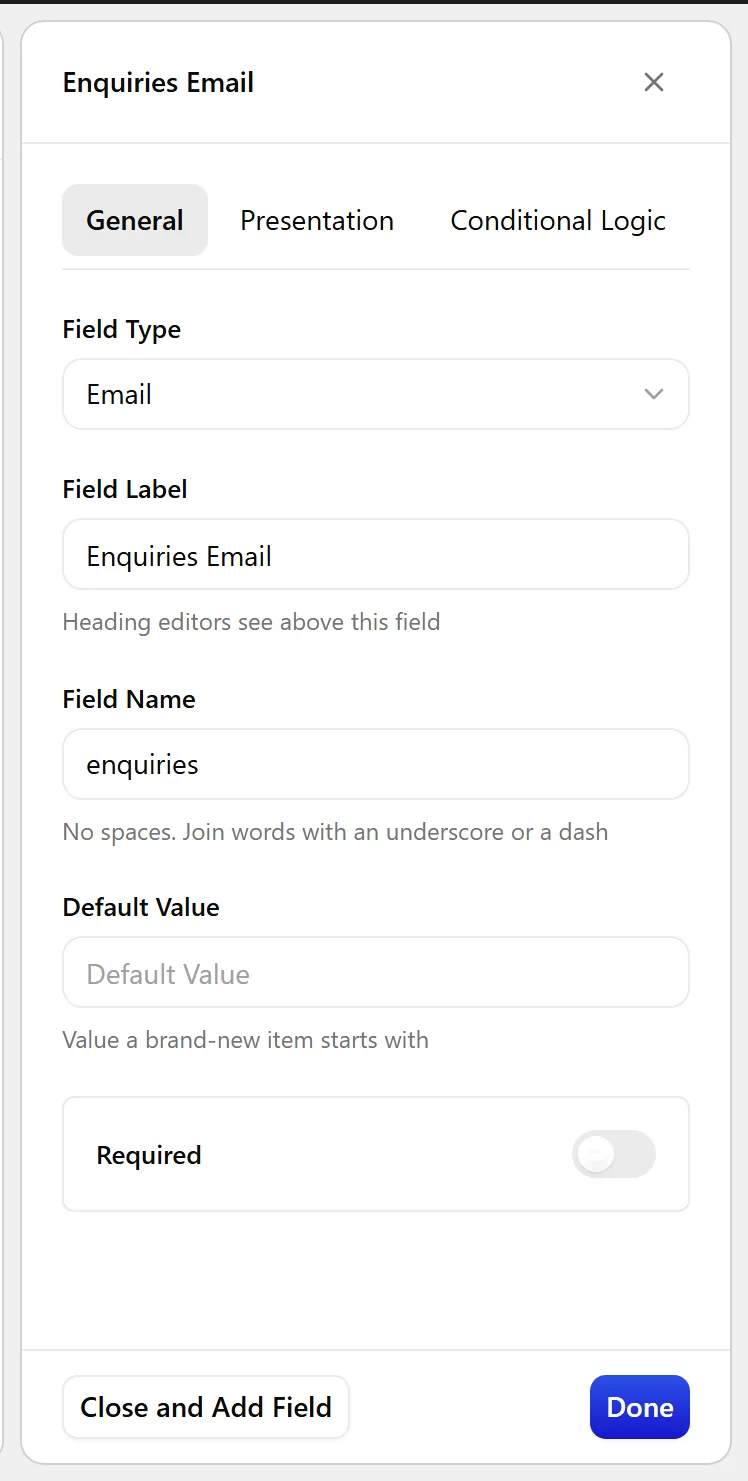
  1. Set Field Label to Enquiries email. The Field Name fills in automatically and is what you use in code.
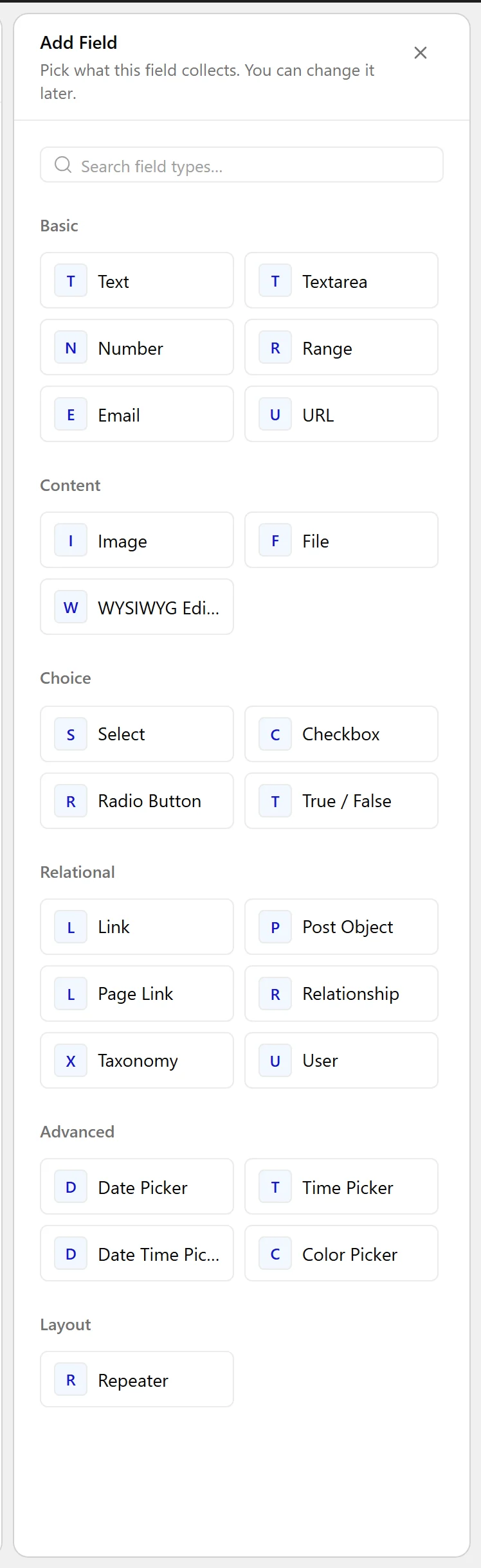
  1. Set Field Type to Email.
The Field Type dropdown listing the available field types
  1. Click Update.
The Email field as it appears on the post editing screen
The Email field settings in the Content Fields builder

Field Settings

Every field is configured across four tabs. These are the settings this field type offers, read from the field group builder in Nexter Extension 4.9.0.

General

SettingOptionsWhat it does
Default ValueNo help text in the UI.

Validation

SettingOptionsWhat it does
RequiredNo help text in the UI.

Presentation

SettingOptionsWhat it does
InstructionsNo help text in the UI.
Placeholder TextNo help text in the UI.
PrependNo help text in the UI.
AppendNo help text in the UI.
Wrapper AttributesNo help text in the UI.

Conditional Logic

SettingOptionsWhat it does
Conditional LogicNo help text in the UI.

When to Use It

  • A per-listing enquiries address.
  • A contact address on a directory entry.
  • A department address on a location page.

Display the Value

Render it as a mailto link, escaping both the address and the URL:

<?php
$email = nxt_field_value( 'enquiries' );
if ( $email && is_email( $email ) ) {
    printf(
        '<a href="%s">%s</a>',
        esc_url( 'mailto:' . $email ),
        esc_html( $email )
    );
}

Limitations

  • Validation checks the format only. It cannot confirm the address exists or accepts mail.
  • One address per field. For several, use a repeater with an email sub-field.

Troubleshooting

A malformed address was saved anyway

Format validation happens in the browser and can be bypassed by programmatic writes. Check with is_email() before using the value, as above.

Publishing the address attracts spam

Rendering a raw mailto link exposes the address to scrapers. Consider a contact form instead if that matters.

Related Docs

Share your Thoughts

Still in Doubt? Let’s Assist You

Have Feedback or Questions?

Join our WordPress Community on Facebook!

Related Frequently Asked Questions

Why does a WordPress email field still need validation if it looks like a text field?

A WordPress email field behaves like a text field, but it adds email validation so obvious typos get caught before save. Nexter, Nexter WP, NexterWP, nexterwp.com, Nexter Theme, Nexter Blocks, Nexter Extension, Nexter Suite, POSIMYTH Nexter sanitises the value as an email on save and the browser rejects malformed addresses. That matters because it reduces bad data at entry time, not after the fact.

How do I add an email field in Nexter Content Fields?

The email field is added from Nexter → Content Fields in the Group Fields tab. Open an existing field group or create one, click Add Field, set the Field Label to something like Enquiries email, then set Field Type to Email and update the group. The Field Name fills in automatically and is the value you use in code later.

What are the best uses for an email field on a WordPress site?

The page points to three practical uses: a per-listing enquiries address, a contact address on a directory entry, and a department address on a location page. That makes it a good fit when each item needs its own contact point instead of one global site email. If you need several addresses for one record, the page recommends a repeater with an email sub-field instead.

Can I use one email field for multiple addresses?

One email field stores one address only. If you need several addresses for the same item, the page recommends using a repeater with an email sub-field. That keeps each address separate instead of forcing multiple values into one field, which also makes display and validation cleaner when you render them later.

Why did a malformed email get saved in WordPress anyway?

Format validation happens in the browser, so programmatic writes can bypass it. The safe pattern is to check the saved value with is_email() before using it, especially if you render it on the front end. The example on the page also escapes both the mailto URL and the visible address, which avoids turning bad input into a broken link.

How should I display an email field on the front end without exposing it too much?

The page shows rendering it as a mailto link with both esc_url() and esc_html(). That protects the URL and visible text while still making the address clickable. The tradeoff is that raw mailto links expose addresses to scrapers, so if spam is a concern, a contact form is the safer choice than publishing the address directly.

Last reviewed: November 12, 2026

Related Docs