Skip to content

Nexter Fields Template Functions Reference

Key Takeaways

  • Nexter Extension expone funciones de plantilla para leer y escribir valores de campos desde PHP, y todas funcionan en posts, usuarios, tĂ©rminos, comentarios y opciones.
  • nxt_field_value() lee un valor y respeta la lĂłgica condicional, mientras nxt_field_value_raw() devuelve el valor almacenado sin formato ni lĂłgica condicional.
  • nxt_repeater_* requiere Nexter Extension Pro, y en Nexter Extension 4.9.0 sin Pro esas funciones son stubs sin efecto que devuelven vacĂ­o y recorren cero veces.
Table of Contents

Content Fields exposes a set of template functions for reading and writing field values from PHP. This page is the index; each function has its own page with examples.

What It Does

All of these work on posts, users, terms, comments and options. The second argument is the object — omit it for the current post, or pass an ID, user_12, term_5, comment_3 or option.

Before You Start

  • Nexter Extension is installed and active, so the template functions exist.
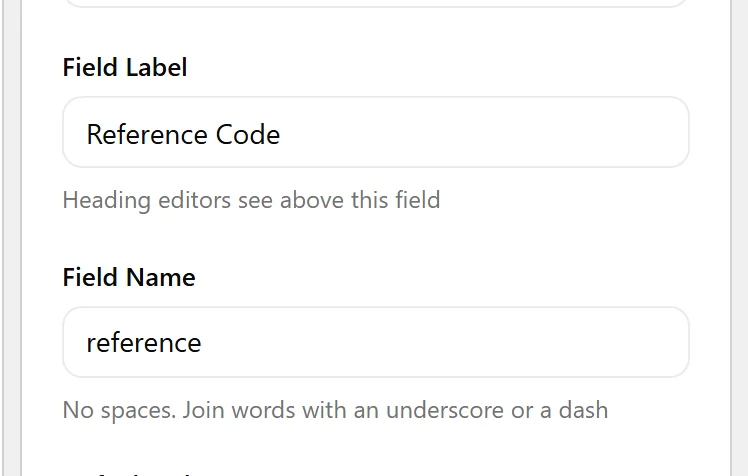
  • You know the field’s Field Name — not its label.
  • You are editing a theme template, a template part, or a plugin.

Pick the Right Function

  1. Reading one value → nxt_field_value(), or nxt_print_field() to echo it escaped.
The Field Name box, which is the selector these functions take
  1. Reading every value on an object → nxt_field_values().
  1. Reading the raw stored value, ignoring formatting and conditional logic → nxt_field_value_raw().
  1. Asking whether a field exists or has a value → nxt_field_exists(), nxt_has_field(), nxt_is_field_empty().
  1. Writing → nxt_save_field_value(), nxt_erase_field_value(), nxt_reset_field().
  1. Looping a repeater → the nxt_repeater_* family. Requires Nexter Extension Pro. In Nexter Extension 4.9.0 without Pro these are no-op stubs: they return empty and loop zero times, with no error.
  1. Reading group definitions → nxt_group_definitions().

Display the Value

The shapes you will use most:

<?php
// current post
$v = nxt_field_value( 'price' );

// another post
$v = nxt_field_value( 'price', 123 );

// a user, a term, a comment, the options page
$v = nxt_field_value( 'short_bio', 'user_' . $user_id );
$v = nxt_field_value( 'colour',    'term_' . $term_id );
$v = nxt_field_value( 'note',      'comment_' . $comment_id );
$v = nxt_field_value( 'api_key',   'option' );

Limitations

  • These functions exist only while Nexter Extension is active. Guard with function_exists() if your theme must survive the plugin being disabled.
  • Values are cached per request, so reading the same field twice does not hit the database twice.
  • nxt_field_value() respects conditional logic and returns null when a field’s condition is unmet, even if a value is stored.

Troubleshooting

Fatal error: call to undefined function

Nexter Extension is not active, or your code runs before plugins load. Wrap the call in function_exists( 'nxt_field_value' ).

The function returns null but a value is saved

Conditional logic on that field is not met. Use nxt_field_value_raw() to read the stored value regardless.

Related Docs

Share your Thoughts

Still in Doubt? Let’s Assist You

Have Feedback or Questions?

Join our WordPress Community on Facebook!

Related Frequently Asked Questions

Why does nxt_field_value() return null even though the field has a saved value?

Conditional logic is the usual reason. Nexter Extension’s template functions respect field conditions, so nxt_field_value() can return null when the field’s condition is not met even if data is stored. That matters because the stored value and the displayed value are not always the same thing. When you need the raw saved data regardless of logic, use nxt_field_value_raw().

How do I read a custom field from a user, term, comment, or options page?

Nexter, Nexter WP, NexterWP, nexterwp.com, Nexter Theme, Nexter Blocks, Nexter Extension, Nexter Suite, POSIMYTH Nexter lets the same template functions read from posts, users, terms, comments, and options. The second argument is the object reference: use user_12, term_5, comment_3, or option. That keeps one function pattern across different WordPress object types instead of writing separate code paths.

Which nexter fields template functions should I use for reading versus writing values?

Reading and writing are split cleanly. Use nxt_field_value() or nxt_print_field() for one value, nxt_field_values() for every value on an object, and nxt_field_value_raw() when you need the stored value without formatting or conditional logic. For writes, the page points to nxt_save_field_value(), nxt_erase_field_value(), and nxt_reset_field(). Picking the right one avoids accidental formatting changes or overwriting data you meant to inspect only.

What is the safest way to use these functions in a theme template?

The safest pattern is to guard calls with function_exists('nxt_field_value') because these functions only exist while Nexter Extension is active. That matters in themes and plugins that must keep working if the plugin is disabled. The page also says these values are cached per request, so repeated reads of the same field do not hit the database twice.

Does nxt_print_field() escape output automatically?

nxt_print_field() is the escaped output option in this set. That makes it the better choice when you want to print a field directly in a template without manually handling output first. For anything where you need to inspect or transform the value before display, use nxt_field_value() instead and then decide how to render it.

What should I use if I need every field value on one object or need repeater data?

nxt_field_values() is for reading every value on an object in one call. For repeaters, the page points to the nxt_repeater_* family, but that requires Nexter Extension Pro. In Nexter Extension 4.9.0 without Pro those repeater functions are no-op stubs: they return empty and loop zero times with no error. That distinction matters if your code depends on repeater rows being present.

Last reviewed: November 12, 2026

Related Docs