






What It Does
Cookie Consent holds analytics, advertising and embed scripts until the visitor agrees to that kind of cookie. After they agree, the scripts load. Until then, script tags are not requested by the browser, and embeds are replaced with a placeholder.
Why It Matters
A cookie banner only matters if the scripts behind it wait. If Google Analytics or a pixel loads before the visitor answers, the banner is only a notice. Holding the scripts is the part that makes a choice mean something.
What You Get
- A built-in list of vendor rules that is on by default.
- Scripts that wait for the matching category and load only after the visitor agrees.
- A placeholder with an Accept and show button in place of blocked YouTube, Vimeo and Google Maps embeds.
- A Compliance Check row that names any tag Nexter cannot hold.
Capabilities
| Vendor | Waits for |
|---|---|
| Google Tag Manager, Google Analytics 4, Hotjar, Microsoft Clarity | Analytics |
| Google Ads, Meta (Facebook) Pixel, LinkedIn Insight Tag, TikTok Pixel, Pinterest Tag, X (Twitter), HubSpot, Mailchimp | Marketing |
| Intercom, Crisp, Tawk.to | Functional |
| YouTube embeds | Marketing, with a placeholder |
| Vimeo embeds, Google Maps embeds | Functional, with a placeholder |
| Google reCAPTCHA | Never held, so your forms keep working |
- Hold scripts that plugins and themes load through WordPress.
- Hold script tags printed straight into the page, when they have a
srcaddress that matches a rule. - Replace blocked embeds with a placeholder, and let the visitor accept only that category.
- Leave Google Tag Manager to manage consent itself, with the GTM-managed path.
How It Works
- Rules match the script address. Each rule has a vendor name, a category and one or more address patterns. A script whose address contains a pattern waits for that category.
- The browser never requests a held script. Nexter changes the script’s type and moves its address aside. After the visitor agrees, the script is put back in its original place and loads.
- Embeds are swapped as the page loads. Nexter does not rewrite embed code on the server. The page’s script replaces a blocked embed with a message, “This content is blocked until you accept” followed by the category name and “cookies.” Two buttons follow: Accept and show, which grants only that one category, and Cookie settings, which opens the preferences window. The video itself does not load, but the browser can begin the request for an instant before the swap cancels it.
- reCAPTCHA is never held. Holding it would break login and contact forms.
- Vendors not on the list are not held.
How to Use It
Before you start: Cookie Consent must be switched on. See the setup guide. Under Script Blocking, Block non-essential scripts before consent is on by default.
- Go to Nexter > Nexter Extension > Security, click the gear icon on the Cookie Consent card, and open Setup.
- Under Script Blocking, make sure Block non-essential scripts before consent is on.
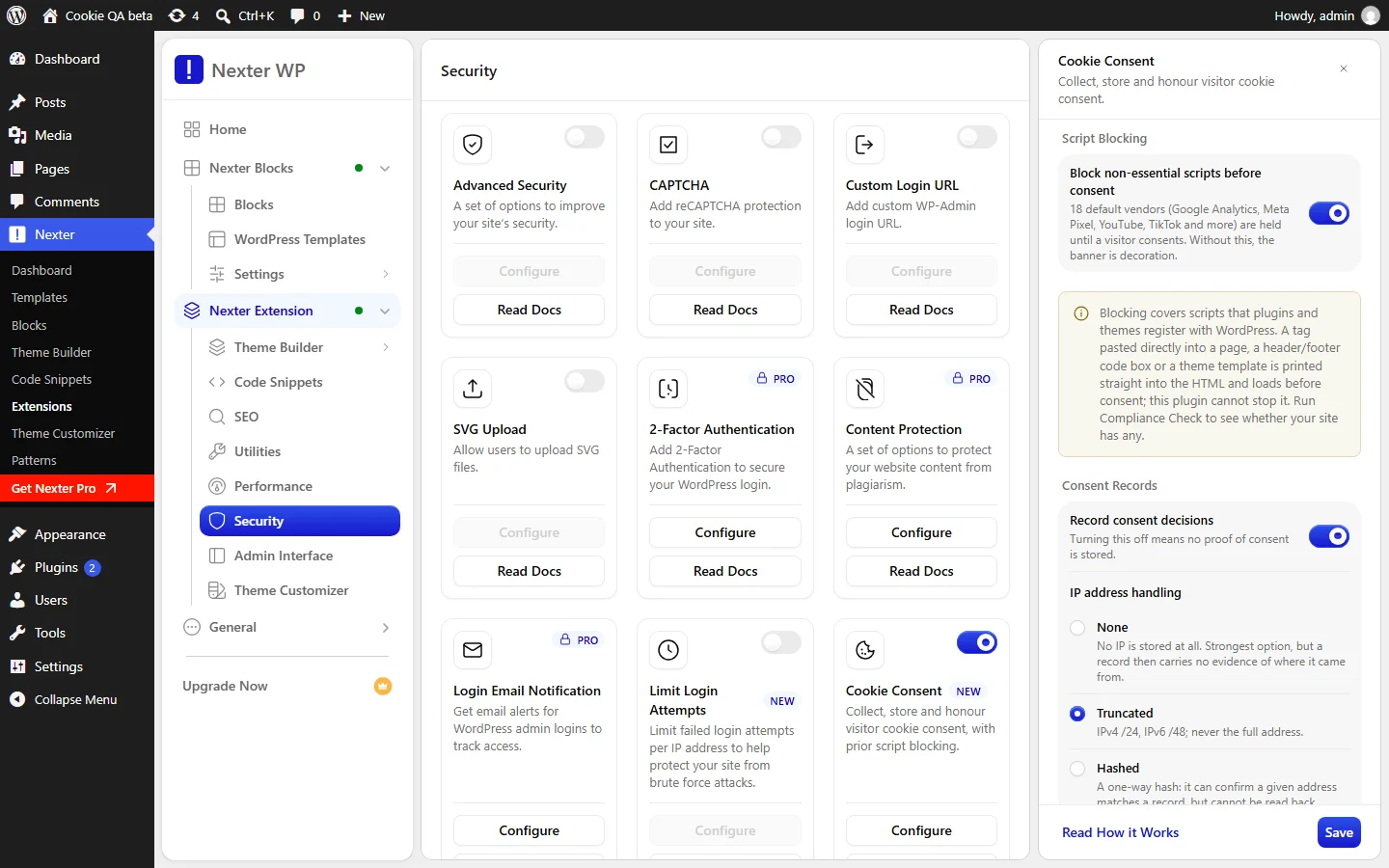
- If Google Tag Manager manages Consent Mode on your site, turn on Enable Google Consent Mode v2 and set Integration path to GTM-managed. Nexter then never holds Google Tag Manager itself.
- Click Save.
- Open the Compliance Check tab and click Re-check.
- Read the row Vendor tags this plugin cannot block. If it lists any tags, move them to a plugin or theme setting that loads scripts the WordPress way, or remove the pasted code and let a tag manager handle consent.
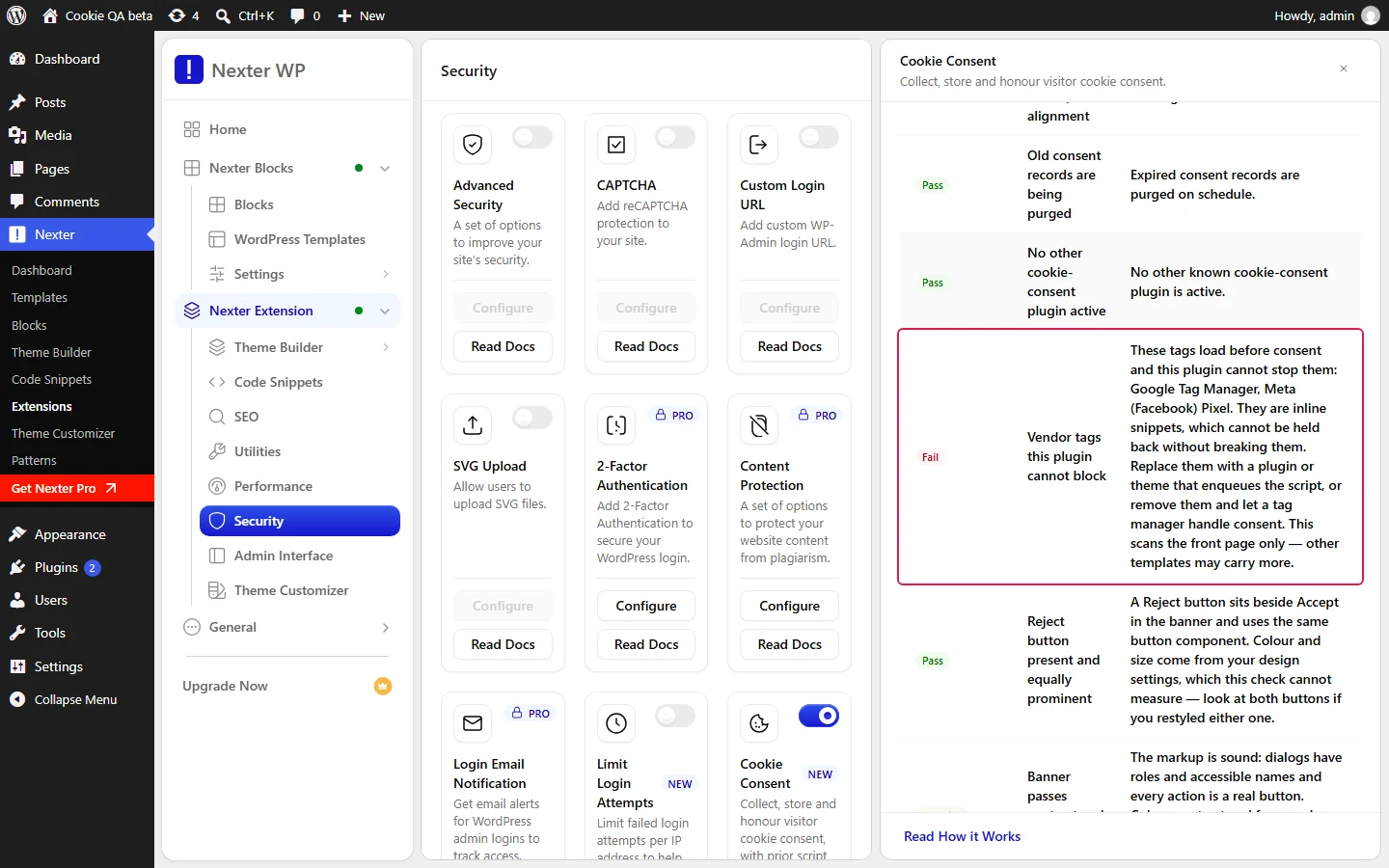
- Click Re-check again. The row should now pass.
- Test in a private window. Before you answer the banner, open the browser’s network panel and confirm the vendor scripts are not requested.
Use Cases
- Analytics that waits. A site with Google Analytics or Microsoft Clarity loads them only after a visitor accepts Analytics.
- A video that asks first. A page with a YouTube embed shows a placeholder until the visitor accepts Marketing, or clicks Accept and show for that video.
- A Tag Manager site. A site that runs Google Tag Manager with Consent Mode lets Tag Manager handle consent through the GTM-managed path.
- Forms that keep working. A site with reCAPTCHA on its contact form keeps the form working, because reCAPTCHA is never held.
Limitations
- Inline snippets cannot be held back. Many vendors give you a code block, not a script address. The standard Google Tag Manager and Meta Pixel snippets are examples. They run as soon as the page loads, and holding them would break them.
- Embeds start to load for an instant. Nexter swaps an embed for a placeholder after the page starts loading, so the browser can send a request to the video provider before the swap cancels it. No video loads.
- The Compliance Check reads the front page only. Another template could still carry an inline tag, so check other templates yourself.
- Only vendors on the list are held. The dashboard has no screen for editing the vendor list.
- Caching and optimisation plugins can conflict. If another plugin also rewrites script tags, the two can fight over the same tag.
Troubleshooting
A Script Still Loads Before Consent
It is probably an inline snippet, or a vendor that is not on the list. Run the Compliance Check and read the row Vendor tags this plugin cannot block.
The Script Does Not Load After the Visitor Accepts
Check which category the vendor waits for, in the table above. A visitor who accepted only Analytics does not unlock Marketing scripts. If you use a caching or optimisation plugin, clear its cache after changing consent settings.
A YouTube Video Shows a Placeholder
That is the intended behaviour. The visitor can click Accept and show to play it, or Cookie settings to choose.
The Compliance Check Says It Could Not Scan the Front Page
Some hosts block a site from requesting its own pages. The row then shows “Not available”, never a pass. Check your front page for pasted tags yourself.
Related guides: set up Cookie Consent, read the Compliance Check and build a cookie banner.
