








How to Disable Emojis Script for WordPress Website?

Key Takeaways

  • Nexter Extension (Free) allows users to remove the Emoji Script from their WordPress website with just a click.
  • Disabling the Emoji Script can improve website optimization scores by eliminating an additional HTTP request.
  • The 'wp-emoji-release.min.js' file, used for displaying emojis, adds to site load time despite its small size.
Table of Contents

In today’s world, emojis are everywhere. From text messages to social media, it is not surprising that more and more websites and blogs are adding these small icons to represent emotions and reactions. Although they can be fun and vibrant, they are not always appropriate or necessary for content on your website.

Apart from that, allowing emojis on WordPress sites can add to your website load time by making an extra HTTP request. You should make every little effort to optimize your site, and disabling emojis can help you in that process.

With the Nexter Extension (Free) plugin, you can easily remove the Emoji Script from your WordPress website with just a click.

Learn via Video Tutorial

YouTube video

Why Disable Emoji Script?

For displaying emojis, WordPress uses the “wp-emoji-release.min.js” file. While its size is relatively small but it does add to an additional HTTP request and site load time.
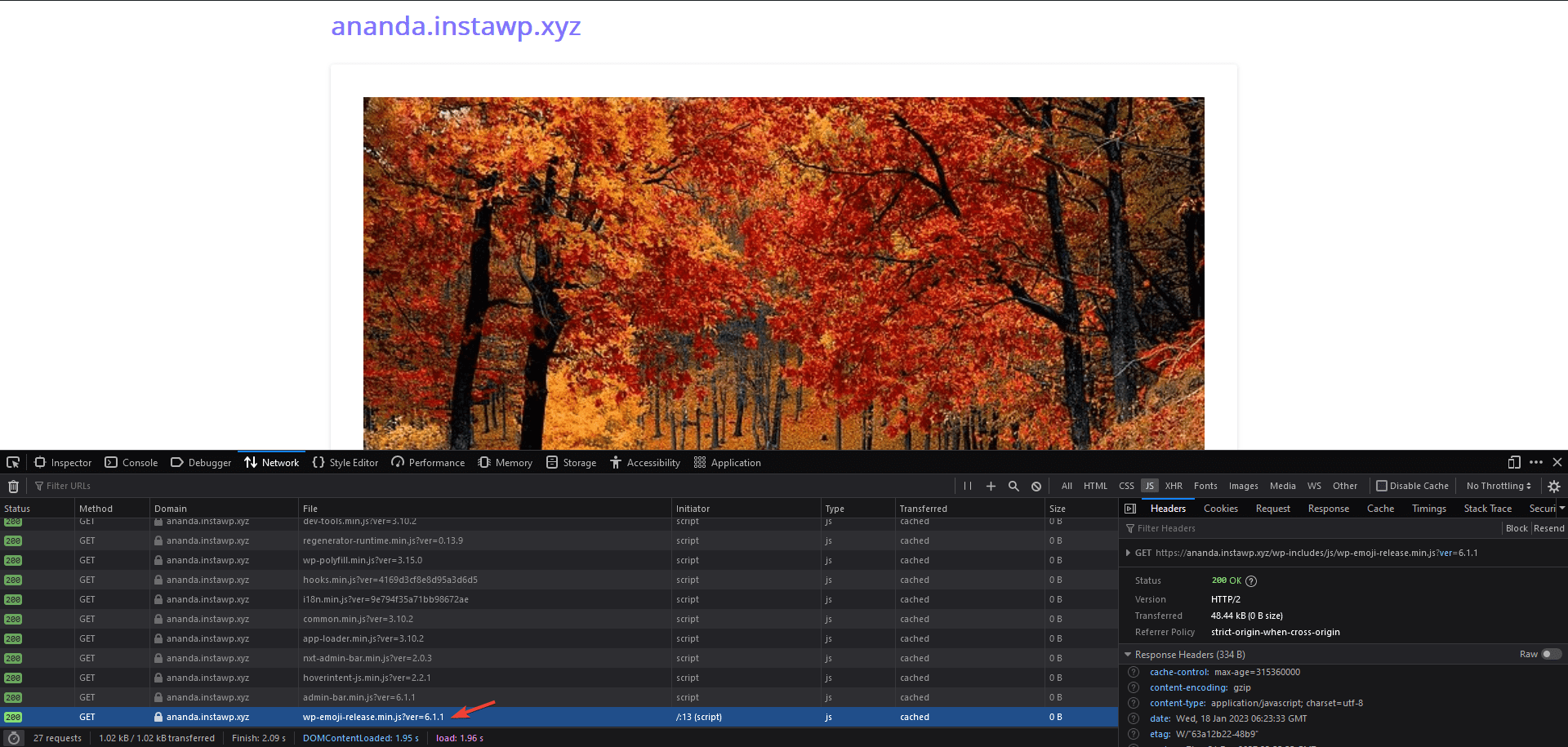
emoji script load

This can result in a poor optimization score for your website and negatively impact your ranking.

Besides, those emojis are more related to Social Media which people use to express their emotions and on most professional websites, they are rarely used.

So it does make sense to disable the Emoji Script on the WordPress website. 

How to Disable Emoji Scripts with the Nexter Extension? 

To disable Emoji Script with the Nexter theme, from the WordPress dashboard and go to Nexter > Extensions > Performance.

Then go to the Advanced Performance section, enable the toggle, and click on the gear icon (⚙).

advanced performance settings new 1 1

It will open the Advanced Performance popup, go to the Disable Emojis Script section and turn on the toggle.

Then click on the Save button.

disable emoji script

That’s it! This will remove the “wp-emoji-release.min.js” from your site.

About the Author

Photo of Aditya Sharma CMO of NexterWP
CMO at POSIMYTH Innovations · NexterWP · 7 years experience

He has spent years in the WordPress ecosystem building, breaking, and optimizing sites until they actually perform. He works at the intersection of speed, growth, and usability, helping creators ship websites that load fast and convert. An active WordPress community contributor sharing through tools, tutorials, and direct collaboration. Tested practice, not theory.

WordpressThemesElementorn8nAIClaudeAutomationServer

Share your Thoughts

Get Instant Answers to all your questions about Nexter Blocks,
Extensions & Theme trained on 1000+ Docs and Videos

Still in Doubt? Let’s Assist You

Have Feedback or Questions?

Join our WordPress Community on Facebook!

Related Frequently Asked Questions

Can I use the Nexter Extension to disable emojis on any WordPress theme?

The Nexter Extension is designed to work with the Nexter Theme and enhances its performance features. While it can be used to disable emojis, ensure that your theme supports the extension for optimal results.

What are the benefits of disabling emojis on a professional website?

Disabling emojis can streamline your website's performance, as they are often unnecessary for professional content. By removing the emoji script, you reduce load times and improve your site's optimization score, which is crucial for maintaining a professional appearance and enhancing user experience.

Why might my website still show emojis after following the steps to disable them?

If emojis are still appearing, ensure that you have correctly enabled the toggle in the Nexter Extension under the Advanced Performance section. Additionally, check for any caching plugins that may need to be cleared to reflect the changes on your site.

Is there a way to disable emojis without using the Nexter Extension?

The page does not provide alternative methods for disabling emojis outside of using the Nexter Extension. This plugin offers a straightforward way to manage performance settings, including emoji removal, directly from your WordPress dashboard.

What settings should I consider for optimal performance when using the Nexter Extension?

For optimal performance, enable the Advanced Performance settings in the Nexter Extension, including disabling unnecessary scripts like emojis. This helps to minimize load times and improve your site's overall optimization score, which is essential for user retention and search engine ranking.

Last reviewed: April 15, 2026

Related Docs