Skip to content

How to Customize Post Title in WordPress Blog Post?

Key Takeaways

{"bullets":["Nexter Blocks Post Title block places and styles the post title at any location in a WordPress blog post template, instead of the default WordPress block editor’s fixed location.","Post Title supports Single Page and Archive Page template types, plus Prefix Text and Postfix Text fields for labels like "Review:" or a year.","Post Title lets the user change the HTML tag for SEO hierarchy, enable a Link toggle on archive pages, and limit titles by letters or words for listing or card layouts."]}

Table of Contents

Do you want to customize the post title in the WordPress blog post? The default WordPress block editor places the post title in a fixed location, which limits your control over where and how it appears on the page.

With the Post Title block from Nexter Blocks, you can place and style the post title at any location in your blog post template on the WordPress blog post page.

To check the complete feature overview documentation of the Nexter Blocks Blog Builder, click here.

Best Used For:

  • Blog post templates where you want the title positioned above a featured image or author bio section
  • Magazine or news layouts that require the title to use a specific HTML tag for SEO hierarchy
  • Archive and category pages that display post titles with a consistent prefix label, such as a series name or category tag

Requirement – This block is a part of Nexter Blocks. Make sure it is installed and activated.

Required Setup

  • Make sure the default WordPress Block editor is active.
  • You need to have the Nexter Blocks plugin installed and activated.
  • Make sure the Post Title block is activated. To verify this, go to Nexter → Blocks and search for Post Title and activate.

How to Activate the Post Title Block?

Go to

  • NexterBlocks
  • Search the block name and turn on the toggle then click Save Settings.

Add Post Title

Add the Post Title block to the appropriate location on the blog post template.

To create the blog post template, you can use the free Nexter Builder.

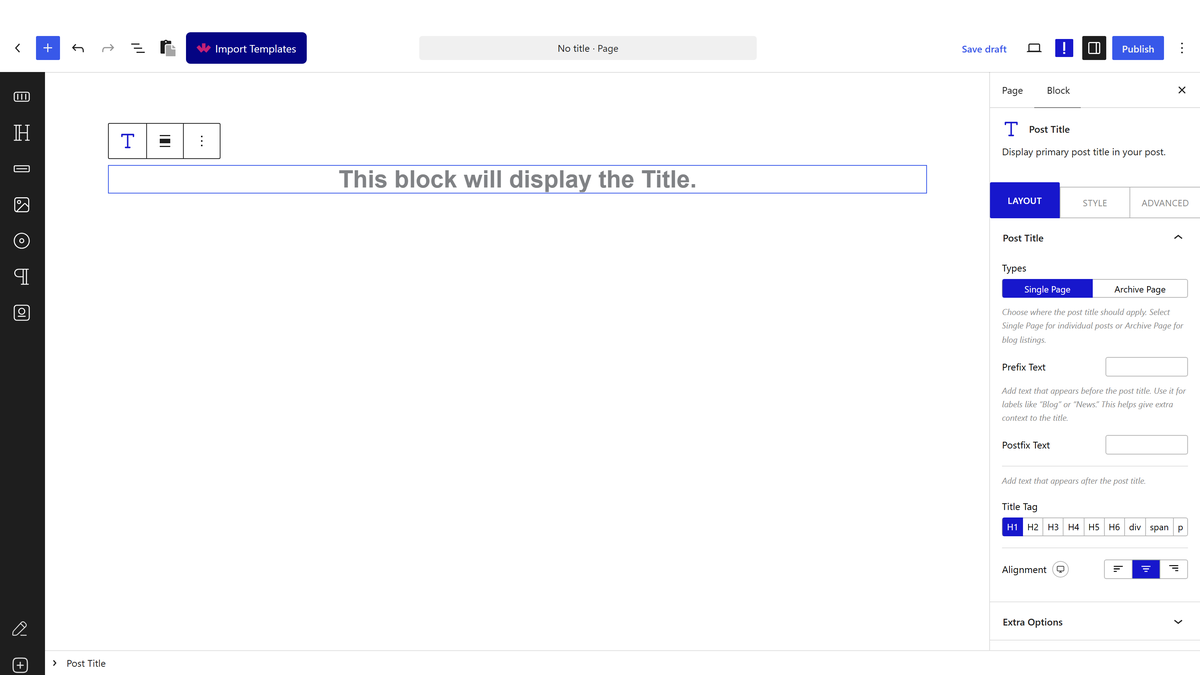
From the Types section under the Post Title tab, you have to select the template type. Here you will find two options:

  • Single Page — Use this to show the post title on a single post template, such as an individual article or blog post page.
  • Archive Page — Use this to show the post title on an archive page template, such as a category or tag listing page.

Here, select the Single Page option.

Then, you can add a prefix and postfix text to the title from the Prefix Text and Postfix Text fields. This is useful when you want to prepend a label like “Review:” or append a year to every post title automatically.

From the Title Tag section, you can change the HTML tag of the post title. Use this to set the correct heading level for SEO, such as H1 on single post pages and H2 or H3 on archive templates.

You can also change the post title alignment to match your template layout.

From the Extra Options tab, you can make the post title linkable by enabling the Link toggle. This is helpful on archive pages where each title should link back to the full post.

Then, from the Text Limit section, you can limit the post title by the number of letters or words. Use this on listing or card layouts where long titles would break the design.

To display additional post information alongside the title, see How to Add Post Meta in WordPress Blog Post?

You can customize the post title style from the Style tab.

You can add a post title to the archive template using the same process above, selecting Archive Page from the Types section instead.

The Advanced tab options are shared across all Nexter Blocks. You can review every available setting in the dedicated tutorial.

View Advanced tab tutorial.

About the Author

Photo of Aditya Sharma CMO of Nexter
CMO at POSIMYTH Innovations · Nexter · 7 years experience

He has spent years in the WordPress ecosystem building, breaking, and optimizing sites until they actually perform. He works at the intersection of speed, growth, and usability, helping creators ship websites that load fast and convert. An active WordPress community contributor sharing through tools, tutorials, and direct collaboration. Tested practice, not theory.

WordPressThemesElementorn8nAIClaudeAutomationServer

Share your Thoughts

Still in Doubt? Let’s Assist You

Have Feedback or Questions?

Join our WordPress Community on Facebook!

Related Frequently Asked Questions

Why is the post title still stuck in the default WordPress position?

The default WordPress block editor keeps the post title in a fixed spot, so it cannot be moved or styled freely there. Nexter Blocks adds a Post Title block that lets you place the title anywhere in your blog post template and control how it looks. That matters when the title needs to sit above a featured image or author bio section instead of at the top of the content area.

What do I need installed before I can customize a post title in WordPress?

The setup depends on two things: the default WordPress Block editor must be active, and the Nexter Blocks plugin must be installed and activated. The Post Title block itself also has to be turned on under Nexter → Blocks. If any of those pieces are missing, the block will not be available in the template builder.

How do I turn on the Post Title block if it is not showing up?

The block is enabled from Nexter → Blocks by searching for Post Title, turning on the toggle, and saving settings. That activation step matters because Nexter Blocks ships many blocks, but only enabled blocks appear for use. If you are building a blog template, this is usually the first thing to check before troubleshooting layout issues.

Should I use Single Page or Archive Page for my post title layout?

Single Page is for an individual article or blog post page, while Archive Page is for category or tag listing pages. That choice changes where the title appears and how it behaves in the template. For example, single posts usually need one main heading, while archive layouts often need titles that fit a list or card design.

How can I make long post titles fit better in a blog layout?

The Text Limit section lets you cap titles by letters or words, which is useful when long headlines would break a listing or card layout. Nexter Blocks also lets you change alignment and style from the Style tab, so you can keep titles visually consistent even when content length varies. This is especially useful on archive pages with tighter spacing.

What is the best HTML tag to use for a custom post title?

The Title Tag setting should match the page type and SEO hierarchy. The page calls out H1 for single post pages and H2 or H3 for archive templates. That matters because heading levels help search engines understand structure, and using the wrong tag can make a template feel visually right but semantically messy.

Last reviewed: August 18, 2026

Related Docs