---
title: "How to Add Custom CSS Preloader Animations in WordPress?"
url: https://nexterwp.com/docs/custom-css-preloader-animations-in-wordpress/
date: 2023-04-10
modified: 2026-04-15
author: "Aditya Sharma"
description: "Custom CSS preloader animations are a great way to add unique and engaging loading experiences to your WordPress website. By using CSS code, you can customize the look and feel..."
image: https://nexterwp.com/wp-content/uploads/2024/05/custom-css-preloader-animations-in-wordpress-1024x519.jpg
word_count: 295
---
# How to Add Custom CSS Preloader Animations in WordPress?
## Key Takeaways
- Nexter Blocks includes a Preloader block that allows users to implement custom CSS loading animations.
- Users can add their CSS preloader code in the Code field of the Preloader block after selecting Custom Code from the dropdown.
- Custom CSS loading animations can be sourced from websites like CSSloaders and Loading.io.
Custom CSS preloader animations are a great way to add unique and engaging loading experiences to your WordPress website. By using CSS code, you can customize the look and feel of your preloader animation to match your website's branding and style.
With the Preloader block from the Nexter Blocks, you can easily use your custom CSS loading animation as a preloader.
*To check the complete feature overview documentation of the Nexter Blocks* Preloader block, [click here](/docs/preloader-block-settings-overview/).
***Requirement - This block is a part of the Nexter Blocks*, make sure its installed & activated to enjoy all its powers.**
[LIVE BLOCK LINK](https://nexterwp.com/nexter-blocks/blocks/wordpress-preloader-animation-and-page-transitions/)
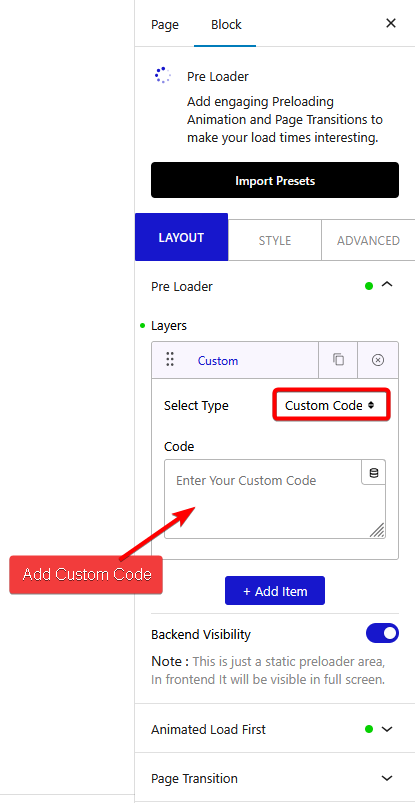
To do this, add the Preloader block on the page or template, in the **Pre Loader** tab, you’ll find a repeater item under **Layers**.
Open the item and select **Custom Code **from the **Select Type** dropdown.
In the **Code** field, add your CSS Preloader code.
Now if you know HTML and CSS, you can create your own CSS loading animation, but if you don’t, then you can find many custom CSS loading animations on different websites like [CSSloaders](https://cssloaders.github.io/), [Loading.io](https://loading.io/css/) etc.
For example, we’ll use a CSS loading animation from the [CSSloaders](https://cssloaders.github.io/).
Click on the animation you like and it will show the HTML and CSS code in a popup. Copy the CSS first, then in the Preloader block add tag and paste the CSS in between the tag.
Like this -
``
Then go back to the CSSloaders site and copy the HTML and paste it in the Preloader block.
> *Note: You have to change the CSS to adjust the style of the loader.*
So this is how you can use custom CSS code as loading animation.
Also, check [How to Add Lottie File Preloader Animation in WordPress](https://nexterwp.com/docs/lottie-file-preloader-animation-in-wordpress/).
## Frequently Asked Questions
**Q: What should I do if my custom CSS preloader animation isn't displaying?**
A: If your custom CSS preloader animation isn't showing, ensure that you've correctly added your CSS code within the Preloader block. Check that you selected 'Custom Code' from the Select Type dropdown and pasted your CSS inside the tags. If the animation still doesn't appear, verify that the Preloader block is properly installed and activated as part of the Nexter Blocks.
**Q: What are the best practices for creating custom CSS preloader animations?**
A: When creating custom CSS preloader animations, focus on keeping the animation simple and aligned with your website's branding. Use lightweight CSS code to avoid slowing down page load times. Additionally, refer to resources like CSSloaders or Loading.io for inspiration and ensure your CSS is correctly formatted within tags in the Preloader block.
**Q: What happens if I forget to include the tags in my CSS code?**
A: If you forget to include the tags when adding your CSS code in the Preloader block, the animation will not render correctly. The browser needs these tags to interpret the CSS properly. Always ensure your CSS is wrapped in tags to avoid display issues.
**Q: Are there any limitations when using custom CSS preloader animations?**
A: One limitation of using custom CSS preloader animations is that they require basic knowledge of HTML and CSS to create or modify. Additionally, complex animations may impact page load times, so it's important to balance visual appeal with performance. Stick to simpler animations for a smoother user experience.