---
title: "How to Create Category Archive Page for Blog Post in WordPress?"
url: https://nexterwp.com/docs/create-category-archive-page-in-wordpress/
date: 2023-05-06
modified: 2026-09-27
lang: en
author: "Aditya Sharma"
description: "The archive page your theme produces is usually the least designed page on the site, and it is the one a visitor lands on from a category link. A Post..."
image: https://nexterwp.com/wp-content/uploads/2024/05/create-category-archive-page-in-wordpress-1024x519.jpg
word_count: 473
---

# How to Create Category Archive Page for Blog Post in WordPress?

## Key Takeaways

- Nexter Blocks Pro requires the Post Listing block in archive mode, with the block switched on under Nexter > Blocks, to build a category archive template in the theme’s template editor.
- Post Listing in archive mode follows the current query, so one template serves every category, tag, or search term instead of running its own fixed query.
- Preview in the editor is limited because there is no real archive query there, so a live category URL is needed to check pagination, empty categories, and whether the template assignment works.

The archive page your theme produces is usually the least designed page on the site, and it is the one a visitor lands on from a category link.

A Post Listing block in archive mode lets you build that page yourself, laid out the way the rest of the site is.

[LIVE BLOCK LINK](https://nexterwp.com/nexter-blocks/listing/wordpress-post-listing/)

## Before You Start

- **Edition:** **Pro** — archive listings needs Nexter Blocks Pro.- **Block to enable:** Post Listing, switched on under **Nexter > Blocks** in your WordPress dashboard.- A **template** for the category archive, created in your theme's template editor.

## Steps

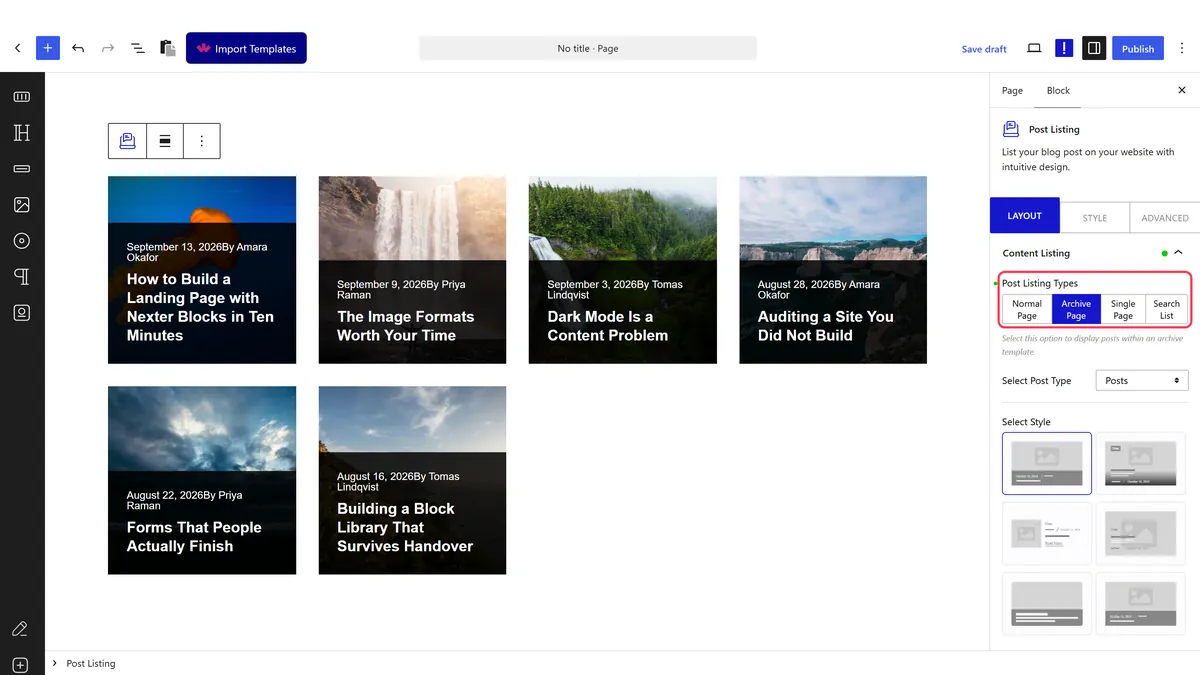
- Create or edit your **category archive template**.

![The archive template](https://nexterwp.com/wp-content/uploads/2026/09/pl-archive-category.webp)

- Add a **Post Listing** block to it.

- Set the listing type to **archive**, so it follows the page rather than running its own query.

- Set the layout, columns and what each card shows.

- Save and open a real category page to check it.

## How It Behaves

In archive mode the block reads the page it is on instead of choosing posts itself.

- **The archive mode follows the current query.** The block reads the category, tag or search term of the page being viewed, so one template serves every category.- **That is the difference from an ordinary listing**, which always runs its own fixed query and would show the same posts on every category page.- **It only makes sense inside a template.** On an ordinary page there is no archive query to read.- **Pagination still applies**, and is usually wanted here — see [add pagination](https://nexterwp.com/docs/add-pagination-in-blog-posts-in-wordpress/).- **Measured with Nexter Blocks Pro deactivated:** this stops working. The block still renders a plain list of posts, so there is no error to see — just the feature quietly missing.

## Limitations

- **Pro only** — measured with Nexter Blocks Pro deactivated, the listing renders as a plain list of posts rather than following the archive.- **It replaces a page people arrive on from search.** Test it properly before shipping, because archive pages carry real traffic.- **One template covers every category**, so you cannot design a different layout per category without separate templates.- **Preview in the editor is limited**, since there is no real archive query there. Always check a live category URL.- **An empty category shows an empty page** unless your template handles that case.

## Troubleshooting

### Every category shows the same posts

The block is running its own query rather than following the archive. Set the listing type to archive.

### It looks empty in the editor

Expected. There is no archive query in the editor. Open a real category URL.

### My theme's archive still shows

The template is not being used for that archive. Check the template assignment in the site editor.

### Pagination does not work on the archive

Check the pagination option is set on the block, and that the category has more posts than one page shows.

## Related Docs

- [Create a custom post type archive page](https://nexterwp.com/docs/create-custom-post-types-archive-page-in-wordpress/)- [Add pagination to blog posts](https://nexterwp.com/docs/add-pagination-in-blog-posts-in-wordpress/)- [Add a category wise filter](https://nexterwp.com/docs/add-category-wise-filter-in-blog-post-in-wordpress/)- [Advanced tab settings](https://nexterwp.com/docs/use-advanced-tab-in-nexter-blocks/)

## Frequently Asked Questions

**Q: What do I need before creating a category archive page in WordPress?**
A: Nexter Blocks Pro is the key requirement, because archive listings need the Pro edition to work in archive mode. You also need the Post Listing block enabled under Nexter &gt; Blocks in your WordPress dashboard, plus a category archive template already created in your theme’s template editor. Without those pieces, the block cannot follow the archive query and will behave like a normal list instead.

**Q: Why does every category page show the same posts?**
A: That usually means the block is running its own query instead of following the archive. In archive mode, Nexter Blocks reads the current category, tag, or search term on the page being viewed, so one template can serve every category. If it is not set to archive, it falls back to a fixed query and repeats the same posts across category pages.

**Q: Why does the category archive look empty in the editor?**
A: That is expected behavior because there is no real archive query inside the editor. The block only has something meaningful to read on an actual category URL, where it can detect the current term and pull the right posts. For a real check, open a live category page instead of judging it from the template editor preview.

**Q: How do I stop my theme's default archive from showing?**
A: The template assignment is what decides whether your custom archive replaces the theme’s version. If the theme’s archive still appears, the category archive template is not being used for that archive. In practice, that means checking the site editor assignment rather than changing the listing itself, because the block only works inside a template.

**Q: Does a category archive page need pagination?**
A: Pagination still applies on archive pages and is usually wanted there, because these pages often carry real traffic and can contain more posts than one screen should show. Nexter Blocks supports pagination on the block, and there is a related guide for [Add pagination to blog posts](https://nexterwp.com/docs/add-pagination-in-blog-posts-in-wordpress/). If pagination is missing, long archives become hard to scan.

**Q: Can I use one template for all blog categories?**
A: One template covers every category when the Post Listing block is set to archive mode. That works because it follows the current query instead of choosing posts itself, so it can read whichever category page a visitor lands on. The tradeoff is that you cannot design a different layout per category unless you build separate templates.