









What It Does
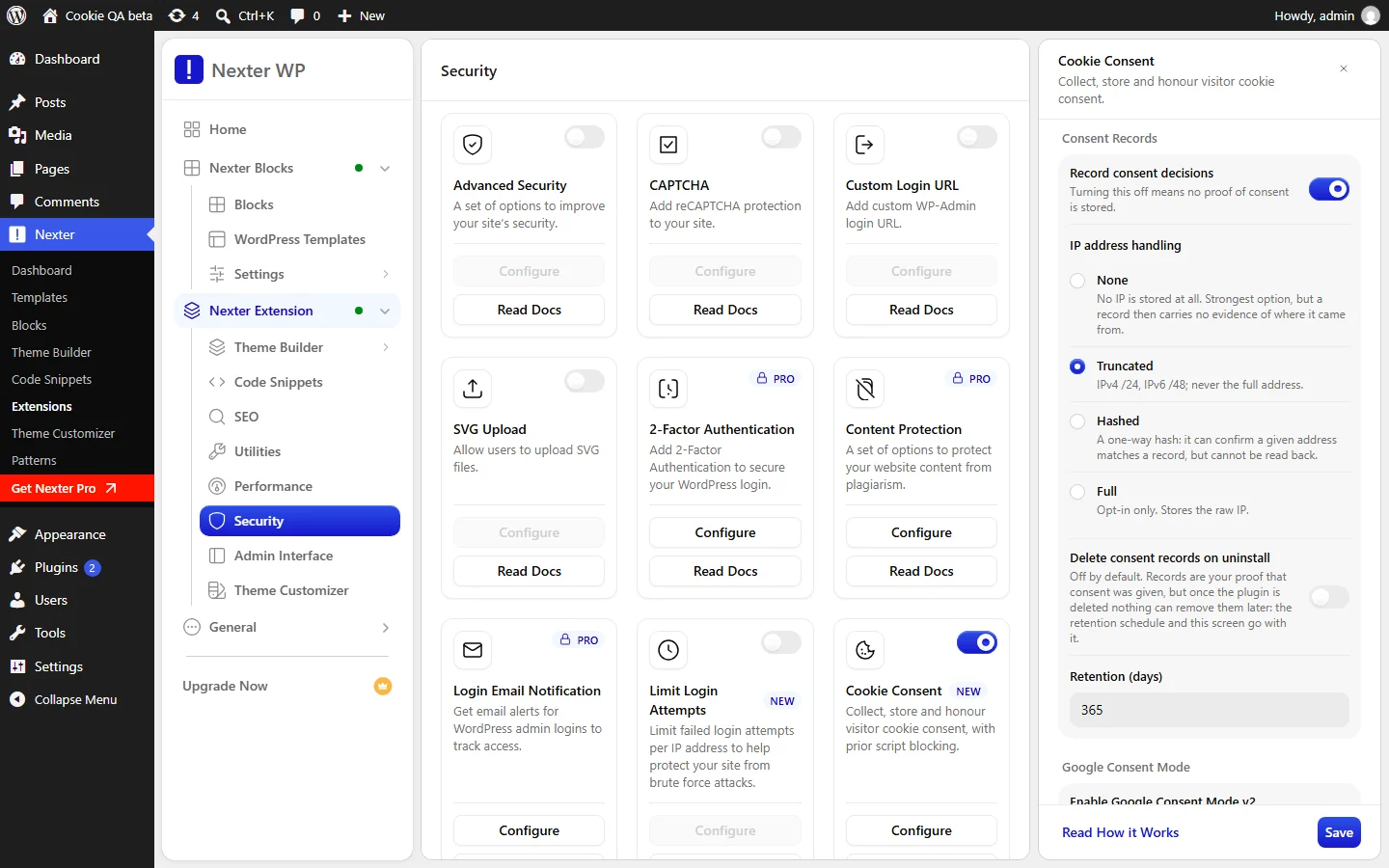
Cookie Consent can keep a record of each visitor decision, so you can show that consent was given. You choose whether to keep records, how the visitor’s IP address is stored, and how long records are kept.
Why It Matters
A record is your proof that a visitor agreed. It also holds data about a visitor, so you should keep only what you need, and for no longer than you need it. These settings let you choose both.
What You Get
- One database row for each decision a visitor makes.
- Four ways to handle the IP address: None, Truncated, Hashed or Full.
- A retention period you set in days, with a daily purge of older records.
- A choice about what happens to the records when the plugin is uninstalled.
Capabilities
| IP address handling | What is stored |
|---|---|
| None | No IP at all. The strongest option, but a record then carries no evidence of where it came from. |
| Truncated (default) | IPv4 /24 and IPv6 /48. Never the full address. |
| Hashed | A one-way hash. It can confirm that a given address matches a record, but cannot be read back. |
| Full | The raw IP. Opt-in only. |
- Turn record keeping on or off with Record consent decisions.
- Set Retention (days) from 1 to 3650. The default is 365.
- Keep or delete all records when the plugin is uninstalled, with Delete consent records when the plugin is uninstalled.
How It Works
- Each decision adds one row. A row holds a random consent ID, the time, the categories the visitor allowed, the settings version at that time, the action taken, the IP value, and the country when your host provides it. Browser details are not stored by default.
- A record has no name or email. The consent ID is random. It is not a user identifier.
- Old records are purged daily. The purge removes records older than your retention period, in batches.
- The purge also catches up. If it has not run for more than two days, for example because WP-Cron is disabled, it runs when an administrator opens the dashboard.
- Turning records off does not freeze old rows. Records already stored, including their IP values, still age out on schedule.
- Deactivating the plugin keeps your records. Only the scheduled purge stops.
How to Use It
Before you start: Cookie Consent must be switched on. See the setup guide. Records are on by default.
- Go to Nexter > Nexter Extension > Security, click the gear icon on the Cookie Consent card, and open Setup.
- Under Consent Records, check that Record consent decisions is on. Turning it off means no proof of consent is stored.
- Choose IP address handling: None, Truncated, Hashed or Full.
- Set Retention (days). Choose the shortest period that still covers your own need to show consent.
- Decide on Delete consent records when the plugin is uninstalled. It is off by default. Records are your proof of consent. If you leave them in place, nothing can remove them later, because the retention schedule and this screen both go away with the plugin.
- Click Save.
- Open the Compliance Check tab and click Re-check. The rows Consent records enabled and Old consent records are being purged should pass.
Use Cases
- A low-risk site. Keep records on with the default Truncated setting and 365 days.
- A site that wants the least data. Choose None for the IP. The record then shows when and what was chosen, without any location evidence.
- A site that needs to check an address later. Choose Hashed. A known address can be matched to a record, but no address can be read out of the log.
- A site you may retire. Decide in advance whether the records should be deleted on uninstall.
Limitations
- Records are kept on uninstall by default. Turn on the delete option before you remove the plugin if you want them gone.
- The IP and retention controls appear only while records are on.
- The dashboard has no screen for browsing records. They live in the database table
nexter_consent_log, with your site’s table prefix. - The country value depends on your host. It is filled only when your host sends it.
- Some settings have no dashboard control. For example, storing browser details is off and can only be changed through Nexter’s settings ability.
- On a multisite network, each site has its own records table and its own purge schedule.
Troubleshooting
The Compliance Check Says Records Are Not Being Stored
The table that holds records is missing. Open any admin page so Nexter can create it, then click Re-check. A visitor’s choice still works while the table is missing, but nothing is saved as proof.
The IP and Retention Options Are Missing
They only appear while Record consent decisions is on. Turn it on to see them.
Old Records Are Not Being Deleted
The purge runs through WP-Cron. If WP-Cron is disabled on your site, set up a real server cron that calls wp-cron.php. The purge also runs when an administrator opens the dashboard after more than two days. The Compliance Check row Old consent records are being purged shows a Warning in this case.
The Records Are Still There After I Removed the Plugin
Records are kept on uninstall unless Delete consent records when the plugin is uninstalled was on. Turn it on before the next uninstall, or remove the table nexter_consent_log from your database yourself.
Related guides: set up Cookie Consent and read the Compliance Check.
