Skip to content

How to Add Conditional Logic in WordPress Form?

Key Takeaways

  • Nexter Blocks Form block adds conditional logic to WordPress forms, and the form must already include a Radio Button or Checkbox field as the source.
  • Radio Button conditions use is, is not, is empty, and is not empty, while Checkbox conditions use contains, does not contain, is empty, and is not empty.
  • Conditional logic applies to Name Field, Email Address, Phone Number, Number Field, URL Field, Date Field, Time Field, Message Field, Dropdown, Radio Button, Checkbox, Acceptance Field, and Submit Button; Hidden Field and Security Code do not support it.
Table of Contents
/*nxt-woo-abfix2*/ .rnrd-author-box{box-sizing:border-box;margin:2em 0} .rnrd-author-box *{box-sizing:border-box} .rnrd-ab-card{background:var(–rnrd-ab-bg,#f8f9fa);border-radius:var(–rnrd-ab-radius,10px);padding:var(–rnrd-ab-padding,24px);border:1px solid var(–rnrd-ab-border,rgb(0 0 0 / .08))} .rnrd-ab-heading{margin:0 0 1em;color:var(–rnrd-ab-heading-color,inherit);font-weight:var(–rnrd-ab-heading-fw,inherit)} .rnrd-ab-inner{display:flex;gap:20px;align-items:flex-start} .rnrd-ab-headshot img{display:block;width:var(–rnrd-ab-img-size,96px);height:var(–rnrd-ab-img-size,96px);object-fit:cover;border-radius:var(–rnrd-ab-img-radius,50%);flex-shrink:0} .rnrd-ab-body{flex:1 1 0%;min-width:0} .rnrd-ab-name-row{display:flex;align-items:center;flex-wrap:wrap;gap:6px;margin:0 0 4px} .rnrd-ab-name{text-decoration:none;color:var(–rnrd-ab-name-color,inherit);font-size:var(–rnrd-ab-name-size,1.15em);font-weight:var(–rnrd-ab-name-fw,600);line-height:1.3} .rnrd-ab-name:hover{text-decoration:underline} .rnrd-ab-suffix{opacity:.7;font-weight:400} .rnrd-ab-meta{margin:2px 0 6px;font-size:var(–rnrd-ab-meta-size,.92em);color:var(–rnrd-ab-meta-color,currentColor);opacity:.82;line-height:1.5} .rnrd-ab-meta a{color:inherit;text-decoration:none;border-bottom:1px dotted} .rnrd-ab-sep{opacity:.5;padding:0 4px} .rnrd-ab-bio{margin:8px 0 10px;font-size:var(–rnrd-ab-bio-size,.96em);color:var(–rnrd-ab-bio-color,inherit);line-height:var(–rnrd-ab-bio-lh,1.6)} .rnrd-ab-expertise{display:flex;flex-wrap:wrap;gap:6px;margin:10px 0} .rnrd-ab-topic{display:inline-block;font-size:.78em;padding:3px 10px;border-radius:999px;background:rgba(0,0,0,.06);color:inherit;line-height:1.5} .rnrd-ab-credentials{margin:10px 0;font-size:.88em;line-height:1.7;opacity:.85} .rnrd-ab-cred-row{display:flex;align-items:flex-start;gap:8px} .rnrd-ab-cred-icon{flex-shrink:0;opacity:.7} .rnrd-ab-socials{display:flex;flex-wrap:wrap;gap:8px;margin:12px 0 0} .rnrd-ab-social{display:inline-block;padding:4px 10px;font-size:var(–rnrd-ab-social-size,.78em);text-decoration:none;color:var(–rnrd-ab-social-color,inherit);border:1px solid;border-radius:4px;line-height:1.5;opacity:.85;transition:opacity .15s} .rnrd-ab-social:hover{opacity:1;text-decoration:none} .rnrd-ab-reviewed{margin-top:10px;font-size:.82em;opacity:.75;line-height:1.5} .rnrd-ab-reviewed a{color:inherit;text-decoration:underline;text-underline-offset:2px} .rnrd-ab-policy{margin-top:12px;padding-top:10px;border-top:1px solid rgba(0,0,0,.08);font-size:.8em;opacity:.7} .rnrd-ab-policy a{color:inherit;text-decoration:none} .rnrd-ab-policy a:hover{text-decoration:underline} .elementor-widget-container .rnrd-author-box{margin-top:0;margin-bottom:0}

Are you looking to show or hide form fields based on what your visitors select? Conditional Logic lets your form react to the answers people give, so visitors only see the fields that are relevant to them.

With the Form block from Nexter Blocks, you can easily add conditional logic to your WordPress form.

To check the complete feature overview documentation of the Nexter Blocks Form block, click here.

Requirement  – This block is a part of the Nexter Blocks, make sure it’s installed & activated to enjoy all its powers.

For this, your form must already have a Radio Button or a Checkbox field, because a condition needs a fixed set of options to compare against.

Add the Field That Controls the Condition

Add the Form block to the page and select the appropriate form type, then follow the steps –

1. Add the required form fields and customize them as per your requirements.

2. Add a Radio Button or a Checkbox field. This is the field your condition will check.

3. Add the options a visitor can choose from. For each option, the first field is the label name and the second field is the value.

Note: Only the Radio Button and Checkbox fields can control a condition. Other field types cannot be used as the source.

Set the Condition on the Field You Want to Show or Hide

Now select the field you want to show or hide, then follow the steps –

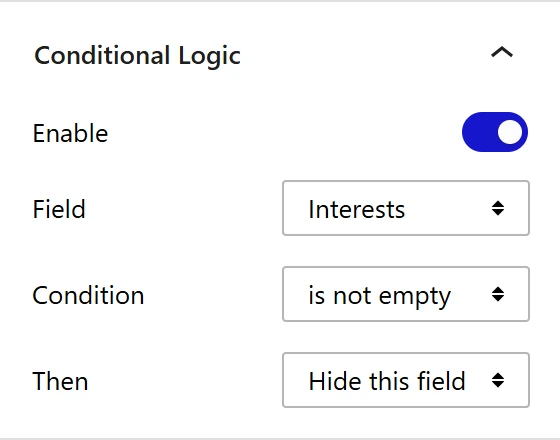
1. Open the Conditional Logic panel in the block settings.

2. Enable the Enable toggle.

3. From the Field dropdown, select the Radio Button or Checkbox field you want the condition to check.

4. From the Condition dropdown, select how the answer should be compared.

5. From the Value dropdown, select the option you want to compare against.

6. From the Then dropdown, select Show this field or Hide this field.

Nexter Blocks Form block Conditional Logic panel with Field, Condition and Then options

Available Conditions

The conditions you can choose depend on the field you selected –

  • Radio Button – is, is not, is empty, and is not empty.
  • Checkbox – contains, does not contain, is empty, and is not empty.

A Checkbox uses contains because a visitor can select more than one option at a time.

Note: The Value dropdown is not needed when the condition is set to is empty or is not empty.

Fields That Support Conditional Logic

You can add a condition to the following fields –

  • Name Field
  • Email Address
  • Phone Number
  • Number Field
  • URL Field
  • Date Field
  • Time Field
  • Message Field
  • Dropdown
  • Radio Button
  • Checkbox
  • Acceptance Field
  • Submit Button

The Hidden Field and the Security Code field do not support conditional logic.

Good To Know

  • When a field is hidden, its value is cleared and it stops being required. So a hidden field can never block the form from submitting, and it is not included in the email you receive.
  • Values are matched without case sensitivity.
  • Conditional logic keeps working across steps in a multi step form.
  • You can set a condition on the Submit Button as well, so the form can only be submitted once a visitor gives a particular answer.

Now your form will show and hide fields based on what your visitors select.

About the Author

Photo of Aditya Sharma CMO of Nexter
CMO at POSIMYTH Innovations · Nexter · 7 years experience

He has spent years in the WordPress ecosystem building, breaking, and optimizing sites until they actually perform. He works at the intersection of speed, growth, and usability, helping creators ship websites that load fast and convert. An active WordPress community contributor sharing through tools, tutorials, and direct collaboration. Tested practice, not theory.

WordPressThemesElementorn8nAIClaudeAutomationServer

Share your Thoughts

Still in Doubt? Let’s Assist You

Have Feedback or Questions?

Join our WordPress Community on Facebook!

Related Frequently Asked Questions

What do I need before adding conditional logic to a WordPress form?

A Radio Button or Checkbox field has to exist first, because conditional logic needs a fixed set of options to compare against. Nexter Blocks Form block provides this setup inside WordPress, and the block itself must be installed and activated. That matters because other field types cannot act as the source for the condition, so the logic has nothing stable to evaluate.

Why isn't my conditional logic working on a form field?

The most common blocker is using the wrong source field. Only Radio Button and Checkbox fields can control a condition, so a Dropdown, Name Field, or any other field will not work as the trigger. Another gotcha is that matching is done without case sensitivity, so the value comparison should still work even if capitalization differs.

Which form fields can be shown or hidden with conditional logic?

Nexter Blocks lets you apply conditional logic to Name Field, Email Address, Phone Number, Number Field, URL Field, Date Field, Time Field, Message Field, Dropdown, Radio Button, Checkbox, Acceptance Field, and Submit Button. Hidden Field and Security Code do not support it. That split matters when you are planning a form flow, because not every field can react to user input.

What conditions are available for radio buttons and checkboxes in WordPress forms?

Radio Button supports is, is not, is empty, and is not empty. Checkbox supports contains, does not contain, is empty, and is not empty. The difference exists because a checkbox can hold more than one selected option at once, so contains is the right comparison type for multi-select behavior.

Can conditional logic hide a field without breaking form submission?

When a field is hidden, its value is cleared and it stops being required. That means a hidden field cannot block submission and it will not be included in the email you receive. This is useful when you want to keep forms short for visitors while still using extra fields for specific paths.

Can I use conditional logic in a multi-step form or on the submit button?

Conditional logic keeps working across steps in a multi step form, so the rules do not stop just because the form spans multiple screens. The Submit Button can also have a condition attached to it, which lets the form submit only after a visitor gives a particular answer. That makes it useful for gating submission based on one specific response.

Last reviewed: September 8, 2026

Related Docs