Inline, but still important
` Once a declaration is marked important, the only ways to beat it are another important declaration with higher precedence, or a rule from a more important origin. That is exactly where the trouble starts. ### How CSS Specificity Works CSS resolves conflicting rules with **specificity**, a score that decides which rule wins when two rules target the same element and property. The [MDN guide to specificity](https://developer.mozilla.org/en-US/docs/Web/CSS/Guides/Cascade/Specificity) weights selectors in this order, from lowest to highest: - **Type selectors** (for example `div`, `p`) have the lowest weight - **Class, attribute and pseudo-class selectors** (for example `.button`, `[type="text"]`, `:hover`) come next - **ID selectors** (for example `#header`) outrank classes - **Inline styles** (for example `style="color: red"`) outrank any selector in a stylesheet - **!important** flips the order: an important declaration beats every normal declaration, including inline styles When two normal rules have the same specificity, the one that appears later wins. That is the cascade in action. The `!important` flag steps outside this normal flow, which is why it creates so many side effects when overused.  *Need to add custom CSS in WordPress without editing theme files directly? Here's the difference between **[using a code snippets plugin vs. editing functions.php in a child theme](https://nexterwp.com/blog/wordpress-code-snippets-plugin-vs-child-theme-in-functions-php/)**.* ## How to Override !important in CSS If a rule you cannot edit uses `!important`, these are the ways that actually work, from cleanest to most forceful. I tested each one in Chromium. - **Edit or remove the original rule.** If the stylesheet is yours, deleting the flag is always the best fix. - **Add a later rule with equal specificity and its own !important.** With the same weight, the last important declaration wins. - **Add a more specific selector with !important.** A higher-specificity important rule beats a lower one. - **Use an important inline style.** An inline `style="color: red !important"` beats an important rule in a stylesheet. - **Use cascade layers.** An important declaration inside a layer beats an important declaration outside any layer, and among layers the earlier one wins. `.alert { color: red !important; } .alert.more { color: blue !important; } /* more specific, wins: blue */ .u { color: red !important; } @layer overrides { .u { color: blue !important; } /* layered important beats unlayered important: blue */ }` The layer behaviour is defined in the [MDN documentation for @layer](https://developer.mozilla.org/en-US/docs/Web/CSS/Reference/At-rules/@layer): for important declarations the order of precedence is reversed, so the first layer you declare is the strongest. ### CSS Cascade Layers Reverse the Order for !important Layers are the most surprising part of the modern cascade. For normal declarations, a later layer beats an earlier one. For important declarations, the earlier layer wins. This is deliberate, and it lets you build a base layer whose important rules cannot be overridden by a theme layer. `@layer base, theme; @layer base { .btn { color: crimson !important; background: crimson; } } @layer theme { .btn { color: royalblue !important; background: royalblue; } } /* color: crimson (important, so the earlier layer wins) background: royalblue (normal, so the later layer wins) */`  ### Why Is My !important Not Working? If the flag seems to be ignored, check these causes first: - **Another important rule is stronger.** A more specific selector, a later rule, an inline `!important`, or an earlier layer can all beat yours. - **The declaration is invalid.** A typo in the value (`color: redd !important`) or text after the keyword makes the browser drop the whole declaration. - **The selector does not match.** A wrong class name or a different element structure means the rule never applies, flag or not. - **It sits inside @keyframes.** MDN states that !important is not valid inside keyframe rules, so those declarations are ignored. - **A cached stylesheet is being served.** On WordPress, purge your caching plugin and CDN, then hard refresh. To see which rule wins, open the Elements panel in Chrome DevTools and read the Styles pane. Losing declarations are shown struck through, and the winning rule lists its selector and file. The [Chrome DevTools CSS guide](https://developer.chrome.com/docs/devtools/css) covers the Styles pane in detail. ## When Is !important Actually Acceptable in CSS? !important has a place in CSS, a narrow one. Knowing those cases helps you tell correct use from a shortcut that will cost you later. - **Utility classes in CSS frameworks:** Bootstrap generates its utilities with !important, for example `.text-decoration-none { text-decoration: none !important; }`, as its utilities API documentation shows. Tailwind CSS does not do this by default, but offers an opt-in `!` modifier and an `important` flag. In both cases the use is deliberate, documented, and scoped to single-purpose classes. - **Overriding third-party inline styles you cannot control:** When a plugin or script injects inline styles into your markup, an important rule in a stylesheet is often the only override that does not require editing the source. The MDN specificity guide describes pairing it with a very targeted selector for this exact case. Treat it as an edge case, not a routine fix. - **Accessibility overrides in user stylesheets:** Browsers let people load their own stylesheets for larger fonts or higher contrast. Important rules there are what let personal preferences beat whatever a site specifies. That is CSS working as designed. - **Temporary debugging:** Adding the flag briefly confirms whether a rule reaches an element. Remove it before the code ships. The distinction that matters: acceptable use is deliberate, scoped, and understood by everyone on the project. The problems start when it is used reactively, as a quick fix for a cascade you do not fully understand yet. ## 4 Reasons to Avoid !important in CSS For most real-world work, here is why reaching for the flag causes more problems than it solves. ### 1. It Breaks the Natural CSS Cascade CSS stands for *Cascading* Style Sheets for a reason. Rules flow from general to specific, broader rules set the foundation, and more targeted rules override them in a predictable order. That predictability is what makes stylesheets maintainable. !important punches a hole in that system. An important rule no longer competes on specificity or order, it simply wins until something else beats it with its own flag. Consider this example: `.button { color: red !important; } /* Dark theme override: never applies because of the !important above */ .theme-dark.button { color: white; }` The button stays red in dark mode even though the dark theme rule is more specific and appears later. A later, more relevant rule has no effect, which is the exact behaviour the cascade was designed to prevent. 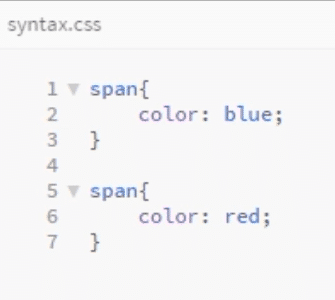 ### 2. It Creates Specificity Wars Once one rule uses !important, overriding it requires another !important at equal or higher precedence. That override gets countered by a third. This pattern is sometimes called the **!important spiral**: every developer who touches the codebase adds another flag to win the last battle, without knowing why the previous ones were added. The only way out is to refactor: remove every flag and restructure the selectors. That is hours of cleanup that planning specificity from the start would have avoided. For more on the history of the flag and its trade-offs, see [Smashing Magazine's guide to !important](https://www.smashingmagazine.com/2010/11/the-important-css-declaration-how-and-when-to-use-it/). ### 3. It Makes Stylesheet Maintenance Harder Picture a WordPress site with several contributors over a long timeline. One developer adds `font-style: italic !important;` to a component. Six months later, someone updates that style for a redesign and the change does not apply. There is no obvious reason, and they lose time in DevTools tracing the issue to a declaration written a year ago by someone who has left the project. Important declarations are invisible maintenance debt. They do not show up in the natural flow of the cascade, so you only discover them when things break. On a site that uses third-party theme frameworks, this is extremely common. ### 4. Debugging Becomes Harder When a style does not apply, the standard routine is to check selector specificity and source order. If !important is involved, those checks tell you little, because the rule wins regardless. DevTools shows the important rule winning with strikethroughs on everything it overrides, but tracing why it was added and what it blocks takes longer when the flag is scattered through the stylesheet. *Dealing with custom CSS on a WordPress site? Check out how to **[design galleries and layouts in Gutenberg without writing CSS from scratch](https://nexterwp.com/blog/create-a-wordpress-image-gallery-using-gutenberg/)**.* ## What to Use Instead: 4 Better Alternatives to !important In almost every situation where a developer reaches for !important, one of these four approaches solves the problem cleanly and leaves the codebase in better shape. ### 1. Increase Specificity Naturally The most direct substitute. Instead of forcing a rule to win, write a rule that already has higher specificity. Combine selectors, add a parent context, or add a class to the selector chain. `/* Low specificity, easily overridden */ .button { color: blue; } /* Higher specificity, wins without !important */ .sidebar .button { color: blue; } /* Even higher if needed (use sparingly) */ #main-nav .sidebar .button { color: blue; }` Before adding !important, ask whether a more specific selector can do the same job. In most cases it can, and the result behaves predictably for everyone who touches it afterward. ### 2. Use the CSS Cascade Strategically Stylesheet order matters. Place broader, general rules earlier in the file and more specific rules later. Since rules with equal specificity are resolved by source order, organising your CSS this way removes most override conflicts before they appear. A practical pattern is global base styles first, component styles next, and modifier and variant styles last. A modifier that needs to override a component style goes later in the file with matching or slightly higher specificity. No !important required. ### 3. Write Modular CSS Stylesheets Divide your CSS into focused files, each scoped to a component or section. A `buttons.css` file handles only buttons and a `header.css` file handles only the header. When styles are organised this way, unrelated components stop colliding, because they never share the same namespace. This is the foundation of methodologies like **BEM** (Block Element Modifier) and CSS Modules, both designed to prevent the cascade collisions that push developers toward !important. In WordPress, modular CSS also means per-template stylesheets that load only on the pages that need them. ### 4. Use CSS Preprocessors Preprocessors like **Sass** and **Less** give you variables, nesting, mixins and functions that make selectors easier to structure correctly. Nesting maps directly to component structure, so the compiled output is scoped CSS that rarely needs !important overrides: `// SCSS nesting: compiles to .sidebar .button { color: blue; } .sidebar { .button { color: blue; } }` The preprocessor compiles to regular CSS that browsers read without issues, and the structure it encourages reduces the situations where the flag seems necessary.  *Building a WordPress site without writing CSS manually? Here's how to **[customize your WordPress homepage using the block editor, no stylesheet editing required](https://nexterwp.com/blog/how-to-edit-your-homepage-in-wordpress/)**.* ## Modern CSS Options: @layer and :where() Instead of !important Two newer features give you control over precedence without the flag, and both are covered in MDN. ### Control the Cascade With @layer Declare your layer order once, and normal declarations then follow that order no matter how specific a selector is. Put third-party or reset styles in an early layer and your own styles in a later one, and your rules win without a single !important. `@layer reset, vendor, theme; @layer vendor { .card a { color: gray; } } /* higher specificity */ @layer theme { a { color: crimson; } } /* lower specificity, later layer: crimson */` One caveat from the MDN documentation: normal declarations outside any layer beat normal declarations inside layers, so unlayered CSS always wins the normal cascade against layered CSS. ### Keep Selectors Easy to Override With :where() The [:where() pseudo-class](https://developer.mozilla.org/en-US/docs/Web/CSS/Reference/Selectors/:where) always has zero specificity, so it lets you write targeted selectors that anyone can override later. It is a good fit for base styles in themes and plugins. `:where(.entry-content) a { color: royalblue; } /* specificity 0-0-1 */ .link { color: crimson; } /* specificity 0-1-0, wins without !important */` ## Overriding Theme and Plugin CSS in WordPress Without !important Most WordPress override problems come from load order, not from missing flags. A few habits keep them away: - **Load your CSS after the theme and plugin styles.** Enqueue your stylesheet with the theme stylesheet handle as a dependency so equal-specificity rules in your file win by source order. - **Scope selectors to the page or component.** A body class or a block wrapper class adds specificity naturally. - **Keep custom CSS in one managed place.** Scattered snippets in the Customizer, child theme and plugins are where forgotten flags hide. If you prefer a managed approach, **[Nexter Extension](https://nexterwp.com/nexter-extension/features/)** includes a Code Snippets Manager (Pro) that lets you add, organise and scope custom CSS without editing `style.css` or maintaining a child theme, and it supports conditional loading so a snippet fires only on the pages that need it. Our walkthrough on [adding code snippets in WordPress without a plugin](https://nexterwp.com/blog/code-snippets-wordpress-nexter-extension/) shows the setup step by step. If you style with blocks instead of hand-written CSS, global design settings avoid most conflicts: see how [Nexter Theme global styles](https://nexterwp.com/blog/nexter-theme-global-styles/) set brand colours, fonts and spacing sitewide, and how [responsive block styles](https://nexterwp.com/blog/responsive-block-styles-wordpress/) handle mobile, tablet and hover states without custom CSS. For a fixed header, the [sticky header guide](https://nexterwp.com/blog/wordpress-sticky-header/) compares CSS and block-native methods. Designers who work in Figma before moving to WordPress can also skip manual CSS entirely: [UiChemy](https://uichemy.com/) converts Figma layouts to 100% editable Gutenberg, Elementor, or Bricks blocks, generating structured CSS output with no inline style conflicts to fight. #### Stay updated with Helpful WordPress Tips, Insider Insights, and Exclusive Updates – Subscribe now to keep up with Everything Happening on WordPress! Subscribe ## Wrapping Up: Using CSS !important the Right Way CSS !important is a powerful override mechanism, which is precisely why overusing it causes problems. It takes a declaration out of the normal cascade, and once one flag appears it tends to invite more until the stylesheet becomes unpredictable for everyone working on it. Use it when you have a genuine, bounded reason: overriding third-party inline styles, building utility class libraries, or supporting user stylesheets. In every other situation, higher specificity, deliberate source order, modular CSS, preprocessors, and modern tools like `@layer` and `:where()` give cleaner results without the side effects. If you are building your WordPress site with Gutenberg and want a setup where CSS specificity conflicts are minimal from the start, **[Nexter Blocks](https://nexterwp.com/nexter-blocks/)** is a Gutenberg block plugin by POSIMYTH Innovations that generates clean, scoped CSS, always 1 CSS file and 1 JS file per page regardless of how many blocks you use. Less manual CSS means fewer specificity conflicts to debug. New to WordPress and looking for a code-free starting point? See [Nexter for Beginners](https://nexterwp.com/nexter-for-beginners/), 1,000+ ready-made templates with no CSS required. [Get Nexter free](https://nexterwp.com/pricing/) and start building. ## FAQs About CSS !important ### What does !important do in CSS? It marks a declaration as important, so it overrides normal declarations for the same property regardless of selector specificity or source order. Only another important declaration with higher precedence can override it. ### How do you override !important in CSS? Add a later rule with equal specificity and its own !important, use a more specific selector with !important, use an important inline style, or place the declaration in an important rule inside an earlier cascade layer. Removing the original flag is always the cleanest fix. ### Is using !important bad practice? Overusing it is bad practice because it breaks the cascade and forces more !important declarations later. It is acceptable for utility classes, overriding third-party inline styles you cannot edit, user stylesheets and short debugging sessions. ### Can !important be used in an inline style? Yes. An inline style such as works and beats an important rule in a stylesheet. You can also set it from JavaScript with element.style.setProperty('color', 'red', 'important'). ### Why is my !important not working? Usually a stronger important rule is winning, the declaration is invalid because of a typo or text after the keyword, the selector does not match, the rule sits inside @keyframes, or a cached stylesheet is being served.