












Key Takeaways
- OAI-SearchBot is the OpenAI crawler that builds the search index behind ChatGPT search. It is not the training crawler and not the live page fetcher.
- OpenAI states it plainly: sites opted out of OAI-SearchBot will not be shown in ChatGPT search answers. Blocking it makes you invisible there.
- Unlike ChatGPT-User, OAI-SearchBot respects robots.txt, so you can allow or block it cleanly with a few lines.
- Getting indexed is not the same as getting cited. OAI-SearchBot makes you eligible; clear structure, an llms.txt file, and fresh content earn the citation.
- Verify it is genuine against OpenAI’s published IP ranges at openai.com/searchbot.json, then track AI crawler hits and referrals from one dashboard.
A few weeks ago I was checking why one of our guides kept turning up as a source inside ChatGPT search while a near-identical post on the same site never did. The pages were similar in length, both indexed in Google, both linked internally. The difference showed up in the access logs: one path was being fetched regularly by something called OAI-SearchBot, the other almost never. That single user agent, quietly crawling in the background, was the gatekeeper deciding which of our pages ChatGPT search even knew about.
If you run a WordPress site and you care about showing up when people search inside ChatGPT, OAI-SearchBot is the crawler to understand first. This guide explains exactly what it is, why blocking it quietly removes you from ChatGPT search answers, how to allow or block it correctly, and how to confirm it is really reaching your site.
What OAI-SearchBot actually is
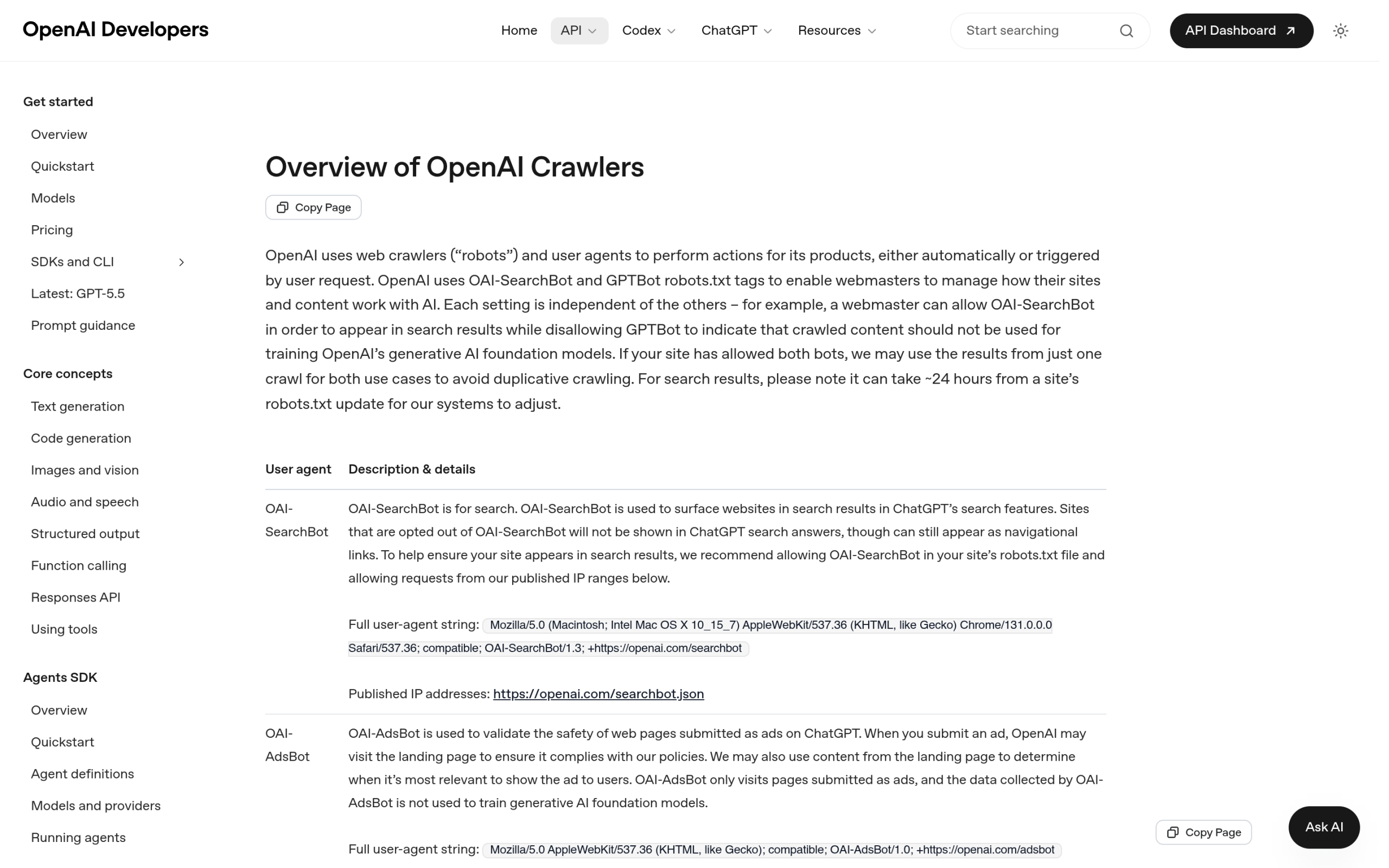
OpenAI runs three separate crawlers, and they do very different jobs. OAI-SearchBot is the one that builds the search index. In OpenAI’s own words, it is “used to surface websites in search results in ChatGPT’s search features.” It visits your pages, reads them, and adds them to the pool of content that ChatGPT search can pull from when a user runs a query. It does not train models, and it is not the agent that grabs a page mid-conversation.
Also Read: here is how ChatGPT Search surfaces WordPress sites and how to become a source it pulls from.
The full user agent string, straight from OpenAI’s documentation, is Mozilla/5.0 (Macintosh; Intel Mac OS X 10_15_7) AppleWebKit/537.36 (KHTML, like Gecko) Chrome/131.0.0.0 Safari/537.36; compatible; OAI-SearchBot/1.3; +https://openai.com/searchbot. If you see OAI-SearchBot/1.3 in your logs, that is this crawler indexing you for ChatGPT search.
Here is how OpenAI’s three crawlers compare, pulled from its official documentation:
| Crawler | User-agent token | What it does | Trains models? | Respects robots.txt? |
|---|---|---|---|---|
| GPTBot | GPTBot/1.3 | Trains OpenAI’s foundation models | Yes | Yes |
| OAI-SearchBot | OAI-SearchBot/1.3 | Builds the ChatGPT search index | No | Yes |
| ChatGPT-User | ChatGPT-User/1.0 | Fetches a live page for a user’s question | No | May not apply |
The piece people get wrong is treating all three as one “OpenAI bot.” They are independent switches. You can welcome the search crawler while blocking the training crawler, and the live fetcher follows its own rules again. If you want the full landscape of every AI crawler hitting WordPress sites right now, we keep a running reference.
Also Read: The complete list of AI web crawlers and what each one wants from your WordPress site.
Why blocking OAI-SearchBot makes you invisible in ChatGPT search
This is the part that catches site owners off guard. OAI-SearchBot is not optional plumbing you can ignore. OpenAI is direct about the consequence of blocking it: “Sites that are opted out of OAI-SearchBot will not be shown in ChatGPT search answers.” If this crawler cannot reach your pages, your content simply is not in the index that ChatGPT search draws from. You are not ranked low. You are absent.
That matters more every month. ChatGPT search has become a real discovery surface, where people ask a question and get a synthesized answer with cited sources instead of ten blue links. To be one of those cited sources, you first have to be in the index, and OAI-SearchBot is the only way in. Block it by accident, through an overzealous security plugin or a copied robots.txt rule, and you have opted your whole site out of that channel without realizing it.
This is the same shift that the wider answer-engine conversation is built on: discovery is moving from search results to AI answers. If that framing is new to you, our guide to answer engine optimization for WordPress lays out the full picture.
How to check if OAI-SearchBot can reach your WordPress site
Before you change anything, find out what your site is telling OAI-SearchBot today. Open yourdomain.com/robots.txt in a browser and look for any rule that disallows it, either by name or through a blanket block on all bots. A line like User-agent: * followed by Disallow: / blocks OAI-SearchBot along with everything else. So does a security plugin or a host-level “block AI bots” setting that you may have toggled on months ago.
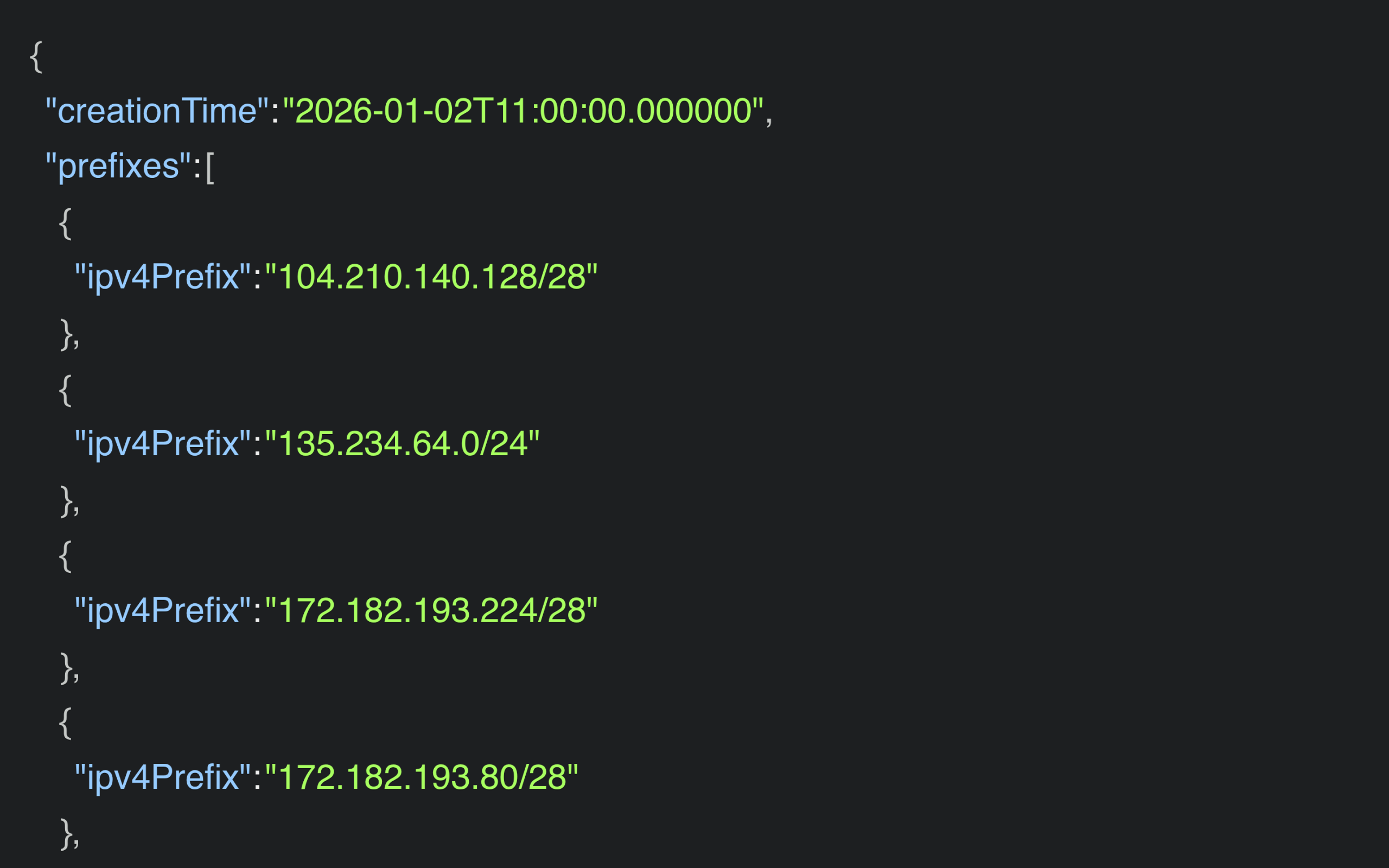
Next, confirm whether the crawler is actually visiting. Because anyone can fake a user agent, OpenAI publishes the real IP ranges for OAI-SearchBot as a JSON file at openai.com/searchbot.json. A request that claims to be OAI-SearchBot but comes from an address outside that list is not the genuine crawler, and you can disregard it.
Also Read: OAI-SearchBot indexes you, but ChatGPT-User is the bot that fetches your page live when someone asks a question. Here is how to handle that one.
How to allow or block OAI-SearchBot in robots.txt
Good news here: unlike ChatGPT-User, OAI-SearchBot fully respects robots.txt. That means a few clean lines give you exact control, no firewall gymnastics required.
To allow OAI-SearchBot (recommended for almost every site): make sure nothing disallows it. You can state it explicitly so a future blanket rule does not catch it by surprise.
User-agent: OAI-SearchBot
Allow: /
To stay in ChatGPT search but out of model training: allow the search crawler and the user fetcher, and disallow only the training crawler. This is the setup many publishers land on.
User-agent: OAI-SearchBot
Allow: /

User-agent: ChatGPT-User
Allow: /

User-agent: GPTBot
Disallow: /
To genuinely keep your site out of ChatGPT search: disallow OAI-SearchBot by name. Just remember the trade-off from earlier, that this removes you from ChatGPT search answers entirely.
User-agent: OAI-SearchBot
Disallow: /
On WordPress you can edit robots.txt without touching files. Rank Math includes a robots.txt editor under its general settings, and most other SEO plugins offer the same. If you prefer, you can drop a physical robots.txt at your site root. One caution: blanket toggles like Cloudflare’s “Block AI Scrapers” or a host’s “block AI bots” switch often sweep up OAI-SearchBot with everything else, so prefer a named rule you can see and reason about. If you want a deeper walkthrough of crawler rules on block themes, see our guide to the WordPress robots.txt for AI crawlers.
Getting indexed is not the same as getting cited
Allowing OAI-SearchBot gets you in the door. It does not guarantee a seat at the table. Being in the index makes you eligible to appear in ChatGPT search answers; whether you actually get cited depends on how easy your content is to read, trust, and quote.
In practice that means a few things working together. Clear heading structure so the crawler can map your page to a question. A clean llms.txt file that points engines at your best content. Demonstrated expertise and authorship, which is the heart of E-E-A-T for AI search. And content you keep current, because answer engines lean heavily on fresh, well-maintained pages. OAI-SearchBot is the access; these are what turn access into a citation.
Verify and measure with a crawler log
Reading raw access logs to spot OAI-SearchBot works, but it is tedious, and most site owners never do it. A WordPress-native crawler log makes the same information glanceable. RankReady keeps a live AI Crawler Log in your dashboard. As its own description puts it, “Every time an AI bot hits your site, you see it. Timestamp, page, bot name, what it was likely doing.” It tracks GPTBot, ClaudeBot, PerplexityBot, Google-Extended and 27 more, 31 AI crawlers in one screen, so you can confirm OAI-SearchBot is indexing you without grepping a single log file.
The next question is whether the indexing pays off. RankReady also tracks AI referral traffic, monitoring visits from chatgpt.com, perplexity.ai, claude.ai, gemini.google.com and copilot.microsoft.com, and gives each post a readiness score from 0 to 100 so you can see what is holding a page back. One honest caveat to keep in mind: in answer engines, mentions happen far more often than clicks. Plenty of readers get their answer, see your name as the source, and never click through. Judge OAI-SearchBot first by whether you are being crawled and cited, and treat referral clicks as the bonus on top. RankReady is free, forever, released under GPL-2.0-or-later, runs on WordPress 6.0 and up with PHP 7.4 and up, and sits alongside Rank Math or Yoast rather than replacing them.
Also Read: Once you are in the index, track your AI Overviews and AI citations so you know which pages are actually getting picked up.
Bottom line: allow OAI-SearchBot
For the overwhelming majority of WordPress sites, OAI-SearchBot should be allowed. It does not train models on your content, it respects your robots.txt, and it is the single path into ChatGPT search. The only sites that should block it are ones with a deliberate policy to stay out of AI products entirely. Everyone else who blocks it is usually doing so by accident, and paying for it with total invisibility in ChatGPT search. Check your robots.txt, allow the crawler by name, confirm it is reaching you against the published IP list, then build the structure and freshness that turn a crawl into a citation.
Suggested Reading
- ChatGPT-User: should you allow or block it on WordPress?
- The complete list of AI web crawlers and bots
- Answer engine optimization for WordPress
- How to build an llms.txt file for WordPress
- E-E-A-T for AI search: earning trust from ChatGPT and Perplexity
