












I priced out an Elementor Pro agency stack last month for a client who was migrating five sites off a page builder they’d outgrown. By the time I added the addon plugins they needed to match what Nexter ships natively, the “cheaper” builder was costing more than double the license price they’d budgeted for. That comparison is the reason this post exists, and it’s the same math I’d run for anyone deciding between the two right now.
Why “License Price” Isn’t the Real Cost
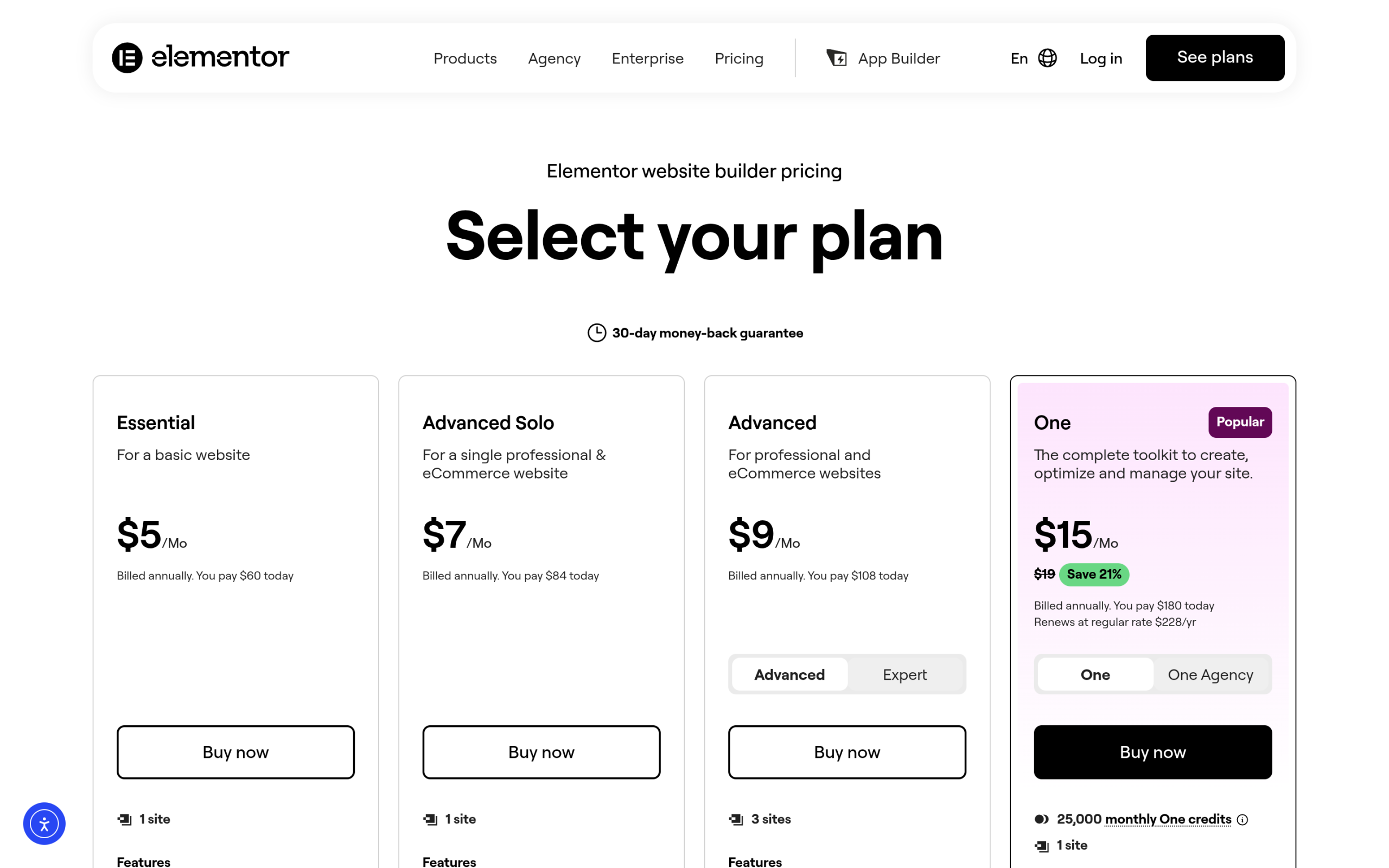
Every page builder comparison starts with the sticker price on the pricing page, and that’s exactly where it goes wrong. The license fee is one line item in a stack that also includes hosting tier, the addon plugins you buy to fill feature gaps, and the time your team spends maintaining all of it. Elementor Pro’s own pricing page (elementor.com/pricing, checked live this week) lists four core Pro tiers: Essential at $59.88/year for one site, Advanced Solo at $84/year for one site, Advanced at $107.88/year for three sites, and Expert at $204/year for 25 sites. None of those numbers include hosting, and none of them include the extra plugins most Elementor builds end up needing once the project moves past a basic landing page.
Total cost of ownership, or TCO, is the accounting term for exactly this: the full multi-year cost of a tool, not just the number printed on the checkout page. It’s the same framing IT teams use to compare software vendors, and it applies just as directly to a WordPress theme and block stack as it does to enterprise software.
Also Read: Nexter Theme vs Astra: Which Should You Build On in 2026? if you’re comparing theme-level costs before you even get to the builder layer.
Elementor Pro’s True Stack Cost
Elementor’s free version covers basic drag-and-drop layout, but the moment a build needs a real theme builder, popups, dynamic content pulled from custom fields, or WooCommerce templates, you’re on a Pro tier. For a single production site with a header and footer builder, a popup for lead capture, and a handful of dynamic archive templates, Advanced Solo at $84/year is the realistic floor. Add a second or third site and you’re paying for Advanced at $107.88/year, which still caps out at three site activations, so a fourth site needs an entirely separate license.
That’s before the addon layer. Elementor Pro’s own widget set doesn’t include things like advanced data tables, marquee or ticker bars, timeline builders, or a native code-snippets manager. Teams commonly reach for a separate addon plugin, something like Essential Addons or Happy Addons, to cover those gaps, and that’s another $59 to $99 a year on top depending on the vendor and site-count tier. An agency running five client sites on Elementor Pro Advanced at $107.88/year, capped at three sites so two of those five need a second license, plus one addon-plugin subscription, is realistically looking at $250 to $320 a year before hosting is even factored in.
NexterWP’s Stack Cost
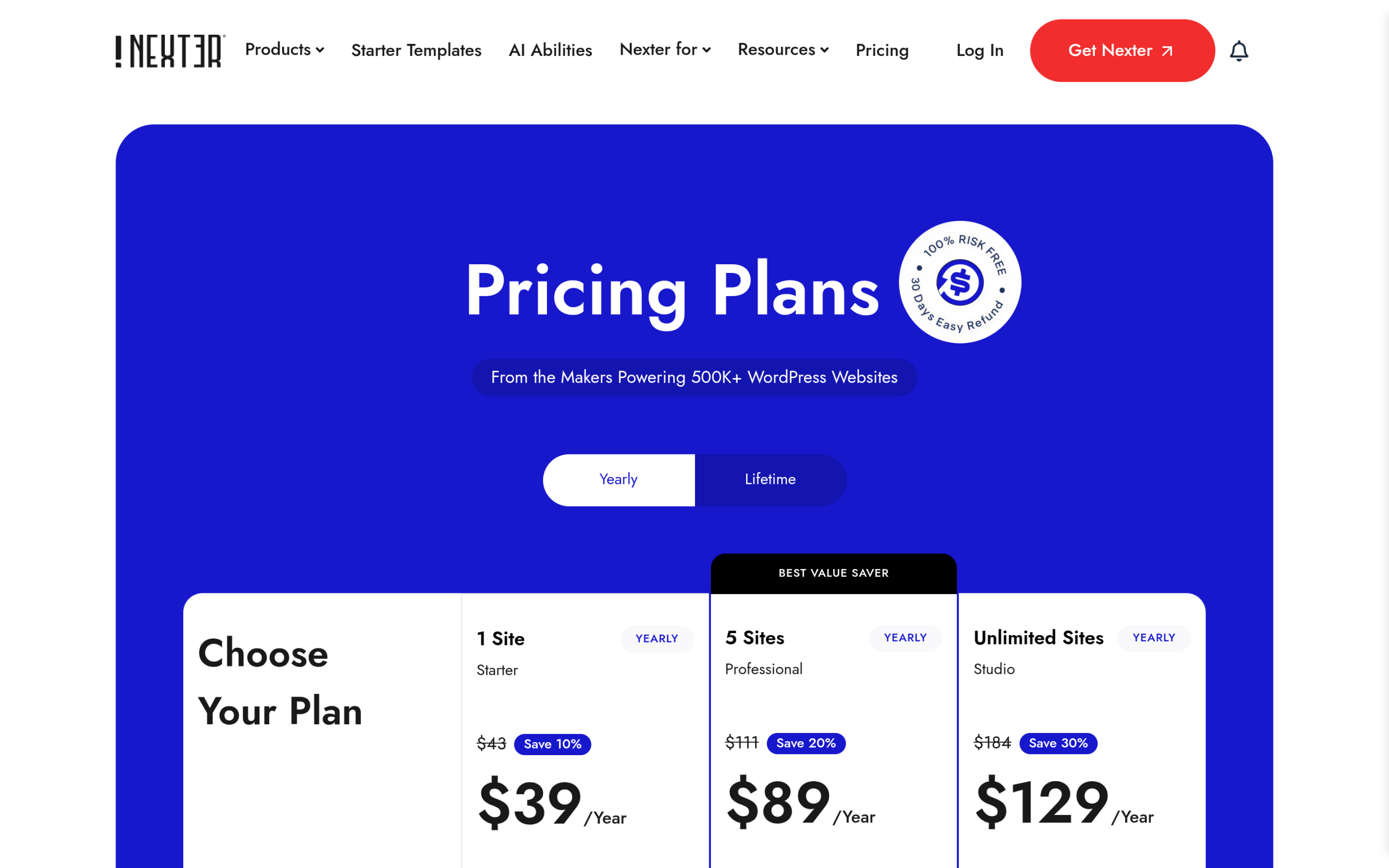
Nexter’s pricing page (nexterwp.com/pricing, checked live this week) runs on three yearly tiers: Starter at $39/year for one site, Professional at $89/year for five sites, and Studio at $129/year for unlimited site activations. Lifetime options exist too, at $139, $249, and $349 respectively as one-time purchases with no renewal at all. Every tier includes the same 90+ Gutenberg blocks, 1,000+ templates, the WooCommerce builder, white-label capability, and the AI Abilities (MCP) layer. There’s no separate addon plugin to buy for data tables, marquee blocks, timeline or roadmap blocks, or a code-snippets manager, because Nexter Blocks ships all of them in the core plugin at every paid tier.
Run the same five-site agency scenario on Nexter: Professional at $89/year covers all five sites outright, no second license required. Studio at $129/year removes the site cap entirely if the agency expects to keep adding client sites through the year. Either way, that’s one license, one renewal date, and zero addon-plugin subscriptions layered on top just to reach feature parity.
Feature-by-Feature Cost Comparison
Here’s the same feature set priced out both ways, based on each vendor’s own live pricing page pulled this week:
| Feature | Elementor Pro Path | NexterWP Path |
|---|---|---|
| Theme builder (header/footer/archive templates) | Included in Advanced Solo ($84/yr)+ | Included in Starter ($39/yr)+ |
| Popup builder | Included in Advanced Solo ($84/yr)+ | Included, all tiers |
| WooCommerce templates | Included in Advanced Solo ($84/yr)+ | Included, all tiers |
| Data tables / pricing tables | Separate addon plugin (approx $59 to $99/yr) | Included, all tiers |
| Marquee / ticker block | Separate addon plugin | Included, all tiers |
| Timeline / roadmap block | Separate addon plugin | Included, all tiers |
| Code snippets manager | Separate free plugin (extra maintenance overhead) | Included in Extension bundle |
| 5-site agency cost per year | Approx $250 to $320 (license plus addon plugin) | $89 (Professional) |
Also Read: Nexter Blocks Data Table and Pricing Table for exactly how that block replaces a paid comparison-table addon.
Performance and Hosting Cost Implications
Total cost of ownership doesn’t stop at the plugin invoice. Elementor renders each widget through its own runtime and CSS-generation layer, and stacking a theme, Elementor Pro, and a third-party addon plugin adds three separate asset pipelines to every page load. On a shared or entry-level managed hosting plan, that combination is what usually forces an upgrade to a higher hosting tier just to keep Core Web Vitals in an acceptable range, and that’s an indirect cost that never shows up on the plugin’s own pricing page. Nexter Blocks is built on vanilla JavaScript rather than a heavier framework layer, so a comparable feature set typically ships fewer scripts per page, which matters most on the entry-level hosting tier that most solo sites and small agencies actually run on.
Migration Cost: What It Actually Takes to Switch
Switching a live site is never free, and it’s fair to weigh that against the annual savings before making the call. Elementor content is stored as widget-specific JSON, so a full switch to Nexter Blocks means rebuilding pages rather than a straight import. Budget real hours for a content-heavy site, not a quick plugin-deactivation afternoon. The pattern that keeps migration cost lowest in practice: start new client sites on Nexter from day one, and only migrate an existing Elementor site when it’s already due for a redesign, so the rebuild hours are hours you were going to spend on that redesign anyway. Retrofitting an active, frequently-updated site mid-cycle purely to save on license fees is the expensive way to do it, and the savings rarely justify the disruption on their own.
Also Read: Nexter vs Bricks Builder: Native Blocks vs Visual Builder for how the same migration math plays out against a second visual-builder competitor.
A Real-World Scenario: Five-Site Agency Over Three Years
Numbers land differently over a longer horizon, so here’s the same five-site agency scenario carried out three years. On the Elementor path: an Advanced license at $107.88/year covers three of the five sites, a second Advanced Solo license at $84/year covers a fourth site, and a fifth site needs its own Advanced Solo at $84/year as well, for a combined $275.88/year in license fees alone. Add one shared addon-plugin subscription across the agency at roughly $79/year for the missing data-table, marquee, and timeline blocks, and the yearly total lands around $354.88. Over three years that’s approximately $1,064.64, before any hosting upgrade the heavier stack might require.
On the Nexter path: Professional at $89/year covers all five sites under one license, with every block included. Over three years that’s $267, or the agency could pay once for the Professional Lifetime plan at $249 and never renew at all. The gap isn’t small: it’s the difference between renewing one license and juggling three, and between paying for extra plugins and not needing them in the first place.
Who Should Actually Pay for Elementor Pro
This isn’t a case that Elementor Pro is never worth it. Teams already deep in an Elementor template library, agencies with client contracts that specifically require Elementor because that’s what the client’s in-house team already knows, or builds that lean heavily on a specific third-party Elementor widget ecosystem all have real reasons to stay put. The honest read: if you’re starting a new site, onboarding a new client, or evaluating your renewal purely on cost and feature completeness, price out the addon plugins you’d actually need before comparing the two license fees side by side. That’s the step most builder comparisons skip entirely, and it’s the one that changes the answer.
What This Comparison Doesn’t Cover
To keep this honest: this comparison is about license and addon cost, not raw design flexibility. Elementor’s visual, click-and-drag canvas still gives some designers finer pixel-level control in the editor itself than a block-based workflow does, and that’s a real trade-off, not a cost one. If your team’s speed depends on that specific editing feel, factor it in alongside the numbers above rather than treating cost as the only variable that matters. Pricing on both sides is also subject to change; the figures here were pulled directly from each vendor’s live pricing page this week, not from memory or an old screenshot, so re-check both pages before finalizing a budget for a specific project.
Suggested Reading
- Nexter Theme vs Astra: Which Should You Build On in 2026?
- Nexter Theme vs GeneratePress: Full Feature Comparison
- Nexter Blocks vs Spectra: Feature-by-Feature
- Nexter vs Bricks Builder: Native Blocks vs Visual Builder
